| View previous topic :: View next topic |
| Author |
Message |
economic2
Junior 2

Joined: 14 Apr 2018
Posts: 26
|
 Posted: 07/03/2020 17:54 Post subject: rs logix5000 1769-L33ERM compact logix 5370 Posted: 07/03/2020 17:54 Post subject: rs logix5000 1769-L33ERM compact logix 5370 |
 |
|
what the difference between controller 1769-L33ERM compact logix 5370
and controller 1769-L33ERM/A CompactLogix 5370
and how can I upload the plc program because this message appears that theproject does not match the controller project.
can you help me please... |
|
| Back to top |
|
 |
economic2
Junior 2
Joined: 14 Apr 2018
Posts: 26
|
| Posted: 14/03/2020 12:29 Post subject: |
|
|

there is no body can help me??? |
|
| Back to top |
|
|
duckman
Member

Joined: 08 Jul 2013
Posts: 214
|
| Posted: 14/03/2020 23:01 Post subject: |
|
|
I can't find any info on RA site, /A = series A.
Just change the controller in the project |
|
| Back to top |
|
|
ALAMos
Junior

Joined: 26 Oct 2018
Posts: 9
|
| Posted: 14/03/2020 23:45 Post subject: |
|
|
check your compatibility...all are series A just check software and firmware
https://bayfiles.com/B4V692h2oc/complist_1769-L33ERM_1769-L33ERMK_1769-L33ERMO_A_31.011_csv |
|
| Back to top |
|
|
economic2
Junior 2
Joined: 14 Apr 2018
Posts: 26
|
| Posted: 16/03/2020 07:19 Post subject: |
|
|
sorry I don,t understand
why I don,t find A seies in the project
how can I find it?
please help |
|
| Back to top |
|
|
139dam
Junior
Joined: 09 Jul 2019
Posts: 8
|
| Posted: 16/03/2020 15:58 Post subject: ControlFLASH v15: |
|
|
ControlFLASH v15: Cannot Find v30, v31, v32 Firmware for CompactLogix, ControlLogix Controllers
https://rockwellautomation.custhelp.com/app/answers/answer_view/a_id/1072431
Summary
ControlFLASH v15: Cannot Find v30, v31, v32 Firmware for CompactLogix, ControlLogix Controllers
Question
• Why is the v30.014 and higher firmware revisions not listed in ControlFLASH under the particular controller catalog number selected?
• Why is there only selections up to v30.011 firmware for the CompactLogix or ControlLogix in ControlFLASH v15?
• What version of ControlFLASH is required for use with a v30.014 or higher firmware kit?
• Why don’t I see the specific catalog # of the unit that I want to flash in ControlFLASH?
• How to find new release of firmware v28.014 for 1769-L33ERMS which cannot be discovered at selection list in ControlFLASH?
Answer
The DMK file name changed for the CompactLogix and ControlLogix controllers in ControlFLASH v15 in order to support the full set of catalog numbers in one easy download.
Note: ControlFLASH version 15.01 is required for use with firmware 30.014 and higher.
How ".DMK" firmware files are organized (into families and bundles), and where they are stored on the workstation, changed in ControlFLASH v15.01. See 1071313 - Installing legacy ControlFLASH firmware kits may delete new ControlFLASH DMK flash files and revert ControlFLASH to an earlier version for details.
In ControlFLASH v14 and earlier, each specific catalog number of the controller needed to be downloaded and selected for the firmware upgrade.
In ControlFLASH v15, one of the general categories needs to be selected in order to complete the firmware upgrade (for v31 and higher):
• CompactLogix 5380 (5069-L3),
• Compact GuardLogix 5380 Safety (5069-L3xxERMS2),
• GuardLogix 5580 Safety (1756-L8xES),
• ControlLogix 5570 (1756-L7),
• ControlLogix 5580 (1756-L8),
• CompactLogix 5370 (1769-L3),
• CompactLogix 5370 (1769-L2),
• CompactLogix 5370 (1769-L1).
Downloading any of these DMK files will populate all of that families controller models available.
Note: If you are flashing to an older version of firmware (29 or earlier) you still select that specific tip number and if you are flashing to version 30 or higher you need to select the controller family category.
The CompactLogix 5380 v31 and higher firmware kit includes - 5069-L306ER, 5069-L306ERM, 5069-L310ER, 5069-L310ERM, 5069-L310ER-NSE, 5069-L320ER, 5069-L320ERM, 5069-L330ER, 5069-L330ERM, 5069-L340ER, 5069-L340ERM, 5069-L350ERM, 5069-L380ERM & 5069-L3100ERM.
The Compact GuardLogix v31 and higher 5380 firmware kit includes - 5069-L306ER(M)S2, 5069-L310ER(M)S2, 5069-L320ER(M)S2, 5069-L330ER(M)S2, 5069-L340ER(M)S2,5069-L350ER(M)S2, 5069-L380ER(M)S2, 5069-L3100ER(M)S2. The v30 firmware for these Compact GuardLogix controllers needs to use ControlFLASH V15. They will not be found in ControlFLASH v14, even with the .DMK files in the ControlFLASH folder.
• The GuardLogix 5580 Safety v31 and higher firmware kit includes - 1756-L81ES, 1756-L82ES, 1756-L83ES, 1756-L84ES, 1756-L85ES.
• The ControlLogix 5580 v31 and higher firmware kit includes - 1756-L81E, 1756-L82E, 1756-L83E, 1756-L84E, 1756-L85E.
• The ControlLogix 5570 v31 and higher firmware kit includes - 1756-L71, 1756-L72, 1756-L73, 1756-L74, 1756-L75.
• The CompactLogix 5370 v31 and higher firmware kit includes - 1769-L30xxx, 1769-L33xxx, 1769-L36xxx, 1769-L37xxx, 1769-L38xxx...all varieties of these controllers
In order to select an older firmware revision (v28-30) you must choose the separate controller model 5069-L340ERM, as opposed to the CompactLogix 5380 (5069-L3) or 1756-L85E.
ControlFLASH pre-v15 ControlFlash selection:
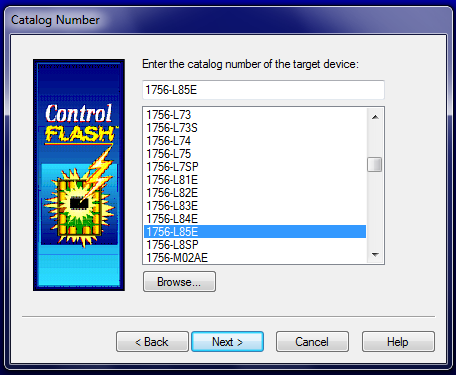
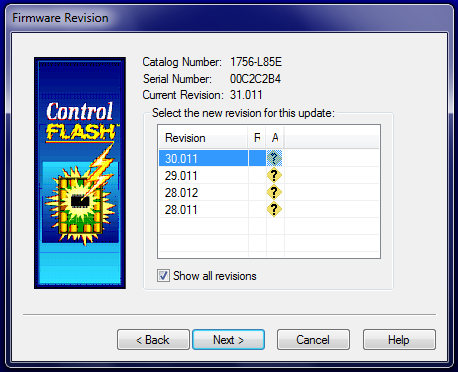
ControlFLASH v15 or higher selection:
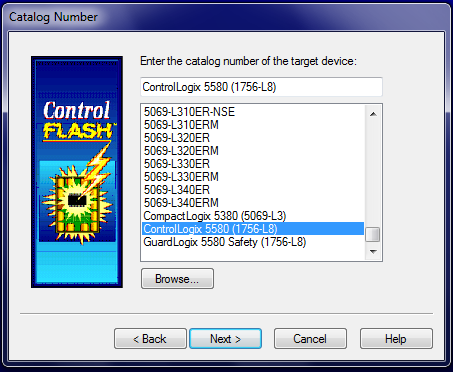
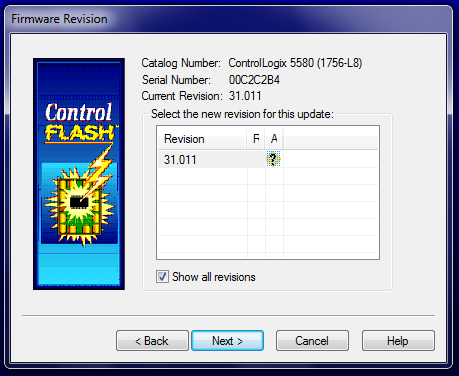
The View Inventory selection in ControlFLASH also shows the difference between the catalog number selections.
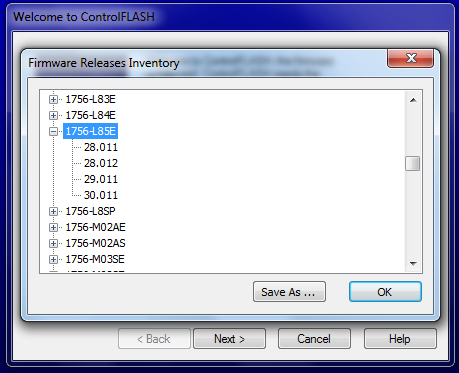
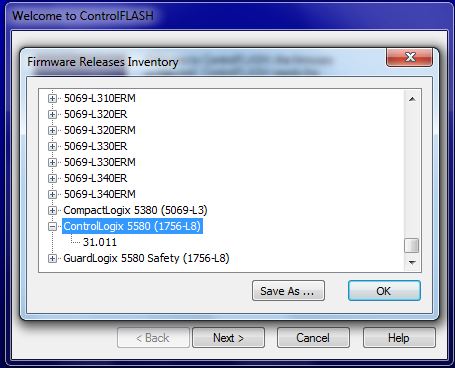
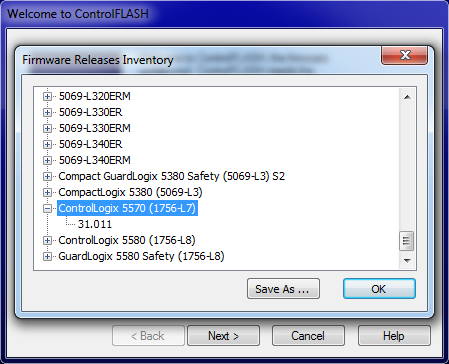 |
|
| Back to top |
|
|
139dam
Junior
Joined: 09 Jul 2019
Posts: 8
|
| Posted: 16/03/2020 16:15 Post subject: |
|
|
Yu don't say what version of studio do you use?
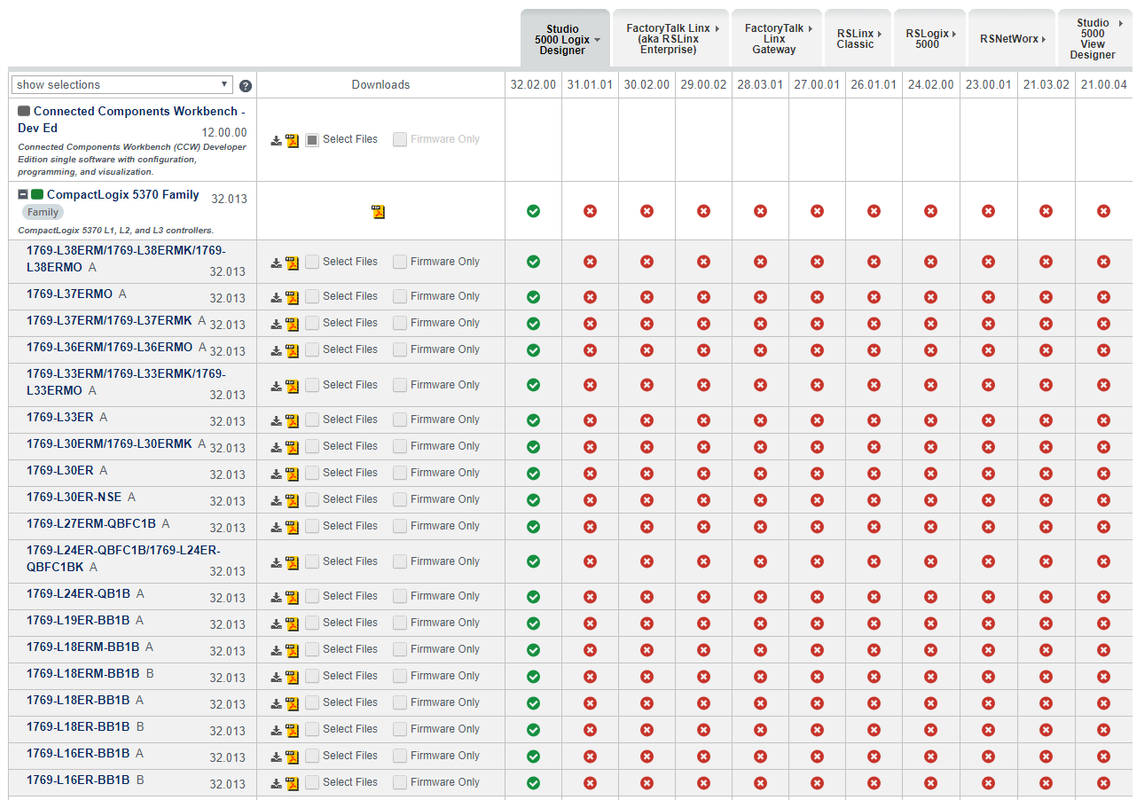
https://openload.cc/v1D4Lfh9o7/CompactLogix_5370_1769-L3_32.013_zip
https://openload.cc/p8D2L0h3oa/0001000E006E2000_eds
https://openload.cc/jdS0L4hdo3/ControlFLASH_Plus_V3.01.00_install_with_FTSP_zip
https://openload.cc/r8D6L1h8o7/1769-L30ERM_1769-L30ERMK_A_32.013_released_12_2019_pdf
https://ulozto.net/tamhle/8W0eLVaPYXbq |
|
| Back to top |
|
|
economic2
Junior 2
Joined: 14 Apr 2018
Posts: 26
|
| Posted: 17/03/2020 13:55 Post subject: |
|
|
| how can I get series A in my offline project |
|
| Back to top |
|
|
economic2
Junior 2
Joined: 14 Apr 2018
Posts: 26
|
| Posted: 19/03/2020 13:51 Post subject: |
|
|
how??????
can you help me |
|
| Back to top |
|
|
psx2300
Junior
Joined: 13 Jul 2018
Posts: 4
|
| Posted: 19/03/2020 18:55 Post subject: |
|
|
| install v32 |
|
| Back to top |
|
|
economic2
Junior 2
Joined: 14 Apr 2018
Posts: 26
|
| Posted: 22/03/2020 13:16 Post subject: |
|
|
my controller is:1769-l33ERM/A
how can I found it in v32 offline project??? |
|
| Back to top |
|
|
snoduouf
Junior
Joined: 08 Nov 2018
Posts: 5
|
| Posted: 22/03/2020 19:03 Post subject: |
|
|
ibstall esd and you'll find
@139dam gave the clue...
https://openload.cc/v1D4Lfh9o7/CompactLogix_5370_1769-L3_32.013_zip
https://openload.cc/p8D2L0h3oa/0001000E006E2000_eds
https://openload.cc/jdS0L4hdo3/ControlFLASH_Plus_V3.01.00_install_with_FTSP_zip
https://openload.cc/r8D6L1h8o7/1769-L30ERM_1769-L30ERMK_A_32.013_released_12_2019_pdf |
|
| Back to top |
|
|
economic2
Junior 2
Joined: 14 Apr 2018
Posts: 26
|
| Posted: 24/03/2020 08:46 Post subject: |
|
|
| HOW CAN I INSTALL IT? |
|
| Back to top |
|
|
economic2
Junior 2
Joined: 14 Apr 2018
Posts: 26
|
| Posted: 25/03/2020 16:52 Post subject: |
|
|
but I need seies A in my offline project for upload
how can I get it this is my question? |
|
| Back to top |
|
|
economic2
Junior 2
Joined: 14 Apr 2018
Posts: 26
|
| Posted: 26/03/2020 13:03 Post subject: |
|
|
please help  |
|
| Back to top |
|
|
duckman
Member
Joined: 08 Jul 2013
Posts: 214
|
| Posted: 27/03/2020 05:49 Post subject: |
|
|
economic2, people have given you the answer to your question.
Re read the complete thread and do as advised. |
|
| Back to top |
|
|
economic2
Junior 2
Joined: 14 Apr 2018
Posts: 26
|
| Posted: 29/03/2020 10:34 Post subject: |
|
|
| please can you tell me the steps because I don,t know |
|
| Back to top |
|
|
economic2
Junior 2
Joined: 14 Apr 2018
Posts: 26
|
| Posted: 30/03/2020 11:30 Post subject: |
|
|
the EDS files is used for yellow question mark in rs linx
but, what I need is diferent
I need to upload a l33ERM/A compact logix controller v30.11
but my off line project is l33ERM CompactLogix controller(without A)
so the peoject not match the controller program
can you help |
|
| Back to top |
|
|
economic2
Junior 2
Joined: 14 Apr 2018
Posts: 26
|
| Posted: 05/04/2020 07:49 Post subject: |
|
|

no body help me? |
|
| Back to top |
|
|
tuncay
Junior
Joined: 07 Aug 2018
Posts: 2
|
| Posted: 05/04/2020 13:37 Post subject: |
|
|
| What version of RSLogix are you installed? |
|
| Back to top |
|
|
tuncay
Junior
Joined: 07 Aug 2018
Posts: 2
|
| Posted: 05/04/2020 15:01 Post subject: |
|
|
You can use only Studio 5000 Logix Designer 29.00.00 for old dmk or upgrade firmware to use 30.00.00 ... 31.00.00
Note:
If you are flashing to an older version of firmware (29 or earlier) you still select that specific tip number
if you are flashing to version 30 or higher you need to select the controller family category no matter A
Try to install V29.00.02 to see if you have firmware 30.11. If not AB do not put a download for this firmware so you have to upgrade..
There are some inconsistencies on Rockwell ....with this firmware..
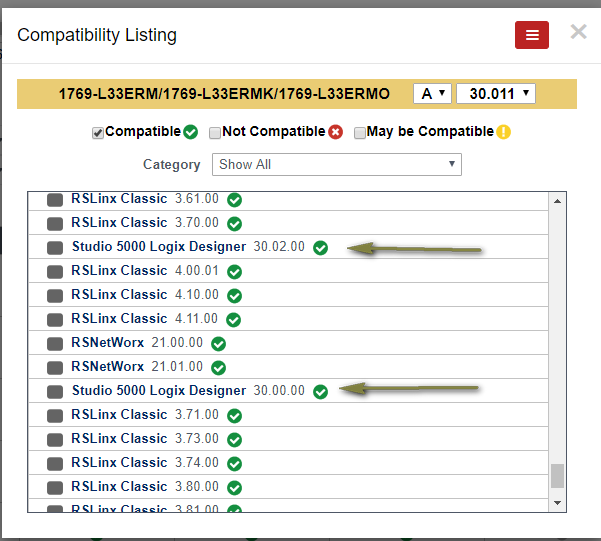
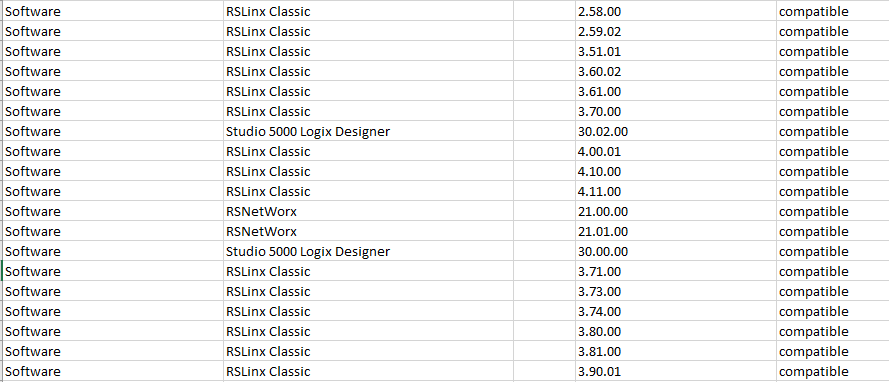
here is inconsistent
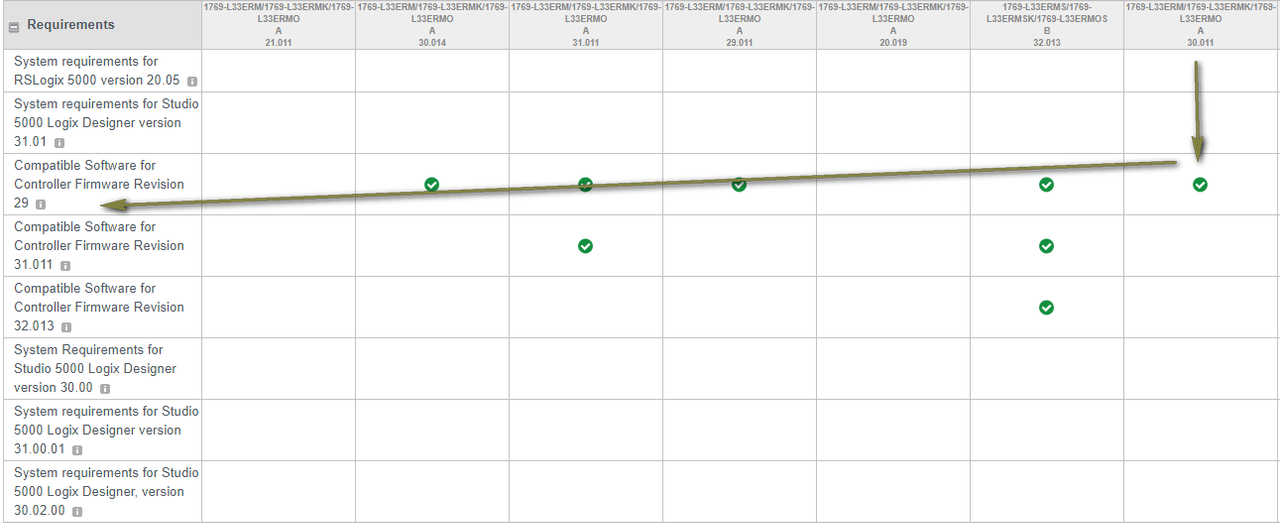
and here ..
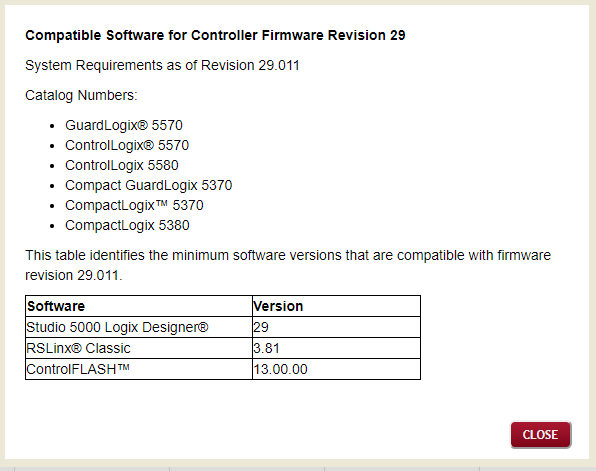
ControlFLASH v15: Cannot Find v30, v31, v32 Firmware for CompactLogix, ControlLogix Controllers
| Code: | | https://rockwellautomation.custhelp.com/app/answers/answer_view/a_id/1072431/kw/CompactLogix%205370%20Family%2030.011%20Compatible%20Software%20for%20Controller%20Firmware%20Revision%2029/session/L3RpbWUvMTU4NjA4ODc1Ni9nZW4vMTU4NjA4ODc1Ni9zaWQvZlVfdHA0a3l3QnUlN0VLcVYxT1JzZkh1Ym9nUWxHclpsQlY5YWJ0blgwMFVMbFZRNnh5OEM2X3pPWUh5N2x3UTJac2htbFVLNCU3RXpsamZMUnh6ZCU3RUR2eWZtaWZFUUEycXQ1STQ5UUNNNkJQU1p0SE0xOUVoV1k1SlVRJTIxJTIx |
Summary
ControlFLASH v15: Cannot Find v30, v31, v32 Firmware for CompactLogix, ControlLogix Controllers
Question
Why is the v30.014 and higher firmware revisions not listed in ControlFLASH under the particular controller catalog number selected?
Why is there only selections up to v30.011 firmware for the CompactLogix or ControlLogix in ControlFLASH v15?
What version of ControlFLASH is required for use with a v30.014 or higher firmware kit?
Why don’t I see the specific catalog # of the unit that I want to flash in ControlFLASH?
How to find new release of firmware v28.014 for 1769-L33ERMS which cannot be discovered at selection list in ControlFLASH?
Answer
The DMK file name changed for the CompactLogix and ControlLogix controllers in ControlFLASH v15 in order to support the full set of catalog numbers in one easy download.
Note: ControlFLASH version 15.01 is required for use with firmware 30.014 and higher.
How ".DMK" firmware files are organized (into families and bundles), and where they are stored on the workstation, changed in ControlFLASH v15.01.
See 1071313 - Installing legacy ControlFLASH firmware kits may delete new ControlFLASH DMK flash files and revert ControlFLASH to an earlier version for details.
https://rockwellautomation.custhelp.com/app/answers/answer_view/a_id/1071313
Summary
Installing legacy ControlFLASH firmware kits may delete new ControlFLASH DMK flash files and revert ControlFLASH to an earlier version
Problem
When legacy ControlFLASH firmware kits are installed new versions of ControlFLASH software versions may be downgraded and DMK flash files may be deleted.
Cause
Case 1
Version 13 or version 14 of ControlFLASH is installed and DMK flash files exist in the C:\Program Files x86\ControlFLASH folder.
Software that installs the DMK files in this folder
Studio 5000 Logix Designer, V30 and earlier
Connected Components Workbench (CCW), V11 and earlier
A firmware kit built with ControlFLASH versions 8 or version 9 is installed
Version 8 and 9 of ControlFLASH have an anomaly in comparing the version installed on the target PC
As a result the newer versions of ControlFLASH are erroneously uninstalled because the compare is performed between the first digit of the version number and not the whole number
Ex. V9 vs V1(3) instead of V9 vs V13
During the uninstall of the newer revision, the DMK files are deleted.
Finally the second ControlFLASH kit is installed with any version
Case 2
Version 11 or earlier ControlFLASH versions are installed and DMK flash files exist in the C:\Program Files x86\ControlFLASH\ folder
ControlFLASH kit at any version is installed
During the existing ControlFLASH uninstall, all DMK files are deleted
Solution
Install V15.00.00 or later of ControlFLASH
The installation of ControlFLASH version 15.00.00 will move the DMK flash files located in the previous ControlFLASH installation folder to a new folder
Previous ControlFLASH files location
For 64-bit operating systems
C:\Program Files (x86)\ControlFLASH
For 32-bit operating systems
C:\Program Files\ControlFLASH
New ControlFLASH files location
C:\Users\Public\Documents\Rockwell Automation\Firmware Kits
This folder will be the new default monitored folder starting with version 15.01.00.
DMK files installed by the following software will also place DMK in this new location.
Logix Designer V31
Connected Components Workbench V12
Older versions of Logix Designer and CCW will still place DMK flash files in previous ControlFLASH file locations
This change is to prevent the problems described in this technote.
Keeping DMK files in the new monitored folder avoids the DMK files from being deleted when uninstalling ControlFLASH
How to identify the Version of ControlFLASH Before Installing
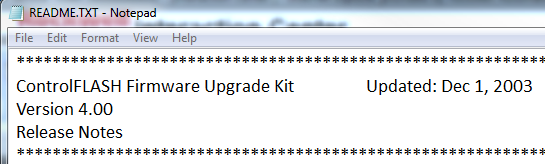
If there is a README.TXT in the install folder
Open that and the version will be shown
If there is a ControlFLASH.msi in the install folder
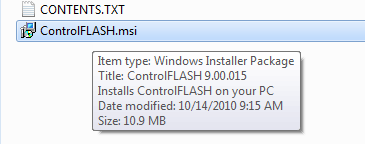
Select the ControlFLASH.msi install file (one click, not dublu click)
Move the mouse cursor on top to the file name
A pop-up will appear showing the version
Workaround
If you’d like to install legacy firmware kits on the Working PC, there is alternate way to accomplish this task.
Important note: This steps should be performed on a Development Computer or Test Virtual Machine not in a Production or Working PC to preserve its functional state. Rockwell Automation Technical Support cannot perform this workaround for the customer, it must be done by the customer itself. This is Rockwell Automation Company Policy, currently under review.
Download ControlFLASH Firmware Kit Manager V12 from the PCDC and install it on the development PC or Virtual Image.
Download the desired legacy Firmware kit and install it on the Development PC or Virtual Image
Launch ControlFLASH Kit Manager and locate the recently installed legacy Firmware version in the list
Select it and move to the right window box.
Click on Build Kit button.
This procedure will lucrate Legacy Firmware Version bundled with version 12 ControlFLASH.
Copy currently build Kit over to the Working PC and install it.
Version 12 will not overwrite latest version of Firmware Flash tool and preserve DMK files located in default location.
Note:
The following scenario will not cause the problem:
Version 13 or version 14 of ControlFLASH is installed and the DMK flash files exist in the C:\Program Files x86\ControlFLASH folder
A firmware kit installs with ControlFLASH versions 10 or version 11
This fixed the compare version anomaly and will not cause a downgrade
During the ControlFLASH firmware kit install all the DMK flash files will remain preserved
1769-L33ERM/1769-L33ERMK/1769-L33ERMO (SERIES A) 29.011 RSLogix 29.00.02
EDS files for 1769-L33ERM Version: 30.012
https://anonfile.com/x4x340m1o2/complist_1769-L33ERM_1769-L33ERMK_1769-L33ERMO_A_30.011_csv
https://anonfile.com/z0x647m0o0/1769-L33ERM_1769-L33ERMK_1769-L33ERMO_A_30.014_released_5_2018_pdf
https://anonfile.com/11xc48m1oc/1769-L33ERM_1769-L33ERMK_1769-L33ERMO_A_29.011_released_7_2016_pdf
https://anonfile.com/3ax54dmcoa/1769-L33ERM_1769-L33ERMK_1769-L33ERMO_A_30.011_released_11_2016_pdf
https://anonfile.com/59x841m3o1/eds_1769-L33ERM_v1-30_zip
https://anonfile.com/B5x142meo6/1769-in047_-en-p_pdf
https://anonfile.com/P8x140mdoe/1769-L33ERM_29.011_zip
https://anonfile.com/Tfx045m5od/CompactLogix_5370_1769-L3_30.014_zip
https://anonfile.com/X1xd45m4o7/1769-td005_-en-p_pdf |
|
| Back to top |
|
|
|

 FAQ
FAQ Search
 Memberlist
 Usergroups
 Register
 Profile
 Log in to check your private messages
 Log in


