 |
plc.myforum.ro
PLCs users www.plc.myforum.ro!
|
| View previous topic :: View next topic |
| Author |
Message |
taktiz
Junior

Joined: 12 Sep 2018
Posts: 13
|
 Posted: 30/07/2020 12:33 Post subject: programming error in the STOP mode of the S7-1500 CPU Posted: 30/07/2020 12:33 Post subject: programming error in the STOP mode of the S7-1500 CPU |
 |
|
How do you determine the programming error in the STOP mode of the S7-1500 CPU?
https://support.industry.siemens.com/cs/document/109780828/how-do-you-determine-the-programming-error-in-the-stop-mode-of-the-s7-1500-cpu
STEP 7 (TIA Portal) refers you to the last instruction in the relevant block that was executed before the CPU changed to STOP mode.
If your CPU switches to STOP mode because of a programming error, you may also diagnose the cause via the "Testing" task card and the "Call hierarchy" palette. Proceed as follows:
Select the "Program blocks" folder in the project tree in your PLC station.
Switch to the Online view by clicking the "Online connection" button.
Open the "Call hierarchy" palette in the "Testing" task card. The Call hierarchy gives you an overview of the blocks used in your program.
Note
The task card "Testing" is only available when you open a program block with the editor. Without an opened program block or just with a data block the task card "Testing" is not visible.
Double-click the last block at the bottom of the Call hierarchy. In this example it is the "Execute" block. When the block opens in the block editor, the last instruction from STEP 7 (TIA Portal) that was executed before the CPU went into STOP mode is marked.
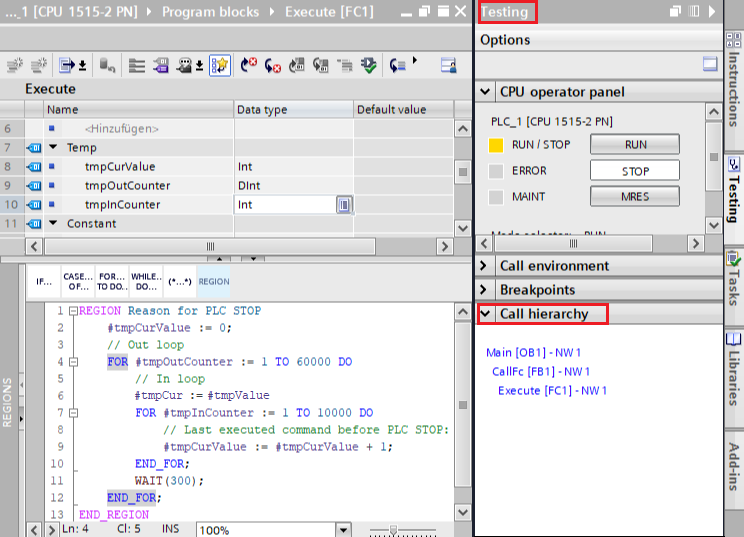
The screen in this FAQ was created with STEP 7 (TIA Portal) V16. |
|
| Back to top |
|
 |
|
|
You cannot post new topics in this forum
You cannot reply to topics in this forum
You cannot edit your posts in this forum
You cannot delete your posts in this forum
You cannot vote in polls in this forum
|
Powered by phpBB © 2001, 2005 phpBB Group
Fa-ti si tu propriul forum GRATUIT, pe www.myforum.ro |
 FAQ
FAQ Search
 Memberlist
 Usergroups
 Register
 Profile
 Log in to check your private messages
 Log in


