 |
plc.myforum.ro
PLCs users www.plc.myforum.ro!
|
| View previous topic :: View next topic |
| Author |
Message |
buwaxa
Junior

Joined: 16 Sep 2022
Posts: 2
|
 Posted: 20/09/2022 11:29 Post subject: Programming a Loop with Indirect Addressing Posted: 20/09/2022 11:29 Post subject: Programming a Loop with Indirect Addressing |
 |
|
Programming a Loop with Indirect Addressing
https://support.industry.siemens.com/cs/document/19345564/programming-a-loop-with-indirect-addressing
QUESTION:
How to program a loop with indirect addressing in STEP 7?
ANSWER:
Indirect addressing allows addressing of operands whose address is determined only during runtime of the program. This means, e. g., parts of the program can be executed repeatedly. Loop programming allocates a different address to the operands used with every run.
In the attached "LoopAddr" download program a loop is programmed to supply 100 consecutive memory cells with values from the input variables "Input_1" and "Input_2". The program contains a function FC10 with IN variables "Input_1" and "Input_2" (type DWORD) and the "DB_No" (type WORD), containing the number of the data block, as well as data block DB10 with the declaration: "Value: ARRAY[1..100] of REAL".
During every run of the loop, the value from "Input_2" is added to the intial value from "Input_1", or to the resulting sum, and saved in the calculated address in the data block. For example, if the value 0.5 is allocated to "Input_1" and the value 1.5 to "Input_2", then the first value 0.5 is at address 0.0 and the calculated sum (0.5+1.5=2.0) at the following address (4.0), and the next calculated sum (2.0+1.5=3.5) at the subsequent address (8.), and so on.
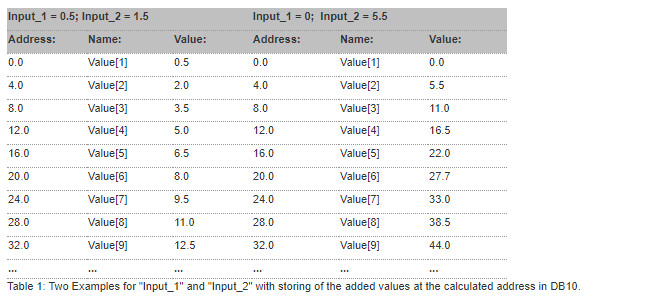
In the first part of FC10 the system function SFC24 "TEST_DB" is called and thereafter the parameter "RET_VAL" evaluated. The SFC24 provides information on the data block located in the work memory of the CPU. The number of data bytes of the selected DB is evaluated and a check is made whether the DB is write protected. If the error code of the "RET_VAL" is not zero, the program is terminated via a command jump. The following error numbers of "RET_VAL" are possible:
0000: No error occurred.
80A1: The number of the data block is either zero, or larger than the maximum allowed for the CPU.
80B1: The specified data block is not in the CPU.
80B2: The data block was generated with the key word UNLINKE.
The selected data block is opened via memory-indirect addressing:
L #DB_No //Number of the selected data block (10 for DB10).
T #Init_DB //Temporary variable of the type WORD.
AUF DB[#Init_DB] //DB10 is opened (<=> AUF DB10).
The specified block number (via input parameter "DB_No") is loaded to Accu1 and copied to the temporary variable "Init_DB" for tempory storage. The data block is then opened via this tempory variable.
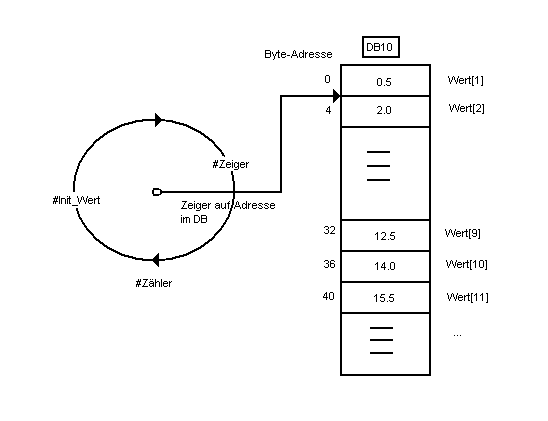
The value of "Input_1" is copied to a temporary variable "Init" and, via a loop, the value of "Init" added to "Input_2". The loop uses the LOOP instruction, whereby the loop counter is saved in temporary variable "Count". The transfer of sums into the various data double words (type: REAL) of the data block is done with memory indirect addressing via the temporary variable "Point_to" (type: DWORD).
Before entering the loop, a pointer is loaded with the address of the first component of the value and transferred to the variable "Point_to". With every run of the loop the access address of the "Point_to" variable is incremented by P#4.0, because the values are transferred in double-word manner (type: REAL).
FC10 is called in OB1 and the parameters "Input_1" and "Input_2" are paramterized with MD10 and MD20. Parameter "DB_No" is parametrized with "W#16#A" (A for DB10).
Download:
The attached download contains the STEP 7 project with the blocks described above, for programming of a loop with indirect addressing.
https://support.industry.siemens.com/cs/attachments/19345564/LoopAddr.exe
Copy file "LoopAddr.exe" into a separate directory and then start the file with a dublu click. The STEP 7 V5.3 project will be unpacked automatically with all subdirectories. You can then open and edit the unpacked project with SIMATIC Manager.
Executability and test environment:
The example can be used on all CPU variants of SIMATIC S7-300, S7-400 , C7 and WinAC.
The table below lists the components with which this bulletin was created and the described functionality verified:

[URL=https://veryfiles.com/s1khkmaolt02]loopaddr.exe - 524 KB[/URL] |
|
| Back to top |
|
 |
|
|
You cannot post new topics in this forum
You cannot reply to topics in this forum
You cannot edit your posts in this forum
You cannot delete your posts in this forum
You cannot vote in polls in this forum
|
Powered by phpBB © 2001, 2005 phpBB Group
Fa-ti si tu propriul forum GRATUIT, pe www.myforum.ro |
 FAQ
FAQ Search
 Memberlist
 Usergroups
 Register
 Profile
 Log in to check your private messages
 Log in


