 |
plc.myforum.ro
PLCs users www.plc.myforum.ro!
|
| View previous topic :: View next topic |
| Author |
Message |
pinoquo
Junior

Joined: 04 Nov 2012
Posts: 1
|
 Posted: 26/02/2020 00:34 Post subject: problem with the B&R plc, which has gone to reset mode Posted: 26/02/2020 00:34 Post subject: problem with the B&R plc, which has gone to reset mode |
 |
|
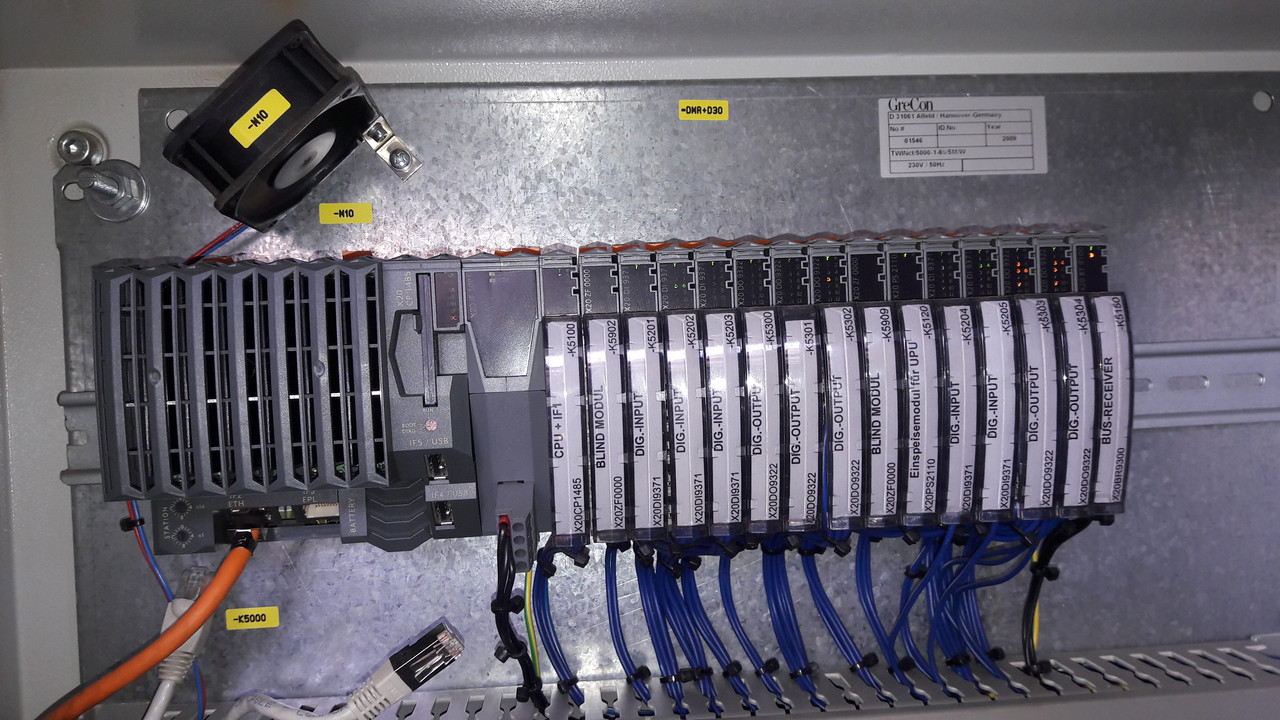
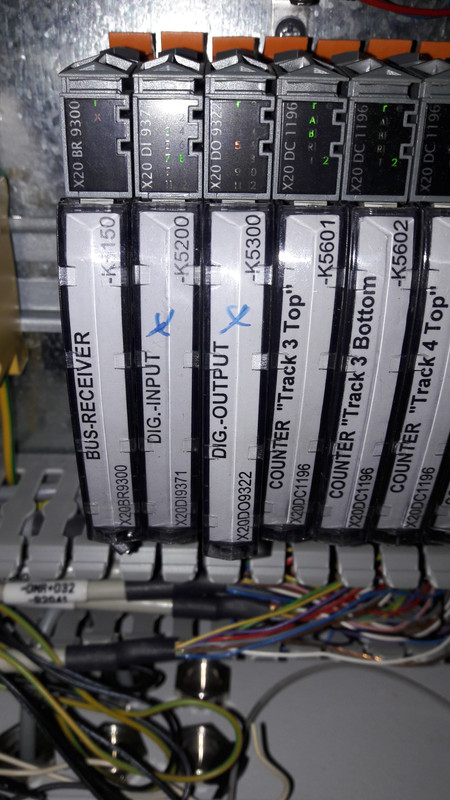
I have problem with the B&R plc, which I think has gone to reset mode.
The following photos give a general overview of communication and problems:
https://drive.google.com/file/d/1W5dCAD8mfwXW7oxBn_nChUNQhQILnSkM/view?usp=sharing
https://drive.google.com/file/d/1DIVvawD1WgytOIXig-zi0rM1W7_FgGj2/view?usp=sharing
https://drive.google.com/file/d/1Gnv5vsxbimwx4ve9ryzog9wEv2ckz629/view?usp=sharing
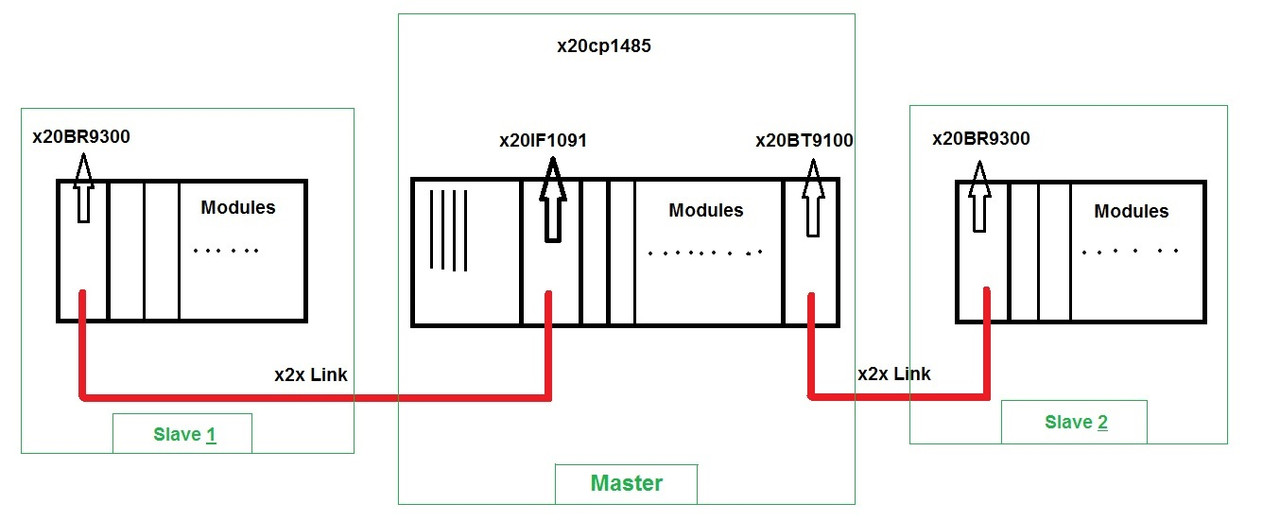
The machine consists of one master panel and two slave panels whose data connection is via the x2x module. Problem :
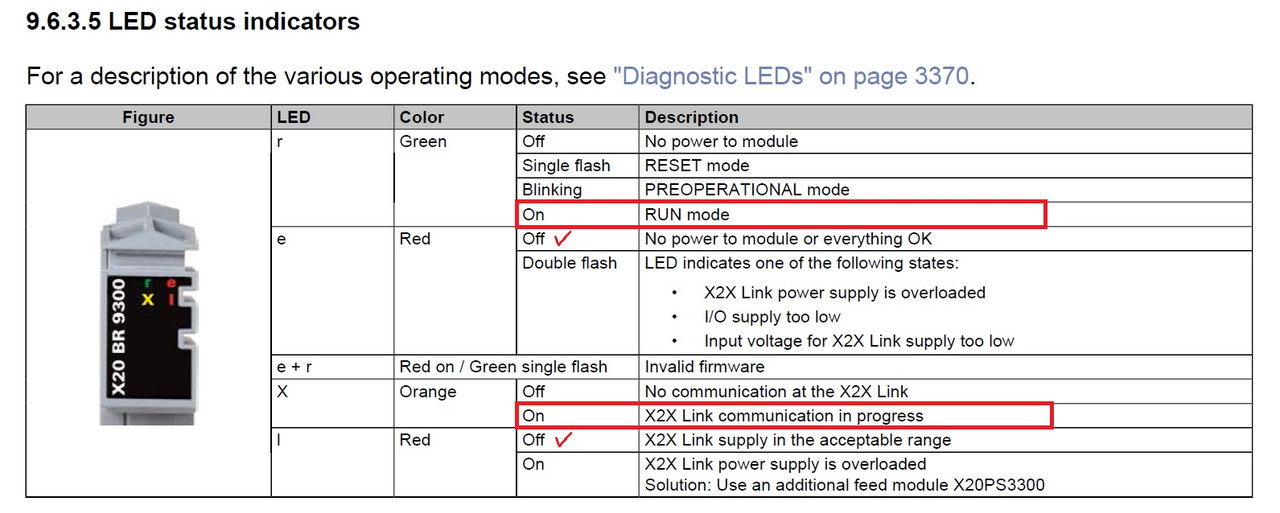
x2x communication is established between the master and slave1, in slave1 panel, r-led X20BR9300 module is on and green, and x-led is on and orange, as well r-led of the rest of the slave1 Panel modules are on.
But that's not the case in master panel and slave2 !
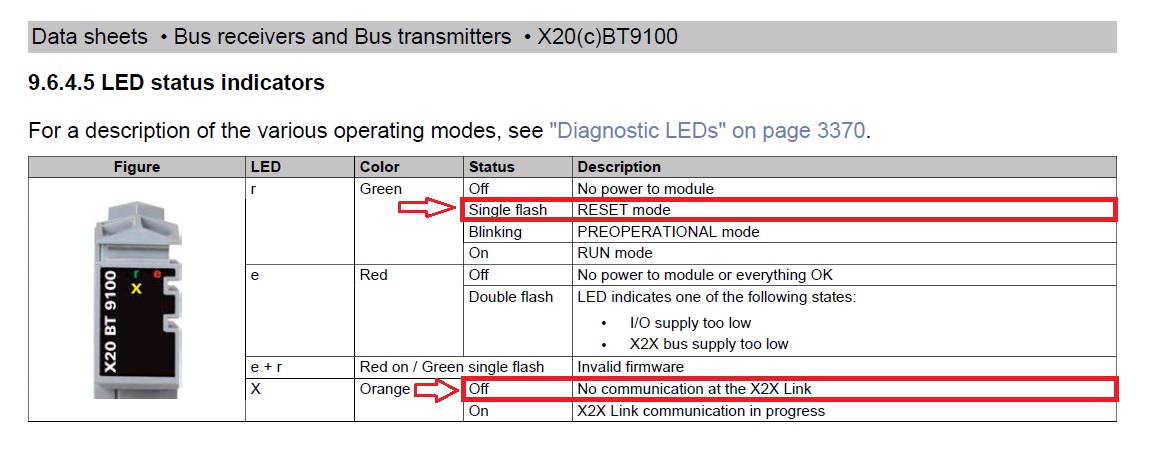
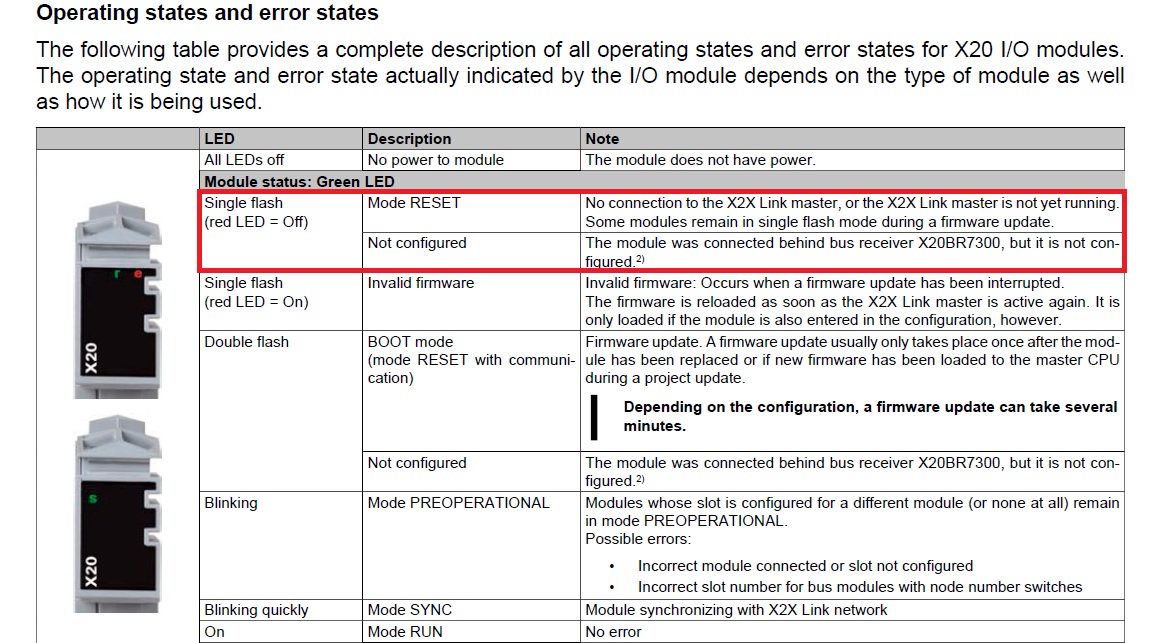
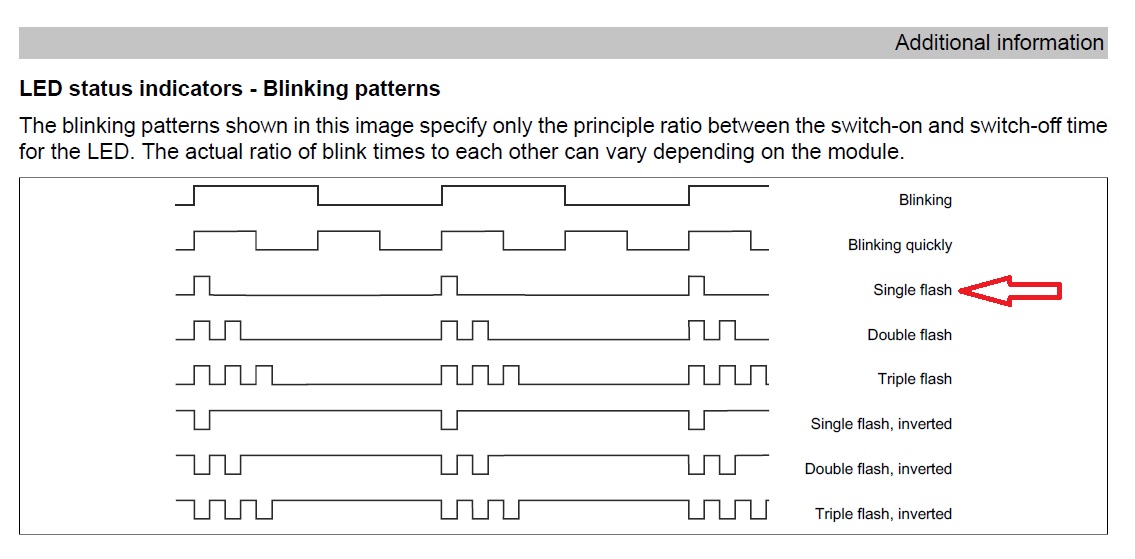
in master panel and plc rack the r-leds of all the modules are single flash, and r-led X20BT9100 module is single flash, and x-led is off.
in slave2 panel as well, the r-leds of all the modules are single flash, and r-led X20BR9300 module is single flash , and x-led is off.
https://drive.google.com/file/d/1PQi0n0h0hVgCjqeJ2Yjq2EscOnDf3lH9/view?usp=sharing
https://drive.google.com/file/d/1Q4xLgbGsigLpPjMNqFZOS5not86Vcq1m/view?usp=sharing
https://drive.google.com/file/d/1_33Nqudzk8BfczreiPop3pUsu4JX_tXw/view?usp=sharing
https://drive.google.com/file/d/1kZe-LIu3IgoWki0qLDTNf2lDuyHEqRUG/view?usp=sharing
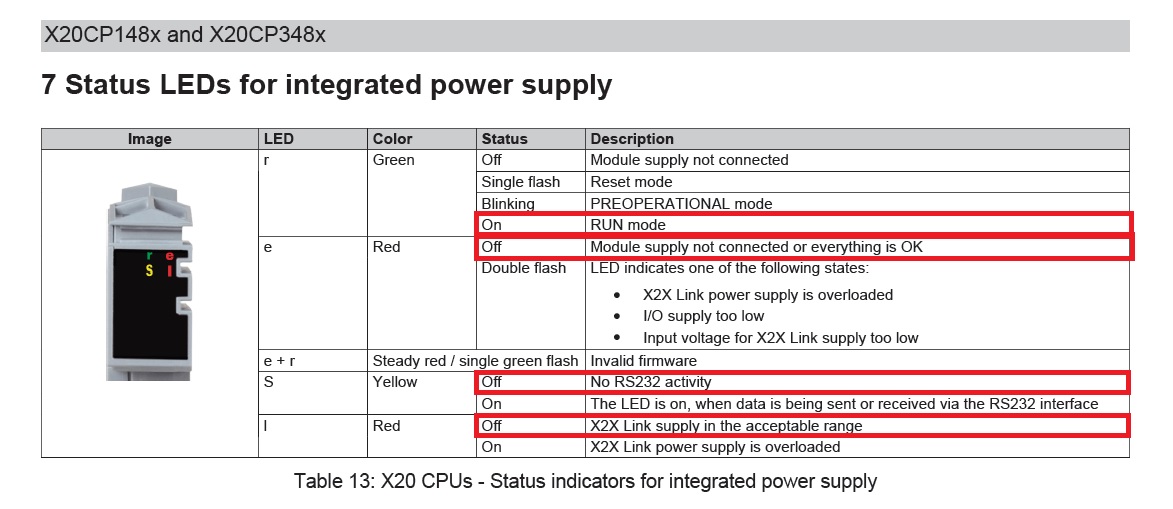
the x2x cable connection between master and slave2 panel is checked and not disconnected, power supplies operate properly. the digital input modules are operate properly and their leds are on when triggered. But the device, which is actually a particleboard thickness measuring, has no output and its equipment is disabled.
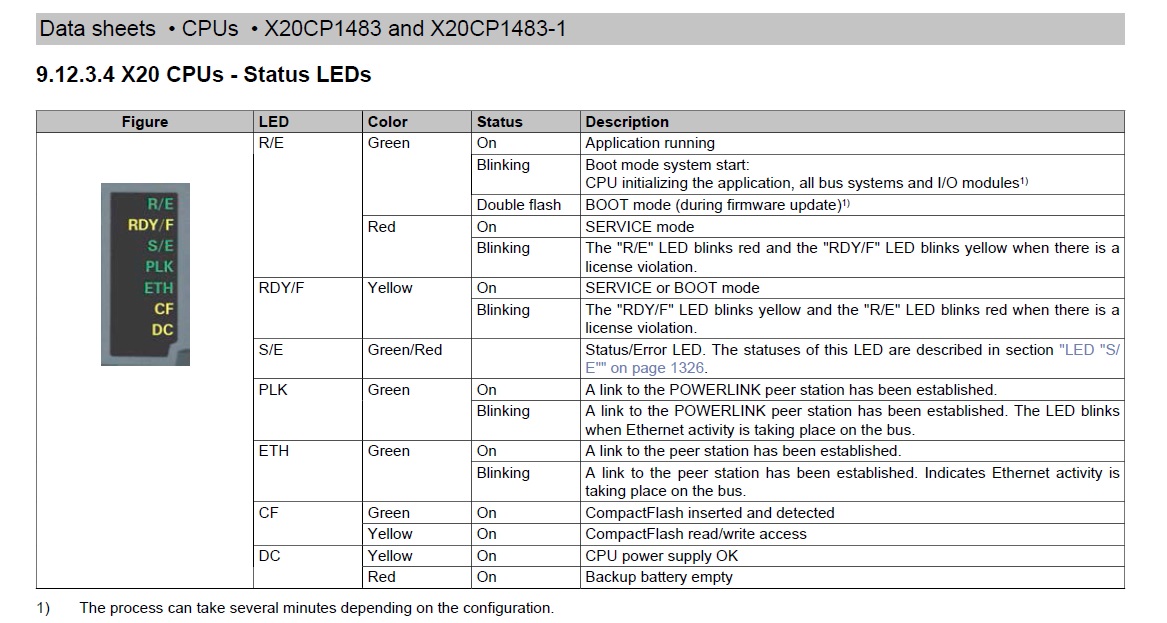
According to my study on plc instructions and b&r modules, the equipment is in reset mode and system performance is impaired.
as pictured below, I put the CPU on boot and diag mode, but the problem is still there.
https://drive.google.com/file/d/1y78IiJ9cMYNh6yEakUcagJJbZ1gzMsEL/view?usp=sharing
https://drive.google.com/file/d/1BPBkjxdhFjbMzz505N1y6F0mWE7TaetL/view?usp=sharing
https://drive.google.com/file/d/1y5vnrctxqwkbrwH2xhyd1SmxF_pHlvfs/view?usp=sharing
But I haven't pressed the reset button because I'm worried that the CPU might cold restart.
I don't have access to the plc program and can't go online and troubleshoot.
what does reset mode mean ?
https://drive.google.com/file/d/1qLmxO6cSaHi-HTuzuAHngV-lExKG498C/view?usp=sharing |
|
| Back to top |
|
 |
jabyr
Junior
Joined: 18 Aug 2018
Posts: 2
|
| Posted: 26/02/2020 13:12 Post subject: |
|
|
| Quote: | I have problem with the B&R plc, which I think has gone to reset mode.
The following photos give a general overview of communication and problems:
The machine consists of one master panel and two slave panels whose data connection is via the x2x module. Problem :
x2x communication is established between the master and slave1, in slave1 panel, r-led X20BR9300 module is on and green, and x-led is on and orange, as well r-led of the rest of the slave1 Panel modules are on.
But that's not the case in master panel and slave2 !
in master panel and plc rack the r-leds of all the modules are single flash, and r-led X20BT9100 module is single flash, and x-led is off.
in slave2 panel as well, the r-leds of all the modules are single flash, and r-led X20BR9300 module is single flash , and x-led is off.
the x2x cable connection between master and slave2 panel is checked and not disconnected, power supplies operate properly. the digital input modules are operate properly and their leds are on when triggered. But the device, which is actually a particleboard thickness measuring, has no output and its equipment is disabled.
According to my study on plc instructions and b&r modules, the equipment is in reset mode and system performance is impaired.
as pictured below, I put the CPU on boot and diag mode, but the problem is still there.
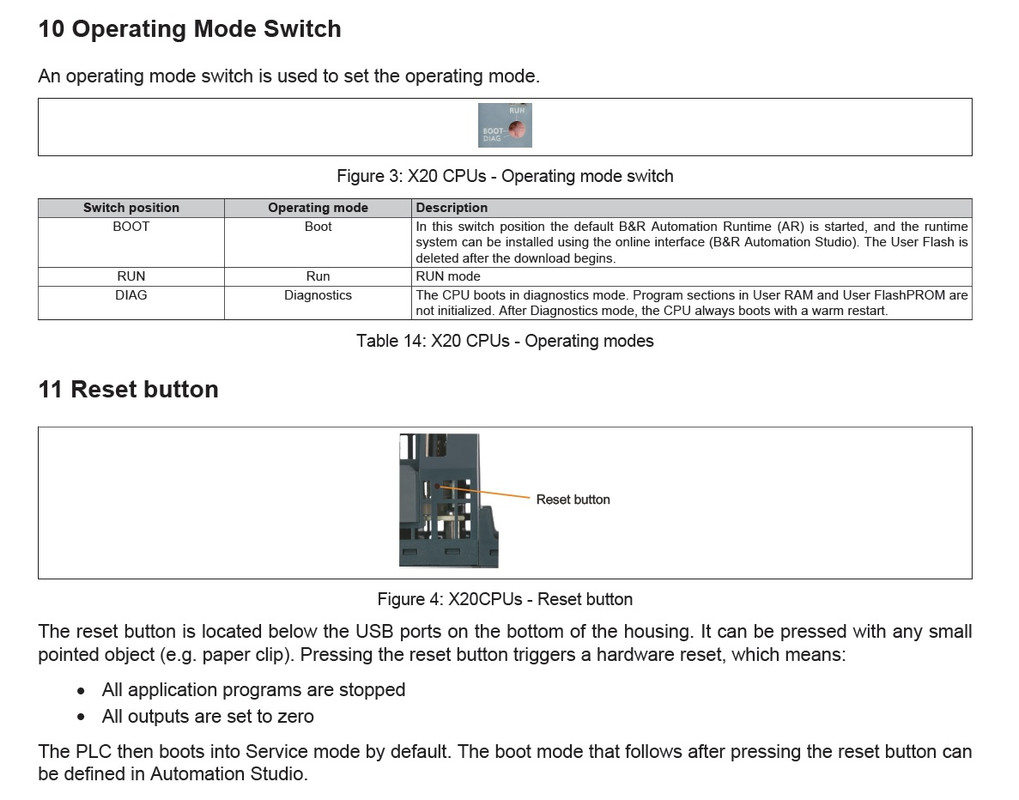
But I haven't pressed the reset button because I'm worried that the CPU might cold restart.
I don't have access to the plc program and can't go online and troubleshoot.
what does reset mode mean ?
https://drive.google.com/file/d/1qLmxO6cSaHi-HTuzuAHngV-lExKG498C/view?usp=sharing |
B&R PLCs go into service mode when something goes wrong (divide by zero, cycle time violation, page fault, comm faults) or as an option when doing a major transfer (updating firmware, re-transferring the entire project, etc).
You get out of service mode by doing a warm restart (assuming whatever error condition isn't still going on).
To see what has put you in service mode, you can open the logger in either Automation Studio (in the 'Open' menu) or in SDM, which is the web based System Diagnostics Manager that the PLC is hosting at http://<PLC_IPaddress>/sdm (which still works in service mode)
You can search the help for any error number you see in the logger and you can also use the backtrace feature in the logger to see what part of your code cause the problem
Why you cannot go online!! |
|
| Back to top |
|
|
sfljbsqm
Junior
Joined: 05 Oct 2018
Posts: 4
|
| Posted: 27/02/2020 11:41 Post subject: |
|
|
brwatch: service tool for B&R plc: watch, change, log variables, set ip adresses etc
https://github.com/hilch/brwatch |
|
| Back to top |
|
|
mohdabshr
Member junior

Joined: 07 Oct 2012
Posts: 86
|
| Posted: 27/02/2020 12:59 Post subject: |
|
|
Hi sfljbsqm
with the brwatch is it possible to change user password in pc panel pc2100
we have machine the user password changed every 24h. |
|
| Back to top |
|
|
|
|
You cannot post new topics in this forum
You cannot reply to topics in this forum
You cannot edit your posts in this forum
You cannot delete your posts in this forum
You cannot vote in polls in this forum
|
Powered by phpBB © 2001, 2005 phpBB Group
Fa-ti si tu propriul forum GRATUIT, pe www.myforum.ro |
 FAQ
FAQ Search
 Memberlist
 Usergroups
 Register
 Profile
 Log in to check your private messages
 Log in


