| View previous topic :: View next topic |
| Author |
Message |
go
Member

Joined: 26 Mar 2015
Posts: 147
|
 Posted: 09/05/2016 19:16 Post subject: Primary Setup Tool 4.2 Posted: 09/05/2016 19:16 Post subject: Primary Setup Tool 4.2 |
 |
|
Primary Setup Tool 4.2
[URL=https://userscloud.com/wnkh41gxnst9]PST_V4.2.rar - 212.6 MB[/URL] |
|
| Back to top |
|
 |
grig100
Member 3


Joined: 01 Jan 2015
Posts: 752
|
| Posted: 20/06/2017 16:32 Post subject: Primary Setup Tool PST V4.2 HF1 |
|
|
New Primary Setup Tool (PST) version V4.2 HF1, 4.2 and 4.1 for setting addresses of SIMATIC NET Industrial Ethernet products
https://support.industry.siemens.com/cs/document/19440762/
Effective immediately, the new Primary Setup Tool (PST) - version 4.2 HF1 is available for the Windows 10 (64-bit)
Support of these operating systems:
| Code: | 32-bit: Windows 7 Professional/Ultimate SP 1
Windows 8.1 Professional
64-bit: Windows 7 Professional/Ultimate SP 1
Windows Server 2008 Standard R2
Windows 8.1 Professional
Windows Server 2012 Standard R2
Windows 10 Pro
Support for new device families:
SCALANCE XC200
IE/PB Link V3 |
Download:
PST V4.2.0.1.zip (278.3 MB)
https://support.industry.siemens.com/cs/attachments/19440762/PST_V4_2_0_1.zip
https://support.industry.siemens.com/cs/attachments/19440762/ph_primary-setup-tool_en_v4p2p1.pdf
Download older version:
pst_v4p2.zip (217.8 MB)
https://support.industry.siemens.com/cs/attachments/19440762/pst_v4p2.zip
https://support.industry.siemens.com/cs/attachments/19440762/ph_primary-setup-tool_76_v4p2.pdf |
|
| Back to top |
|
|
flq68e31
Junior

Joined: 14 Dec 2018
Posts: 3
|
| Posted: 01/05/2021 08:52 Post subject: SINEC PNI V1.0 SP1 |
|
|
SINEC PNI V1.0 SP1
https://support.industry.siemens.com/cs/document/109776941/
SINEC PNI can be used when commissioning PROFINET devices and offers support when initializing SCALANCE and RUGGEDCOM devices.
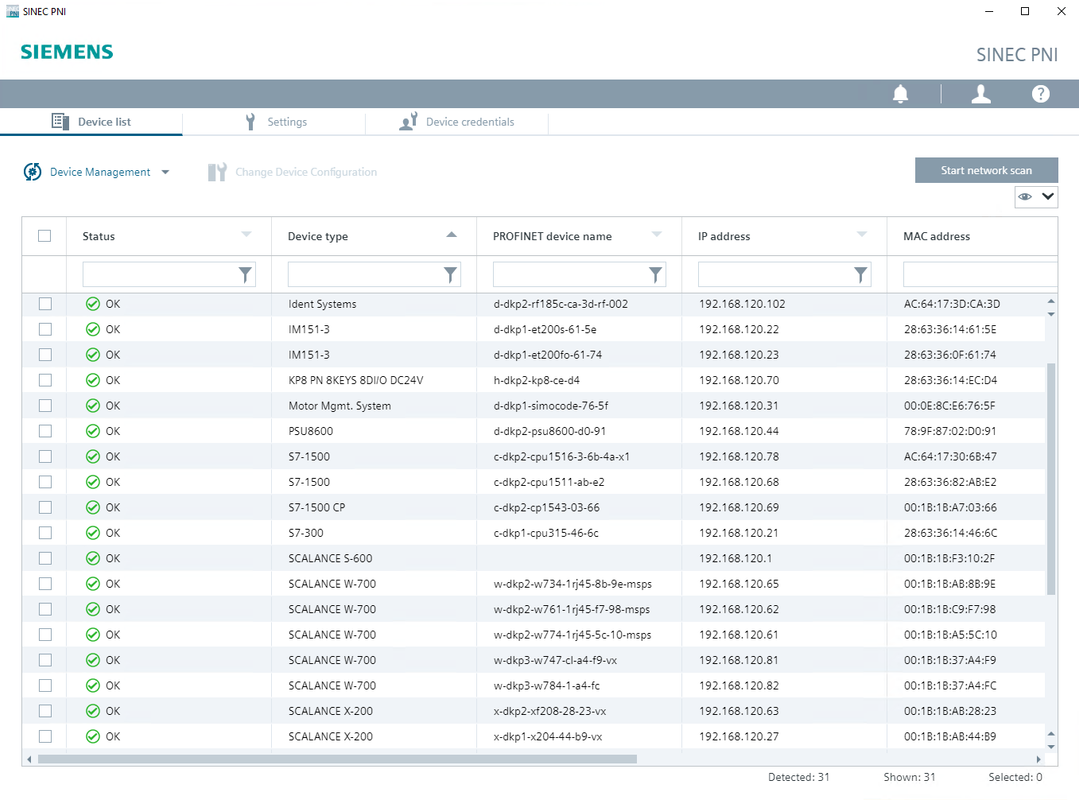
Configuration can be performed for several devices at the same time.
Functions:
· Network scan over all PROFINET and RUGGEDCOM devices
· Initialization by setting the following parameters on the devices:
o IP address, subnet and gateway
o Initial password change (SCALANCE & RUGGEDCOM)
o PROFINET name (PROFINET)
o I&M data for device identification (PROFINET)
o SystemName, SystemContact and SystemLocation
· Enable DHCP client
· Restore factory settings
· Reset to PROFINET default values
· Ping
· LED flashing
· Open Web Based Management for the devices
https://support.industry.siemens.com/cs/attachments/109776941/SinecPni-V1.0.1.zip
https://support.industry.siemens.com/cs/attachments/109776941/BA_SINEC-PNI_76.pdf
https://anonfiles.com/F5s2W9tdu6/BA_SINEC-PNI_76_pdf
https://anonfiles.com/B1zdW9t7u3/SinecPni-V1.0.1_zip |
|
| Back to top |
|
|
|

 FAQ
FAQ Search
 Memberlist
 Usergroups
 Register
 Profile
 Log in to check your private messages
 Log in


