| View previous topic :: View next topic |
| Author |
Message |
valz
Member 3


Joined: 26 Jul 2015
Posts: 771
|
 Posted: 27/11/2019 16:28 Post subject: Powermanager V4.1 Posted: 27/11/2019 16:28 Post subject: Powermanager V4.1 |
 |
|
Power Monitoring Software powermanager V4.1
https://support.industry.siemens.com/cs/document/109771760/
https://support.industry.siemens.com/cs/attachments/109771760/Setup.zip
https://support.industry.siemens.com/cs/attachments/109771760/OperatingHelp_us.zip
https://support.industry.siemens.com/cs/attachments/109771760/Readme.pdf
https://support.industry.siemens.com/cs/attachments/109771760/ReadmeOSS.zip
https://support.industry.siemens.com/cs/attachments/109771760/Cybersecurity_Guidelines.pdf
https://bayfiles.com/p17ba5C2nf/Cybersecurity_Guidelines_pdf
https://bayfiles.com/r174afCdn6/Readme_pdf
https://bayfiles.com/x973a8Cdn8/ReadmeOSS_zip
https://bayfiles.com/z379aeCfn4/OperatingHelp_us_zip
https://ulozto.net/file/AgfTfTx9HWW6/powermanager-v4-1-zip |
|
| Back to top |
|
 |
valz
Member 3
Joined: 26 Jul 2015
Posts: 771
|
| Posted: 13/07/2020 16:11 Post subject: powermanager V4.2 |
|
|
Power monitoring software powermanager V4.2
https://support.industry.siemens.com/cs/document/109771760/power-monitoring-software-powermanager-v4-2
Since with SENTRON powermanager V4.1 a new kind of delivery of software and license was introduced:
The software is offered via SIOS portal download free of charge only (the delivery form software at DVD bundled with license key on USB stick will not be offered for SENTRON powermanager V4.x anymore). The order and delivery process for SENTRON powermanager V3.x remains untouched
The license can be ordered via order number (MLFB); the license is delivered to the user via email
The software download includes the so-called License Management Unit (LMU), which has to be used to handle the licenses
The license key (delivered via email) is imported to the LMU. In a next step the final license is downloaded from the server via a secured internet connection using the so-called License Management System (LMS)
In case of the SENTRON powermanager server not connected to the Internet the LMU must be installed to a PC which is connected to the internet. The license key can be transferred between both PC's using the so-called offline mode via a USB stick or commonly used drive.
SENTRON powermanager classic will be continued to delivered as software on DVD and license on USB Stick.
To request a SENTRON powermanager Trial license free of charge, please send us an e-mail to
powermanagerlicense.de@siemens.com
The license has to be activated using an internet connection - as described in the manual. This is a one-time process and this Trial license cannot be activated again after the 60 days expired. SENTRON powermanager stops working after expiration of the Trial license (60 days).
When the Trial license expired (after 60 days) the SENTRON powermanager application cannot be activated with another Trial license. If you want to continue using SENTRON powermanager please consider buying standard license.
Make sure to start the installation routine for SENTRON powermanager from a path without any blanks!
Before starting the installation please read all attached documents carefully
SENTRON powermanager V4.2 addresses new customers and blank projects only. Updating from 4.1 is possible. Upgrades from powermanager classic (V3.6) will be possible in the future
Download
https://support.industry.siemens.com/cs/attachments/109771760/Setup.zip
https://support.industry.siemens.com/cs/attachments/109771760/powermanager_Manual.zip
https://support.industry.siemens.com/cs/attachments/109771760/Readme.pdf
https://support.industry.siemens.com/cs/attachments/109771760/ReadmeOSS.zip
https://support.industry.siemens.com/cs/attachments/109771760/Cybersecurity_Guidelines.pdf
https://ulozto.net/file/IV6U4upOloMJ/setup-zip
https://bayfiles.com/n4deD4Fbo4/Setup_zip
https://bayfiles.com/p5xcD2Fboa/ReadmeOSS_zip
https://bayfiles.com/77xcD2F9o5/powermanager_Manual_zip |
|
| Back to top |
|
|
dosline
Junior

Joined: 08 Jun 2019
Posts: 1
|
| Posted: 04/06/2021 16:26 Post subject: powermanager V3.6 HF1 |
|
|
powermanager V3.6 HF1
https://support.industry.siemens.com/cs/document/64850998/powermanager-v3-6-hf1?dti=0&lc=en-DE
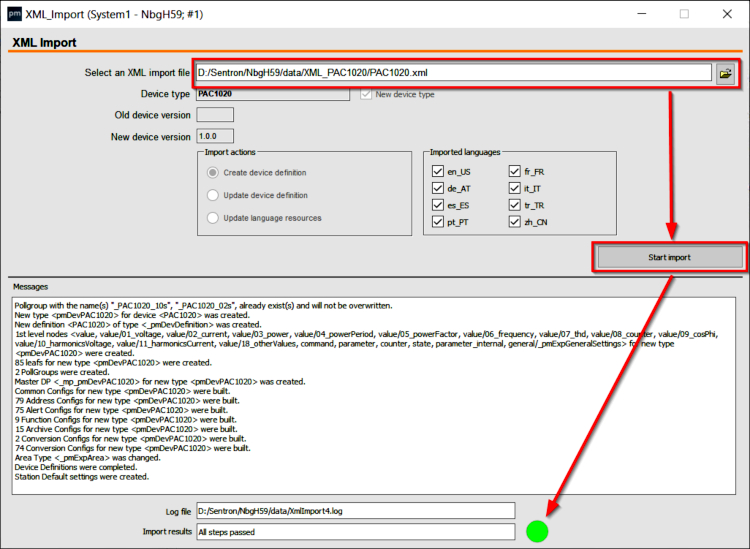
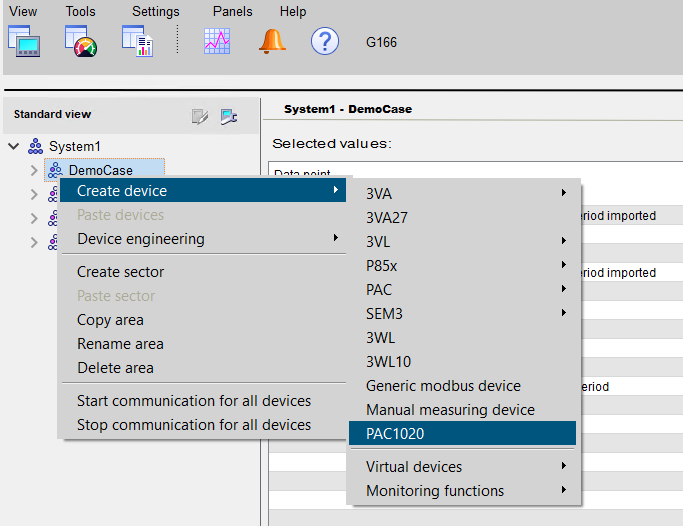
Powermanager V3.6 - integrating XML device files
https://support.industry.siemens.com/cs/document/109798105/powermanager-v3-6-integrating-xml-device-files?dti=0&pnid=13613&lc=en-IT
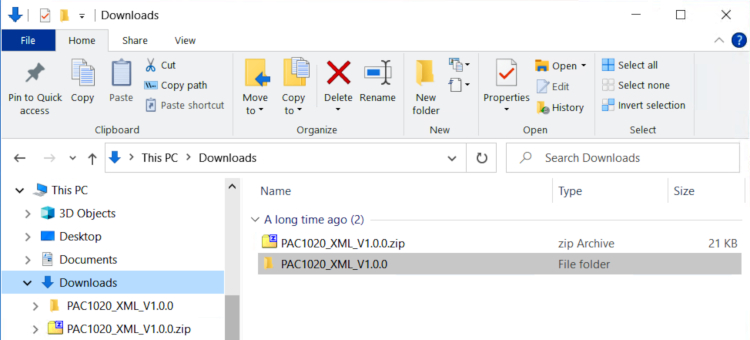
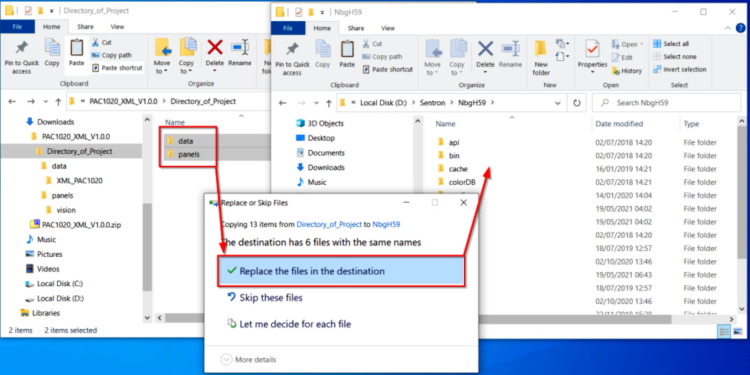
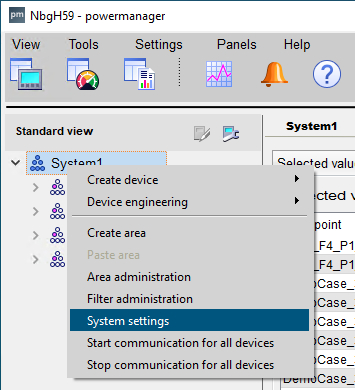
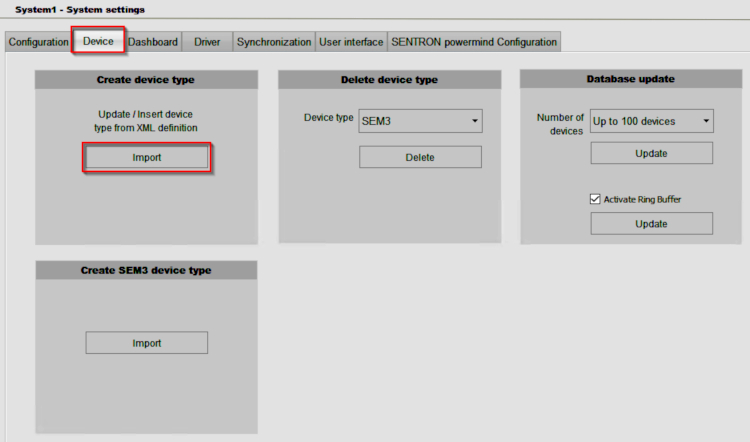
 |
|
| Back to top |
|
|
|

 FAQ
FAQ Search
 Memberlist
 Usergroups
 Register
 Profile
 Log in to check your private messages
 Log in


