| View previous topic :: View next topic |
| Author |
Message |
valz
Member 3


Joined: 26 Jul 2015
Posts: 771
|
 Posted: 05/10/2022 19:47 Post subject: Port Configuration Tool S7-PCT V3.5 SP2 Upd3 Posted: 05/10/2022 19:47 Post subject: Port Configuration Tool S7-PCT V3.5 SP2 Upd3 |
 |
|
Port Configuration Tool S7-PCT V3.5 SP2 Upd3
S7-PCT V3.5 SP2 Upd3 for IO-Link Master
https://support.industry.siemens.com/cs/document/32469496/
The IO-Link devices are integrated using the standardized device description "IODD" which can be obtained from the relevant device manufacturer. S7-PCT supports both IODD versions 1.0 and V1.1.
All IO-Link devices available at Siemens are already included in the hardware selection catalog of S7-PCT.
S7-PCT is called up via the IO-Link master hardware configuration of STEP 7, but it can also be started in "standalone" mode if the IO-Link master is not operated on a SIMATIC controller or if no STEP 7 is used.
Download:
https://support.industry.siemens.com/cs/attachments/32469496/SIMATIC_S7PCT_V35_SP2_UPD3.zip
https://support.industry.siemens.com/cs/attachments/32469496/ReadMe_OSS_PCM_3.5.2.3.zip |
|
| Back to top |
|
 |
valz
Member 3
Joined: 26 Jul 2015
Posts: 771
|
| Posted: 05/10/2022 19:48 Post subject: IO-Link |
|
|
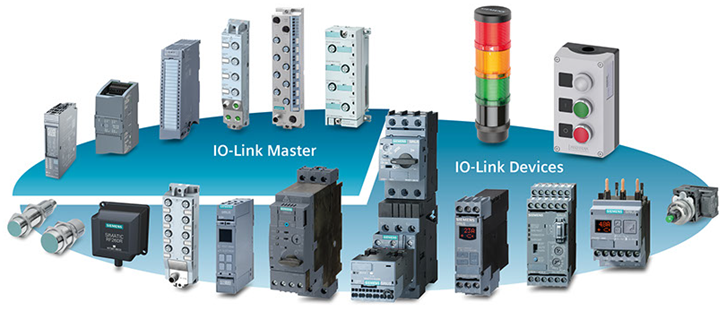
IO-Link – An Overview of the Most Important Documents and Links
https://support.industry.siemens.com/cs/document/109737170/
 |
|
| Back to top |
|
|
valz
Member 3
Joined: 26 Jul 2015
Posts: 771
|
| Posted: 05/10/2022 19:49 Post subject: Configuration of IO-Link Components in RUN |
|
|
Configuration of IO-Link Components in RUN
https://support.industry.siemens.com/cs/document/109813086/
With the help of the S7-PCT, the Siemens IO-Link solution also offers the possibility of configuring IO-Link components in the run.This function is particularly essential for systems that must not be switched off during operation.
With S7-PCT (Port Configuration Tool) you have the possibility to configure the IO-Link masters of the ET200 system family and to parameterize the IO-Link devices connected to them using the IODDs. The configuration is also possible without the CPU stopping.
Based on the following hardware structure the example demonstrates in detail the necessary steps to reconfigure an IOLink configuration in the RUN state of the CPU.
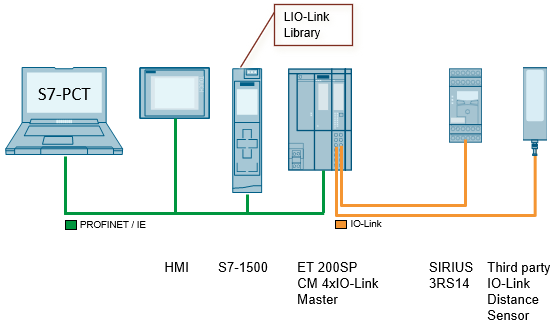
In addition, an HMI and the LIO-Link library are used to demonstrate how you can change the parameters of an IO-Link device with the user program.
Documentation and Project
https://support.industry.siemens.com/cs/attachments/109813086/109813086_CiR_IO_Link_DOC_V1_0_en.pdf
https://support.industry.siemens.com/cs/attachments/109813086/109813086_CiR_IO_Link_PROJ_V1_0_TIAP_V16.zip |
|
| Back to top |
|
|
valz
Member 3
Joined: 26 Jul 2015
Posts: 771
|
| Posted: 05/10/2022 20:00 Post subject: Application of the device-specific blocks for IO-Link |
|
|
Application of the device-specific blocks for IO-Link
https://support.industry.siemens.com/cs/document/90529409/
This application uses a concrete example to illustrate the simple connection of Siemens IO-Link devices to a SIMATIC S7-CPU using the Library for IO-Link
Systematic diagnostic concepts and efficient handling of parameter data are demanded in automation technology on all levels. It is imperative here that sensors and switching devices are integrated into the automation compound.
Communication IO-Link offers new possibilities through intelligent connection of sensors and switching devices to the control level. Main topics are switching, protecting and monitoring on field level.
The IO-Link system consists of an IO-Link master and one or several IO-Link devices (sensors or actuators). The IO-Link master works as interface for superimposed control and controls the communication with the connected IO-Link devices.
The application illustrates the usage of the Library for IO-Link (LIOLink) using three scenarios with SIRIUS IO-Link components. The following scenarios are realized for various IO-Link master and PNIO controllers:
Simple reading and writing of data records.
Generating a program alarm using a diagnostic data record.
Save and restore the configuration parameters.
The operation is handled via a WinCC user interface.
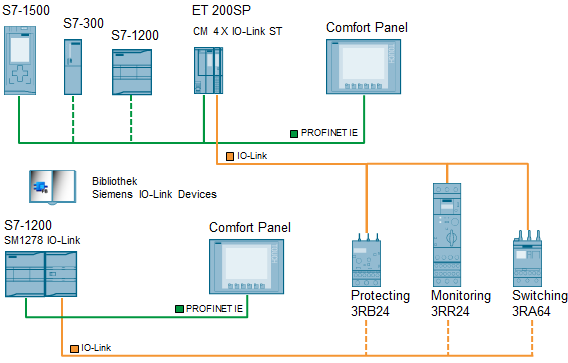
Hardware setup
The following scheme shows the hardware setup of the application:
Downloads
https://support.industry.siemens.com/cs/attachments/90529409/90529409_IOLink_Devices_Appl_DOC_V2_1_en.pdf
https://support.industry.siemens.com/cs/attachments/90529409/90529409_IOLink_Devices_Appl_PROJ_V2_1.zip
Archive
https://support.industry.siemens.com/cs/attachments/90529409/90529409_IOLink_Devices_Appl_PROJ_V13.zip
https://support.industry.siemens.com/cs/attachments/90529409/90529409_IOLink_Devices_LIB_V13_SP1.zip
https://support.industry.siemens.com/cs/attachments/90529409/90529409_IOLink_Devices_LIB_V55.zip |
|
| Back to top |
|
|
valz
Member 3
Joined: 26 Jul 2015
Posts: 771
|
| Posted: 10/01/2023 19:26 Post subject: S7-PCT V3.5 SP3 Upd1 for IO-Link master |
|
|
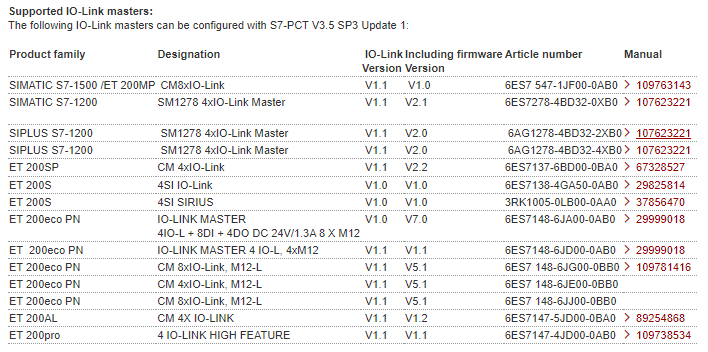
S7-PCT V3.5 SP3 Upd1 for IO-Link master
https://support.industry.siemens.com/cs/document/32469496/
nstallation requirements:
S7-PCT V3.5 is a 32-bit application which has been released for use with the following operating systems:
| Code: | • MS Windows 10, 64-bit Home, Professional, and Enterprise, as well as (IoT) Enterprise 2016 LTSB, 2019 LTSC (only for IPC/PG), and 2021 LTSC
• MS Windows 11, 64-bit Home, Professional, and Enterprise
• MS Windows Server 2016 64-bit
• MS Windows Server 2019 64-bit
• MS Windows Server 2022 64-bit |
There is no guarantee that S7-PCT V3.5 SP3 will run on other operating systems. Any use is at the user's own responsibility.
Download:
https://support.industry.siemens.com/cs/attachments/32469496/SIMATIC_S7PCT_V35_SP3_UPD1.exe
https://support.industry.siemens.com/cs/attachments/32469496/S7-PCT_V3.5_SP3_Readme.zip
[URL=https://www.file-upload.net/download-15074175/SIMATIC_S7PCT_V35_SP3_UPD1.exe.html]SIMATIC_S7PCT_V35_SP3_UPD1.exe[/URL]
https://ulozto.net/file/EuBB1Ya400G1/simatic-s7pct-v35-sp3-upd1-exe |
|
| Back to top |
|
|
|

 FAQ
FAQ Search
 Memberlist
 Usergroups
 Register
 Profile
 Log in to check your private messages
 Log in


