| View previous topic :: View next topic |
| Author |
Message |
jinheumna
Junior

Joined: 24 Jul 2012
Posts: 4
|
 Posted: 09/06/2019 07:03 Post subject: Plc backup tool v6.0 Posted: 09/06/2019 07:03 Post subject: Plc backup tool v6.0 |
 |
|
I need plc backup tool v6.0 for cqm plc.
All existing links were removed.
Please help.
Last edited by jinheumna on 10/06/2019 06:52; edited 1 time in total |
|
| Back to top |
|
 |
al_fayed
Junior
Joined: 01 Apr 2018
Posts: 6
|
| Posted: 09/06/2019 08:58 Post subject: |
|
|
| http://plc.myforum.ro/viewtopic.php?p=41786#41786 |
|
| Back to top |
|
|
jinheumna
Junior
Joined: 24 Jul 2012
Posts: 4
|
| Posted: 09/06/2019 09:47 Post subject: |
|
|
| al_fayed wrote: | | http://plc.myforum.ro/viewtopic.php?p=41786#41786 |
Thank you very much.
After completed installation, comm.tab and Runtime Error '8002' issue still exist. |
|
| Back to top |
|
|
al_fayed
Junior
Joined: 01 Apr 2018
Posts: 6
|
| Posted: 09/06/2019 12:06 Post subject: |
|
|
On C:\Program Files (x86)\CBACKWIN you.ll find COMM.TAB
If you open COMM.TAB with Notepad you'll see
1,9600,2,2,7
Modify the COMM.TAB as your default parameters
1,9600,1,0,8
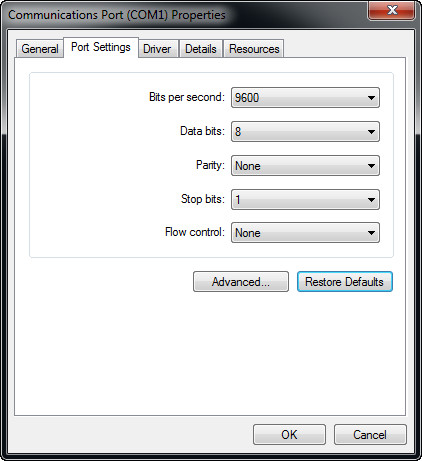
If do not work then
come back to the initial COMM.DAT parameters and configure your port accordingly
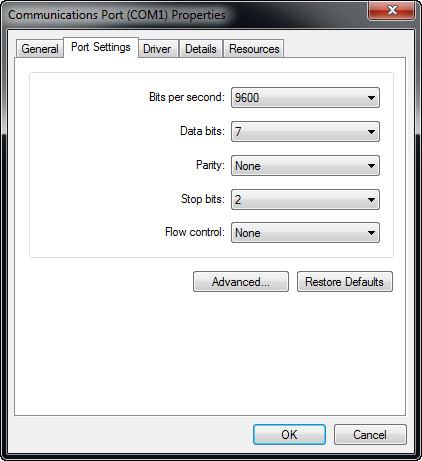
Have some data regarding RS232
https://www.arcelect.com/rs232.htm
https://assets.aten.com/product/manual/UC2322-24-4852-54-Serial-Port-Config-s_2013-03-12.pdf
Hope you have a native RS232 on your computer.. |
|
| Back to top |
|
|
ETRD
Junior
Joined: 14 May 2019
Posts: 1
|
| Posted: 09/06/2019 19:36 Post subject: |
|
|
| what operating system do you work? |
|
| Back to top |
|
|
jinheumna
Junior
Joined: 24 Jul 2012
Posts: 4
|
| Posted: 10/06/2019 06:40 Post subject: |
|
|
| ETRD wrote: | | what operating system do you work? |
Windows XP SP3 x86 and Windows 10 x64, Windows 7 x86 VHD triple booting.
Because of servicing old and new generation machinery. |
|
| Back to top |
|
|
jinheumna
Junior
Joined: 24 Jul 2012
Posts: 4
|
| Posted: 10/06/2019 06:53 Post subject: |
|
|
| al_fayed wrote: | On C:\Program Files (x86)\CBACKWIN you.ll find COMM.TAB
If you open COMM.TAB with Notepad you'll see
1,9600,2,2,7
Modify the COMM.TAB as your default parameters
1,9600,1,0,8
If do not work then
come back to the initial COMM.DAT parameters and configure your port accordingly
Have some data regarding RS232
https://www.arcelect.com/rs232.htm
https://assets.aten.com/product/manual/UC2322-24-4852-54-Serial-Port-Config-s_2013-03-12.pdf
Hope you have a native RS232 on your computer.. |
Thank you for your help. |
|
| Back to top |
|
|
|

 FAQ
FAQ Search
 Memberlist
 Usergroups
 Register
 Profile
 Log in to check your private messages
 Log in


