| View previous topic :: View next topic |
| Author |
Message |
grig100
Member 3


Joined: 01 Jan 2015
Posts: 752
|
 Posted: 05/09/2018 14:14 Post subject: PDT V1.3 SIMATIC Industry PC Panel Drivers and Tools Posted: 05/09/2018 14:14 Post subject: PDT V1.3 SIMATIC Industry PC Panel Drivers and Tools |
 |
|
PDT V1.3 SIMATIC Industry PC Panel Drivers and Tools
https://support.industry.siemens.com/cs/document/109749144/
The software SIMATIC IPC Panel Driver and Tools installs the "IPC Configuration Center" and optionally the software "IFP Ethernet Monitor". The existing displays and touch components are recognized automatically by the software.
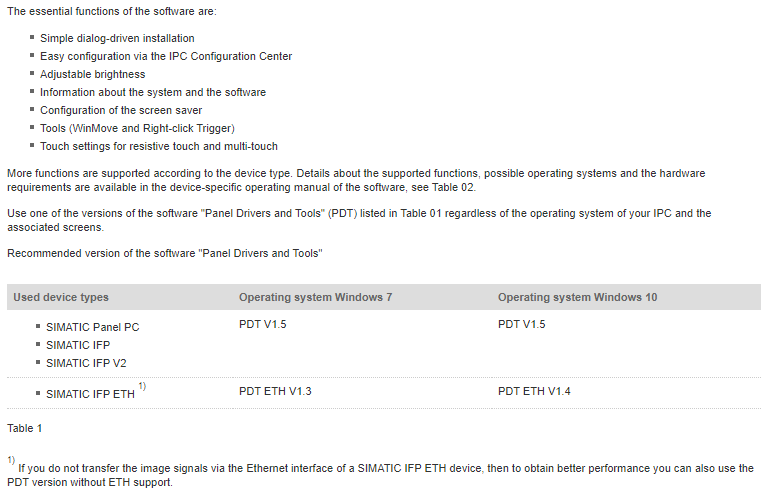
The essential functions of the software are:
| Code: | Simple dialog-driven installation
Easy configuration via the IPC Configuration Center
Adjustable brightness
Information about the system and the software
Configuration of the screen saver
Tools (WinMove and Right-click Trigger)
Touch settings for resistive touch and multi-touch |
Download
https://support.industry.siemens.com/cs/attachments/109749144/ifp_eth_important_notes_product_information.pdf
https://support.industry.siemens.com/cs/attachments/109749144/PDT_01.03.00.00_01.03.00.17.zip
https://support.industry.siemens.com/cs/attachments/109749144/PDT_ETH_01.03.00.00_01.05.00.10.zip
or
[URL=https://www.file-upload.net/download-13302965/PDT_ETH_01.03.00.00_01.05.00.10.zip.html]PDT_ETH_01.03.00.00_01.05.00.10.zip[/URL]
[URL=https://www.file-upload.net/download-13302973/PDT_01.03.00.00_01.03.00.17.zip.html]PDT_01.03.00.00_01.03.00.17.zip[/URL]
Manuals
https://support.industry.siemens.com/cs/attachments/109759014/ETHMT_ipc_pdt_user_manual_en-US_en-US.pdf
https://support.industry.siemens.com/cs/attachments/109751258/T_ipc_pdt_user_manual_en-US_en-US.pdf
https://support.industry.siemens.com/cs/attachments/109759013/ETHT_ipc_pdt_user_manual_en-US_en-US.pdf
https://support.industry.siemens.com/cs/attachments/109751259/TK_ipc_pdt_user_manual_en-US_en-US.pdf |
|
| Back to top |
|
 |
edeconsys
Junior 2

Joined: 05 Aug 2013
Posts: 37
|
| Posted: 12/05/2020 03:11 Post subject: Re: PDT V1.3 SIMATIC Industry PC Panel Drivers and Tools |
|
|
| grig100 wrote: | PDT V1.3 SIMATIC Industry PC Panel Drivers and Tools
https://support.industry.siemens.com/cs/document/109749144/
The software SIMATIC IPC Panel Driver and Tools installs the "IPC Configuration Center" and optionally the software "IFP Ethernet Monitor". The existing displays and touch components are recognized automatically by the software.
The essential functions of the software are:
| Code: | Simple dialog-driven installation
Easy configuration via the IPC Configuration Center
Adjustable brightness
Information about the system and the software
Configuration of the screen saver
Tools (WinMove and Right-click Trigger)
Touch settings for resistive touch and multi-touch |
Download
https://support.industry.siemens.com/cs/attachments/109749144/ifp_eth_important_notes_product_information.pdf
https://support.industry.siemens.com/cs/attachments/109749144/PDT_01.03.00.00_01.03.00.17.zip
https://support.industry.siemens.com/cs/attachments/109749144/PDT_ETH_01.03.00.00_01.05.00.10.zip
or
[URL=https://www.file-upload.net/download-13302965/PDT_ETH_01.03.00.00_01.05.00.10.zip.html]PDT_ETH_01.03.00.00_01.05.00.10.zip[/URL]
[URL=https://www.file-upload.net/download-13302973/PDT_01.03.00.00_01.03.00.17.zip.html]PDT_01.03.00.00_01.03.00.17.zip[/URL]
Manuals
https://support.industry.siemens.com/cs/attachments/109759014/ETHMT_ipc_pdt_user_manual_en-US_en-US.pdf
https://support.industry.siemens.com/cs/attachments/109751258/T_ipc_pdt_user_manual_en-US_en-US.pdf
https://support.industry.siemens.com/cs/attachments/109759013/ETHT_ipc_pdt_user_manual_en-US_en-US.pdf
https://support.industry.siemens.com/cs/attachments/109751259/TK_ipc_pdt_user_manual_en-US_en-US.pdf |
Hi grig100
Can you reupload?
I can't download from official web page of siemens, thanks. |
|
| Back to top |
|
|
maersk
Member 3

Joined: 17 Aug 2014
Posts: 891
|
| Posted: 12/05/2020 13:42 Post subject: SIMATIC Industry PC Panel Drivers and Tools |
|
|
SIMATIC Industry PC Panel Drivers and Tools
https://ulozto.net/tamhle/iWxG0y57QyEC
mirror
https://bayfiles.com/pcO07ayfo2/T_ipc_pdt_user_manual_en-US_en-US_1_pdf
https://bayfiles.com/nbOb7by6oa/MT_ipc_pdt_user_manual_en-US_en-US_1_pdf
https://bayfiles.com/r3O076yboe/ETHT_ipc_pdt_user_manual_en-US_en-US_pdf
https://bayfiles.com/v8O47fy2oe/ETHMT_ipc_pdt_user_manual_en-US_en-US_pdf
https://bayfiles.com/x2Oc75ydoc/D_ipc_pdt_user_manual_en-US_en-US_pdf
https://bayfiles.com/zcO87fydob/MT_ipc_pdt_user_manual_en-US_en-US_pdf
https://bayfiles.com/3fO27dy7o8/T_ipc_pdt_user_manual_en-US_en-US_pdf
https://bayfiles.com/56Ob73yco5/TK_ipc_pdt_user_manual_en-US_en-US_pdf
https://bayfiles.com/7fO97eybo0/IAM2_0706_en_pdf
https://bayfiles.com/j1V177ycoe/PDT_01.05.00.00_01.00.00.14_zip
https://bayfiles.com/36Vc77y0o6/PDT_ETH_01.03.00.00_01.05.00.10_zip
https://bayfiles.com/D5V372ydo6/PDT_ETH_01.04.00.00_01.01.00.31_zip
mirror
[URL=https://www.file-upload.net/download-14071738/IAM2_0706_en.pdf.html]IAM2_0706_en.pdf[/URL]
[URL=https://www.file-upload.net/download-14071736/MT_ipc_pdt_user_manual_en-US_en-US1.pdf.html]MT_ipc_pdt_user_manual_en-US_en-US1.pdf[/URL]
[URL=https://www.file-upload.net/download-14071737/T_ipc_pdt_user_manual_en-US_en-US1.pdf.html]T_ipc_pdt_user_manual_en-US_en-US1.pdf[/URL]
[URL=https://www.file-upload.net/download-14071740/ETHMT_ipc_pdt_user_manual_en-US_en-US.pdf.html]ETHMT_ipc_pdt_user_manual_en-US_en-US.pdf[/URL]
[URL=https://www.file-upload.net/download-14071741/ETHT_ipc_pdt_user_manual_en-US_en-US.pdf.html]ETHT_ipc_pdt_user_manual_en-US_en-US.pdf[/URL]
[URL=https://www.file-upload.net/download-14071739/D_ipc_pdt_user_manual_en-US_en-US.pdf.html]D_ipc_pdt_user_manual_en-US_en-US.pdf[/URL]
[URL=https://www.file-upload.net/download-14071744/TK_ipc_pdt_user_manual_en-US_en-US.pdf.html]TK_ipc_pdt_user_manual_en-US_en-US.pdf[/URL]
[URL=https://www.file-upload.net/download-14071742/MT_ipc_pdt_user_manual_en-US_en-US.pdf.html]MT_ipc_pdt_user_manual_en-US_en-US.pdf[/URL]
[URL=https://www.file-upload.net/download-14071743/T_ipc_pdt_user_manual_en-US_en-US.pdf.html]T_ipc_pdt_user_manual_en-US_en-US.pdf[/URL]
[URL=https://www.file-upload.net/download-14071750/PDT_ETH_01.03.00.00_01.05.00.10.zip.html]PDT_ETH_01.03.00.00_01.05.00.10.zip[/URL]
[URL=https://www.file-upload.net/download-14071765/PDT_ETH_01.04.00.00_01.01.00.31.zip.html]PDT_ETH_01.04.00.00_01.01.00.31.zip[/URL]
[URL=https://www.file-upload.net/download-14071764/PDT_01.05.00.00_01.00.00.14.zip.html]PDT_01.05.00.00_01.00.00.14.zip[/URL]
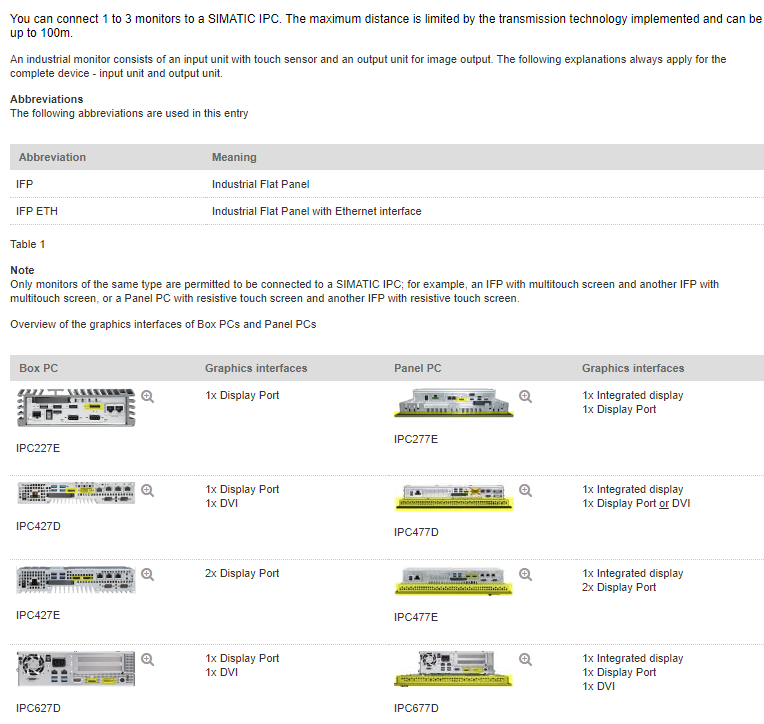
Note
The maximum number of industrial monitors you can connect to a SIMATIC IPC is given in
How many industrial monitors (IFPs) can you connect to one SIMATIC IPC?
https://support.industry.siemens.com/cs/document/109483774/how-many-industrial-monitors- (ifps)-can-you-connect-to-one-simatic-ipc
 |
|
| Back to top |
|
|
|

 FAQ
FAQ Search
 Memberlist
 Usergroups
 Register
 Profile
 Log in to check your private messages
 Log in


