| View previous topic :: View next topic |
| Author |
Message |
ressurect83
Junior

Joined: 08 Oct 2018
Posts: 7
|
 Posted: 09/10/2018 18:32 Post subject: PCMCIA Card 573.2 32MB Image Posted: 09/10/2018 18:32 Post subject: PCMCIA Card 573.2 32MB Image |
 |
|
| Looking for image pcmcia card from NCU573.2 32Mb. |
|
| Back to top |
|
 |
uwett
Junior
Joined: 12 May 2018
Posts: 9
|
| Posted: 09/10/2018 20:24 Post subject: |
|
|
| card code? |
|
| Back to top |
|
|
ressurect83
Junior
Joined: 08 Oct 2018
Posts: 7
|
| Posted: 09/10/2018 21:46 Post subject: |
|
|
6FC5250-4BX30-4AH0 |
|
| Back to top |
|
|
ressurect83
Junior
Joined: 08 Oct 2018
Posts: 7
|
| Posted: 10/10/2018 17:46 Post subject: Request for PCMCIA Card image with 573.2 32MB system files. |
|
|
Somebody help me please... Look for image from CF card Sinumerik 840D 573S
Any help... |
|
| Back to top |
|
|
uwett
Junior
Joined: 12 May 2018
Posts: 9
|
| Posted: 10/10/2018 19:42 Post subject: Sinumerik_Utilities |
|
|
Go to page 4 and download Sinumerik_Utilities.zip for use SinuCom FFS
http://plc.myforum.ro/sinumerik-810d-840d-840di-for-step7-vt284.html
or
https://www.file-upload.net/download-13304742/Sinumerik_Utilities.zip.html
General Notes
| Code: | -------------
Supported systems and NCK versions:
- SinuCom FFS supports the 8XXD and 8XXDi systems with all NCK versions.
Starting SinuCom FFS:
- SinuCom FFS is either started from the 'Start' menu on the task bar or
from 'sinucomffs.exe' in the SinuCom NC directory.
Error messages:
- Uniform appearance, in part with detailed information.
PC-Card read and write:
- When you will read and write PC-Cards with SinuCom FFS, you have to
declare program calls under Reader and Writer in the options dialog.
These program calls must read or write a file from or to the card
one to one.
|
or download cardware from
http://www.tssc.de/
or have in that package.
| Code: | Driver Notes
------------
When you are using Cardware from APSoft with the SIMATIC File PG, SIMATIC Power PG,
the calls have to be specified as follows:
Cardware for Windows NT (version 6.00.36 or newer):
- Writer: <CARDWAREDIR>\PCDISK.EXE /ES:<SOCKET> "/DF:%1" /WS:<SOCKET> /Y
- Reader: <CARDWAREDIR>\PCDISK.EXE "/DF:%1" /RS:<SOCKET> /Y
Cardware for Windows 2000/XP (version 1.00.003 or newer):
- Writer: <WINDOWSDIR>\SYSTEM32\CWMEMCTL.EXE /ES:<SOCKET> "/DF:%1" /WS:<SOCKET> /Y
- Reader: <WINDOWSDIR>\SYSTEM32\CWMEMCTL.EXE "/DF:%1" /RS:<SOCKET> /Y
- <CARDWAREDIR>: the directory, where Cardware was installed
- <WINDOWSDIR>: the Windows directory, mostly C:\WINDOWS
- <SOCKET>: the PCMCIA socket you are using, mostly 0 or 1
- The parameter "/DF:%1" must be typed in much that, with the dublu quotation mark.
- If you wish no output, you can add the parameter /E to the end of the other parameters.
- If <CARDWAREDIR> or <WINDOWSDIR> contain blanks, you must type in the program in
double quotation marks. E.g.: "C:\Program Files\CWNT\PCDISK.EXE" and than the rest
of the parameters.
- For other drivers the calls must be adjusted.
- %1 is a place holder for the file name specified in SinuCom FFS. |
Try to read card files one by one and save.
Point Enablers for DOS depending what Sinumerik you have ..
Then dump on a new Card or on the same (but risk to loose all data) and use Generator license for success.
Or regenerate system files.
Good luck. |
|
| Back to top |
|
|
uwett
Junior
Joined: 12 May 2018
Posts: 9
|
| Posted: 10/10/2018 19:56 Post subject: doconcd sinumerik |
|
|
you can find useful information on
http://plc.myforum.ro/doconcd-sinumerik-09-2011-vt2800.html |
|
| Back to top |
|
|
ressurect83
Junior
Joined: 08 Oct 2018
Posts: 7
|
| Posted: 10/10/2018 21:13 Post subject: Re: Sinumerik_Utilities |
|
|
| uwett wrote: |
Try to read card files one by one and save.
Point Enablers for DOS depending what Sinumerik you have ..
Then dump on a new Card or on the same (but risk to loose all data) and use Generator license for success.
Or regenerate system files.
Good luck. |
Is it possible in more detail? Step by step?
when i do image *.abb (read) in sinucomffs, sistem files cant be copyed or deleted. only look. |
|
| Back to top |
|
|
ressurect83
Junior
Joined: 08 Oct 2018
Posts: 7
|
| Posted: 11/10/2018 11:38 Post subject: Re: Sinumerik_Utilities |
|
|
| ressurect83 wrote: | | uwett wrote: |
Try to read card files one by one and save.
Point Enablers for DOS depending what Sinumerik you have ..
Then dump on a new Card or on the same (but risk to loose all data) and use Generator license for success.
Or regenerate system files.
Good luck. |
Is it possible in more detail? Step by step?
when i do image *.abb (read) in sinucomffs, sistem files cant be copyed or deleted. only look. |
Point Enablers? what is this? Some util?
I'am read image pcmcia card in *.abb and *.img files. Without problem.
But image property in SinucomFFS is "wrong cheksum" and Sinumerik840d cant boot.
How rapair this image?
OR How fabricate system files on this images? |
|
| Back to top |
|
|
ressurect83
Junior
Joined: 08 Oct 2018
Posts: 7
|
| Posted: 12/10/2018 21:24 Post subject: Please help... Somebody something... |
|
|
| Up topic... Need Help! |
|
| Back to top |
|
|
trialab
Junior
Joined: 14 Oct 2018
Posts: 1
|
| Posted: 14/10/2018 16:51 Post subject: |
|
|
try to repair .img with but need a CF reader
https://dmde.com/download.html |
|
| Back to top |
|
|
uwett
Junior
Joined: 12 May 2018
Posts: 9
|
| Posted: 14/10/2018 19:43 Post subject: |
|
|
Do you have the software coming with this machine?
Did you try a NC general RESET ?
Switch S3 (NCU) must be reset to “0”.
If the NC general RESET does not work, replace the PCMCIA card.
If none of these measures work, the NCU module must be replaced.
What is the behaviour on boot?
Give more data..
Read on documentation how to proceed for boot and repair:
Series start-up via NC card (SW 4.4 and higher)
The free memory on the NC card (PCMCIA card) can be used to store a
start-up archive. The archive can be loaded onto the NC card with SINUCOPYFFS
(on an external PG/PC) :
Possible applications:
1. After replacing an NC module (or after the loss of data), the user can restore the original state of the machine with the archive stored on the NC card, or
2. The machine manufacturer can supply cycles and data in an archive on the NC card with the machine or a software upgrade.
SW version 6 and higher provide the option to transfer Siemens cycles and/or machine manufacturer cycles from the Flash File System of the NC card to the DRAM during control ramp-up and execute them from there. For the relevant configurations and the DRAM cycles response see 12.4.3.
Operating sequence
A) Fabricate a start-up file on the NC card
Requirement:
The SINUCOPY_FFS software is loaded
1. Copy the series start-up data of the NC/PLC via RS-232 onto a PG/PC
2. Store the series start-up data as file ORIGINAL.ARC on the PG/PC
(e.g. in \tmp)
3. Call up SINUCOPY-FFS on the PG/PC
4. Insert the NC card in the PCMCIA slot
5. Copy the NC software to the PC card
6. Select “Area setting” in NC card menu.
Enter 0 under “FFS Startadr” and “FFS Endadr”.
7. Select field “Create new FFS”, and then the “Calculate automatically” field.
8. Format FFS on NC card.
9. Select field “Create DIR” in the FFS menu and set up and open directory
_N_ARC_DIR
10. Call command “Save FFS from hard disk to card [Archives/Parts Programs]”
in the FFS menu. The data are loaded onto the NC card.
Note
The start-up file created can be stored directly on the NC card in SW 5.2 and
higher.
B) Load the start-up file from the NC card
Requirement:
The start-up archive with the name _N_ORIGINAL_ARC is stored on the
NC card (in the directory _N_NC_CARD_DIR\_N_ARC_DIR).
1. Insert the NC card in the NCU module
Start-up switch = 1 (NCK general RESET)
Press NCK RESET and wait until a “6” appears on the 7-segment display
Start-up switch = 0 (NCK general RESET executed)
When the “6” appears, the start-up switch can be set to basic setting “0”.
2. Set the password
3. In the Services basic display, press the “Etc key” and then press the “original status” soft key.
This soft key is available only if the NC card contains the above-mentioned
start-up archive and access level 3 (user) is set on the control system.
4. When you press this soft key, the log window appears with the prompt:
“Series start-up archive: Perform series start-up?”; when you confirm, the
data are loaded.
Note
If no PLC program is active, the loading of the data takes longer (since the system has to wait for the PLC timeout).
�
Caution
All user-specific NC data (and PLC data if these are contained in the start-up
archive) are deleted and replaced by corresponding data from the start-up archive.
The SINUCOPYFFS program can be used to read or write either the SINUMERIK
system software (NC) or a flash file system (FFS) from or to NC cards of
the NCU installed on a PC with an active PCMCIA slot.
FFS:
flash file system
A flash file system is similar to a DOS data storage medium, such as a floppy
disk. The system must be formatted before data can be stored. Directory structures
can then be created and files stored in any format.
The data storage medium is an electrically erasable EPROM. That means that
the corresponding area always has to be deleted before data are written. Algorithms adapted in accordance with the block identification are required in order to delete and write data. You can determine the speed of data write transfers to a large extent.
An FFS system can usually be read directly by DOS/WINDOWS. Since the
NC system software, which is not saved in FFS format, is also stored on the
card, this is only possible with SINUCOPYFFS.
Software/hardware requirements
� The following PCMCIA card drivers/hardware are supported:
– CSM OMNI97 (external PCMCIA device operated on the parallel interface
of the PC)
– PG740 /PG720C (with CSM driver CISIO-S)
– Laptops with PCMCIA slots (with Intel driver ICARDRV3 – only for cards
up to 4MB)
– CSM PCJB slots (only for cards up to 4MB).
� The program will run under Windows 95. If CSM OMNI97 is used, it will also run under Windows NT.
Functions
SINUCOPYFFS can manipulate the FFS area of the NC card using the following functions, independent of the SINUMERIK system software (NC):
� Read
� Modify
� Rewrite
� Reformat
� Create new directories
� Copy a file into the directories and subdirectories
� Read and write system software
� Write data to the NC card (SW 5.1 and higher).
Expert mode
An FFS image is generated in the PC memory in expert mode. It can be written onto the inserted NC card or saved as a file.
Normal mode
In natural mode, every action (read/write/delete) is performed directly on the NC card.
Independent of the FFS, the NC system can be:
� Rewritten (condition: the storage capacity above the FFS start address is
not used by the NC system).
� Duplicated
� Read out and saved as a file
� NC cards can be duplicated completely (NC + FFS).
The NC system version of the inserted card can be displayed.
The memory capacity of the inserted NC card is automatically detected and
displayed. The same applies to the limit memory addresses for the FFS.
Operation
The functions of the program can be called up from the menu bar or by activating buttons in the user interface. Help is available for all actions by activating the “Help” menu.
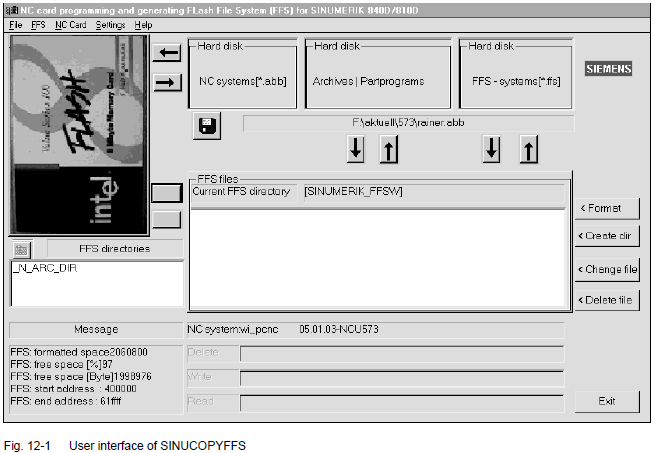
� Display card contents:
Click the NC card display with the left mouse button (menu: NC card/version
display of the NC system)
� View card info with card and FFS data
Click a free location (not a button, not a display, e.g. top right) with the right mouse button (same effect as menu NC Card/ID Info menu).
� The arrows are used in the same way as menu commands:
– Read/write NC system. Below that, read/write FFS system.
– Copy files from the hard disk to the FFS system.
– Copy files from the FFS system to the hard disk.
– Load or save finished FFS systems in RAM image.
� List boxes (Explorer)
The list boxes show the available FFS directories on the left, and the contents of the selected directory on the right. Double-click the directory names to select the directories. Use the “Back arrow” to move back one level. A file must be selected in the right list field before activating the “Modify file” or “Delete file” key.
� Info field bottom left
After you compus the FFS system, the bottom left info field indicates the
formatted memory, and the free capacity as a % number and a byte count.
� FFS system detection
If the program is started when a card is inserted, the program detects
whether an FFS system is supported. If no reference data are available for
the FFS start and end address on the card, the system suggests these be
entered automatically as far as possible.
Note
A card change is detected automatically. The contents of the card (FFS) are
displayed.
ARCEDIT
This tool is intended for experts.
� Read archive files
� Delete/insert files
� Modify files (if editable).
SICARD
This tool is intended for experts.
� Read and write data to NC cards
� Duplicate NC cards.
Note
1. Programming device with SINUCOPY (previous version)
The installation may be unsuccessful if the driver “cisio-s” is entered in the
“config.sys” file and it is detected during ramp-up: Error message. Remedy:
– Delete the line “Device ...cisio.exe, cisio.ini”.
– In the “cisio.ini” file, enter a free interrupt number as a hex number in the
line IRQ=....
You can determine a free interrupt number from the menu “Properties
for system”– “Device manager”.
2. If an NC card with FFS is duplicated with the previous version SINUCOPY,
only the NC system (not the FFS part) is duplicated.
3. The drive name for the OMNI97 device can be entered: Enter the drive letter in the menu “System control/Device manager/Drives/OMNI97”.
Windows NT: Enter the drive letter in the menu “OmniControl/DriveLetter”.
SINUCOPY
The SINUCOPY program can be used to:
� Read, write or duplicate the SINUMERIK system software (NC) on NC cards
of the NCU installed on a PC with an active PCMCIA slot. The version identifiers of the programs can be displayed (corresponding to the version display of the SINUMERIK control).
� Read and write the SINUMERIK system software (MMC) on PC cards of the
MMC 100.2.
� Write data from the NC onto the NC card.
Operation
The functions of the program can be called up from the menu bar or by activating buttons in the user interface. Help is available for all actions by activating the “Help” menu
Read this
https://www.file-upload.net/download-13350340/IAD_1102_en.pdf.html
Recovery of the NC Card files ...well you can try..
https://ccm.net/download/download-11923-sd-card-recovery |
|
| Back to top |
|
|
ressurect83
Junior
Joined: 08 Oct 2018
Posts: 7
|
| Posted: 15/10/2018 22:29 Post subject: |
|
|
| uwett wrote: | Do you have the software coming with this machine?
Did you try a NC general RESET ?
Switch S3 (NCU) must be reset to “0”.
If the NC general RESET does not work, replace the PCMCIA card.
If none of these measures work, the NCU module must be replaced.
What is the behaviour on boot?
Give more data..
|
Did you try a NC general RESET ? - Yes.
Switch S3 (NCU) must be reset to “0”. - All ok
If the NC general RESET does not work, replace the PCMCIA card.
- I am looking image PCMCIA card, for replace... |
|
| Back to top |
|
|
uwett
Junior
Joined: 12 May 2018
Posts: 9
|
| Posted: 21/10/2018 20:07 Post subject: |
|
|
Try to contact to see what price..
http://www.quad-industry.com/catalog/automatization/8621/636380.html
http://www.quad-industry.com/catalog/automatization/8621/636382.html
Buy one or two blank MMC and make copies....for not being in this situation..
This software is too old and I cannot help you more... |
|
| Back to top |
|
|
|

 FAQ
FAQ Search
 Memberlist
 Usergroups
 Register
 Profile
 Log in to check your private messages
 Log in


