 |
plc.myforum.ro
PLCs users www.plc.myforum.ro!
|
| View previous topic :: View next topic |
| Author |
Message |
Ahmanli Amiri
Junior

Joined: 28 Jun 2019
Posts: 9
|
 Posted: 21/08/2022 13:21 Post subject: PAC Machine Edition 9.80 PME V9.80 Posted: 21/08/2022 13:21 Post subject: PAC Machine Edition 9.80 PME V9.80 |
 |
|
PAC Machine Edition 9.80 PME V9.80
https://ulozto.net/file/mX62nx9YCxGd/pac-machine-edition-v9-80-0-8695-iso
https://ulozto.net/file/7vpWVgJzK2Xv/pac-machine-edition-9-80-sim-10-exe
https://store3.gofile.io/download/f083902c-c15d-4b9d-a0e6-1593a59fe0a0/PAC_Machine_Edition_V9.80.0.8695.iso
https://store7.gofile.io/download/616e5344-f314-431a-b0a0-d6074a2caf06/PAC%20Machine%20Edition%209.80%20SIM%2010.exe |
|
| Back to top |
|
 |
Ahmanli Amiri
Junior
Joined: 28 Jun 2019
Posts: 9
|
| Posted: 15/09/2022 15:35 Post subject: Machine Edition 9.8 License Activation Procedure Offline |
|
|
Machine Edition 9.8 License Activation Procedure Offline
The recommended and easier method of activating Machine Edition is using the Internet. However, if the Internet access of the computer on which the license is to be activated is not possible, you can use:
- or from a USB key containing a license (available from the manufacturer),
- or from the so-called offline activation, which uses another computer that has internet access.
The procedure for activating a Machine Edition 9.8 license offline (offline) is as follows:
1. On a computer without Internet, run ELM (Entitlement and License Manager).

2. Press the Activate button.
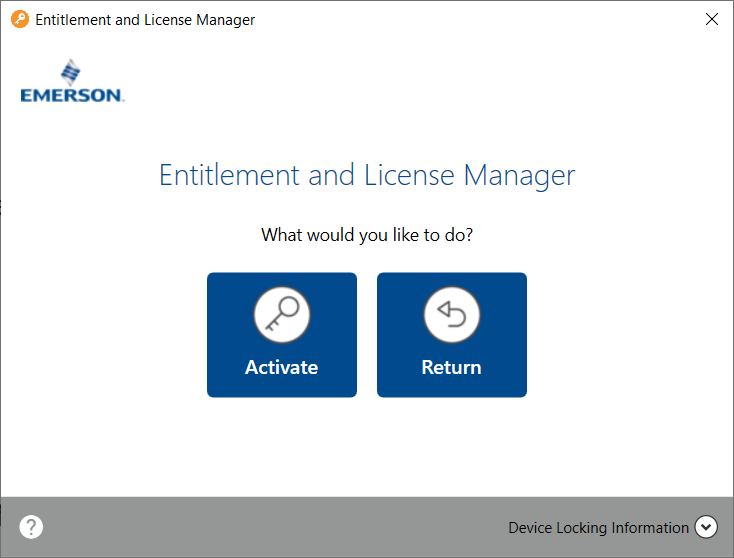
3. At the bottom of the window there is a button to display Device Locking Code information. Copy or write this code. It can also be saved as text on a USB stick. Do not close this window, it will be needed later.
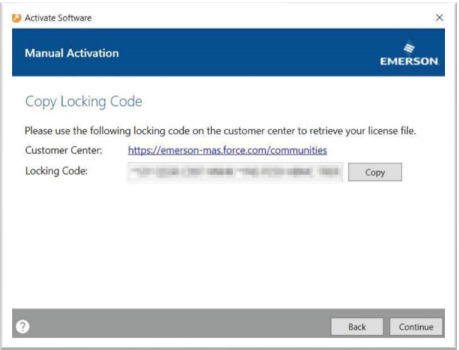
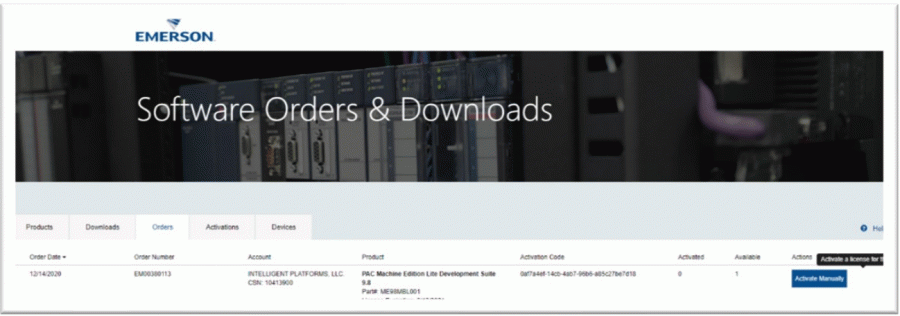
4. Using a separate computer with Internet access, download the license from the Emerson Customer Center https://emerson-mas.force.com/communities/CC_Login (Software Orders and Downloads tab, click Activate Manually).
5. Rewrite or paste the previously copied code. Optionally, you can enter Device Name. If Automatic Activation is selected, the computer name will be used as the Device Name.
6. Press the Complete Activation button.
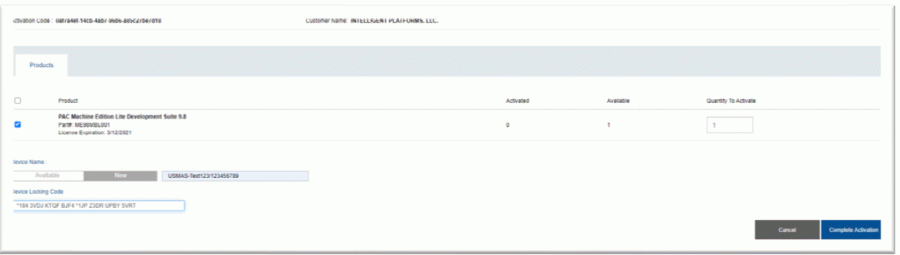
7. Click Download License File.
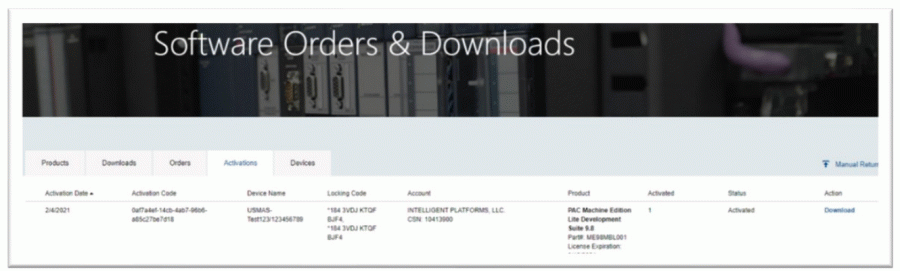
8. Copy the files to a USB stick and go to a computer that has no Internet access.
9. In the ELM program, press Continue.
10. Press Browse and select the file (the file name is lservrc ).
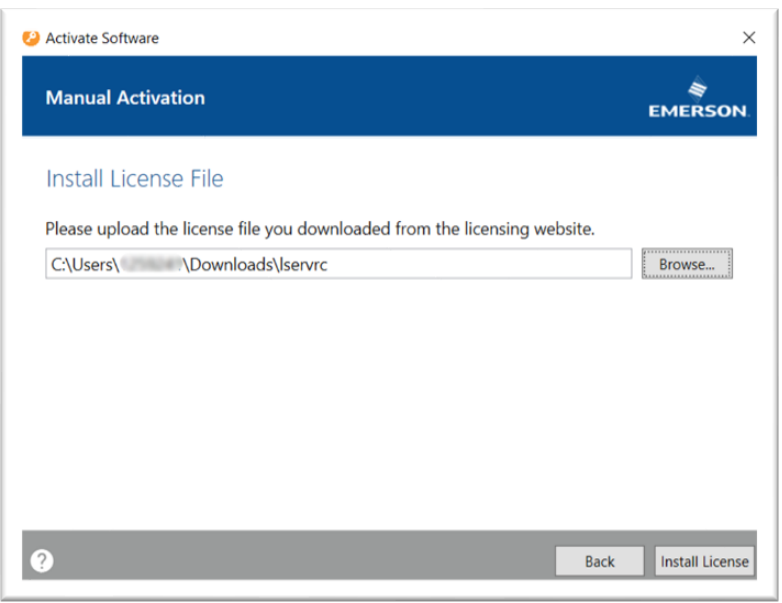
11. Press the Install License button.
12. A successful operation will be confirmed with the following message:
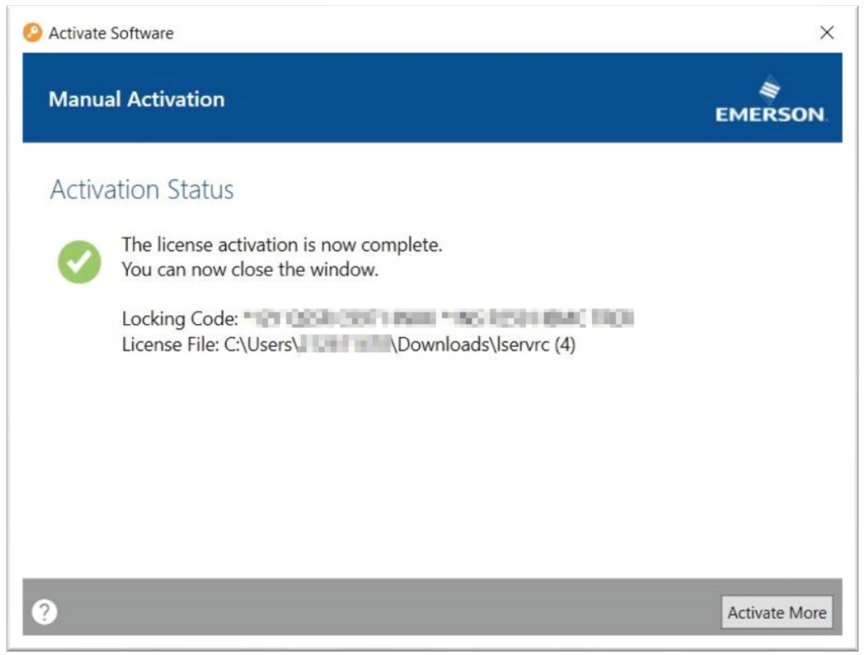 |
|
| Back to top |
|
|
|
|
You cannot post new topics in this forum
You cannot reply to topics in this forum
You cannot edit your posts in this forum
You cannot delete your posts in this forum
You cannot vote in polls in this forum
|
Powered by phpBB © 2001, 2005 phpBB Group
Fa-ti si tu propriul forum GRATUIT, pe www.myforum.ro |
 FAQ
FAQ Search
 Memberlist
 Usergroups
 Register
 Profile
 Log in to check your private messages
 Log in


