 |
plc.myforum.ro
PLCs users www.plc.myforum.ro!
|
| View previous topic :: View next topic |
| Author |
Message |
bingbing88
Senior

Joined: 29 Dec 2022
Posts: 1012
|
 Posted: 19/01/2023 00:27 Post subject: OpenUtilities Substation CONNECT Edition Update 14 (10.14.00 Posted: 19/01/2023 00:27 Post subject: OpenUtilities Substation CONNECT Edition Update 14 (10.14.00 |
 |
|

OpenUtilities Substation CONNECT Edition Update 14 | 8.2 Gb
Product:OpenUtilities Substation
Version:CONNECT Edition Update 14 (10.14.00.092)
Supported Architectures:x64
Website Home Page :www.bentley.com
Languages Supported:english
System Requirements:Windows *
Size:8.2 Gb
The Bentley OpenUtilities Substation Design Software development team is pleased to announce the availability of OpenUtilities Substation CONNECT Edition Update 14 is integrated software application for intelligent electrical and physical substation design.
New and Changed in OpenUtilities Substation CONNECT Edition Update 14
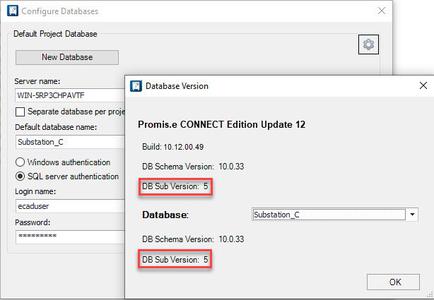
Project Database Update Required
To take full advantage of enhancement and resolve issues, all SQL Project Databases must be updated. After successful update, Sub version for selected Database should equal 5.
Microsoft Access / Office Version Dependency
This software build requires Microsoft Office 365 version 2209 or higher.

If you do not need fullMicrosoft Office 365, then install the Runtime version.
The following items summarize the new features and enhancements in the OpenUtilities Substation CONNECT Edition Update 14 release.
-Balloon Callout Rotation Setting added to Place Balloon dialog.

Result when Option set toVertical
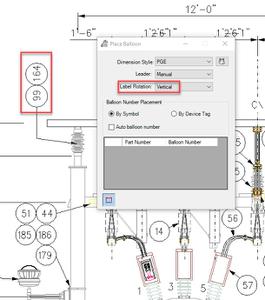
Result when Option set toHorizontal

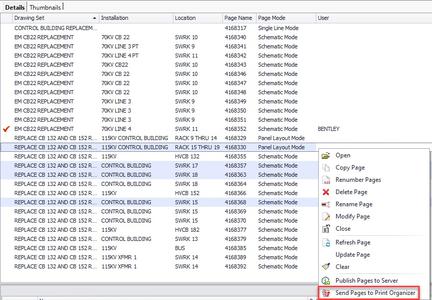
-Send Pages to Print Organizer function added to Project Manager right-click menu.
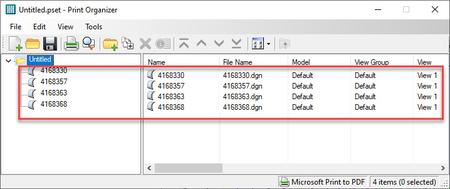
This new function will automatically add user selected pages to Print Organizer. First, ensure some page is open. Second, select desire page or pages in project manager. When selecting numeroase pages use Ctrl or Shift keys. Then right-click and select Send Pages to Print Organizer.Known issue - Function currently not supported when project resides in a ProjectWise Datasource. This issue will be addressed in a future release.
-ProjectWise Document Access Control improvement for projectoptions.xml file.
Page Management functions no longer require full read & write document access to projectoptions.xml. A clearinformationmessage will appear if a software functioncannot write toprojectoptions.xml.
Page Management Functions:

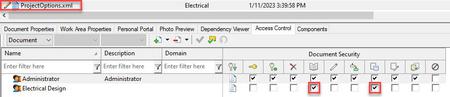
Information Message:

-Backup and Restore enhancement - Missing Pagefile detection
A Warning Message box will appear if a project is missing one or more Page files (DGN) during project Backup or Restore project operations.Message will not appear for machines configured toutilize the Auto Backup feature. Instead, details will be written to the Autobackup.log file.

Warning Message:

Auto Backup log file entries:
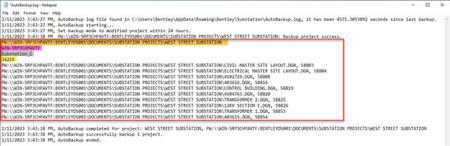
Legend for above highlighted items
Orange - Project Folder Path
Magenta - SQL Server Name
Grey - SQL Database Name
Yellow - SQL ProjectID
-(Technology Preview) - New configuration option to use txt files in place of Mutli_Language_UI.mdb and Catalog.mdb files.
Historically Microsoft Access Database files (mdb) have been used to store symbol text attributes, drawing mode definitions, and catalog item descriptions. In large multi-user environments, these Microsoft Access Database files can become cumbersome causing system administrators to perform periodic filemaintenance, such as, compacting and repairing mdb files.
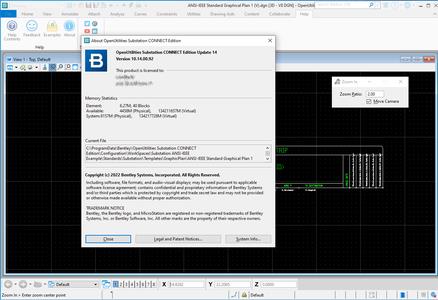

Bentley Substationis a design tool for substation design. It uses Promis.e Title functionality for the electrical design. Integrated into the application with is a range of additional tools allowing users to create the 3D physical design of the substation. All of the drawings exist within the same project and sharing the same database. This results in easy navigation between the different drawing modes and shared attribute, part data, and reports. Bentley Substation is unique in that the 3D physical model and the Electrical drawings are all created with the same application and sharing the same common project database. In addition to the Promis.e functionality and 3D functionality of the MicroStation-based platform, Bentley Substation has specialized stil tools for substation design in a 3D environment:
Hook Points- Hook points are placed on symbols to allow them to easily snap onto other symbols. Orientation can be controlled in all three axes (or less). They also bond the connected symbols allowing them to me moved as a unit. This simplifies working in the 3D environment.
Grounding Grid- A particular tool allows a grounding network to be placed into the Substation foundation to be used for equipment grounding. Parameters are entered to generate the Grid based on desired spacing. Once generated, the components are automatically included in the bill of materials (BOM). Individual areas of the generated grid can be modified by the user as needed.
Sag Algorithms- Used to graphically generate cables in the substation model with sag. Custom algorithms can also be created by Bentley Professional Services. These are in addition to the standard benefits of 3D modeling which can speed estetică and approval while eliminating interference and positioning design errors.
OpenUtilities Substation
Bentley Systems, Incorporated.is the global leader dedicated to providing architects, engineers, constructors, and owner-operators with comprehensive architecture and engineering software solutions for sustaining infrastructure. Founded in 1984, Bentley has nearly 3,000 colleagues in more than 45 countries, $500 million in annual revenues, and, since 2001, has invested more than $1 billion in research, development, and acquisitions.
Recommend Download Link Hight Speed | Please Say Thanks Keep Topic Live
| Code: |
Download from Fikper
https://fikper.com/ndt8HF0vhf/mav21.setup.part1.rar.html
https://fikper.com/Gp7Gg33Omk/mav21.setup.part2.rar.html
https://fikper.com/7MDRI1goK2/mav21.setup.part3.rar.html
https://fikper.com/HQcwzkSspO/mav21.setup.part4.rar.html
https://fikper.com/RXPY9Bw9qf/mav21.setup.part5.rar.html
Rapidgator
https://rapidgator.net/file/0bb9a8cf99f491c6d28223b89a014c9e/mav21.setup.part1.rar.html
https://rapidgator.net/file/f91586feeda0d40aefdd9408323214db/mav21.setup.part2.rar.html
https://rapidgator.net/file/43c06fc618565f665248d0df9650649f/mav21.setup.part3.rar.html
https://rapidgator.net/file/69efdfb5231bc0ec8124acca95e318f8/mav21.setup.part4.rar.html
https://rapidgator.net/file/41db05d819ffb321284cbefc1dac039d/mav21.setup.part5.rar.html
Uploadgig
https://uploadgig.com/file/download/FC6b56a03a550737/mav21.setup.part1.rar
https://uploadgig.com/file/download/1159e94bbab5F969/mav21.setup.part2.rar
https://uploadgig.com/file/download/b69f9d4ec07Bfe70/mav21.setup.part3.rar
https://uploadgig.com/file/download/7d416a44e1550f09/mav21.setup.part4.rar
https://uploadgig.com/file/download/65ff799Cb5c8B0B6/mav21.setup.part5.rar
NitroFlare
https://nitroflare.com/view/3545913271A5A00/mav21.setup.part1.rar
https://nitroflare.com/view/1083A45C7E3B678/mav21.setup.part2.rar
https://nitroflare.com/view/54FED899D4A5A35/mav21.setup.part3.rar
https://nitroflare.com/view/2A90FE4367AD332/mav21.setup.part4.rar
https://nitroflare.com/view/6798EF2F167DBED/mav21.setup.part5.rar
|
Links are Interchangeable - No Password - Single Extraction |
|
| Back to top |
|
 |
|
|
You cannot post new topics in this forum
You cannot reply to topics in this forum
You cannot edit your posts in this forum
You cannot delete your posts in this forum
You cannot vote in polls in this forum
|
Powered by phpBB © 2001, 2005 phpBB Group
Fa-ti si tu propriul forum GRATUIT, pe www.myforum.ro |
 FAQ
FAQ Search
 Memberlist
 Usergroups
 Register
 Profile
 Log in to check your private messages
 Log in


