 |
plc.myforum.ro
PLCs users www.plc.myforum.ro!
|
| View previous topic :: View next topic |
| Author |
Message |
grig100
Member 3


Joined: 01 Jan 2015
Posts: 752
|
 Posted: 16/02/2017 18:18 Post subject: Open user communication PROFINET S7-1200/S7-1500 CPU Posted: 16/02/2017 18:18 Post subject: Open user communication PROFINET S7-1200/S7-1500 CPU |
 |
|
How do you program the TSEND_C and TRCV_C instructions for open user communication over the integrated PROFINET interface of the S7-1200/S7-1500 CPU?
https://support.industry.siemens.com/cs/document/67196808/how-do-you-program-the-tsend_c-and-trcv_c-instructions-for-open-user-communication-over-the-integrated-profinet-interface-of-the-s7-1200-s7-1500-cpu-?dti=0&pnid=13613&lc=en-WW
You can use the open communication by means of the TSEND_C and TRCV_C instructions for data exchange over the integrated PROFINET interface of the S7-1200/S7-1500 CPU.
The following protocols are supported for this:
ISO-on-TCP
TCP
UDP
The S7 program contains the call of the "TSEND_C" and "TRCV_C" instructions and the parameterization of two ISO-on-TCP connections for data exchange between an S7-1200 CPU and an S7-1500 CPU. The connection parameters for establishing the ISO-on-TCP connection are saved in the "General Data" data block.
https://support.industry.siemens.com/cs/attachments/67196808/net_s7-1200_isoontcp_de.pdf
https://support.industry.siemens.com/cs/attachments/67196808/Ouc_S7-1200_S7-1500.zip |
|
| Back to top |
|
 |
go
Member

Joined: 26 Mar 2015
Posts: 147
|
| Posted: 28/06/2017 10:29 Post subject: Open User Communication |
|
|
Open User Communication (OUC)
https://support.industry.siemens.com/cs/document/109747710/
By now, TCP/IP-based Open User Communication (OUC) is the standard for communication with SIMATIC S7-CPUs.
In the S7 CPU, the OUC is implemented on the basis of instructions (e.g. TCON, TSEND, TRCV and TDISCON).
The user needs to parameterize the instructions in his user program and call them up in a fault-tolerant way. This task needs to be rethought by every user time and again. To make the task easy we provide you function blocks (FBs) in SCL.
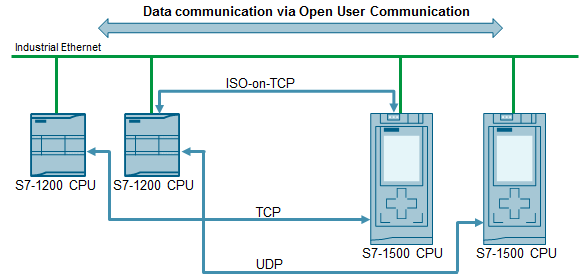
The FBs contains the following mechanisms:
Connection management with the instructions "TCON" and "TDISCON"
Sending data to a partner CPU
Receiving data from a partner CPU
The application example shows you at which places in the code you can integrate your individual extensions.
For the following OUC versions, there is an own FB which serves as communication template.
ISO-on-TCP: FB "LOpenUserComm_IsoOnTcp"
TCP: FB "LOpenUserComm_Tcp" (in progress)
UDP: FB "LOpenUserComm_Udp"(in progress)
All communication templates are summarized in the "LOpenUserComm" library.
Documentation and example project
https://support.industry.siemens.com/cs/attachments/109747710/109747710__IsoOnTcp_BaseComm_V1_en.pdf
https://support.industry.siemens.com/cs/attachments/109747710/109747710_LOpenUserComm.zip
Last edited by go on 25/04/2018 17:12; edited 1 time in total |
|
| Back to top |
|
|
grig100
Member 3
Joined: 01 Jan 2015
Posts: 752
|
| Posted: 11/10/2017 17:00 Post subject: Basic Examples for Open User Communication (OUC) |
|
|
Basic Examples for Open User Communication (OUC)
https://support.industry.siemens.com/cs/document/109747710/
By now, TCP/IP-based Open User Communication (OUC) is the standard for communication with SIMATIC S7-CPUs.
In the S7 CPU, the OUC is implemented on the basis of instructions (e.g. TCON, TSEND, TRCV and TDISCON). The user needs to parameterize the instructions in his user program and call them up in a fault-tolerant way. This task needs to be rethought by every user time and again. To make the task easy we provide you function blocks (FBs) in SCL.
The FBs contains the following mechanisms:
Connection management with the instructions "TCON" and "TDISCON"
Sending data to a partner CPU
Receiving data from a partner CPU
The application example shows you at which places in the code you can integrate your individual extensions.
For the following OUC versions, there is an own FB which serves as communication template.
ISO-on-TCP: FB "LOpenUserComm_IsoOnTcp"
TCP: FB "LOpenUserComm_Tcp" (in progress)
UDP: FB "LOpenUserComm_Udp"(in progress)
All communication templates are summarized in the "LOpenUserComm" library.

Documentation and example project
https://support.industry.siemens.com/cs/attachments/109747710/109747710__IsoOnTcp_BaseComm_V1_en.pdf
https://support.industry.siemens.com/cs/attachments/109747710/109747710_LOpenUserComm.zip |
|
| Back to top |
|
|
grig100
Member 3
Joined: 01 Jan 2015
Posts: 752
|
| Posted: 25/04/2018 17:15 Post subject: Open User Communication between CPU runtime and C/C++ runtim |
|
|
Establishment of Open User Communication between CPU runtime and C/C++ runtime of a multifunctional platform
https://support.industry.siemens.com/cs/document/109756757/
Integrate high-Level language applications into SIMATIC PLC by using a multifunctional platform.
The integration of PC functionality into the controller program is often advantageous to the overall automation task. For example, compact automation solutions are implemented on a single device. In addition, complex functions and solutions for automation tasks are already available in high-level languages or are created in high-level languages.
For this purpose, for example, high-level language programs must communicate with the controller program via defined interfaces or be integrated. A connection of both worlds – high-level language and PLC – is achieved within the multifunctional platform CPU 1518(F)-4 PN/DP MFP.
The task is to integrate high-level language applications in the SIMATIC PLC. Besides the STEP 7 blocks of the customary user program, the CPU 1518-4 PN/DP MFP can also execute functions (blocks) and applications that were programmed with C/C++.
The multifunctional platform gives you to option of having C/C++ code executed synchronously during the CPU cycle (via the CPU function library). In addition, the multifunctional platform can run C/C++ applications as separate applications in parallel with the CPU runtime.
In so doing, it may be necessary to arrange for a data exchange between the C/C++ runtime and the CPU runtime. This data exchange may be used, for example, to trigger responses on the other side or to provide necessary information. A first step of the application example shows the configuration for the CPU runtime in the TIA Portal. The creation of the C/C++ program with Eclipse is then shown.
Open User Communication (OUC) is chosen here for the communication.
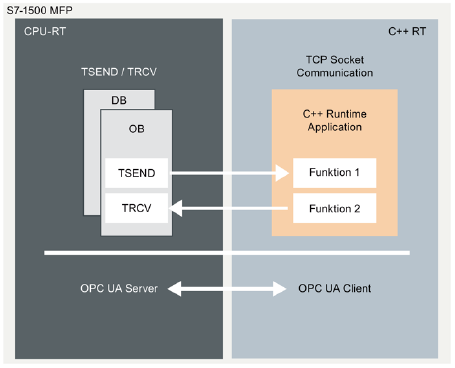
The PLC program is composed of function blocks from the libraries and is parameterized appropriately. On the other side, the functions for "Establishing the connection", "Sending" and "Receiving" must be analogously implemented in the C program. In so doing, it is also recommended that methods, such as error handling, similar to the SCL template, be implemented in the C program in order to enable easier usage for the user.
Download
https://support.industry.siemens.com/cs/attachments/109756757/109756757_CPU1518MfpOuc_DOC_V11_en.pdf
https://support.industry.siemens.com/cs/attachments/109756757/109756757_CPU1518MFP_CODE_V5.zip |
|
| Back to top |
|
|
maersk
Member 3

Joined: 17 Aug 2014
Posts: 891
|
| Posted: 25/04/2018 17:41 Post subject: TCON Open User Communication between two S7-1500 CPUs |
|
|
How do you program the TCON communication instruction to establish a connection for the Open User Communication between two S7-1500 CPUs?
https://support.industry.siemens.com/cs/document/58875807/
You can use Open User Communication over Industrial Ethernet, for example, for data exchange through the integrated PROFINET interface.
The protocols below are supported for this:
TCP
ISO-on-TCP
UDP
The following communication instructions are available for Open User Communication over Industrial Ethernet.
TCON for establishing a connection
TDISCON for ending a connection
TSEND for sending data
TRCV for receiving data
In STEP 7 V14 SP1 (TIA Portal) you will find the above-mentioned communication instructions in the "Instructions" task card in the "Communication > Open User Communication > Other" palette.
This example shows how to program the TCON communication instruction to establish a connection for the Open User Communication between two S7-1500 CPUs.
In the S7-1500 CPU which actively establishes the connection, the TCON communication instruction returns a message (ERROR=1) to the user if the remote connection partner cannot be reached or the port addressed there is not available. In this case there must follow another attempt to establish a connection with a positive edge at the REQ input.
For this reason, in the S7-1500 CPU that actively establishes the connection, the REQ input of the TCON communication instruction must remain toggled until the TCON communication instruction has been completed successfully with DONE=1 and the connection is established.
The document below describes how to program establishment of the connection and data exchange in the active and passive S7-1500 CPUs.
https://support.industry.siemens.com/cs/attachments/58875807/58875807_net_tcon_s7-1500_en.pdf
Download for STEP 7 V14 SP1
The download includes the "T_COMM_S7-1500.zip" project.
Copy the "T_COMM_S7-1500.zip" file into a separate directory and then start the file with a double-click. You can then use STEP 7 Professional V14 SP1 (TIA Portal) to open and process the extracted project data.
https://support.industry.siemens.com/cs/attachments/58875807/t_comm_s7-1500.zip
Download for STEP 7 V15
The download includes the "T_COMM_S7-1500_V15.zip" project.
Copy the "T_COMM_S7-1500_V15.zip" file into a separate directory and then start the file with a double-click. You can then use STEP 7 Professional V15 (TIA Portal) to open and process the extracted project data.
https://support.industry.siemens.com/cs/attachments/58875807/T_COMM_S7-1500_V15.zip
Detailed information about programming Open User Communication in the S7-1500 CPU is available in following manuals:
https://support.industry.siemens.com/cs/attachments/109747136/STEP_7_Professional_V14_1_enUS_en-US.pdf
https://support.industry.siemens.com/cs/attachments/109755202/STEP_7_WinCC_V15_enUS_en-US.pdf |
|
| Back to top |
|
|
|
|
You cannot post new topics in this forum
You cannot reply to topics in this forum
You cannot edit your posts in this forum
You cannot delete your posts in this forum
You cannot vote in polls in this forum
|
Powered by phpBB © 2001, 2005 phpBB Group
Fa-ti si tu propriul forum GRATUIT, pe www.myforum.ro |
 FAQ
FAQ Search
 Memberlist
 Usergroups
 Register
 Profile
 Log in to check your private messages
 Log in


