 |
plc.myforum.ro
PLCs users www.plc.myforum.ro!
|
| View previous topic :: View next topic |
| Author |
Message |
rott
Senior

Joined: 23 Aug 2011
Posts: 2266
|
 Posted: 15/12/2011 18:06 Post subject: Open Communication Wizard Posted: 15/12/2011 18:06 Post subject: Open Communication Wizard |
 |
|
Wizard for creating connection data for open TCP/IP communication (Open Communication Wizard).

From STEP 7 V5.5 SP1 onward the OC Wizard is also included on the STEP 7 DVD.
Here you can download the most current version of the OC Wizard free of charge.
https://support.industry.siemens.com/cs/document/98957840/wizard-for-creating-connection-data-for-open-tcp-ip-communication- (open-communication-wizard)-?dti=0&lc=en-WW |
|
| Back to top |
|
 |
go
Member

Joined: 26 Mar 2015
Posts: 147
|
| Posted: 16/05/2015 19:48 Post subject: ISO-on-TCP protocol for data exchange |
|
|
How do you program the communication blocks FB63 "TSEND", FB64 "TRCV", FB65 "TCON" and FB66 "TDISCON" in order to use the ISO-on-TCP protocol for data exchange via the integrated PROFINET interface of an S7-300/S7-400 CPU or via the CP443-1 Advanced?
https://support.industry.siemens.com/cs/document/29737976
You can use, for example, the "Open User Communication" over Industrial Ethernet for data exchange via the integrated PROFINET interface of a CPU or via CP4431 Advanced. The protocols below are supported for this:
TCP
ISO-on-TCP
UDP
The following communication blocks are available for "Open User Communication" via Industrial Ethernet using the ISO-on-TCP Protocol:
FB65 "TCON" for establishing the connection
FB66 "TDISCON" for ending the connection
FB63 "TSEND" for sending data
FB64 "TRECV" for receiving data
These communication blocks are available in the Standard Library -> Communication Blocks.
Copy the latest versions of the above-mentioned communication blocks from the standard library into your user program and then call them in your user program.
The connection data for establishing the ISO-on-TCP connection are saved in a data structure. The data structure "OUCW_1" will be used in this example. This is stored in the DB1 data block and is parameterized by the user.
The STEP 7 project contains a sample program for calling FB1 and the function blocks FB65 "TCON", FB66 "TDISCON", FB63 "TSEND" and FB64 "TRECV" with status evaluation. It was created with STEP 7 V5.5 SP3.
https://support.industry.siemens.com/cs/attachments/29737976/Sample_open_IoT.zip
configuring an ISO-on-TCP connection for communication via S7-300 and S7-400 CPs
https://support.industry.siemens.com/cs/document/47885440 |
|
| Back to top |
|
|
go
Member
Joined: 26 Mar 2015
Posts: 147
|
| Posted: 28/06/2017 10:28 Post subject: Open User Communication (OUC) |
|
|
Open User Communication (OUC)
https://support.industry.siemens.com/cs/document/109747710/
By now, TCP/IP-based Open User Communication (OUC) is the standard for communication with SIMATIC S7-CPUs.
In the S7 CPU, the OUC is implemented on the basis of instructions (e.g. TCON, TSEND, TRCV and TDISCON).
The user needs to parameterize the instructions in his user program and call them up in a fault-tolerant way. This task needs to be rethought by every user time and again. To make the task easy we provide you function blocks (FBs) in SCL.
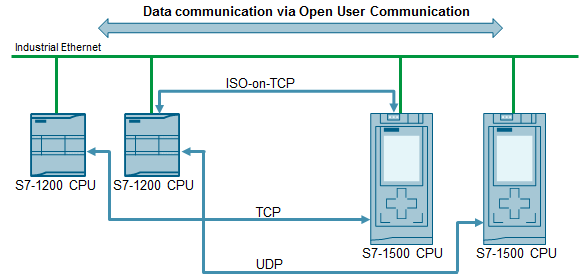
The FBs contains the following mechanisms:
Connection management with the instructions "TCON" and "TDISCON"
Sending data to a partner CPU
Receiving data from a partner CPU
The application example shows you at which places in the code you can integrate your individual extensions.
For the following OUC versions, there is an own FB which serves as communication template.
ISO-on-TCP: FB "LOpenUserComm_IsoOnTcp"
TCP: FB "LOpenUserComm_Tcp" (in progress)
UDP: FB "LOpenUserComm_Udp"(in progress)
All communication templates are summarized in the "LOpenUserComm" library.
Documentation and example project
https://support.industry.siemens.com/cs/attachments/109747710/109747710__IsoOnTcp_BaseComm_V1_en.pdf
https://support.industry.siemens.com/cs/attachments/109747710/109747710_LOpenUserComm.zip
Last edited by go on 25/04/2018 17:44; edited 1 time in total |
|
| Back to top |
|
|
maersk
Member 3


Joined: 17 Aug 2014
Posts: 891
|
| Posted: 25/04/2018 17:42 Post subject: TCON Open User Communication between two S7-1500 CPUs |
|
|
How do you program the TCON communication instruction to establish a connection for the Open User Communication between two S7-1500 CPUs?
https://support.industry.siemens.com/cs/document/58875807/
You can use Open User Communication over Industrial Ethernet, for example, for data exchange through the integrated PROFINET interface.
The protocols below are supported for this:
TCP
ISO-on-TCP
UDP
The following communication instructions are available for Open User Communication over Industrial Ethernet.
TCON for establishing a connection
TDISCON for ending a connection
TSEND for sending data
TRCV for receiving data
In STEP 7 V14 SP1 (TIA Portal) you will find the above-mentioned communication instructions in the "Instructions" task card in the "Communication > Open User Communication > Other" palette.
This example shows how to program the TCON communication instruction to establish a connection for the Open User Communication between two S7-1500 CPUs.
In the S7-1500 CPU which actively establishes the connection, the TCON communication instruction returns a message (ERROR=1) to the user if the remote connection partner cannot be reached or the port addressed there is not available. In this case there must follow another attempt to establish a connection with a positive edge at the REQ input.
For this reason, in the S7-1500 CPU that actively establishes the connection, the REQ input of the TCON communication instruction must remain toggled until the TCON communication instruction has been completed successfully with DONE=1 and the connection is established.
The document below describes how to program establishment of the connection and data exchange in the active and passive S7-1500 CPUs.
https://support.industry.siemens.com/cs/attachments/58875807/58875807_net_tcon_s7-1500_en.pdf
Download for STEP 7 V14 SP1
The download includes the "T_COMM_S7-1500.zip" project.
Copy the "T_COMM_S7-1500.zip" file into a separate directory and then start the file with a double-click. You can then use STEP 7 Professional V14 SP1 (TIA Portal) to open and process the extracted project data.
https://support.industry.siemens.com/cs/attachments/58875807/t_comm_s7-1500.zip
Download for STEP 7 V15
The download includes the "T_COMM_S7-1500_V15.zip" project.
Copy the "T_COMM_S7-1500_V15.zip" file into a separate directory and then start the file with a double-click. You can then use STEP 7 Professional V15 (TIA Portal) to open and process the extracted project data.
https://support.industry.siemens.com/cs/attachments/58875807/T_COMM_S7-1500_V15.zip
Detailed information about programming Open User Communication in the S7-1500 CPU is available in following manuals:
https://support.industry.siemens.com/cs/attachments/109747136/STEP_7_Professional_V14_1_enUS_en-US.pdf
https://support.industry.siemens.com/cs/attachments/109755202/STEP_7_WinCC_V15_enUS_en-US.pdf |
|
| Back to top |
|
|
myt33
Junior

Joined: 13 Jun 2020
Posts: 7
|
| Posted: 12/07/2020 13:13 Post subject: Open Communication Wizard |
|
|
Wizard for creating connection data for open TCP / IP communication (Open Communication Wizard).
https://support.industry.siemens.com/cs/document/98957840/wizard-for-creating-connection-data-for-open-tcp-ip-communication- (open-communication-wizard)
All new SIMATIC S7 CPUs contain an integrated PROFINET interface which in addition to PROFINET also enables TCP / IP communication. The configuration of the TCP / IP communication via this integrated Ethernet interface is made by using the blocks for open communication. For easy configuration of this open communication (TCP native, ISO on TCP, UDP) we offer you here the Open Communication Wizard (OC Wizard) as a free download.
For open TCP / IP communication via the PROFINET interface of the S7-CPUs, the communication blocks FB65 "TCON", FB66 "TDISCON", FB63 "TSEND" and FB64 "TRCV" are used. For the open communication the parameters for each connection have to be specified in a data block. Using the OC Wizard tool enables simple and clear specification of the connection parameters. Only the parameters necessary for the respective connection type have to be specified via the OC Wizard. The tool then exports a UDT or a DB with all parameters of the connection description into your STEP 7 project. Existing connections can be read, altered, copied and documented. The OC Wizard is automatically integrated into the menu of the SIMATIC Manager. Hence, the OC Wizard can be called directly from the SIMATIC Manager.
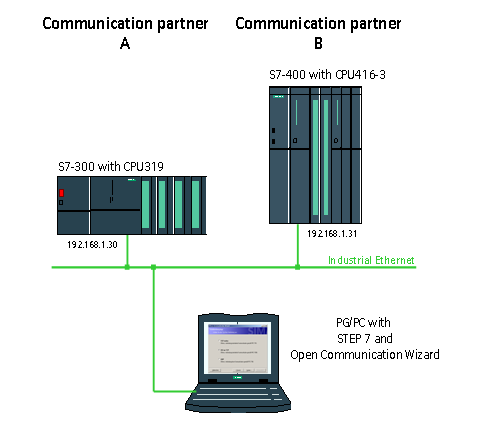
Using the finished data block we then give a simple example of how the communication is realized in the S7-300 and S7-400 CPU from a program technology point of view using the above blocks. This example shows the configuration and programming of a communication relationship between a CPU319 and a CPU416 via the integrated Ethernet interface and the ISO-on-TCP protocol.
https://bayfiles.com/7a6f12F3o2/step7example_zip
https://bayfiles.com/91671fF8oc/oc_wizard_code_v233_zip
https://bayfiles.com/B2691aFeo4/98957840_oc_wizard_doku_v233_en_pdf
https://support.industry.siemens.com/cs/attachments/1214574/SFC_e.pdf
[url=http://www.girlshare.ro/3769943034]oc_wizard_code_v233.zip[/url]
[url=http://www.girlshare.ro/3769943035.1]step7example.zip[/url]
[url=http://www.girlshare.ro/3769943036.2]98957840_oc_wizard_doku_v233_en.pdf[/url] |
|
| Back to top |
|
|
myt33
Junior
Joined: 13 Jun 2020
Posts: 7
|
| Posted: 12/07/2020 13:18 Post subject: ISO-on-TCP PROFINET interface of an S7-300 / S7-400 |
|
|
How do you program the communication blocks FB63 "TSEND", FB64 "TRCV", FB65 "TCON" and FB66 "TDISCON" in order to use the ISO-on-TCP protocol for data exchange via the integrated PROFINET interface of an S7-300 / S7-400 CPU or via the CP443-1 Advanced?
https://support.industry.siemens.com/cs/document/29737976/how-do-you-program-the-communication-blocks-fb63-tsend-fb64-trcv-fb65-tcon-and-fb66-tdiscon-in-order-to-use-the-iso-on-tcp-protocol-for-data-exchange-via-the-integrated-profinet-interface-of-an-s7-300-s7-400-cpu-or-via-the-cp443-1
You can use, for example, the "Open User Communication" over Industrial Ethernet for data exchange via the integrated PROFINET interface of a CPU or via CP4431 Advanced. The protocols below are supported for this:
TCP
ISO-on-TCP
UDP
The following communication blocks are available for "Open User Communication" via Industrial Ethernet using the ISO-on-TCP Protocol :
FB65 "TCON" for establishing the connection
FB66 "TDISCON" for ending the connection
FB63 "TSEND" for sending data
FB64 "TRECV" for receiving data
These communication blocks are available in the Standard Library -> Communication Blocks.
Copy the latest versions of the above-mentioned communication blocks from the standard library into your user program and then call them in your user program.
The connection data for establishing the ISO-on-TCP connection are saved in a data structure. The data structure "OUCW_1" will be used in this example. This is stored in the DB1 data block and is parameterized by the user.
Use the "Open Communication Wizard" for simple creation of connection data. This is available for downloading in Entry ID 98957840 .
The ISO-on-TCP connection is not configured in NetPro.
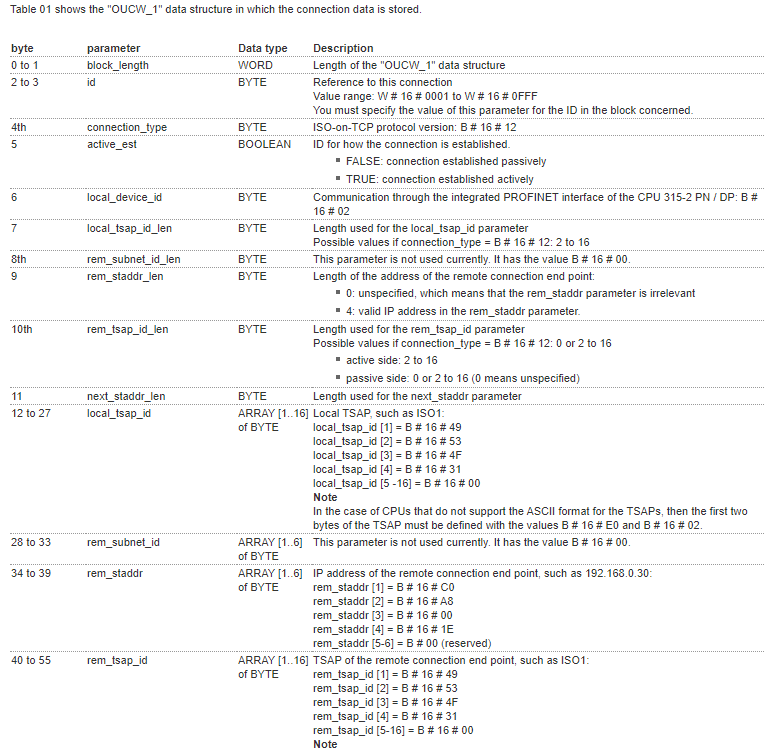
Description of the sample program
The S7 program contains the call of the FB65 "TCON" and the DB1 data block of the "OUCW_1" data structure in which the connection data for setting up the ISO-on-TCP connection are stored. The S7 program also includes the call of the function blocks FB63 "TSEND" and FB64 "TRECV" from the Standard Library -> Communication Blocks. The FB63 "TSEND" is for sending data to an S7 station or to an S5 station, to a PC station or to a third-party system. The FB64 "TRCV" is for receiving data from another S7 station or an S5 station, from a PC station or from a third party system.
First create the hardware configuration for your S7-300 station. Configure marker byte 100 as clock marker . The send job is triggered by this clock marker. Save and compile the hardware configuration of your S7-300 station and load it into the CPU.
The STEP 7 program consists of the blocks OB100, OB1, FB1, DB11, DB1, DB100, DB200 and FB63, FB64, FB65 and FB66.
OB100
The OB100 is a restart OB and is run when the CPU is restarted (warm start). In this OB the first communication trigger is enabled with marker M0.3.
OB1
OB1 is called cyclically. The FB1 is called in OB1 with the instance data block DB11, with the marker M0.3 as INIT_COM parameter and with the marker 10.0 as ABORT parameter. The marker M0.3 is reset in OB1 after the FB1 has been called.
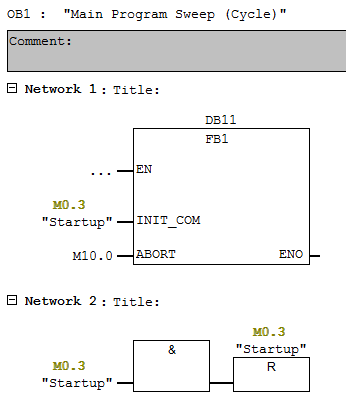
Fig. 01
FB1
The FB1 is called cyclically in OB1. The following function blocks are called in FB1.
FB65 "TCON"
FB63 "TSEND"
FB64 "TRCV"
FB66 "TDISCON"
Define connection number
You can change the connection number separately. Change the connection number in network 2 of FB1 in accordance with your configuration. The connection number is stored in a static tag and so in the instance data block DB11.
The connection number "1" is defined in this example.
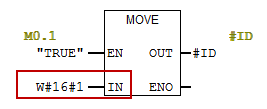
Fig. 02
Connection setup
Establishing a connection is started by a positive edge in the "REQ" input parameter of the FB65 "TCON". The "OUCW_1" data structure with the connection parameters is incorporated in the data block DB1.
On the input parameter "CONNECT" of the FB65 "TCON", the memory area is specified that contains the connection parameterization.
The connection is set up at system start and remains until it is disabled with FB66 "TDISCON", or the CPU goes into STOP mode, or the power supply is switched off.
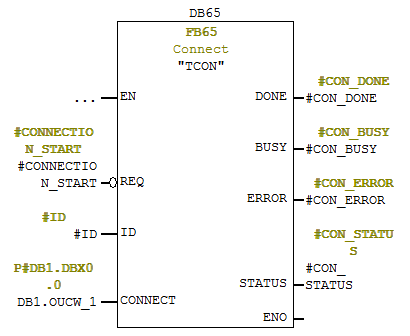
Fig. 03
The send request is triggered by a positive edge at the input parameter "REQ" of the FB63 "TSEND". The send request trigger is controlled by clock marker M100.6 and the variable "SEND_BUSY". If the send request is running, "SEND_BUSY" is set. It is then not possible to trigger a new send request.
You specify the memory area that contains the data to be sent at the input parameter "DATA".
You enter the number of bytes to be sent at the input parameter "LEN".
In this example the Send data is stored in DB100. 100 bytes of data is sent to the communication partner.
The output parameters "DONE", "ERROR" and "STATUS" are required for job evaluation.
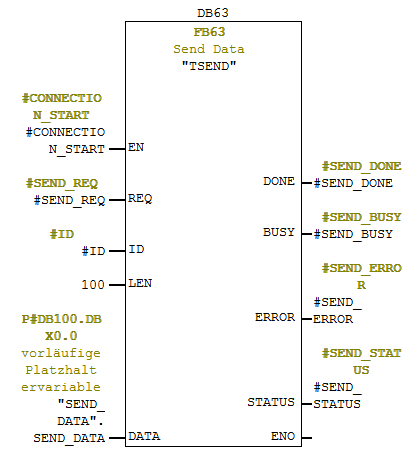
Fig. 04
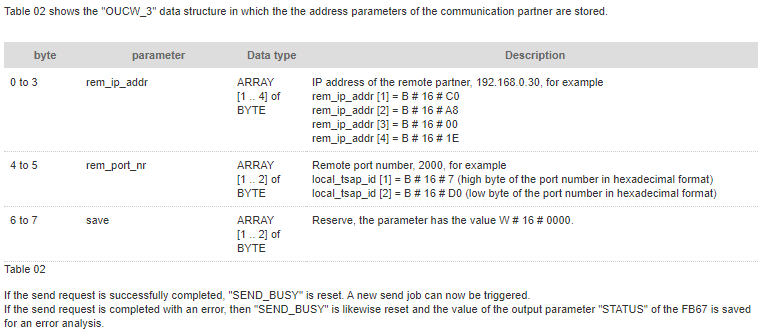
If the send request is successfully completed, "SEND_BUSY" is reset. A new send job can now be triggered.
If the send request is completed with an error, then "SEND_BUSY" is likewise reset and the value of the output parameter "STATUS" of the FB63 is saved for an error analysis.
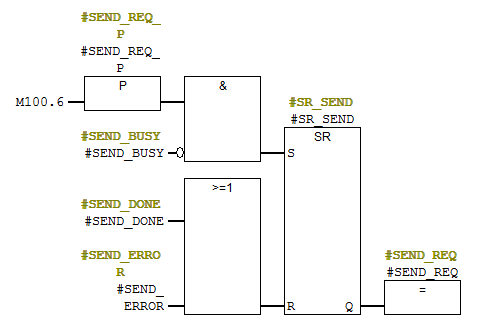
Fig. 05
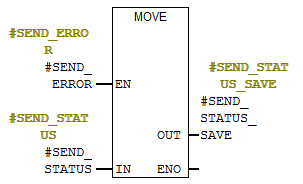
Fig. 06
The data can be received as soon as the ISO-on-TCP connection is established.
At the input parameters "DATA" and "LEN" you specify the address and length of the data area where the received data is saved.
In this example 100 bytes of data are received and stored in DB200.
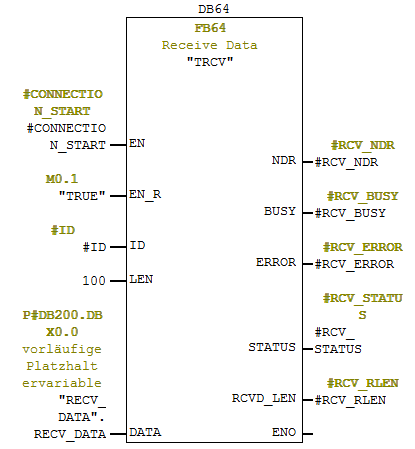
Fig. 07
The output parameter "NDR" is for showing that new data has been received. The "RECV_LEN" output parameter indicates the length of the data received.
If the data is received successfully, then the value of the "RCVD_LEN" output parameter is saved.
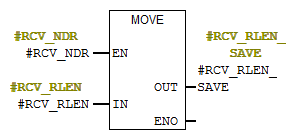
Fig. 08
If the data is not received successfully, then the value of the "STATUS" output parameter is saved and evaluated.
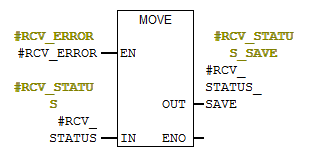
Fig. 09
You can disable the ISO-on-TCP connection with the FB66 "TDISCON". You start the request to disable the ISO-on-TCP connection via a positive edge on the input parameter "REQ" of the FB66 "TDISCON".
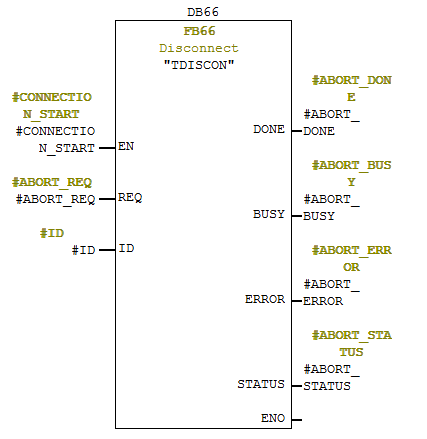
Fig. 10
The STEP 7 project as a download
The STEP 7 project contains a sample program for calling FB1 and the function blocks FB65 "TCON", FB66 "TDISCON", FB63 "TSEND" and FB64 "TRECV" with status evaluation. It was created with STEP 7 V5.5 SP3.
Download
https://support.industry.siemens.com/cs/attachments/29737976/Sample_open_IoT.zip
https://bayfiles.com/jbBd1aF8o9/sample_open_iot_zip
[url=http://www.girlshare.ro/3769943037.3]sample_open_iot.zip[/url] |
|
| Back to top |
|
|
myt33
Junior
Joined: 13 Jun 2020
Posts: 7
|
| Posted: 12/07/2020 13:28 Post subject: Re: TCON Open User Communication between two S7-1500 CPUs |
|
|
| maersk wrote: | How do you program the TCON communication instruction to establish a connection for the Open User Communication between two S7-1500 CPUs?
https://support.industry.siemens.com/cs/document/58875807/
You can use Open User Communication over Industrial Ethernet, for example, for data exchange through the integrated PROFINET interface.
The protocols below are supported for this:
TCP
ISO-on-TCP
UDP
The following communication instructions are available for Open User Communication over Industrial Ethernet.
TCON for establishing a connection
TDISCON for ending a connection
TSEND for sending data
TRCV for receiving data
In STEP 7 V14 SP1 (TIA Portal) you will find the above-mentioned communication instructions in the "Instructions" task card in the "Communication > Open User Communication > Other" palette.
This example shows how to program the TCON communication instruction to establish a connection for the Open User Communication between two S7-1500 CPUs.
In the S7-1500 CPU which actively establishes the connection, the TCON communication instruction returns a message (ERROR=1) to the user if the remote connection partner cannot be reached or the port addressed there is not available. In this case there must follow another attempt to establish a connection with a positive edge at the REQ input.
For this reason, in the S7-1500 CPU that actively establishes the connection, the REQ input of the TCON communication instruction must remain toggled until the TCON communication instruction has been completed successfully with DONE=1 and the connection is established.
The document below describes how to program establishment of the connection and data exchange in the active and passive S7-1500 CPUs.
https://support.industry.siemens.com/cs/attachments/58875807/58875807_net_tcon_s7-1500_en.pdf
Download for STEP 7 V14 SP1
The download includes the "T_COMM_S7-1500.zip" project.
Copy the "T_COMM_S7-1500.zip" file into a separate directory and then start the file with a double-click. You can then use STEP 7 Professional V14 SP1 (TIA Portal) to open and process the extracted project data.
https://support.industry.siemens.com/cs/attachments/58875807/t_comm_s7-1500.zip
Download for STEP 7 V15
The download includes the "T_COMM_S7-1500_V15.zip" project.
Copy the "T_COMM_S7-1500_V15.zip" file into a separate directory and then start the file with a double-click. You can then use STEP 7 Professional V15 (TIA Portal) to open and process the extracted project data.
https://support.industry.siemens.com/cs/attachments/58875807/T_COMM_S7-1500_V15.zip
Detailed information about programming Open User Communication in the S7-1500 CPU is available in following manuals:
https://support.industry.siemens.com/cs/attachments/109747136/STEP_7_Professional_V14_1_enUS_en-US.pdf
https://support.industry.siemens.com/cs/attachments/109755202/STEP_7_WinCC_V15_enUS_en-US.pdf |
https://bayfiles.com/hbHf19F1of/58875807_net_tcon_s7-1500_en_pdf
https://bayfiles.com/j3H611Fbo6/t_comm_s7-1500_zip
https://bayfiles.com/l8H014F9o3/T_COMM_S7-1500_V15_zip
[url=http://www.girlshare.ro/3769943039.5]58875807_net_tcon_s7-1500_en.pdf[/url]
[url=http://www.girlshare.ro/3769943040.6]t_comm_s7-1500.zip[/url]
[url=http://www.girlshare.ro/3769943041.7]T_COMM_S7-1500_V15.zip[/url] |
|
| Back to top |
|
|
myt33
Junior
Joined: 13 Jun 2020
Posts: 7
|
| Posted: 12/07/2020 13:32 Post subject: Re: Open User Communication (OUC) |
|
|
| go wrote: | Open User Communication (OUC)
https://support.industry.siemens.com/cs/document/109747710/
By now, TCP/IP-based Open User Communication (OUC) is the standard for communication with SIMATIC S7-CPUs.
In the S7 CPU, the OUC is implemented on the basis of instructions (e.g. TCON, TSEND, TRCV and TDISCON).
The user needs to parameterize the instructions in his user program and call them up in a fault-tolerant way. This task needs to be rethought by every user time and again. To make the task easy we provide you function blocks (FBs) in SCL.
The FBs contains the following mechanisms:
Connection management with the instructions "TCON" and "TDISCON"
Sending data to a partner CPU
Receiving data from a partner CPU
The application example shows you at which places in the code you can integrate your individual extensions.
For the following OUC versions, there is an own FB which serves as communication template.
ISO-on-TCP: FB "LOpenUserComm_IsoOnTcp"
TCP: FB "LOpenUserComm_Tcp" (in progress)
UDP: FB "LOpenUserComm_Udp"(in progress)
All communication templates are summarized in the "LOpenUserComm" library.
Documentation and example project
https://support.industry.siemens.com/cs/attachments/109747710/109747710__IsoOnTcp_BaseComm_V1_en.pdf
https://support.industry.siemens.com/cs/attachments/109747710/109747710_LOpenUserComm.zip |
https://bayfiles.com/vcI017F3o1/109747710_Udp_BaseComm_V1_en_pdf
https://bayfiles.com/xbI518Fbo8/109747710_IsoOnTcp_BaseComm_V1_en_pdf
https://bayfiles.com/zeIb1eF2oe/109747710_LOpenUserComm_zip
https://bayfiles.com/51I212F2of/109747710_LOpenUserComm_V16_zip
https://bayfiles.com/7bIe18F4o6/109747710_Tcp_BaseComm_V1_en_pdf
[url=http://www.girlshare.ro/3769943042.8]109747710_LOpenUserComm_V16.zip[/url]
[url=http://www.girlshare.ro/3769943043.9]109747710_LOpenUserComm.zip[/url]
[url=http://www.girlshare.ro/3769943045]109747710_Udp_BaseComm_V1_en.pdf[/url]
[url=http://www.girlshare.ro/3769943046.1]109747710_Tcp_BaseComm_V1_en.pdf[/url]
[url=http://www.girlshare.ro/3769943047.2]109747710_IsoOnTcp_BaseComm_V1_en.pdf[/url] |
|
| Back to top |
|
|
myt33
Junior
Joined: 13 Jun 2020
Posts: 7
|
| Posted: 12/08/2020 18:47 Post subject: |
|
|
How do you configure open IE communication via the integrated PN/IE interface of the CPU or via an Industrial Ethernet CP?
https://support.industry.siemens.com/cs/document/24294554/how-do-you-configure-open-ie-communication-via-the-integrated-pn-ie-interface-of-the-cpu-or-via-an-industrial-ethernet-cp
Wizard for creating connection data for open TCP / IP communication (Open Communication Wizard).
https://support.industry.siemens.com/cs/document/98957840/wizard-for-creating-connection-data-for-open-tcp-ip-communication- (open-communication-wizard)
Transferring data (with FC5 "AG_SEND" and FC6 "AG_RECV") with variable message lengths via the TCP protocol
https://support.industry.siemens.com/cs/document/8707570/transferring-data- (with-fc5-ag_send-and-fc6-ag_recv-)-with-variable-message-lengths-via-the-tcp-protocol
How do you program the communication blocks FB63 "TSEND", FB64 "TRCV", FB65 "TCON" and FB66 "TDISCON" in order to use the TCP protocol for data exchange by means of the integrated PROFINET interface of an S7-300/S7-400 CPU?
https://support.industry.siemens.com/cs/document/29737950/how-do-you-program-the-communication-blocks-fb63-tsend-fb64-trcv-fb65-tcon-and-fb66-tdiscon-in-order-to-use-the-tcp-protocol-for-data-exchange-by-means-of-the-integrated-profinet-interface-of-an-s7-300-s7-400-cpu
How do you configure a TCP connection for data exchange between S7-300 and / or S7-400 by way of Industrial Ethernet CPs?
https://support.industry.siemens.com/cs/document/22385024/how-do-you-configure-a-tcp-connection-for-data-exchange-between-s7-300-and-or-s7-400-by-way-of-industrial-ethernet-cps
How do you program the communication blocks FB63 "TSEND", FB64 "TRCV", FB65 "TCON" and FB66 "TDISCON" in order to use the ISO-on-TCP protocol for data exchange via the integrated PROFINET interface of an S7-300/S7-400 CPU or via the CP443-1 Advanced?
https://support.industry.siemens.com/cs/document/29737976/how-do-you-program-the-communication-blocks-fb63-tsend-fb64-trcv-fb65-tcon-and-fb66-tdiscon-in-order-to-use-the-iso-on-tcp-protocol-for-data-exchange-via-the-integrated-profinet-interface-of-an-s7-300-s7-400-cpu-or-via-the-cp443-1
https://cache.industry.siemens.com/dl/files/908/78028908/att_32073/v1/78028908_SIMATIC_Comm_DOKU_v21_e.pdf
https://anonfiles.com/1147qaMao4/oc_wizard_code_v233_zip
https://anonfiles.com/344fq4Meoa/step7example_zip
https://anonfiles.com/9e46qfM4oc/t-bausteine_e_pdf
https://anonfiles.com/B64eq3Mfo0/98957840_oc_wizard_doku_v233_en_pdf
https://anonfiles.com/De46q0M0o5/sample_open_tcp_zip
https://anonfiles.com/Hc4bq4M4od/22385024_tcp_connection_en_pdf
https://anonfiles.com/Ld4bq5Mdob/78028908_SIMATIC_Comm_DOKU_v21_e_pdf
https://anonfiles.com/Nc42qcM5oe/24294554_IE_Kommunikation_S7300_S71200_en_pdf
https://anonfiles.com/P741q0M8o1/t_cp_data_exe
https://anonfiles.com/Rf41qdMboe/24294554_IE_Kommunikation_S71500_en_pdf
https://anonfiles.com/V44aqeM8oc/24294554_IE_Kommunikation_S7400_en_pdf
https://anonfiles.com/T947qdMdo9/s7sfc_en-EN_pdf
https://anonfiles.com/Z549q3M3ob/S7komm_e_pdf |
|
| Back to top |
|
|
|
|
You cannot post new topics in this forum
You cannot reply to topics in this forum
You cannot edit your posts in this forum
You cannot delete your posts in this forum
You cannot vote in polls in this forum
|
Powered by phpBB © 2001, 2005 phpBB Group
Fa-ti si tu propriul forum GRATUIT, pe www.myforum.ro |
 FAQ
FAQ Search
 Memberlist
 Usergroups
 Register
 Profile
 Log in to check your private messages
 Log in


