 |
plc.myforum.ro
PLCs users www.plc.myforum.ro!
|
| View previous topic :: View next topic |
| Author |
Message |
valz
Member 3


Joined: 26 Jul 2015
Posts: 771
|
 Posted: 12/09/2022 19:34 Post subject: open a new browser tab in WinCC Unified PC Runtime Posted: 12/09/2022 19:34 Post subject: open a new browser tab in WinCC Unified PC Runtime |
 |
|
How do you open a new browser tab in WinCC Unified PC Runtime?
https://support.industry.siemens.com/cs/document/109812600/
You use the Custom Web Control (CWC) Open New Browser Tab to open a new tab in WinCC Unified PC Runtime in the browser of the client. In this, you can use any URL you want.
1. Application Case
You want to open a new tab in the client's browser.
You want to change the URL of the tab as you wish.
2. Procedure
The procedure was tested with WinCC Unified V17 Update 4.
Download the corresponding CWC. Download: Login required OpenNewTabOnClient.zip (11.1 KB)(SHA-256)
Unzip the ZIP file.
https://support.industry.siemens.com/cs/attachments/109812600/OpenNewTabOnClient.zip
Place the CWC named "{5042592B-5FBF-4C68-87F3-DB36FBD40AC2}.zip" in the project folder in the following path: [Project name]\UserFiles\CustomControls\
Note
If the "CustomControls" folder does not yet exist in your project, confecționate it manually.
Update "Custom Controls" under Tools, so that the newly added CWC is displayed there.
Drag the CWC in the TIA Portal to a screen in your HMI as shown in Fig. 01.
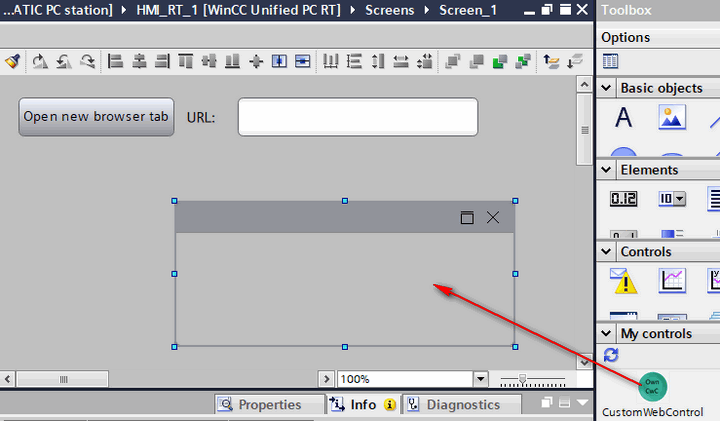
Fig. 01
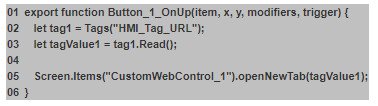
Use the JavaScript function "openNewTab" on an object event in the screen, a button, for example. In the example, the function is stored in the "Release" event of the corresponding button (Button_1) (Fig. 02).
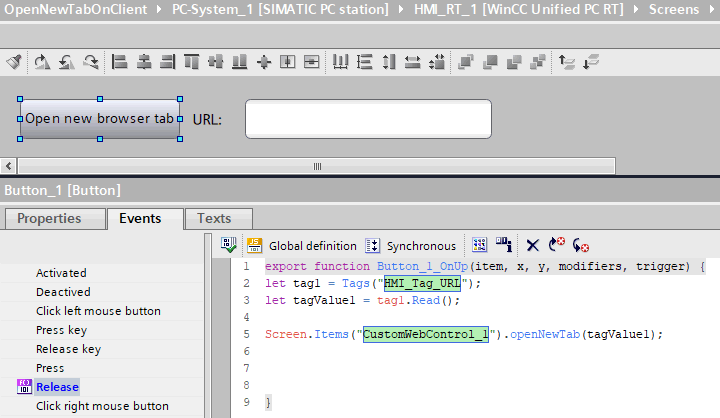
Fig. 02
3. Sample Script and Configuration
You enter the desired URL via an IO field. To do this, you store a corresponding HMI tag of the type WString directly in the "Process value" property of the IO field, "HMI_Tag_URL" as shown in Fig. 03.
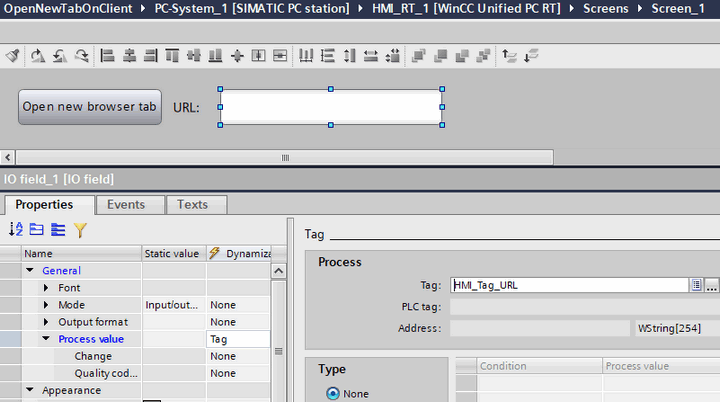
Fig. 03
4. Behavior in Runtime
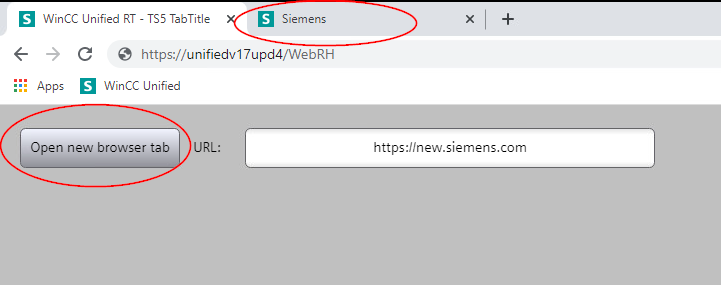
Enter the desired URL in the IO field and confirm it with the Enter key, for example "https://new.siemens.com".
After pressing the button a new browser tab opens with the specified address.
https://support.industry.siemens.com/cs/attachments/109794204/WinCCVisualizingProcessesUnifiedenUS_en-US.pdf
https://support.industry.siemens.com/cs/attachments/109794040/CuCoWCCUenUS_en-US.pdf
https://support.industry.siemens.com/cs/document/109779176/integrating-user-defined-controls-into-wincc-unified- (custom-web-controls)
https://support.industry.siemens.com/cs/document/109781074/why-can-some-web-pages-not-be-displayed-in-the-browser-control-of-the-simatic-wincc-unified-pc-runtime |
|
| Back to top |
|
 |
|
|
You cannot post new topics in this forum
You cannot reply to topics in this forum
You cannot edit your posts in this forum
You cannot delete your posts in this forum
You cannot vote in polls in this forum
|
Powered by phpBB © 2001, 2005 phpBB Group
Fa-ti si tu propriul forum GRATUIT, pe www.myforum.ro |
 FAQ
FAQ Search
 Memberlist
 Usergroups
 Register
 Profile
 Log in to check your private messages
 Log in


