| View previous topic :: View next topic |
| Author |
Message |
maersk
Member 3


Joined: 17 Aug 2014
Posts: 891
|
 Posted: 12/11/2015 21:06 Post subject: OPC UA client/server connection of two WinCC SCADA PCs Posted: 12/11/2015 21:06 Post subject: OPC UA client/server connection of two WinCC SCADA PCs |
 |
|
How do you configure a client/server connection of two WinCC SCADA computers in OPC UA?
https://support.industry.siemens.com/cs/document/109479664/how-do-you-configure-a-clientserver-connection-of-two-wincc-scada-computers-in-opc-ua
For an OPC UA server and an OPC UA client, each running on a WinCC SCADA PC, to be able to communicate with each other, security certificates have to be exchanged between the server and the client. For this you execute the steps below.
Procedure
1. On the server PC you enable WinCC Runtime.
2. Switch to the client PC and open the "Tag Management" of your WinCC project.
3. Right-click the "Tag Management" item in the project navigation and in the pop-up menu under "Add new driver" you select the item "OPC".
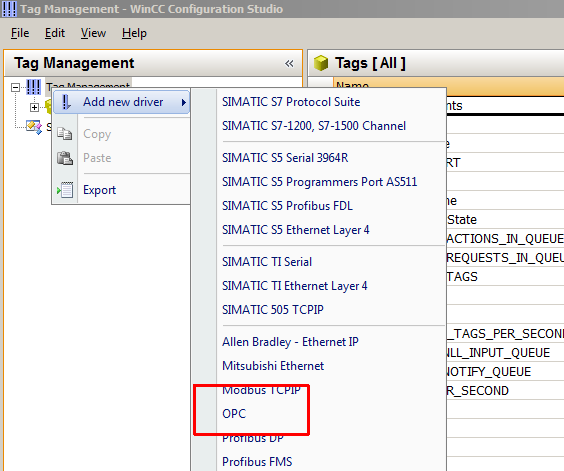
An OPC channel is created.
4. In the project navigation you right-click the item "OPC Groups..." and in the pop-up menu that opens you select the command "System parameters".

The "OPC Item Manager" dialog opens.
5. Click the "OPC UA server" button.

The "Add OPC UA server" dialog opens.
6. Under "Server information" you enter the server URL in this form: "opc.tcp://[server]:[port]". For "[server]" you use the name of the server PC or its IP address, and for "[port]" the port used by the OPC UA server. The default port is "4862" (see here also the configuration notes below).

7. Under "Security", for "Security Policy" you select the item "Basic128Rsa15" and for "Message Security Mode" you select the item "Sign and encrypt". (See here also the configuration notes below. However, it is possible to operate communication non-securely, but for reasons of security this is not advisable.)
8. Click the "OK" button. The dialog closes.
In the "OPC Item Manager" you mark the newly created OPC UA server item. Click the "Browse Server" button.

After a short while you receive the error message "This OPC server does not support a Browse Interface!". Acknowledge the error message with "OK".

9. Open the Windows Explorer and navigate to the Installation directory of WinCC. (In Windows 7 this is by default "C:\Program Files (x86)\Siemens\WinCC".)
10. Navigate to the subdirectory "...\opc\UAWrapper\PKI\CA\rejected\certs". Move the security certificate you find here into the subdirectory "...\opc\UAWrapper\PKI\CA\certs".

11. Repeat Step 9.
12. Switch to the server PC, open the Windows Explorer there and navigate to the Installation directory of WinCC.
13. Navigate to the subdirectory "...\opc\UAServer\PKI\CA\rejected\certs". Move the security certificate of the OPC UA client you find here into the subdirectory "...\opc\UAServer\PKI\CA\certs".
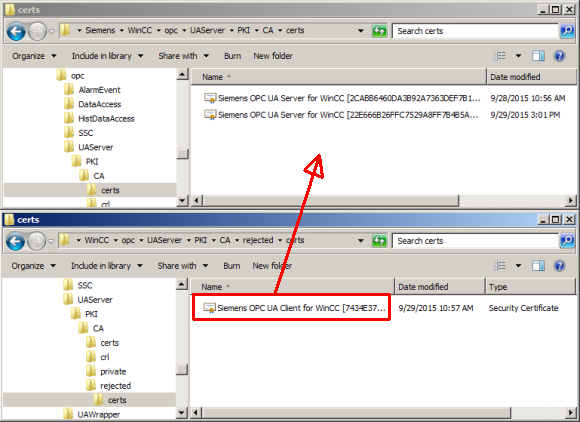
14. Switch back to the client PC and once again click the "Browse Server" button.
15. The "Filter Criteria" dialog opens. Configure your filter for the tags and click the "Next ->" button. Now you can browse in the Tag Management of the server.
Configuration of the OPC UA port and the security settings
The data required for Step 6 is also stored on the server PC in the subdirectory "...\OPC\UAServer" of the project directory in the file "OpcUaServerWinCC.xml".
The server name and its port are configured under "BaseAddresses".
The individual security policies are stored under the "SecurityProfile" codes. If a profile has the value "true" for the "Enabled" code, then that profile is supported.
The security modes supported by the security policies are stored as values under the "MessageSecurityModes" codes.

Checking the connection to the OPC UA server
The error message "This OPC server does not support a Browse Interface!" is output not only at certificate exchange, but also when the specified WinCC server cannot be reached at all. You can use the "telnet" tool to determine whether or not the connection has been established.
For this you open the Windows input prompt and enter the command line "telnet [server] [port]". For this you use the values from Step 6.
If you get the error message "Could not open connection to the host ... Connect failed", either the addressed computer cannot be reached, no OPC UA server is running on it or the server is configured for a different port.
Make sure that your firewall does not prevent communication between server and client.
Notes
The WinCC Connectivity Pack must be install and licensed to be able to use OPC UA.
The "telnet" tool is not installed by default on all the Windows computers. If you need to install it, open the "Control Panel" in the Start menu and select "Programs and Functions". Click "Enable or Disable Windows Functions" in the list of functions that opens you check "Telnet Client". Then "telnet" is available.
Further Information
The basic principles of OPC UA configuration are available in the "WinCC System Manual Communication"
https://support.industry.siemens.com/cs/document/102691766/wincc-v7.3-communication?lc=en-us
A sample application for using a Comfort Panel as OPC UA client is available in
https://support.industry.siemens.com/cs/document/63481236/communication-via-opc-ua-in-conjunction-with-a-simatic-hmi-comfort-panel?lc=en-us
Detailed WinCC Specialist Webinar "OPC Unified Architecture" (July 2013)
https://support.industry.siemens.com/cs/attachments/109479664/20130715_WinCC_Spec_OPC_UA_en.pdf |
|
| Back to top |
|
 |
maersk
Member 3
Joined: 17 Aug 2014
Posts: 891
|
| Posted: 25/04/2017 13:18 Post subject: OPC UA Communication with SIMATIC HMI systems |
|
|
OPC UA Communication with SIMATIC HMI systems
Communication via OPC UA with SIMATIC HMI systems (Comfort Panels, Runtime Advanced, Runtime Professional)
https://support.industry.siemens.com/cs/document/63481236/communication-via-opc-ua-with-simatic-hmi-systems- (comfort-panels-runtime-advanced-runtime-professional)?dti=0&pnid=13613&lc=en-DE
Many SIMATIC HMI systems support the communication via OPC UA. The application examples show various configurations for this purpose. An example project is available for each configuration.
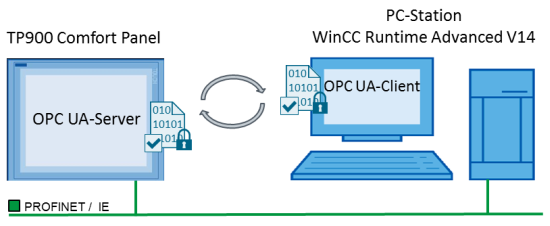
The figure below shows a schematic illustration of the most important components for the
"02 - Panel Server and RT Advanced Client" configuration.
The Comfort Panel (server) provides the data. The PC station (client) accesses the data (tags) of the Comfort Panel.
The OPC UA communication interface supports data integrity through encryption and digital signature.
Documentation and example projects
1 OPC UA Basics
General information on the topic of OPC UA.
https://support.industry.siemens.com/cs/attachments/63481236/63481236_Part1_OPC_UA_Grundlagen_en.pdf
2 Panel Server and RT Advanced Client
communication between a panel that is configured as server and a Runtime Advanced that is configured as “client".
https://support.industry.siemens.com/cs/attachments/63481236/63481236_Part2_Panel_Server_und_RT_Adv_Client_en.pdf
https://support.industry.siemens.com/cs/attachments/63481236/63481236_Part2_CODE_Panel_Server_und_RT_Adv_Client.zip
3 S7-1500 Server and Panel Client
communication between a SIMATIC S7-1500 controller that is configured as server and a panel that is configured as “client".
https://support.industry.siemens.com/cs/attachments/63481236/63481236_Part3_S7-1500_Server_Panel_Client_en.pdf
https://support.industry.siemens.com/cs/attachments/63481236/63481236_Part3_CODE_S7-1500_Server_Panel_Client.zip
4 Panel Server and OPC Scout Panel Client
communication between a panel that is configured as server and an OPC Scout that is configured as “client"
https://support.industry.siemens.com/cs/attachments/63481236/63481236_Part4_Panel_Server_und_OPC-Scout_Client_en.pdf
https://support.industry.siemens.com/cs/attachments/63481236/63481236_Part4_CODE_Panel_Server_und_OPC-Scout_Client.zip
5 RT Advanced Server and Panel Client
communication between a Runtime Advanced that is configured as server and a panel that is configured as “client".
https://support.industry.siemens.com/cs/attachments/63481236/63481236_Part5_RT_Advanced_Server_und_Panel_Client_en.pdf
https://support.industry.siemens.com/cs/attachments/63481236/63481236_Part5_CODE_RT_Advanced_Server_und_Panel_Client.zip
6 RT Professional Server and Panel Client
communication between a Runtime Professional that is configured as server and a panel that is configured as “client".
https://support.industry.siemens.com/cs/attachments/63481236/63481236_Part6_RT_Professional_Server_und_Panel_Client_en.pdf
https://support.industry.siemens.com/cs/attachments/63481236/63481236_Part6_CODE_RT_Professional_Server_und_Panel_Client.zip |
|
| Back to top |
|
|
maersk
Member 3
Joined: 17 Aug 2014
Posts: 891
|
| Posted: 28/04/2017 11:18 Post subject: OPC UA .NET Client for the SIMATIC S7-1500 OPC UA Server |
|
|
OPC UA .NET Client for the SIMATIC S7-1500 OPC UA Server
https://support.industry.siemens.com/cs/document/109737901/opc-ua-net-client-for-the-simatic-s7-1500-opc-ua-server
As of firmware 2.0 of SIMATIC S7-1500 an integrated OPC UA Server has been added to the control system. This enables an additional option of direct process data exchange of the SIMATIC S7‑1500 with a wide variety of other systems that support OPC UA.
The SIMATIC S7-1500 OPC UA server is planned and configured via the TIA Portal. The OPC UA Client is created in C# / .NET and internally uses the freely accessible OPC UA .NET stack of the OPC foundation. For easier individual implementations of a .NET client the “UAClientHelperAPI” C# class is included in delivery. This class summarizes the basic functions of the .NET stack of the OPC Foundation and considerably facilitates the use of the basic functions for you. Client and server are connected via Ethernet and communicate through OPC UA via TCP/IP.

The client supports the following functions:
Searching and finding server:
Creating and ending sessions
Navigating in the address space
Reading and writing tags and attributes
Subscribing tags
Documentation and example project
https://support.industry.siemens.com/cs/attachments/109737901/109737901_OPC_UA_Client_S7-1500_DOKU_V11_en.pdf
https://support.industry.siemens.com/cs/attachments/109737901/109737901_OPC_UA_Client_S7-1500_CODE_V11.zip |
|
| Back to top |
|
|
huynhtrong
Junior 2

Joined: 23 Apr 2017
Posts: 21
Location: vietnam
|
| Posted: 01/12/2017 16:25 Post subject: |
|
|
I'm very appreciate your document.
I'm having problem security in opc ua .
I'm using app c# in siemen support to test read/wire data to server .
when i uncheck none in security channel and only check in Basic128Rca .It's auto login none security from c# app.
How to solve this problem?
Thanks for your support.
_________________
aaaa |
|
| Back to top |
|
|
barro
Junior 2
Joined: 05 Nov 2017
Posts: 24
|
| Posted: 01/12/2017 19:47 Post subject: |
|
|
| huynhtrong wrote: | I'm very appreciate your document.
I'm having problem security in opc ua .
I'm using app c# in siemen support to test read/wire data to server .
when i uncheck none in security channel and only check in Basic128Rca .It's auto login none security from c# app.
How to solve this problem?
Thanks for your support. |
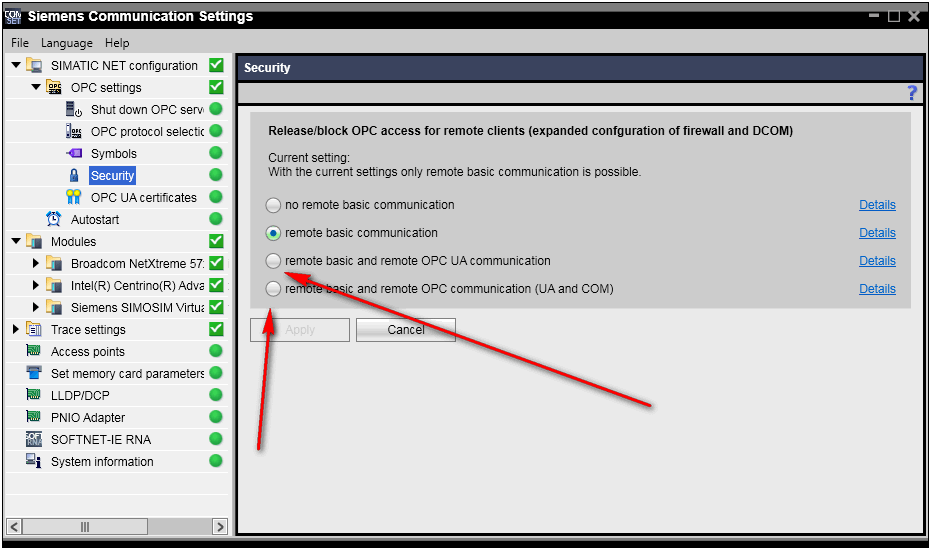
On Simatic Net -> Communication Settings apply security updates for what you need....;

 |
|
| Back to top |
|
|
huynhtrong
Junior 2
Joined: 23 Apr 2017
Posts: 21
Location: vietnam
|
| Posted: 02/12/2017 14:04 Post subject: |
|
|
Thanks for your answer.But I use simulation in plc sim advanced with s7 1500 -opc ua sever.I can't find simatic net in tia v14.
https://imgur.com/7cG2Z0b[/url]
_________________
aaaa |
|
| Back to top |
|
|
barro
Junior 2
Joined: 05 Nov 2017
Posts: 24
|
| Posted: 02/12/2017 15:09 Post subject: |
|
|
| huynhtrong wrote: | Thanks for your answer.But I use simulation in plc sim advanced with s7 1500 -opc ua sever.I can't find simatic net in tia v14.

|
You must install simaticnet ..i saw somewhere in forum...
With simulation advanced there could be problems..????? |
|
| Back to top |
|
|
|

 FAQ
FAQ Search
 Memberlist
 Usergroups
 Register
 Profile
 Log in to check your private messages
 Log in


