 |
plc.myforum.ro
PLCs users www.plc.myforum.ro!
|
| View previous topic :: View next topic |
| Author |
Message |
valz
Member 3


Joined: 26 Jul 2015
Posts: 771
|
 Posted: 03/07/2023 15:09 Post subject: OPC UA – An overview of the most important entries and links Posted: 03/07/2023 15:09 Post subject: OPC UA – An overview of the most important entries and links |
 |
|
OPC UA – An overview of the most important entries and links
https://support.industry.siemens.com/cs/document/109770435/ |
|
| Back to top |
|
 |
valz
Member 3
Joined: 26 Jul 2015
Posts: 771
|
| Posted: 06/07/2023 18:24 Post subject: SIMATIC Live Link V1.0 |
|
|
SIMATIC Live Link V1.0
https://support.industry.siemens.com/cs/document/109821394/
SIMATIC Live Link V1.0 is a web-based tool for configuring & diagnostics of the communication between automation components via OPC UA to enable Machine2Machine communication in runtime, just by drag & connect! The tool is available effective immediately (restricted delivery release)!
Horizontal communication via OPC UA offers several advantages, such as secure and reliable data exchange and high flexibility. With OPC UA, machines can communicate seamlessly with each other, resulting in improved efficiency (faster response times), reduced downtimes, and higher quality. OPC UA also provides a standardized data tip and security features to ensure that data exchanged between machines is accurate, consistent, and protected from unauthorized access. OPC UA's modular architecture allows manufacturers to easily add or remove devices and services as needed, making it a flexible and scalable solution for factory automation.
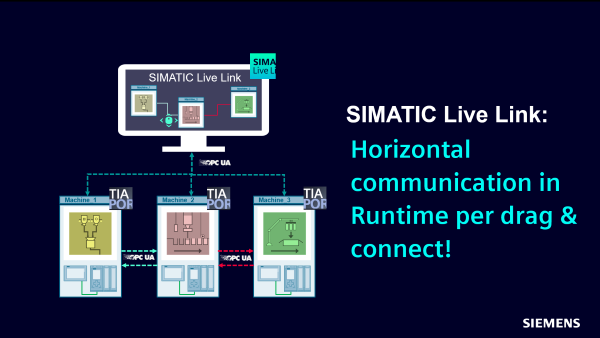
How does it work?
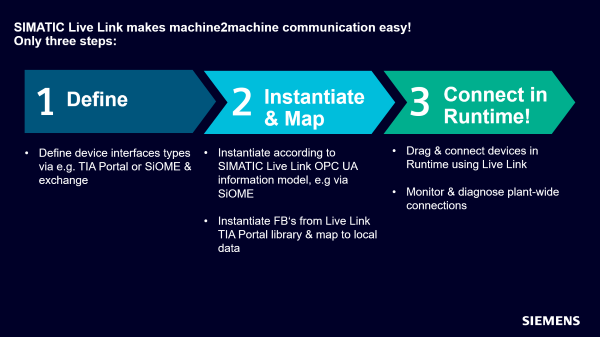
The technological functions of individual automation components are programmed in TIA Portal V17. For this purpose, the SIMATIC Live Link TIA Portal library is provided, which enables and simplifies the connection to Live Link Web App. SIMATIC Live Link is used for plant-wide interconnection.
The engineering workflow consists of three steps:
Hardware and software requirements:
https://support.industry.siemens.com/cs/attachments/109822334/App_SIMATICLiveLink_enUS_en-US.pdf
SIMATIC Live Link library for TIA Portal V17: Live Link provides a TIA Portal library that has function blocks for establishing connections. Using the library and the platform-independent OPC UA protocol reduces the effort required to implement the app and simplifies communication. This library can be downloaded free of charge via this SIOS product release (see below).
SIMATIC Live Link OPC UA information model template: Live Link provides a template "SIMATICLiveLinkInformationModel.xml" for creating information models. You import this template into SIOME and based on it you lucrate information models for your devices.
Download
https://support.industry.siemens.com/cs/attachments/109821394/SIMATIC_Live_Link_V1.0_TIALibrary.zip
https://ulozto.net/file/AvGRtnfzp5dP/simatic-live-link-v1-0-tialibrary-zip
[URL=https://www.file-upload.net/download-15165125/SIMATIC_Live_Link_V1.0_TIALibrary.zip.html]SIMATIC_Live_Link_V1.0_TIALibrary.zip[/URL] |
|
| Back to top |
|
|
mamiko
Member 2


Joined: 25 Dec 2017
Posts: 420
|
| Posted: 17/07/2023 15:27 Post subject: OPC UA tag nodes with a STEP 7 |
|
|
Describing local OPC UA tag nodes with a STEP 7 program (value, time stamp, StatusCode)
https://support.industry.siemens.com/cs/document/109820694/
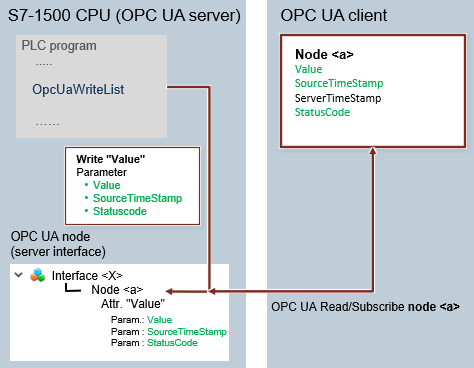
Using the OPC UA instruction "OPC_UA_WriteList", the STEP 7 program lets you write values and supplementary information straight to OPC UA tag nodes of the local OPC UA server. One possible application of this is to modify the time stamp of an OPC UA tag.
The value attribute of an OPC UA tag node has parameters which contain a time stamp in addition to the tag value and StatusCode. The time stamp is only set once an OPC UA client requests this tag. This is done with an OPC UA Read command or as part of a fixed query by an OPC UA subscription.
This means that the OPC UA server sets the time stamp no earlier than a request. The time stamp does not match the actual time at which the event occurred in the source object.
As of firmware V3.0 and TIA Portal V18, the S7-1500 CPUs now offer the capability to assign an OPC UA tag node in the local OPC UA server the following information by means of the program:
Tag value (Value)
Time stamp (SourceTimeStamp)
StatusCode
SourcePicoSeconds
This gives you the ability to determine, besides the actual value, the real time point of a tag change in the OPC UA tag node, and therefore to also make it visible for the OPC UA client.
The following graphic illustrates the principle behind this application.
Basic conditions
The following conditions apply for this function:
A remote OPC UA client has read-only access to this node (access permissions must be set to "RD").
The pertinent OPC UA tags must be modeled with a user-defined server interface.
The server interface must not be mapped with a CPU tag.
The example provides explanations and a function block that intuitively implements the function. You can use it and modify it to suit your own application.
Documentation and sample project
https://support.industry.siemens.com/cs/attachments/109820694/109820694_OPC-UA_SetDataValue_DOC_V1.0_en.pdf
https://support.industry.siemens.com/cs/attachments/109820694/109820694_OPC_UA_WriteList_SetDataValue_PROJ_V1.0.zip
Further informations
Many more examples and information about OPC UA can be found in the link below:
https://support.industry.siemens.com/cs/document/109770435/opc-ua-%e2%80%93-an-overview-of-the-most-important-entries-and-links
https://ulozto.net/tamhle/EOrYqdj0jqkS/
https://teraboxapp.com/s/1GPCp3JoAaq30bKVjHr7lsw |
|
| Back to top |
|
|
|
|
You cannot post new topics in this forum
You cannot reply to topics in this forum
You cannot edit your posts in this forum
You cannot delete your posts in this forum
You cannot vote in polls in this forum
|
Powered by phpBB © 2001, 2005 phpBB Group
Fa-ti si tu propriul forum GRATUIT, pe www.myforum.ro |
 FAQ
FAQ Search
 Memberlist
 Usergroups
 Register
 Profile
 Log in to check your private messages
 Log in


