 |
plc.myforum.ro
PLCs users www.plc.myforum.ro!
|
| View previous topic :: View next topic |
| Author |
Message |
alplus
Junior

Joined: 01 Aug 2018
Posts: 1
|
 Posted: 02/11/2018 01:20 Post subject: Omron - CJ1M - Convert Real Value to BCD Posted: 02/11/2018 01:20 Post subject: Omron - CJ1M - Convert Real Value to BCD |
 |
|
Hi Guys,
i'm begginer and i'm trying to convert a real value (not fix value) to BCD.
It works if i put fix real value but when i put variable real value, the conversion not working.
any idea ?
Thank you. |
|
| Back to top |
|
 |
wildpikachu
Junior 2

Joined: 16 Jul 2015
Posts: 34
|
| Posted: 02/11/2018 08:18 Post subject: |
|
|
Hi Alplus
try using FIX (450) and then BCD (024)
FIX will convert a 32bit floating point value to a signed 16 bit binary value.
BCD will convert binary to BCD.
Let me know if you are still having problems and I'll try and simulate it on my side.
Cheers. |
|
| Back to top |
|
|
Krugger
Junior
Joined: 23 Aug 2018
Posts: 10
|
| Posted: 02/11/2018 09:06 Post subject: |
|
|
How Do I Program Analog Signals?
The Data Memories of analog modules must first be completed. This can be done in CX-Programmer through the I / O table by double clicking on the type of unit. This is necessary to indicate which entrances and exits are active. (For further settings see Operation Manual)
The first analog values are entered at address CIO n +1, the second on CIO n +2, etc. The first analog output is driven by CIO n +1 a value (see below). N CIO address must be enabled for high bits, to start the conversion and output driven.
N 9 at atingere CIO, the alarm and the disconnection bits. These can be read into the program eg to detect the connected sensors are present.
When using analog input and output modules, analog input signals are converted to a hexadecimal number between 0 and FFF and an analog output signal is a hexadecimal number from 0 to FFF converted to an analog signal. We go from a resolution of 12 bits (4000) There are converters with another resolution, but for processing the signals it makes no difference. Positive and negative signals (eg-10V to +10 V) have to do with a signbit. (For conversion dates See Operation Manual)
This means that we must treat the data as hexadecimal (binary) numbers and therefore those commands, which are suitable for binary processing.
CX-Programmer has the capability for binary values shown in decimal numbers. This makes it easier to work with binary instructions. If you are working with decimal numbers, then the incoming and outgoing values are converted. This one uses the command BCD (024) for conversion of binary (HEX) to decimal (BCD), when setting analog input values, and the command BIN (023) for conversion of decimal (BCD) to binary (HEX), the conversion to analog outputs.
It is also dependent on what you want to do with values. If the incoming signals are level or temperature values, for example, then they must be at a maximum or minimum level, in this case use the comparison commands (eg CMP (020)). If the data is Should the data be stored, for example, to conduct a process to analyze, then use the movement instructions (eg MOV (021)).
The converted values are between 0 and FFF in binary processing or 0 to 4095 in decimal processing (assuming 12-bit resolution). One can also scale these signals, such as pressure, temperature or level measurement, in order to get the întocmai value (0-10bar, -50 / 50 degrees). This one uses the "Scaling" instructions SCL (194), SCL2 (486) and SCL3 (487).
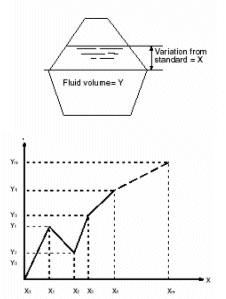
With the APR (069) command you can make a 12-point chart. This can be a level measurement into a volume of a non-legal barrel. (see illustration).
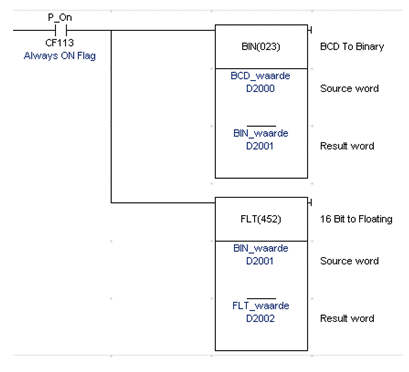
How Do I Convert A BCD To Floating Point (FLT)? - CX-Programmer
For a BCD number to be converted to a Floating Point (FLT) number, we must first convert the BIN (023) command into a binary (HEX) value, then the binary value can be converted to a value for the FLT FLT (452) instruction.
If you want to convert a FLT value to a BCD value, then first convert the FIX (450) instruction to the binary value, and then convert binary value to the BCD (024) instruction and convert it to a BCD value.
For dublu addresses use BINL (058), FLTL (453), FIXL (451) and BCDL (059) instructions.
Scaling with FB - CJ1M An example for CJ1M hardware.
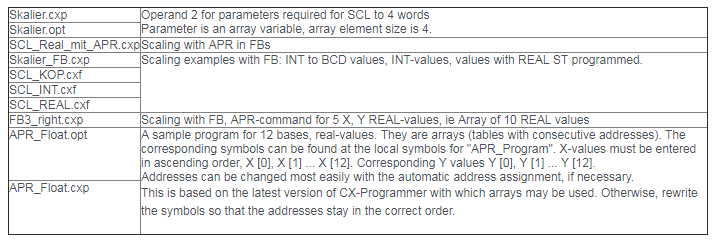
https://www.mediafire.com/file/8obj7bo36akmobf/Scaling_with_FB_CJ1M.rar |
|
| Back to top |
|
|
|
|
You cannot post new topics in this forum
You cannot reply to topics in this forum
You cannot edit your posts in this forum
You cannot delete your posts in this forum
You cannot vote in polls in this forum
|
Powered by phpBB © 2001, 2005 phpBB Group
Fa-ti si tu propriul forum GRATUIT, pe www.myforum.ro |
 FAQ
FAQ Search
 Memberlist
 Usergroups
 Register
 Profile
 Log in to check your private messages
 Log in


