| View previous topic :: View next topic |
| Author |
Message |
grig100
Member 3


Joined: 01 Jan 2015
Posts: 752
|
 Posted: 28/08/2018 13:22 Post subject: Monitoring of Machine Vibration with SIPLUS CMS1200 SM 1281 Posted: 28/08/2018 13:22 Post subject: Monitoring of Machine Vibration with SIPLUS CMS1200 SM 1281 |
 |
|
Monitoring of Machine Vibration Variables with a SIPLUS CMS1200 SM 1281 Condition Monitoring System
https://support.industry.siemens.com/cs/document/109480750/
To protect a machine efficiently against mechanical damage during operation and detect such damages at an early stage, the machine has to be monitored permanently.
Mechanical vibrations are crucial in order to detect damages at an early stage. Vibrations are caused mainly by centrifugal forces at rotating machine parts.
This can be due to:
| Code: | Unbalance
Improper alignment of machine trains
Bearing damages
Transmission faults
Magnetic, hydraulic and other function-related changing forces |

In order to monitor mechanical components, SIEMENS provides the SIPLUS CMS Condition Monitoring Systems. This monitoring system gives a permanent overview of all machines and of the entire system. In line with preventive maintenance, servicing activities can thus be planned more efficiently and carried out on schedule.
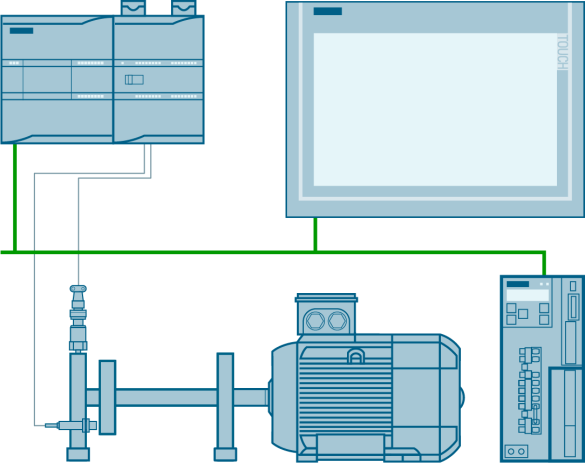
The monitoring is executed by the Condition Monitoring System SIPLUS CMS1200 SM 1281. Specifically designed for the use with a SIMATIC S7-1200, the monitoring can thus be integrated seamlessly into the automation process.
Documentation and Example Project
SM 1281 FW 3.0 with TIA Portal V15
https://support.industry.siemens.com/cs/attachments/109480750/109480750_CMS_SM1281_RMS_DOC_V30_en.pdf
https://support.industry.siemens.com/cs/attachments/109480750/109480750_CMS_SM1281_RMS_PROJ_V30.zip
SM 1281 FW 3.0 with TIA Portal V14 SP1
https://support.industry.siemens.com/cs/attachments/109480750/109480750_CMS_SM1281_RMS_DOC_V21_en.pdf
https://support.industry.siemens.com/cs/attachments/109480750/109480750_CMS_SM1281_RMS_PROJ_V21.zip
SM 1281 FW 2.0
https://support.industry.siemens.com/cs/attachments/109480750/109480750_CMS_SM1281_RMS_DOC_V20_en.pdf
https://support.industry.siemens.com/cs/attachments/109480750/109480750_CMS_SM1281_RMS_PROJ_TIAV14_V20.zip
https://support.industry.siemens.com/cs/attachments/109480750/109480750_CMS_SM1281_RMS_PROJ_TIAV13_V20.zip
Further docs:
Operating instructions SIPLUS CMS1200 SM 1281
https://support.industry.siemens.com/cs/attachments/109481490/cms1200_sm1281_operating_manual_en-US_en-US.pdf
TIA Portal (HSP)
https://support.industry.siemens.com/cs/document/72341852/
Library SIPLUS CMS1200 SM 1281
V3.x.x
https://support.industry.siemens.com/cs/attachments/109482016/LSM1281_V355_TIAV15.zip
https://support.industry.siemens.com/cs/attachments/109482016/LSM1281_V355_TIAV14SP1.zip
https://support.industry.siemens.com/cs/attachments/109482016/LSM1281_V303_TIAV13SP1.zip
V2.0.7
https://support.industry.siemens.com/cs/attachments/109482016/LSM1281_V207_TIAV14SP1.zip
https://support.industry.siemens.com/cs/attachments/109482016/LSM1281_V207_TIAV13SP1.zip
V1.0.0
https://support.industry.siemens.com/cs/attachments/109482016/LSM1281V10.zip |
|
| Back to top |
|
 |
grig100
Member 3
Joined: 01 Jan 2015
Posts: 752
|
| Posted: 20/08/2019 21:50 Post subject: |
|
|
Documentation and Example Project
SM 1281 FW 3.1 with TIA Portal V15/V15.1
https://support.industry.siemens.com/cs/attachments/109480750/109480750_CMS_SM1281_RMS_DOC_V3_1_en.pdf
https://support.industry.siemens.com/cs/attachments/109480750/109480750_CMS_SM1281_RMS_PROJ_V31_TIAP_V15.1.zip
https://support.industry.siemens.com/cs/attachments/109480750/109480750_CMS_SM1281_RMS_PROJ_V31_TIAP_V15.zip |
|
| Back to top |
|
|
grig100
Member 3
Joined: 01 Jan 2015
Posts: 752
|
| Posted: 28/07/2020 13:20 Post subject: Monitoring of Machine Vibration with SIPLUS CMS1200 SM 1281 |
|
|
Monitoring of Machine Vibration Variables with a SIPLUS CMS1200 SM 1281 Condition Monitoring System
https://support.industry.siemens.com/cs/document/109480750/
To protect a machine efficiently against mechanical damage during operation and detect such damages at an early stage, the machine has to be monitored permanently.
Mechanical vibrations are crucial in order to detect damages at an early stage. Vibrations are caused mainly by centrifugal forces at rotating machine parts.
This can be due to:
Unbalance
Improper alignment of machine trains
Bearing damages
Transmission faults
Magnetic, hydraulic and other function-related changing forces
In order to monitor mechanical components, SIEMENS provides the SIPLUS CMS Condition Monitoring Systems. This monitoring system gives a permanent overview of all machines and of the entire system. In line with preventive maintenance, servicing activities can thus be planned more efficiently and carried out on schedule.
The monitoring is executed by the Condition Monitoring System SIPLUS CMS1200 SM 1281. Specifically designed for the use with a SIMATIC S7-1200, the monitoring can thus be integrated seamlessly into the automation process.
Documentation and Example Project
SM 1281 FW 3.2 with TIA Portal V16
https://support.industry.siemens.com/cs/attachments/109480750/109480750_CMS_SM1281_RMS_DOC_V3_2_en.pdf
https://support.industry.siemens.com/cs/attachments/109480750/109480750_CMS_SM1281_RMS_PROJ_V3_2_TIAP_V16.zip
SM 1281 FW 3.2 with TIA Portal V15.1
https://support.industry.siemens.com/cs/attachments/109480750/109480750_CMS_SM1281_RMS_DOC_V3_2_en.pdf
https://support.industry.siemens.com/cs/attachments/109480750/109480750_CMS_SM1281_RMS_PROJ_V3_2_TIAP_V15_1.zip
SM 1281 FW 3.1 with TIA Portal V15/V15.1
https://support.industry.siemens.com/cs/attachments/109480750/109480750_CMS_SM1281_RMS_DOC_V3_1_en.pdf
https://support.industry.siemens.com/cs/attachments/109480750/109480750_CMS_SM1281_RMS_PROJ_V31_TIAP_V15.1.zip
https://support.industry.siemens.com/cs/attachments/109480750/109480750_CMS_SM1281_RMS_PROJ_V31_TIAP_V15.zip
SM 1281 FW 3.1 with TIA Portal V14 SP1
https://support.industry.siemens.com/cs/attachments/109480750/109480750_CMS_SM1281_RMS_DOC_V2_2_en.pdf
https://support.industry.siemens.com/cs/attachments/109480750/109480750_CMS_SM1281_RMS_PROJ_V2_2.zip
SM 1281 FW 3.0 with TIA Portal V15
https://support.industry.siemens.com/cs/attachments/109480750/109480750_CMS_SM1281_RMS_DOC_V30_en.pdf
https://support.industry.siemens.com/cs/attachments/109480750/109480750_CMS_SM1281_RMS_PROJ_V30.zip
SM 1281 FW 3.0 with TIA Portal V14 SP1
https://support.industry.siemens.com/cs/attachments/109480750/109480750_CMS_SM1281_RMS_DOC_V21_en.pdf
https://support.industry.siemens.com/cs/attachments/109480750/109480750_CMS_SM1281_RMS_PROJ_V21.zip
SM 1281 FW 2.0
https://support.industry.siemens.com/cs/attachments/109480750/109480750_CMS_SM1281_RMS_DOC_V20_en.pdf
https://support.industry.siemens.com/cs/attachments/109480750/109480750_CMS_SM1281_RMS_PROJ_TIAV14_V20.zip
https://support.industry.siemens.com/cs/attachments/109480750/109480750_CMS_SM1281_RMS_PROJ_TIAV13_V20.zip
Library SIPLUS CMS1200 SM 1281
https://support.industry.siemens.com/cs/document/109482016/library-siplus-cms1200-sm-1281
Links:
https://anonfiles.com/p6gbCbIco8/LSM1281_V361_TIAV15_zip
https://anonfiles.com/rbgbC2Idod/LSM1281_V361_TIAV14_zip
https://anonfiles.com/t7g4C3Icoc/LSM1281_V370_TIAV14_zip
https://anonfiles.com/v3gaC3I0o1/LSM1281_V361_TIAV15.1_zip
https://anonfiles.com/x1gaC1Ieo2/109480750_CMS_SM1281_RMS_DOC_V3_2_en_pdf
https://anonfiles.com/z7g2C8I4od/LSM1281_V370_TIAV15_zip
https://anonfiles.com/12g6C4I5oc/LSM1281_V370_TIAV16_zip
https://anonfiles.com/VagbCfI6ob/109480750_CMS_SM1281_RMS_PROJ_TIAV13_V20_zip
https://anonfiles.com/l8h5CbI5o2/109480750_CMS_SM1281_RMS_PROJ_V30_zip
https://anonfiles.com/xehfCaI5oe/109480750_CMS_SM1281_RMS_PROJ_V3_2_TIAP_V15_1_zip
https://anonfiles.com/9ch6C9I6o9/109480750_CMS_SM1281_RMS_PROJ_V3_2_TIAP_V16_zip
https://anonfiles.com/Jfh7C0I6o3/109480750_CMS_SM1281_RMS_DOC_V20_en_pdf
https://anonfiles.com/L1h2C6I0ob/109480750_CMS_SM1281_RMS_PROJ_TIAV14_V20_zip
https://anonfiles.com/Xch4CbI6o4/109480750_CMS_SM1281_RMS_PROJ_V2_2_zip
https://anonfiles.com/Z6heCaIco6/109480750_CMS_SM1281_RMS_PROJ_V21_zip
https://anonfiles.com/b7i6C0I6o2/109480750_CMS_SM1281_RMS_DOC_V21_en_pdf
https://anonfiles.com/f8i6C5Ifo8/109480750_CMS_SM1281_RMS_DOC_V30_en_pdf
https://anonfiles.com/jdifC2Idoa/109480750_CMS_SM1281_RMS_DOC_V3_1_en_pdf
https://anonfiles.com/ldi1CaIfo4/109480750_CMS_SM1281_RMS_DOC_V2_2_en_pdf
https://anonfiles.com/pai1CaIbo7/LSM1281_V207_TIAV14SP1_zip
https://anonfiles.com/r0i6C9I8o5/LSM1281V10_zip
https://anonfiles.com/tci9C2I5o9/109480750_CMS_SM1281_RMS_PROJ_V31_TIAP_V15.1_zip
https://anonfiles.com/veieC7I3oc/LSM1281_V355_TIAV14SP1_zip
https://anonfiles.com/x4i8C3I4o1/LSM1281_V207_TIAV13SP1_zip
https://anonfiles.com/zficC9I0o7/LSM1281_V355_TIAV15_zip
https://anonfiles.com/11i7C3I3oe/LSM1281_V303_TIAV13SP1_zip
https://anonfiles.com/39ieC3Ido4/109480750_CMS_SM1281_RMS_PROJ_V31_TIAP_V15_zip |
|
| Back to top |
|
|
AnteSavilt
Member 2


Joined: 13 Feb 2018
Posts: 264
Location: Croatia
|
| Posted: 04/05/2021 18:00 Post subject: SM 1281 in operating mode "RUN: X-Tools" |
|
|
What should you watch out for with SM 1281 in operating mode "RUN: X-Tools"?
https://support.industry.siemens.com/cs/document/109796128/
Observe the instructions described here when you want to operate the SM 1281 in the "RUN: X-Tools" operating mode.
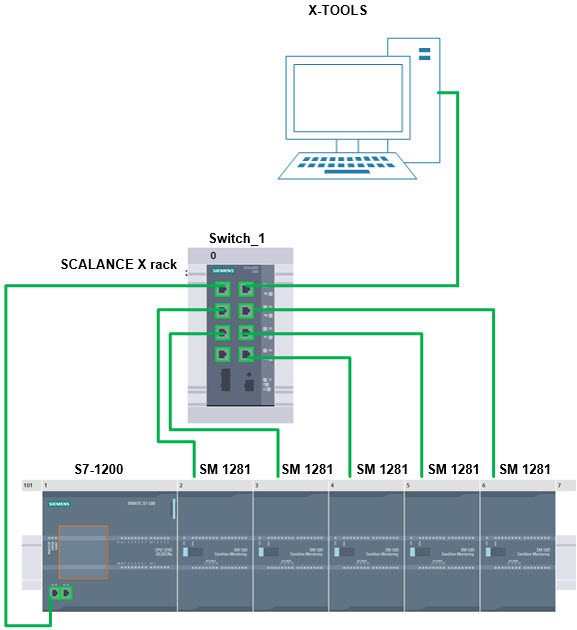
In the "RUN: X-Tools" operating mode, the vibration data for all configured channels is acquired and the streaming interface for X-Tools is enabled. If the SM 1281 is in this operating mode, X-Tools can establish a streaming connection. The RMS and DKW characteristic values are calculated, but no spectra. There is no monitoring. The calculated characteristic values are also made available via the streaming interface.
If the SM 1281 is in this operating mode, make sure that only one Ethernet port is used on each SM 1281 module and that the port is connected directly to a switch. Only this star-shaped network structure can ensure streaming to X-Tools without data loss (see the following Fig. 1).
CMS1200, XTools, SM1281,
https://support.industry.siemens.com/cs/attachments/109757963/cms1200_sm1281_operating_manual_en-US_en-US.pdf
http://plc.myforum.ro/cms-x-tools-v-0404-express-vt7796.html |
|
| Back to top |
|
|
|

 FAQ
FAQ Search
 Memberlist
 Usergroups
 Register
 Profile
 Log in to check your private messages
 Log in


