 |
plc.myforum.ro
PLCs users www.plc.myforum.ro!
|
| View previous topic :: View next topic |
| Author |
Message |
gamax
Member

Joined: 15 Jul 2016
Posts: 131
|
 Posted: 06/04/2022 19:12 Post subject: Modular Application Creator Posted: 06/04/2022 19:12 Post subject: Modular Application Creator |
 |
|
SIMATIC Modular Application Creator
https://support.industry.siemens.com/cs/document/109762852/
With the Modular Application Creator, you can produse high-quality machine projects automatically based on predefined and tested equipment modules. With this procedure you avoid sources of error and save time during engineering and commissioning.
The Modular Application Creator enables the automatic generation of TIA Portal projects. Especially with complex machine configurations, such as multi-belt control or other multi-axis applications, this is very efficient compared to manually creating and assigning software blocks and parameters to the automation project directly in the TIA Portal.
The starting point is a TIA Portal project, with the needed hardware prepared. The software, which is then generated in the automation project, is defined in so called equipment modules (the corresponding download can be found under the entry ID 109762849). The modules offer a technological view of the application and can be used without any knowledge of TIA Portal programming. The modules are stored in a separate repository that is independent of the tool itself and has to be connected via the settings.
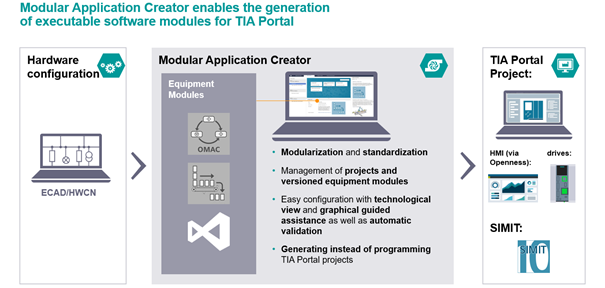
After starting the tool, the user can select a prepared TIA Portal project and fabricate a project with it. In this process, the TIA Portal project is read out and the equipment modules available for the machine project are displayed. The required equipment modules must then be assigned to a PLC in the project.
The parameterization of an equipment module itself is performed in a technological view that maps this application in its specific input options. Examples are axes names, setting parameters from mechanical design, etc. The user is supported by a validation of the inputs, which not only takes incorrect inputs into account but also cross-dependencies, in order to exclude sources of error here.
When the parameterization is completed, all required components including the parameter values and the interconnection to the drives are generated into the TIA Portal project at the push of a button. Then these parts of the TIA Portal project can be downloaded to a (software-)PLC and the functionality can be tested.
To generate a TIA Portal project that runs in a machine, a corresponding license is required in each PLC into which a module is generated:
for standard modules like OMAC or Weihenstephan the order number is 6ES78230MA001BA0
for modules with technology objects such as Intelligent Belt, order number is 6ES78230MA001DA0
In the background, the information of all used components and modules including their parameterization as well as the generated TIA Portal project is saved in a project directory, which can be read out again at any time using various filter mechanisms.
Downloads
Modular Application Creator 17.1 (for TIA-Portal V17) 2022-04-06
https://support.industry.siemens.com/cs/attachments/109762852/Modular_Application_Creator_V17.1_all_in_one.zip
https://support.industry.siemens.com/cs/attachments/109762852/Modular_Application_Creator_17.01.00.03_04.01.2022.zip
https://support.industry.siemens.com/cs/attachments/109762852/Getting_Started_Modular_Application_Creator_EN_17_1.pdf
Modular Application Creator 2.0 (for TIA-Portal V16)
https://support.industry.siemens.com/cs/attachments/109762852/109762852_Modular_Application_Creator_02.00.110.00_12.16.2019.zip
https://support.industry.siemens.com/cs/attachments/109762852/Getting_Started_Modular_Application_Creator_EN.pdf |
|
| Back to top |
|
 |
|
|
You cannot post new topics in this forum
You cannot reply to topics in this forum
You cannot edit your posts in this forum
You cannot delete your posts in this forum
You cannot vote in polls in this forum
|
Powered by phpBB © 2001, 2005 phpBB Group
Fa-ti si tu propriul forum GRATUIT, pe www.myforum.ro |
 FAQ
FAQ Search
 Memberlist
 Usergroups
 Register
 Profile
 Log in to check your private messages
 Log in


