 |
plc.myforum.ro
PLCs users www.plc.myforum.ro!
|
| View previous topic :: View next topic |
| Author |
Message |
bovrrjyak
Junior

Joined: 26 Jun 2019
Posts: 5
|
 Posted: 18/02/2020 08:26 Post subject: Modular Application Creator Equipment Modules Posted: 18/02/2020 08:26 Post subject: Modular Application Creator Equipment Modules |
 |
|
SIMATIC Modular Application Creator Equipment Modules
https://support.industry.siemens.com/cs/document/109762849/simatic-modular-application-creator-equipment-modules
With equipment modules, a TIA Portal machine project can be generated using the Modular Application Creator. The parameterization of an equipment module is made in a technological view. The user is supported by a validation of the entries, which not only considers incorrect entries but also cross-dependencies. This procedure reduces the sources of errors and the time required for engineering.
An equipment module is packaged in a Microsoft standard format which has been optimized for handling in the Modular Application Creator (please see entry ID109762852). It always contains the same coherent structure:
Besides the required TIA Portal resources, all the commands for generating them into a TIA Portal project are included. Appropriately technologically oriented operating screens for configuration support the parameterizing of the module in relationship to the details of the machinery. And a sophisticated versioning allows managing the modules in the project (e.g. updating to newer versions) or support to find out which module was used with which version in specific projects.
Four equipment modules are available for the version V2.0 of the SIMATIC Modular Application Creator:
OMAC PackML Mode and State Manager:
Configurable software libraries for OMAC-compliant operating mode management in SIMATIC S7-1500.
Weihenstephan Standards:
Configurable software libraries defines tags for data evaluation and operating modes in SIMATIC S7-1500 representing the Weihenstephan Standards.
Intelligent Belt:
Configurable software blocks for the "Multi-belt control" application. This enables products arriving one after another to be received and made available together at an unloading position. The most important feature is that loading and unloading can be performed independently.
Project Template with Tech Demo module:
A preconfigured TIA Portal project template which contains a configurable equipment module for a "Flying saw/shears" application example that can be applied to the hardware of the S7-1500T demo case with SINAMICS S210.
Additional modules are currently in the planning stages and will be published here.
https://letsupload.cc/z6P1O8afo6/109762849_Modular_application_Creator_Equipment_Modules_02.00.110.00_02.12.2020_zip |
|
| Back to top |
|
 |
bovrrjyak
Junior
Joined: 26 Jun 2019
Posts: 5
|
| Posted: 18/02/2020 08:30 Post subject: SIMATIC Modular Application Creator |
|
|
SIMATIC Modular Application Creator
https://support.industry.siemens.com/cs/document/109762852/simatic-modular-application-creator
With the Modular Application Creator, you can făcute high-quality machine projects automatically based on predefined and tested equipment modules. With this procedure you avoid sources of error and save time during engineering and commissioning.
The Modular Application Creator enables the automatic generation of TIA Portal projects. Especially with complex machine configurations, such as multi-belt control or other multi-axis applications, this is very efficient compared to manually creating and assigning software blocks and parameters to the automation project directly in the TIA Portal.
The starting point is a TIA Portal project, with the needed hardware prepared. The software, which is then generated in the automation project, is defined in so called equipment modules (the corresponding download can be found under the entry ID 109762849). The modules offer a technological view of the application and can be used without any knowledge of TIA Portal programming. The modules are stored in a separate repository that is independent of the tool itself and has to be connected via the settings.
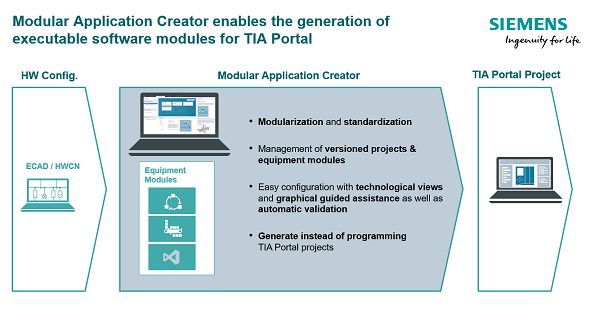
The Modular Application Creator Start Application:
https://support.industry.siemens.com/cs/attachments/109762852/109762852_Modular_Application_Creator_02.00.110.00_12.16.2019.zip
https://support.industry.siemens.com/cs/attachments/109762852/109762852_Modular_application_Creator_System_Components_02.00.110.00_12.16.2019.zip
https://letsupload.cc/veR3O4a8o1/109762852_Modular_application_Creator_System_Components_02.00.110.00_12.16.2019_zip
https://letsupload.cc/z6RdO0a9oa/109762852_Modular_Application_Creator_02.00.110.00_12.16.2019_zip |
|
| Back to top |
|
|
|
|
You cannot post new topics in this forum
You cannot reply to topics in this forum
You cannot edit your posts in this forum
You cannot delete your posts in this forum
You cannot vote in polls in this forum
|
Powered by phpBB © 2001, 2005 phpBB Group
Fa-ti si tu propriul forum GRATUIT, pe www.myforum.ro |
 FAQ
FAQ Search
 Memberlist
 Usergroups
 Register
 Profile
 Log in to check your private messages
 Log in


