| View previous topic :: View next topic |
| Author |
Message |
escro599
Junior

Joined: 19 May 2018
Posts: 19
|
 Posted: 18/10/2018 16:46 Post subject: mmc siemens Posted: 18/10/2018 16:46 Post subject: mmc siemens |
 |
|
Hello
can a siemens mmc card be copied to a mmc card not coming from siemens ?? |
|
| Back to top |
|
 |
DDMan
Junior
Joined: 08 Feb 2018
Posts: 10
|
| Posted: 18/10/2018 19:42 Post subject: Re: mmc siemens |
|
|
| escro599 wrote: | Hello
can a siemens mmc card be copied to a mmc card not coming from siemens ?? |
Every MMC has private CID and CSD register where are stored information as OEM/APPLICATION ID, PRODUCT NAME
If you have SIEMENS MMC accidentally formatted in standard MMC/SD card reader/writer (for example as FAT format) you can repair it in this standard MMC/SD reader/writer.
1. read original SIEMENS MMC by S7imgrd (the same size as failed card)
2. write this image to failed MMC by S7imgwr
If you have a NON-SIMATIC MMC in S7 device you can't use as natural MMC as S7 needs card with special record in CID and CSD registers
| Code: | ==============================================================================
00: FFh 01h FFh FFh FFh FFh FFh FFh
00: FFh FFh FFh FFh FFh FFh FFh FFh
00: FFh FFh FFh FFh FFh FFh FFh FFh
00: FFh FFh FFh FFh FFh FFh FFh FFh
01: FFh 00h FFh FFh FFh FFh FFh FFh
01: FFh FFh FFh FFh FFh FFh FFh FFh
01: FFh FFh FFh FFh FFh FFh FFh FFh
01: FFh FFh FFh FFh FFh FFh FFh FFh
CID: FFh 00h FEh 06h 00h 02h 41h 06h
CID: 41h 00h 00h 00h 25h 1Dh B9h 0Bh
CID: 20h 38h 87h 8Eh 36h FFh FFh FFh
CID: FFh FFh FFh FFh FFh FFh FFh FFh
CSD: FFh 00h FEh 48h 0Eh 01h 2Ah 0Fh
CSD: F9h 81h E9h F6h D9h 01h E1h 8Ah
CSD: 40h 00h 5Dh BEh 4Fh FFh FFh FFh
CSD: FFh FFh FFh FFh FFh FFh FFh FFh
----------------------CID STRUCTURE (10)-----------------------
Manufacturer ID MID : 06h
OEM/Application ID OID : 00h 02h
Product name PNM : 41h 06h 41h 00h 00h 00h
Produkt revision PRV : 25h
Product serial number PNM : 1Dh B9h 0Bh 20h
Manufacturing date MDT : 38h (MM/YY=03/05)
7-bit CRC checksum CRC7 [7:1] : 43h (43h)
16-bit CRC checksum CRC7 [32:1] : 8E36h (8E36h)
----------------------CSD STRUCTURE (09)-----------------------
CSD structure CSD_STR : `01`
Spec versione SPEC_VER : `0010`
Reserved 00 : `00`
Data read access time 1 TAAC : 0x0E (reserved1ms)
Data read access time 2 NSAC : 0x01
Max. data transfer rate TRAN_SPD : 0x2A (2.0x10 Mbit/s)
Card command classes CCC : 0x0FF
Max read data block len R_BLK_LEN : 0x9 (512 bytes)
Partial bl read allowed R_BLK_PAR : 1 (Enabled)
Write block misalignment W_BLK_MIS : 0 (Disabled)
Read block misalignment R_BLK_MIS : 0 (Disabled)
DSR implemented DSR_IMP : 0 (Disabled)
Reserved 00 : `00`
Device Size C_SIZE : 0x7A7
Max. read current Vdd min VDD_R_C_MIN : 0x06 (60 mA)
Max. read current Vdd max VDD_R_C_MAX : 0x02 (10 mA)
Max. write I at Vdd min VDD_W_C_MIN : 0x06 (60 mA)
Max. write I at Vdd max VDD_W_C_MAX : 0x06 (80 mA)
Device size multiplyer C_SIZE : 0x04 (64)
Erase group size ERA_GRP_SI : 0x00 (00 sectors)
Erase group siz. multip. ERA_GRP_MU : 0x05 (128)
Write protect grp. size WP_GRP_SI : 0x00 (00 sectors))
Write protect grp. ena. WP_GRP_E : 1 (Enabled)
Manufacturer default ECC DEFAULT_ECC : 0x0
Write speed factor R2W_FACTOR : 0x0 (1x)
Max. wr data block len WR_BLK_LEN : 0x9 (512 bytes)
Partial blk. wr allowed WR_BLK_PAR : 0 (Disable)
Reserved -- : 0x00 (0x00)
Content prot. app CO_PRO_ALL :x0 (Disable)
File format group F_FORM_GRP :x0 (RESERVED)
Copy flag (OTP) COPY :x0 (ORIGINAL)
Permanent write protect PE_WR_PRO :x0 (NOT PROTECTED)
Temporary write protect TE_WR_PRO :x0 (NOT PROTECTED)
File format FILE_FMT :x0x0 (Reserved)
ECC ECC :x0x0 (2 bits)
7-bit CRC checksum CRC7 [7:1] : 0x2Eh (2Eh)
Not used -- : 0x1
16-bit CRC checksum CRC7 [32:1] : BE4Fh (BE4Fh)
==============================================================================
|
So final..NOT |
|
| Back to top |
|
|
escro599
Junior
Joined: 19 May 2018
Posts: 19
|
| Posted: 19/10/2018 13:26 Post subject: Re: mmc siemens |
|
|
| DDMan wrote: | | escro599 wrote: | Hello
can a siemens mmc card be copied to a mmc card not coming from siemens ?? |
Every MMC has private CID and CSD register where are stored information as OEM/APPLICATION ID, PRODUCT NAME
If you have SIEMENS MMC accidentally formatted in standard MMC/SD card reader/writer (for example as FAT format) you can repair it in this standard MMC/SD reader/writer.
1. read autentic SIEMENS MMC by S7imgrd (the same size as failed card)
2. write this image to failed MMC by S7imgwr
If you have a NON-SIMATIC MMC in S7 device you can't use as normal MMC as S7 needs card with special record in CID and CSD registers
| Code: | ==============================================================================
00: FFh 01h FFh FFh FFh FFh FFh FFh
00: FFh FFh FFh FFh FFh FFh FFh FFh
00: FFh FFh FFh FFh FFh FFh FFh FFh
00: FFh FFh FFh FFh FFh FFh FFh FFh
01: FFh 00h FFh FFh FFh FFh FFh FFh
01: FFh FFh FFh FFh FFh FFh FFh FFh
01: FFh FFh FFh FFh FFh FFh FFh FFh
01: FFh FFh FFh FFh FFh FFh FFh FFh
CID: FFh 00h FEh 06h 00h 02h 41h 06h
CID: 41h 00h 00h 00h 25h 1Dh B9h 0Bh
CID: 20h 38h 87h 8Eh 36h FFh FFh FFh
CID: FFh FFh FFh FFh FFh FFh FFh FFh
CSD: FFh 00h FEh 48h 0Eh 01h 2Ah 0Fh
CSD: F9h 81h E9h F6h D9h 01h E1h 8Ah
CSD: 40h 00h 5Dh BEh 4Fh FFh FFh FFh
CSD: FFh FFh FFh FFh FFh FFh FFh FFh
----------------------CID STRUCTURE (10)-----------------------
Manufacturer ID MID : 06h
OEM/Application ID OID : 00h 02h
Product name PNM : 41h 06h 41h 00h 00h 00h
Produkt revision PRV : 25h
Product serial number PNM : 1Dh B9h 0Bh 20h
Manufacturing date MDT : 38h (MM/YY=03/05)
7-bit CRC checksum CRC7 [7:1] : 43h (43h)
16-bit CRC checksum CRC7 [32:1] : 8E36h (8E36h)
----------------------CSD STRUCTURE (09)-----------------------
CSD structure CSD_STR : `01`
Spec versione SPEC_VER : `0010`
Reserved 00 : `00`
Data read access time 1 TAAC : 0x0E (reserved1ms)
Data read access time 2 NSAC : 0x01
Max. data transfer rate TRAN_SPD : 0x2A (2.0x10 Mbit/s)
Card command classes CCC : 0x0FF
Max read data block len R_BLK_LEN : 0x9 (512 bytes)
Partial bl read allowed R_BLK_PAR : 1 (Enabled)
Write block misalignment W_BLK_MIS : 0 (Disabled)
Read block misalignment R_BLK_MIS : 0 (Disabled)
DSR implemented DSR_IMP : 0 (Disabled)
Reserved 00 : `00`
Device Size C_SIZE : 0x7A7
Max. read current Vdd min VDD_R_C_MIN : 0x06 (60 mA)
Max. read current Vdd max VDD_R_C_MAX : 0x02 (10 mA)
Max. write I at Vdd min VDD_W_C_MIN : 0x06 (60 mA)
Max. write I at Vdd max VDD_W_C_MAX : 0x06 (80 mA)
Device size multiplyer C_SIZE : 0x04 (64)
Erase group size ERA_GRP_SI : 0x00 (00 sectors)
Erase group siz. multip. ERA_GRP_MU : 0x05 (128)
Write protect grp. size WP_GRP_SI : 0x00 (00 sectors))
Write protect grp. ena. WP_GRP_E : 1 (Enabled)
Manufacturer default ECC DEFAULT_ECC : 0x0
Write speed factor R2W_FACTOR : 0x0 (1x)
Max. wr data block len WR_BLK_LEN : 0x9 (512 bytes)
Partial blk. wr allowed WR_BLK_PAR : 0 (Disable)
Reserved -- : 0x00 (0x00)
Content prot. app CO_PRO_ALL :x0 (Disable)
File compus group F_FORM_GRP :x0 (RESERVED)
Copy flag (OTP) COPY :x0 (ORIGINAL)
Permanent write protect PE_WR_PRO :x0 (NOT PROTECTED)
Temporary write protect TE_WR_PRO :x0 (NOT PROTECTED)
File format FILE_FMT :x0x0 (Reserved)
ECC ECC :x0x0 (2 bits)
7-bit CRC checksum CRC7 [7:1] : 0x2Eh (2Eh)
Not used -- : 0x1
16-bit CRC checksum CRC7 [32:1] : BE4Fh (BE4Fh)
==============================================================================
|
So final..NOT |
thank you ;) |
|
| Back to top |
|
|
escro599
Junior
Joined: 19 May 2018
Posts: 19
|
| Posted: 19/10/2018 13:35 Post subject: Re: mmc siemens |
|
|
| DDMan wrote: | | escro599 wrote: | Hello
can a siemens mmc card be copied to a mmc card not coming from siemens ?? |
Every MMC has private CID and CSD register where are stored information as OEM/APPLICATION ID, PRODUCT NAME
If you have SIEMENS MMC accidentally formatted in standard MMC/SD card reader/writer (for example as FAT format) you can repair it in this standard MMC/SD reader/writer.
1. read original SIEMENS MMC by S7imgrd (the same size as failed card)
2. write this image to failed MMC by S7imgwr
If you have a NON-SIMATIC MMC in S7 device you can't use as normal MMC as S7 needs card with special record in CID and CSD registers
| Code: | ==============================================================================
00: FFh 01h FFh FFh FFh FFh FFh FFh
00: FFh FFh FFh FFh FFh FFh FFh FFh
00: FFh FFh FFh FFh FFh FFh FFh FFh
00: FFh FFh FFh FFh FFh FFh FFh FFh
01: FFh 00h FFh FFh FFh FFh FFh FFh
01: FFh FFh FFh FFh FFh FFh FFh FFh
01: FFh FFh FFh FFh FFh FFh FFh FFh
01: FFh FFh FFh FFh FFh FFh FFh FFh
CID: FFh 00h FEh 06h 00h 02h 41h 06h
CID: 41h 00h 00h 00h 25h 1Dh B9h 0Bh
CID: 20h 38h 87h 8Eh 36h FFh FFh FFh
CID: FFh FFh FFh FFh FFh FFh FFh FFh
CSD: FFh 00h FEh 48h 0Eh 01h 2Ah 0Fh
CSD: F9h 81h E9h F6h D9h 01h E1h 8Ah
CSD: 40h 00h 5Dh BEh 4Fh FFh FFh FFh
CSD: FFh FFh FFh FFh FFh FFh FFh FFh
----------------------CID STRUCTURE (10)-----------------------
Manufacturer ID MID : 06h
OEM/Application ID OID : 00h 02h
Product name PNM : 41h 06h 41h 00h 00h 00h
Produkt revision PRV : 25h
Product serial number PNM : 1Dh B9h 0Bh 20h
Manufacturing date MDT : 38h (MM/YY=03/05)
7-bit CRC checksum CRC7 [7:1] : 43h (43h)
16-bit CRC checksum CRC7 [32:1] : 8E36h (8E36h)
----------------------CSD STRUCTURE (09)-----------------------
CSD structure CSD_STR : `01`
Spec versione SPEC_VER : `0010`
Reserved 00 : `00`
Data read access time 1 TAAC : 0x0E (reserved1ms)
Data read access time 2 NSAC : 0x01
Max. data transfer rate TRAN_SPD : 0x2A (2.0x10 Mbit/s)
Card command classes CCC : 0x0FF
Max read data block len R_BLK_LEN : 0x9 (512 bytes)
Partial bl read allowed R_BLK_PAR : 1 (Enabled)
Write block misalignment W_BLK_MIS : 0 (Disabled)
Read block misalignment R_BLK_MIS : 0 (Disabled)
DSR implemented DSR_IMP : 0 (Disabled)
Reserved 00 : `00`
Device Size C_SIZE : 0x7A7
Max. read current Vdd min VDD_R_C_MIN : 0x06 (60 mA)
Max. read current Vdd max VDD_R_C_MAX : 0x02 (10 mA)
Max. write I at Vdd min VDD_W_C_MIN : 0x06 (60 mA)
Max. write I at Vdd max VDD_W_C_MAX : 0x06 (80 mA)
Device size multiplyer C_SIZE : 0x04 (64)
Erase group size ERA_GRP_SI : 0x00 (00 sectors)
Erase group siz. multip. ERA_GRP_MU : 0x05 (128)
Write protect grp. size WP_GRP_SI : 0x00 (00 sectors))
Write protect grp. ena. WP_GRP_E : 1 (Enabled)
Manufacturer default ECC DEFAULT_ECC : 0x0
Write speed factor R2W_FACTOR : 0x0 (1x)
Max. wr data block len WR_BLK_LEN : 0x9 (512 bytes)
Partial blk. wr allowed WR_BLK_PAR : 0 (Disable)
Reserved -- : 0x00 (0x00)
Content prot. app CO_PRO_ALL :x0 (Disable)
File format group F_FORM_GRP :x0 (RESERVED)
Copy flag (OTP) COPY :x0 (ORIGINAL)
Permanent write protect PE_WR_PRO :x0 (NOT PROTECTED)
Temporary write protect TE_WR_PRO :x0 (NOT PROTECTED)
File compus FILE_FMT :x0x0 (Reserved)
ECC ECC :x0x0 (2 bits)
7-bit CRC checksum CRC7 [7:1] : 0x2Eh (2Eh)
Not used -- : 0x1
16-bit CRC checksum CRC7 [32:1] : BE4Fh (BE4Fh)
==============================================================================
|
So final..NOT |
thank you ;) |
|
| Back to top |
|
|
SHKODRAN
Member

Joined: 25 Apr 2012
Posts: 140
Location: Russia
|
| Posted: 20/10/2018 14:04 Post subject: |
|
|
Hi all,
anyway to change cid & csd structure of mmc card ?
Thanks. |
|
| Back to top |
|
|
DDMan
Junior
Joined: 08 Feb 2018
Posts: 10
|
| Posted: 21/10/2018 12:27 Post subject: |
|
|
S7 recognize MMC size from CID, CSD and card format. All these three records must match as S7 checks and compares stored info. from CID and CSD. CID and CSD records are OTP (One Time Programable by manufacturer). In CSD register last 8 bits and CRC are partialy user programable but not help.
If you need to make true bit copy of MMC card or you want to repair failed MMC card (in the sense it can be read however having corrupted data but functional), you have to use WinHex program
http://www.x-ways.net/winhex/index-m.html
| Code: | | https://ulozto.net/!XZpFYOGqAMNJ/winhex-v17-9-sr2-zip |
Read the original MMC
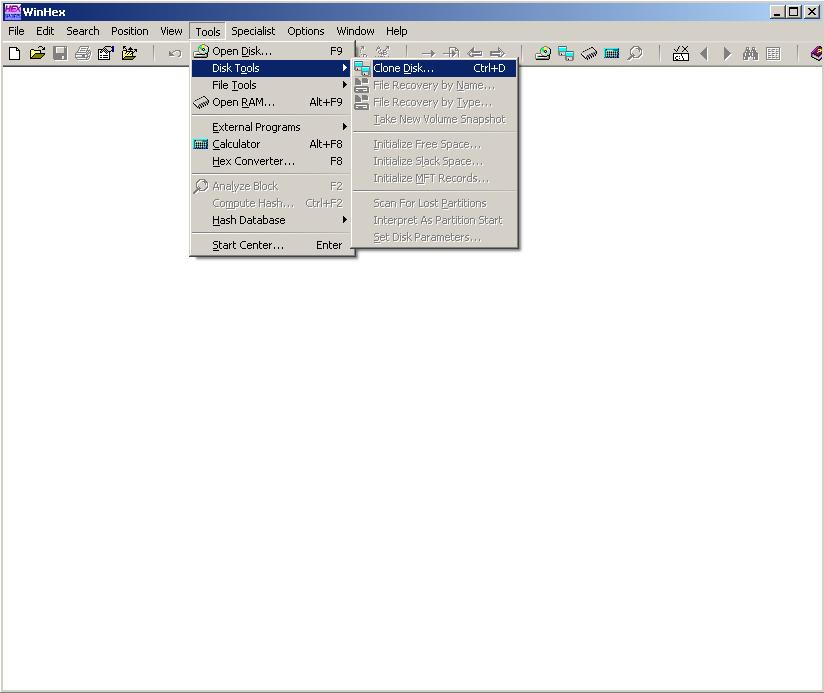
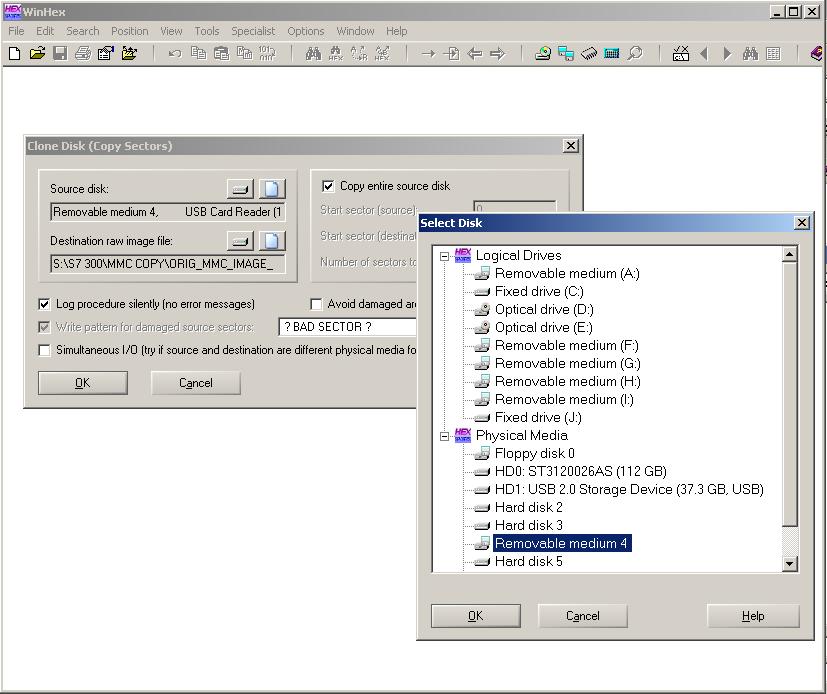
Write the autentic image into failed (corrupted data but functional) MMC or new MMC
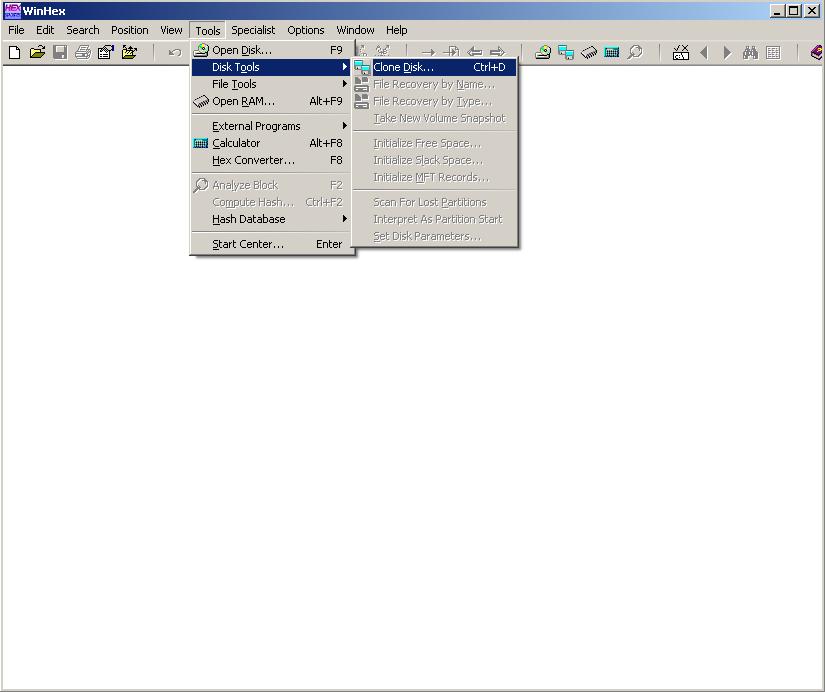
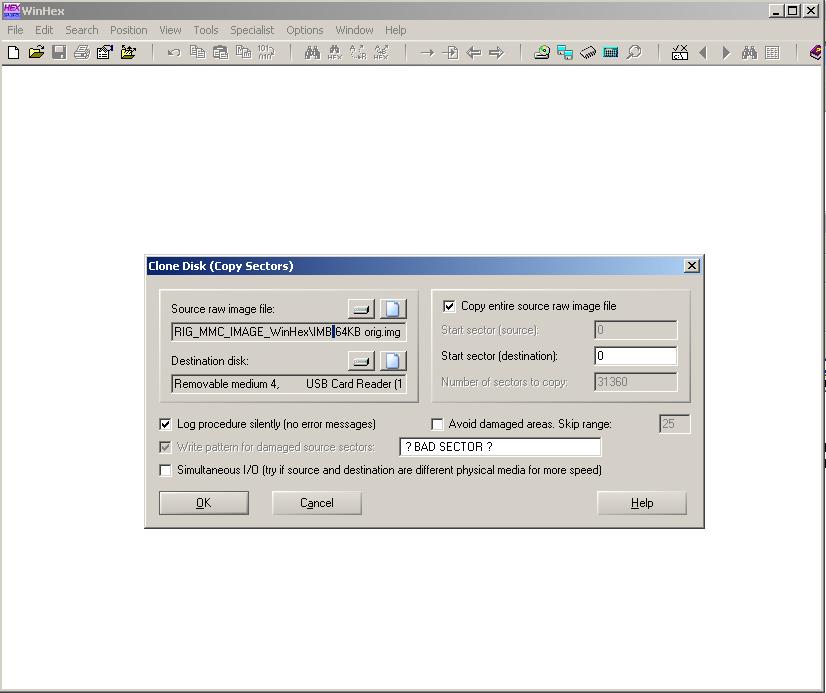
Use of S7imgrd and S7imgwr don't make true bit copy of the MMC, remember.
Conclusion:
OTP (One Time Programmable) records are crosschecked and encrypted. If the checksum is different give errors.
The only way eventually is to check how S7 firmware made all decryption and checks the MMC integrity but not aware yet. |
|
| Back to top |
|
|
SHKODRAN
Member
Joined: 25 Apr 2012
Posts: 140
Location: Russia
|
| Posted: 21/10/2018 13:44 Post subject: |
|
|
OPT ?
do not agree with you.
If through the procedure below, with mmc card samsung can change CID, I do not see why can not change on the natural mmc ...
https://www.youtube.com/watch?v=tbWXsSaAb2M&t=147s |
|
| Back to top |
|
|
DDMan
Junior
Joined: 08 Feb 2018
Posts: 10
|
| Posted: 21/10/2018 14:12 Post subject: |
|
|
I saw this..
don't work with Siemens MMC... |
|
| Back to top |
|
|
Gladiator
Junior
Joined: 03 May 2013
Posts: 8
|
| Posted: 10/11/2018 06:19 Post subject: Re: mmc siemens |
|
|
| Can I change "Product serial number" of the image file then backup to another Siemens MCC? |
|
| Back to top |
|
|
Attos5
Junior
Joined: 21 Oct 2018
Posts: 3
|
| Posted: 10/11/2018 14:16 Post subject: |
|
|
To combat the clones, the serial number is used, which is on the label and in two places on the card itself (in the crdinfo.bin file and at the end of the disk) and perhaps there is also a checksum.

Because of this serial number, the image of someone else's card will not work without alterations - the controller will write that there is no card or it is of a different type.
It is necessary to understand how the checksum is formed and then it will be possible to recover these cards.
Serial numbers SMC_ :(
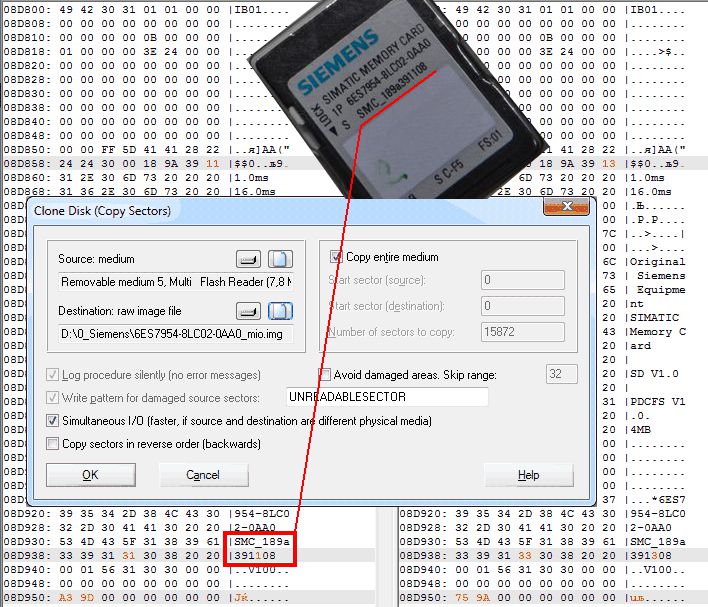
In case of damage in a computer under Windows:
1. Try to compus it regularly in the controller - the procedure is described in the documentation *
You can correct the situation by uploading the autentic image of this card through a consumer card reader and WinHex direct recording software.
Similarly, you can shoot images for archiving.
The data of official registers that distinguish Siemens cards from others
Images of maps for comparison and utilities
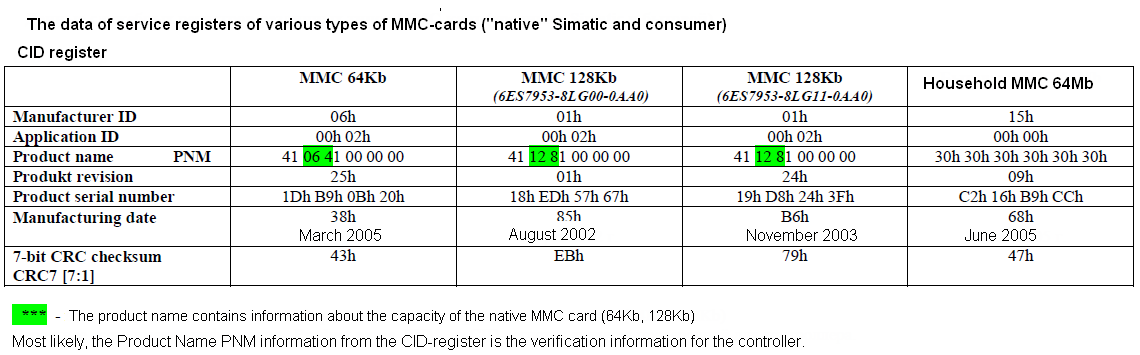
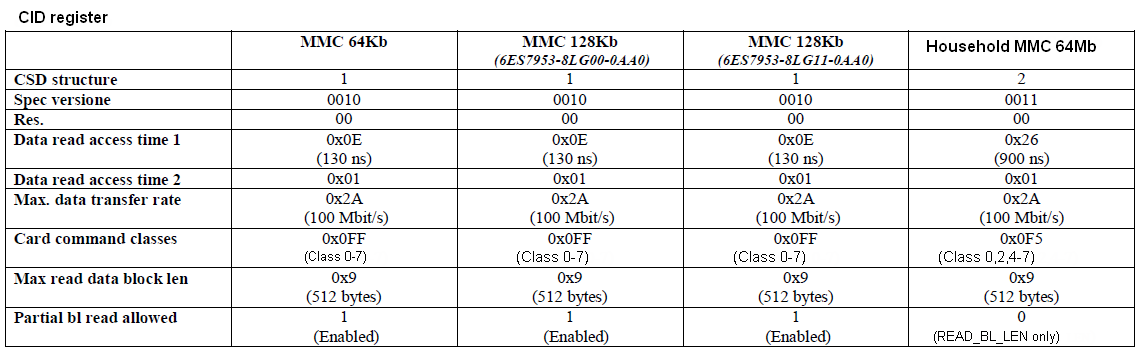
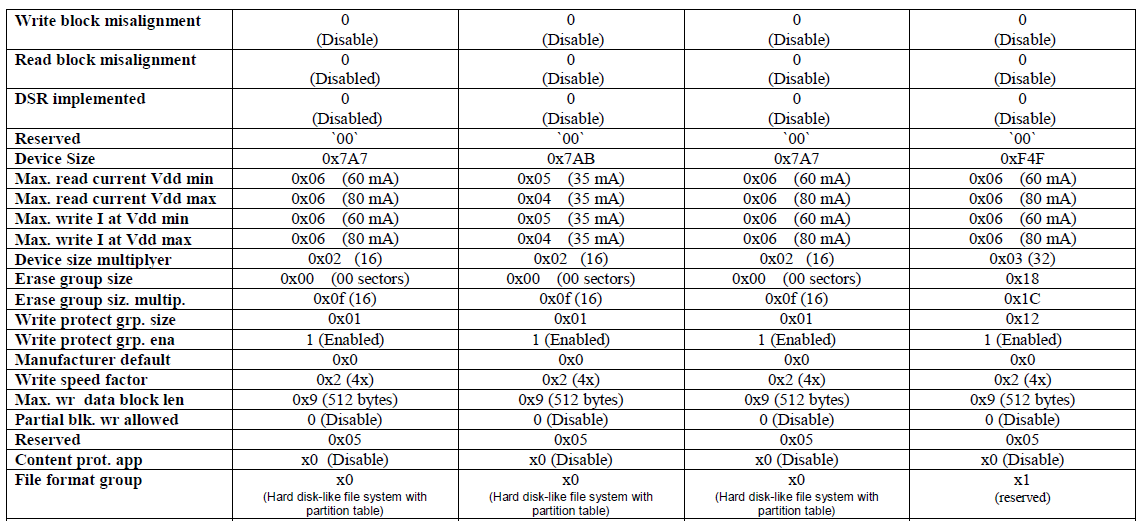

Images
https://anonfile.com/0cB9Pck5ba/6ES7953-8LP10-0AA0_MMC_8MB_zip
https://anonfile.com/17BaPak0be/6ES7953-8LP10-0AA0_8MB_winhex_zip
https://anonfile.com/2dB6Pck6b1/6ES7953-8LP10-0AA0_8MB_zip
https://anonfile.com/32BePbk4b1/6ES7953-8LP31-0AA0_MMC_8MB_zip
https://anonfile.com/5bBbP5k8b4/6ES7953-8LJ11-0AA0_512KB_winhex_zip
https://anonfile.com/41BcPak7b7/6ES7953-8LL31-0AA0_MMC_2MB_winhex_zip
https://anonfile.com/61B9P4k1b9/MMC_512_KB_6ES7953-8LJ20-0AA0_zip
https://anonfile.com/72BcP7kab0/MMC_512_KB_6ES7953-8LJ30-0AA0_zip
https://anonfile.com/85B2Pak8b1/S7_1200_24MB_zip
https://anonfile.com/AdBfP5k8bc/6ES7954-8LC02-0AA0_zip
https://anonfile.com/9aB8P9k8b1/MMC_128_KB_6ES7953-8LG30-0AA0_zip
https://anonfile.com/B4BbP1kcb1/6ES7954-8LF02-0AA0_24_MB_SMC_ZIP
https://anonfile.com/DaB6P4k3b5/6ES7953-8LP20-0AA0_MMC_8MB_zip
https://anonfile.com/E6BePekfbc/S7_MMC_ZIP
https://anonfile.com/HdB6P1k9be/s7imgwr2_zip
https://anonfile.com/GfBfP6kbbe/6ES7953-8LF11-0AA0_zip
https://anonfile.com/I5B0P9keb8/s7imgrd2_zip
https://anonfile.com/J0BeP2keb3/MMC_128_KB_6ES7953-8LG11-0AA0_ZIP
https://anonfile.com/LbBfP5k5b8/WinHex_v17.9_SR2_zip
Deleting the contents of the SIMATIC memory card You have the following options for deleting the contents of the SIMATIC memory card:
● delete files using Windows Explorer
● format with STEP 7 Note If you format the card with Windows utilities, you will render the SIMATIC memory card unusable as a storage medium for a CPU.
Deletion of files and folders is permitted, with the exception of the "__LOG__" and "crdinfo.bin" system files.
These are required by the CPU. If you delete these files, then you will no longer be able to use the SIMATIC memory card with the CPU. If the "__LOG__" and "crdinfo.bin" system files have been deleted, format the SIMATIC memory card as described in the following section.
Formatting a SIMATIC memory card
Note
Formatting of a SIMATIC memory card may only be carried out in a CPU. Otherwise the SIMATIC memory card cannot be used in the S7-1500 CPUs.
If you want to format the SIMATIC memory card using STEP 7, an online connection to the relevant CPU must exist. The relevant CPU is in the
STOP mode.
Proceed as follows to format a SIMATIC memory card:
1. Open the Online and Diagnostics view of the CPU (either from the project context or via "Accessible devices").
2. In the "Functions" folder, select the "Format memory card" group.
3. Click the "Format" button.
4. Click "Yes" in response to the confirmation prompt.
Result:
● The SIMATIC memory card is formatted for use in S7-1500 CPUs
● The data on the CPU are deleted with the exception of the IP address |
|
| Back to top |
|
|
Attos5
Junior
Joined: 21 Oct 2018
Posts: 3
|
| Posted: 15/05/2019 08:14 Post subject: accidental formatting MMC |
|
|
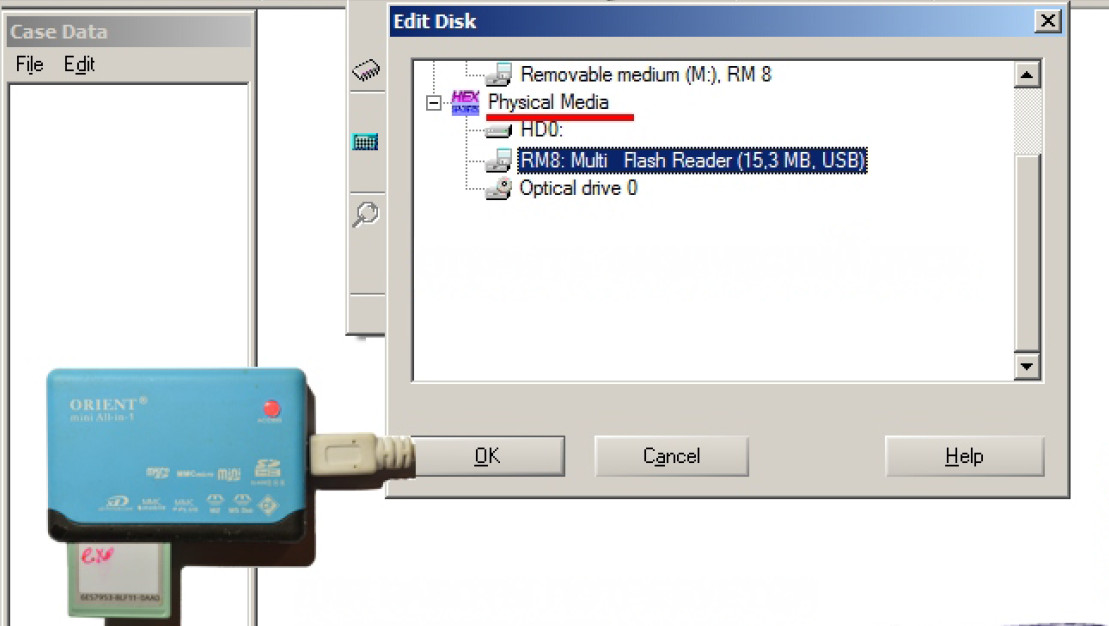
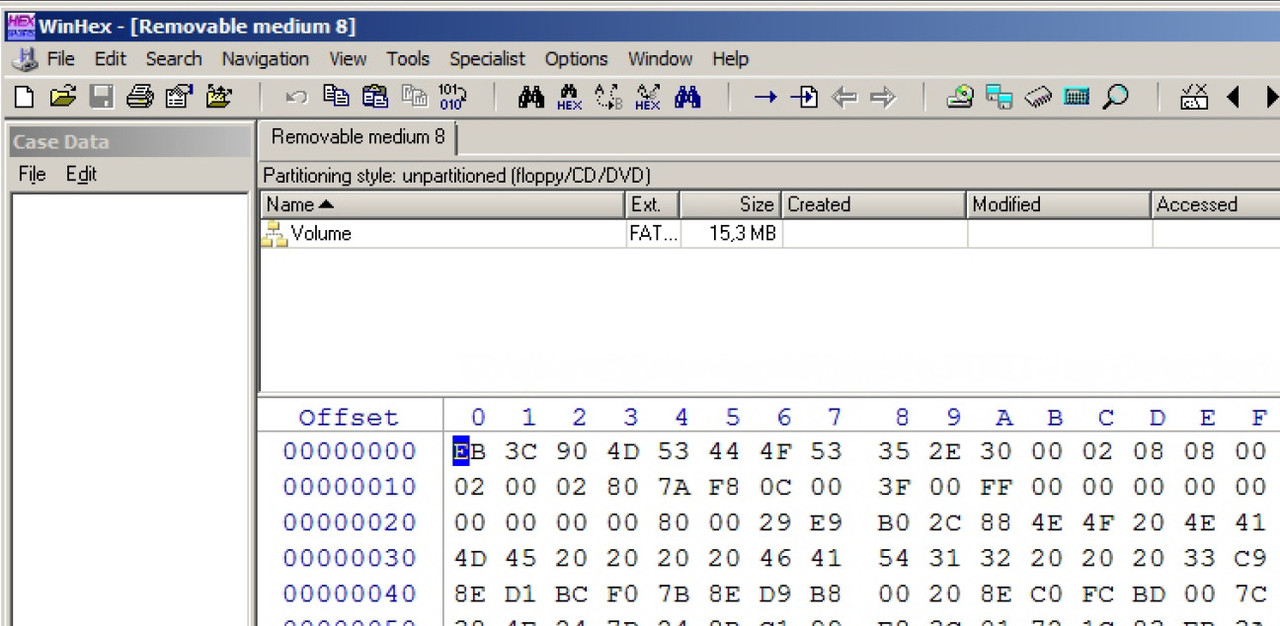
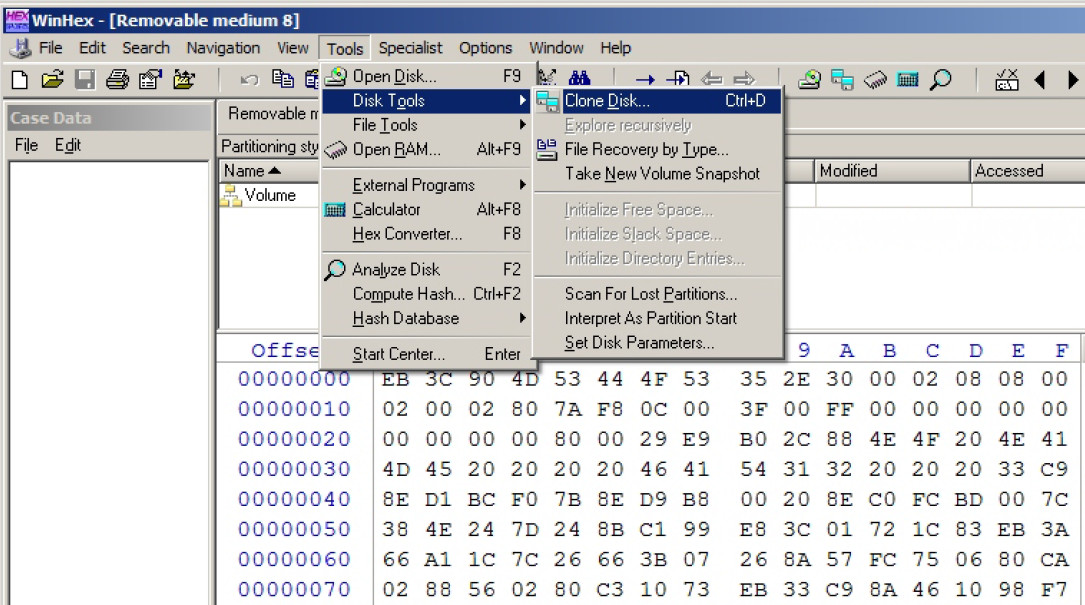
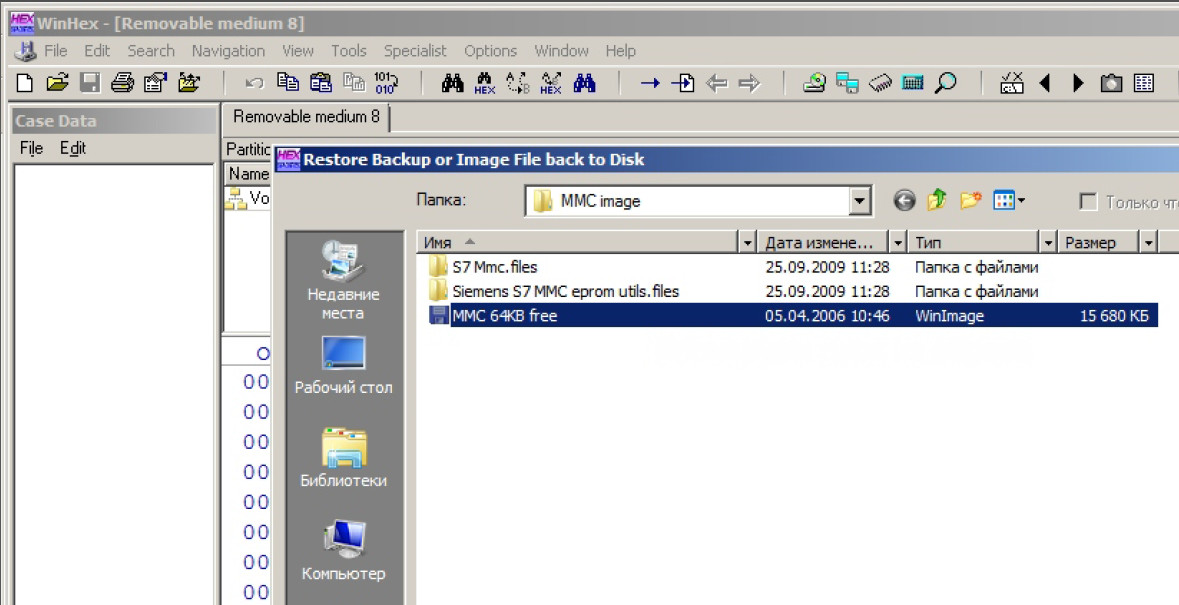
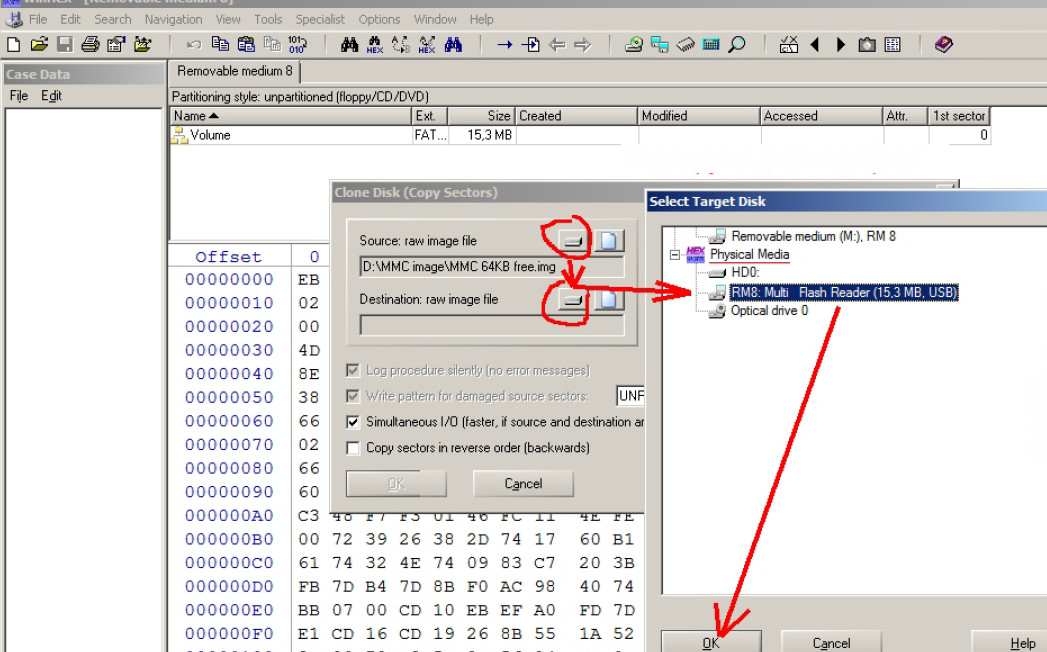
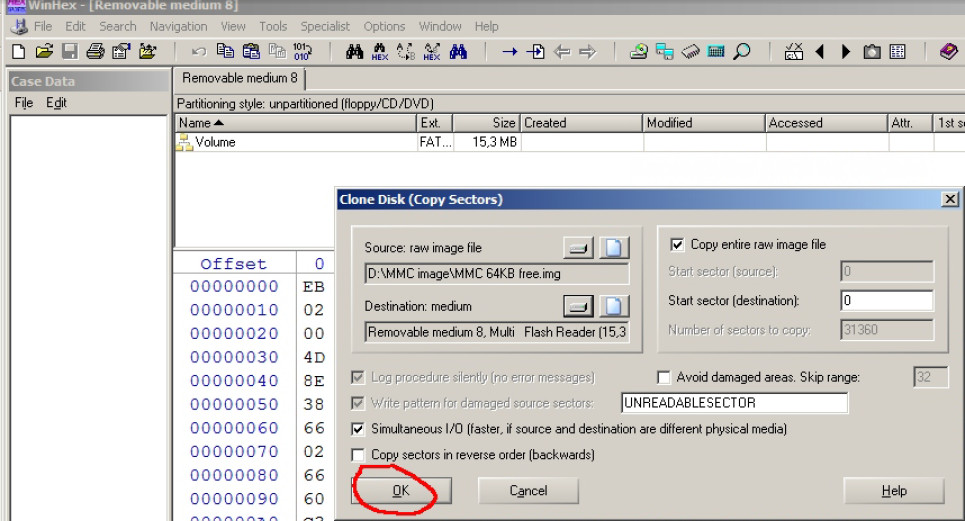
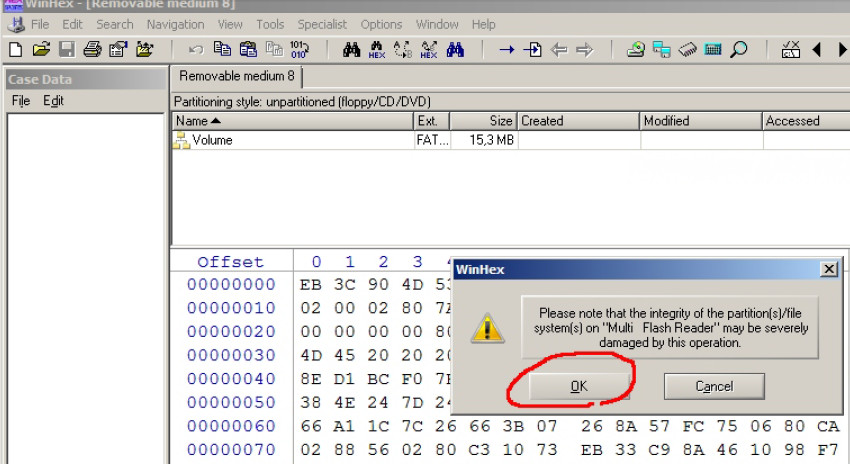
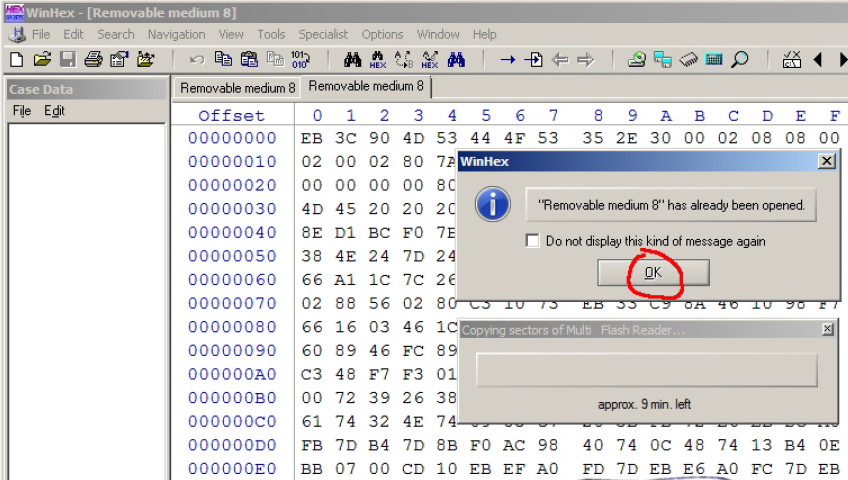
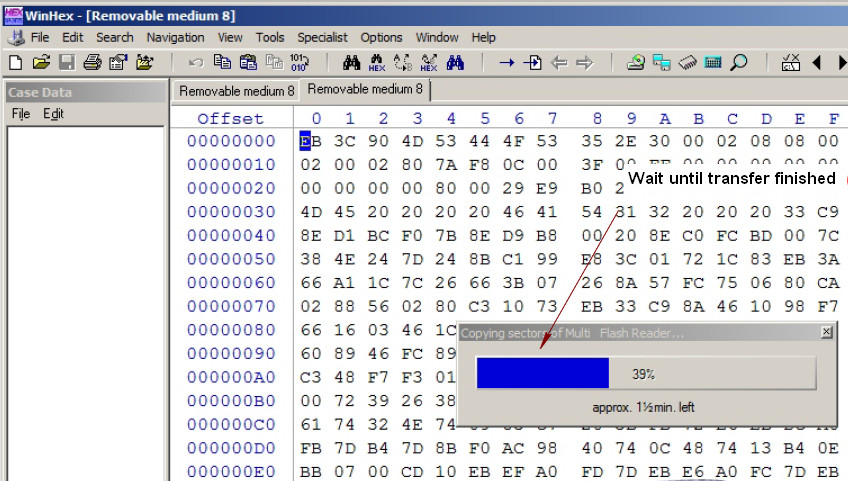
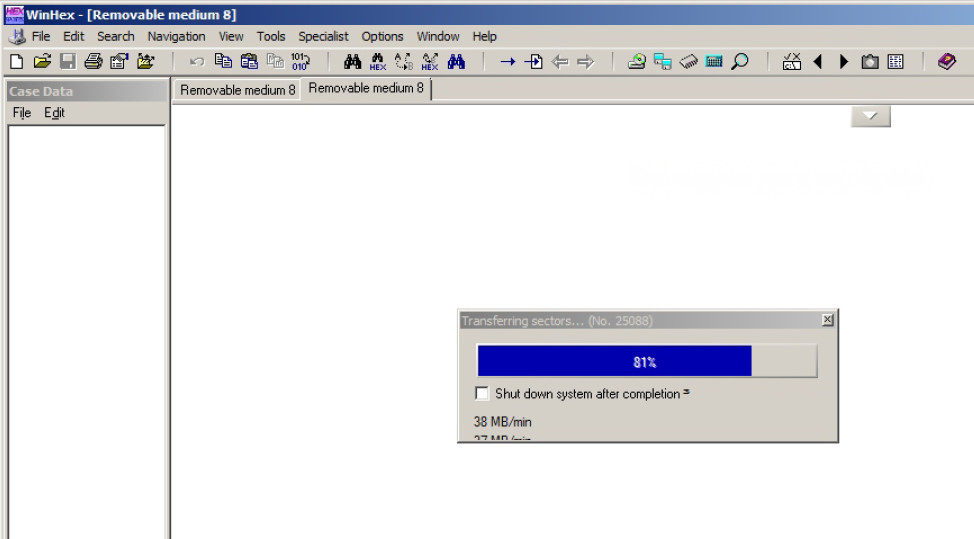
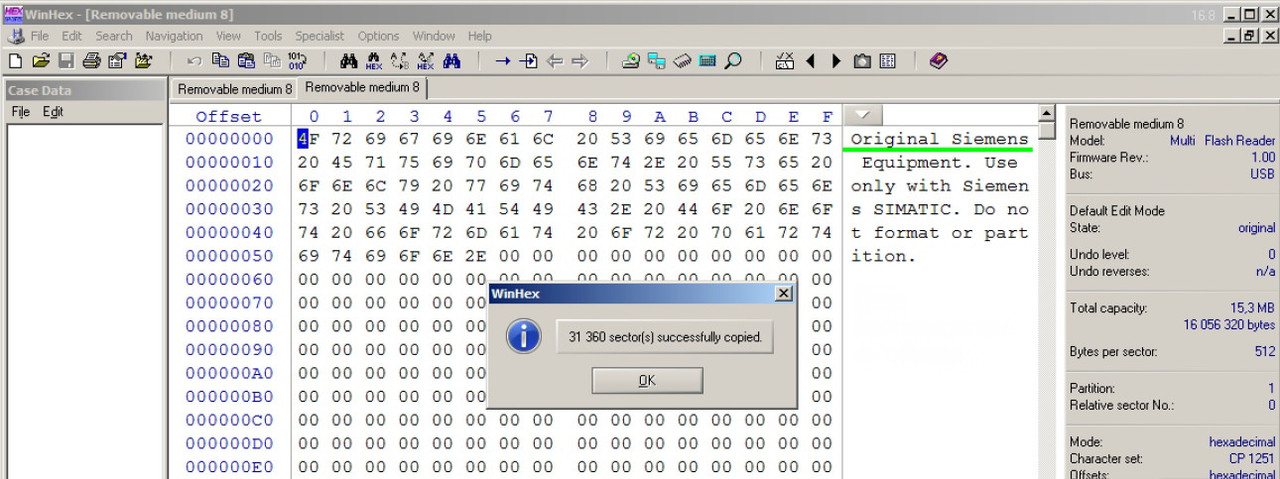
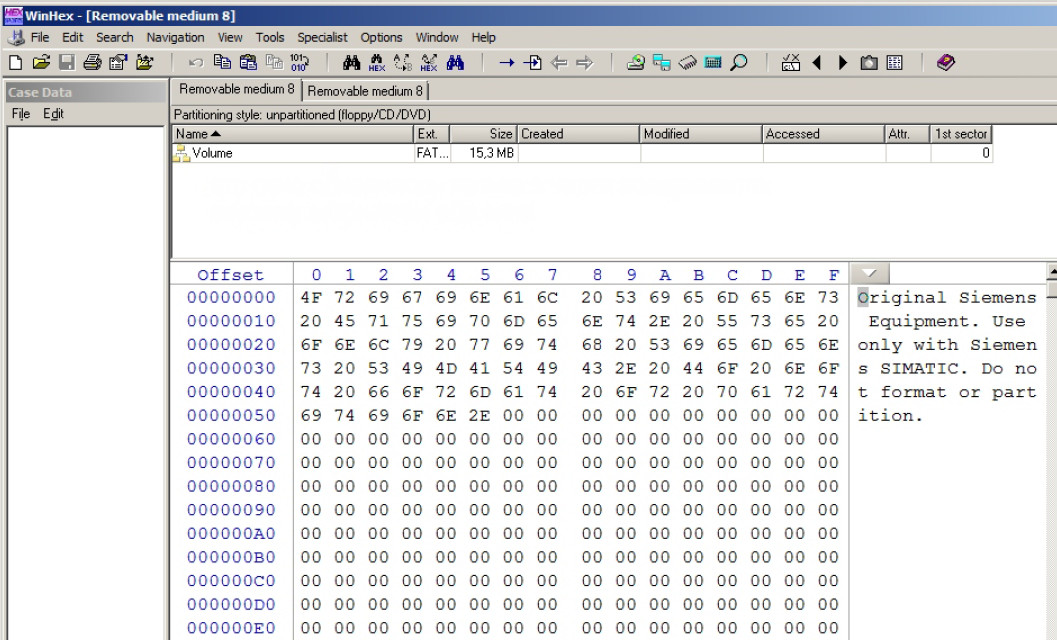
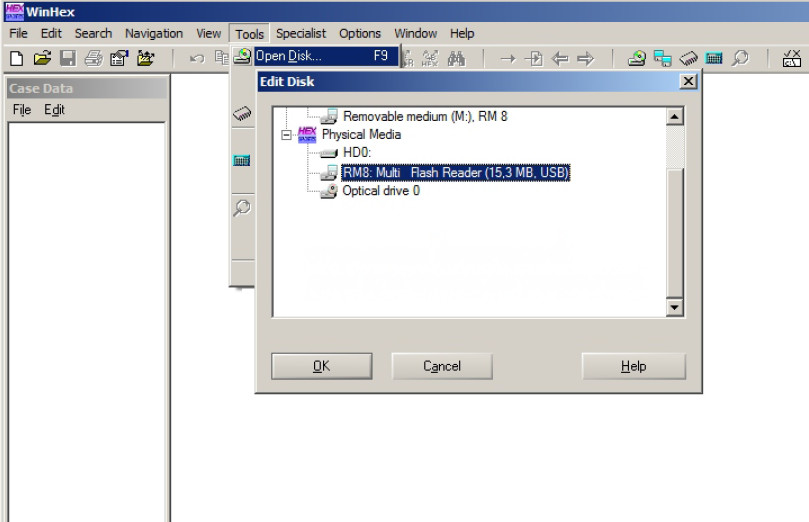
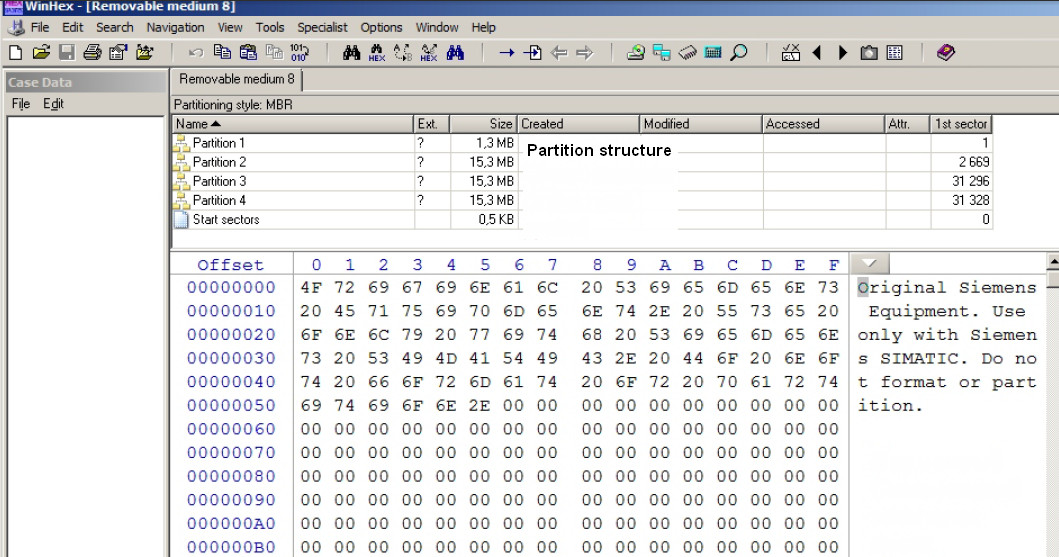
In case of accidental formatting MMC you can remedy the situation by uploading the original image through card reader via WinHex or ImgWr direct recording program.
Reformat MMC on FAT not NTFS
Then write the image on MMC images found on above post
Some steps described on:
 |
|
| Back to top |
|
|
magnyto
Junior
Joined: 24 Nov 2019
Posts: 2
|
| Posted: 03/02/2020 20:56 Post subject: |
|
|
thanks for information
To make a image file of your S7 MMC card place the card in a standard MULTICARD READER (recognized by your Win32 System) and
start the S7imgRD.exe. Select the drive letter of the card from the combo box and hit start
http://members.aon.at/uteetz/ |
|
| Back to top |
|
|
dracula
Member junior


Joined: 16 Jun 2015
Posts: 58
Location: Transilvania
|
| Posted: 25/03/2021 21:50 Post subject: |
|
|
https://anonfiles.com/C0O2A9mbua/Unlock_and_converter_MMC_Image_S7_rar
https://anonfiles.com/AeO1Afm5ue/Unlock_and_converter_MMC_Image_S7_v501_rar
https://anonfiles.com/E7O5A5m2u4/S7ImgRD_rar
https://anonfiles.com/G7O5Afmau5/S7ImgWR1_rar
[url=http://www.girlshare.ro/3770027287.4]Unlock_and_converter_MMC_Image_S7.rar[/url]
[url=http://www.girlshare.ro/3770027288.5]Unlock_and_converter_MMC_Image_S7_v501.rar[/url]
[url=http://www.girlshare.ro/3770027290.7]S7ImgRD.rar[/url]
[url=http://www.girlshare.ro/3770027291.8]S7ImgWR1.rar[/url] |
|
| Back to top |
|
|
9631pccb
Junior
Joined: 20 Jun 2022
Posts: 4
|
| Posted: 23/08/2022 08:44 Post subject: |
|
|
[URL=https://veryfiles.com/at5vpjj4gkmj]s7imgwr2.zip - 1.4 MB[/URL]
[URL=https://veryfiles.com/nixeg011y3iz]s7imgrd2.zip - 1.4 MB[/URL]
https://ulozto.net/tamhle/lGKVLlB8Qg4w/ |
|
| Back to top |
|
|
Hexados
Member junior
Joined: 22 Sep 2017
Posts: 52
|
| Posted: 19/03/2023 22:05 Post subject: |
|
|
| Attos5 wrote: | To combat the clones, the serial number is used, which is on the label and in two places on the card itself (in the crdinfo.bin file and at the end of the disk) and perhaps there is also a checksum.
Because of this serial number, the image of someone else's card will not work without alterations - the controller will write that there is no card or it is of a different type.
It is necessary to understand how the checksum is formed and then it will be possible to recover these cards.
Serial numbers SMC_ :(
In case of damage in a computer under Windows:
1. Try to compus it regularly in the controller - the procedure is described in the documentation *
You can correct the situation by uploading the original image of this card through a consumer card reader and WinHex direct recording software.
Similarly, you can shoot images for archiving.
The data of official registers that distinguish Siemens cards from others
Images of maps for comparison and utilities
Images
https://anonfile.com/0cB9Pck5ba/6ES7953-8LP10-0AA0_MMC_8MB_zip
https://anonfile.com/17BaPak0be/6ES7953-8LP10-0AA0_8MB_winhex_zip
https://anonfile.com/2dB6Pck6b1/6ES7953-8LP10-0AA0_8MB_zip
https://anonfile.com/32BePbk4b1/6ES7953-8LP31-0AA0_MMC_8MB_zip
https://anonfile.com/5bBbP5k8b4/6ES7953-8LJ11-0AA0_512KB_winhex_zip
https://anonfile.com/41BcPak7b7/6ES7953-8LL31-0AA0_MMC_2MB_winhex_zip
https://anonfile.com/61B9P4k1b9/MMC_512_KB_6ES7953-8LJ20-0AA0_zip
https://anonfile.com/72BcP7kab0/MMC_512_KB_6ES7953-8LJ30-0AA0_zip
https://anonfile.com/85B2Pak8b1/S7_1200_24MB_zip
https://anonfile.com/AdBfP5k8bc/6ES7954-8LC02-0AA0_zip
https://anonfile.com/9aB8P9k8b1/MMC_128_KB_6ES7953-8LG30-0AA0_zip
https://anonfile.com/B4BbP1kcb1/6ES7954-8LF02-0AA0_24_MB_SMC_ZIP
https://anonfile.com/DaB6P4k3b5/6ES7953-8LP20-0AA0_MMC_8MB_zip
https://anonfile.com/E6BePekfbc/S7_MMC_ZIP
https://anonfile.com/HdB6P1k9be/s7imgwr2_zip
https://anonfile.com/GfBfP6kbbe/6ES7953-8LF11-0AA0_zip
https://anonfile.com/I5B0P9keb8/s7imgrd2_zip
https://anonfile.com/J0BeP2keb3/MMC_128_KB_6ES7953-8LG11-0AA0_ZIP
https://anonfile.com/LbBfP5k5b8/WinHex_v17.9_SR2_zip
Deleting the contents of the SIMATIC memory card You have the following options for deleting the contents of the SIMATIC memory card:
● delete files using Windows Explorer
● format with STEP 7 Note If you format the card with Windows utilities, you will render the SIMATIC memory card unusable as a storage medium for a CPU.
Deletion of files and folders is permitted, with the exception of the "__LOG__" and "crdinfo.bin" system files.
These are required by the CPU. If you delete these files, then you will no longer be able to use the SIMATIC memory card with the CPU. If the "__LOG__" and "crdinfo.bin" system files have been deleted, format the SIMATIC memory card as described in the following section.
Formatting a SIMATIC memory card
Note
Formatting of a SIMATIC memory card may only be carried out in a CPU. Otherwise the SIMATIC memory card cannot be used in the S7-1500 CPUs.
If you want to format the SIMATIC memory card using STEP 7, an online connection to the relevant CPU must exist. The relevant CPU is in the
STOP mode.
Proceed as follows to format a SIMATIC memory card:
1. Open the Online and Diagnostics view of the CPU (either from the project context or via "Accessible devices").
2. In the "Functions" folder, select the "Format memory card" group.
3. Click the "Format" button.
4. Click "Yes" in response to the confirmation prompt.
Result:
● The SIMATIC memory card is formatted for use in S7-1500 CPUs
● The data on the CPU are deleted with the exception of the IP address |
To this AMAZING contributor, would you, or anyone, please reupload the files again? The links unfortunately no longer work. I am immensely thankful to your contribution! |
|
| Back to top |
|
|
|

 FAQ
FAQ Search
 Memberlist
 Usergroups
 Register
 Profile
 Log in to check your private messages
 Log in


