| View previous topic :: View next topic |
| Author |
Message |
Micik
Junior

Joined: 01 Nov 2017
Posts: 1
|
 Posted: 21/04/2018 11:01 Post subject: Migration from WinCC 6.2 to WinCC 7.3 Posted: 21/04/2018 11:01 Post subject: Migration from WinCC 6.2 to WinCC 7.3 |
 |
|
Dear Simatic experts,
I have an old PC with windows XP and winCC 6.2. Since PC is now more than 10 years old I want to replace it with up to date HW with windows 7 pro OS. Since Wincc 6.2 cannot be installed on Windows 7 pro, I need to update Wincc as well. I have performed a test and open WinCC 6.2 project on another machine that has WinCC 7.3 installed. Migration started automatically and ended with no errors. However I have noticed that many faceplates (functionality written in C script) don't work.
In some documents found on Siemens webpage, I have found that WinCC 6.2 project needs to be migrated first to WinCC 7.0 SP3 and then from WinCC 7.0 sp3 to WinCC 7.3
Is this really necessary? Do I really need to obtain wincc 7.0 just for the purpose of migration?
Thank you. |
|
| Back to top |
|
 |
netbox
Junior
Joined: 10 Apr 2018
Posts: 1
|
| Posted: 21/04/2018 11:58 Post subject: |
|
|
Yes is necessary ..just download WinCC7.0 from
http://plc.myforum.ro/wincc-v70-sp3-x32-x64-vt1528.html
and activate with
http://plc.myforum.ro/simatic-keys-vt1564.html
and then make the translation..... |
|
| Back to top |
|
|
AnteSavilt
Member 2


Joined: 13 Feb 2018
Posts: 264
Location: Croatia
|
| Posted: 29/07/2019 16:09 Post subject: migrate WinCC projects of WinCC from V4 to V7 |
|
|
How do you migrate WinCC projects to new versions of WinCC from V4 to V7?
https://support.industry.siemens.com/cs/document/44029132/how-do-you-migrate-wincc-projects-to-new-versions-of-wincc-from-v4-to-v7
The attached PDF document provides detailed instructions for migrating WinCC projects from V4 to V7. Information is also given about the order numbers and licenses required plus everything you need to know about upgrading a WinCC project.
Please note that upgraded WinCC projects can no longer be opened with previous versions of WinCC. Make a backup of your project before upgrading.
Detailed information is available in the WinCC Online Help under the keywords "Migration" and "Upgrade".
The function of the PROFIBUS FMS channel is dependent on the version of SIMATIC NET. Up to WinCC V7.2 the channel can be used without any restrictions. With WinCC V7.3 you can use PROFIBUS FMS with the SIMATIC NET version V7.1. With WinCC WinCC V7.4 and higher this version of SIMATIC NET is incompatible, which means that you cannot use PROFIBUS FMS in WinCC.
Prior to use, check the compatibility of the required version of SIMATIC NET up to version V7.1 with your operating system.
Information and the link to the CompaTool are available in Entry ID 64847781.
With WinCC V7.0 SP2 and higher the "Windows DDE" channel is no longer included in the delivery. Use the "OPC" channel instead. Remove the "Windows DDE" channel before migration.
If the quantity framework of the license used before migration no longer exists, the next largest license comes automatically during migration.
Example:
License before migration: V6.2 RT (256)
License after migration: V7.0 RT (512)
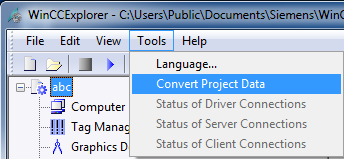
With SIMATIC WinCC V7.2 onwards you use the tool integrated in the WinCC Explorer: Convert Project Data.
https://support.industry.siemens.com/cs/attachments/44029132/44029132_wincc_upgrade_v4_v7.5_en.pdf |
|
| Back to top |
|
|
|

 FAQ
FAQ Search
 Memberlist
 Usergroups
 Register
 Profile
 Log in to check your private messages
 Log in


