 |
plc.myforum.ro
PLCs users www.plc.myforum.ro!
|
| View previous topic :: View next topic |
| Author |
Message |
maersk
Member 3


Joined: 17 Aug 2014
Posts: 891
|
 Posted: 21/09/2016 19:17 Post subject: MATLAB/Simulink models using STEP 7 and WinAC ODK Posted: 21/09/2016 19:17 Post subject: MATLAB/Simulink models using STEP 7 and WinAC ODK |
 |
|
WinAC Target: Add-on for MATLAB/Simulink for integrating and calling MATLAB/Simulink models using STEP 7 and WinAC ODK
https://support.industry.siemens.com/cs/document/56969417/winac-target%3A-add-on-for-matlab-simulink-for-integrating-and-calling-matlab-simulink-models-using-step-7-and-winac-odk
This application illustrates the integration of MATLAB/Simulink models using STEP 7 and WinAC ODK on a powerful PC-based controller with WinAC RTX.
WinAC Target facilitates integration and independently generates:
DLL or RTDLL file with the algorithm of the Simulink model
SCL source with the interfaces of the tip and the communication with the DLL/RTDLL file
This allows you to quickly and conveniently port a Simulink model to a WinAC RTX controller and place it in service.
Using the example of a PID controller, we provide a detailed description of all steps: From the creation of the PID controller in MATLAB/Simulink to the execution on the WinAC RTX PC-based controller. It shows you how to use WinAC Target in a time-saving and easy way to integrate MATLAB/Simulink models. Models can be integrated for STEP 7 V5.5 and also for STEP 7 V11 SP2 or higher.
To integrate the Simulink model, the following steps are performed:

Creating a model in MATLAB/Simulink and testing it in MATLAB/Simulink
Compiling the Simulink model into an SCL source and a DLL/RTDLL file using WinAC Target
Integrating the SCL source into the S7 program
Copying the DLL/RTDLL file to the IPC with WinAC RTX
Downloading the S7 program to WinAC RTX and launching it
Advantages
This application provides, in particular, the following advantages:
Easy integration of Simulink models into WinAC RTX
Simulink External mode for monitoring Simulink models and changing integrated model parameters during operation:

. Graphical online view of the running process
2. Changing internal model parameters using Simulink
Manipulating internal model parameters in the user program with STEP 7
Benefits
This application provides, in particular, the following advantages:
Easy and time-saving familiarization with WinAC Target through detailed step-by-step instructions
Optimized process for integrating Simulink models into WinAC RTX
Effective commissioning and diagnostics with Simulink and External mode
Flexible options to change internal model parameters during operation in the STEP 7 program
https://support.industry.siemens.com/cs/attachments/56969417/56969417_WinAC_Target_DOCU_V15_en.pdf
https://support.industry.siemens.com/cs/attachments/56969417/56969417_WinAC_Target_EXAMPLES_V15.zip
https://support.industry.siemens.com/cs/attachments/56969417/56969417_WinAC_Target_SETUP_V15.zip |
|
| Back to top |
|
 |
valz
Member 3

Joined: 26 Jul 2015
Posts: 771
|
| Posted: 20/02/2020 20:29 Post subject: SIMATIC Target 1500S: Calling Simulink® Models |
|
|
SIMATIC Target 1500S: Calling Simulink® Models
https://support.industry.siemens.com/cs/document/109482830/
In automation and control engineering, the MATLAB/Simulink software from MathWorks is used to simulate processes and create algorithms. The requirement is to have the model, algorithm or function run on an ODK-capable CPU (SIMATIC S7-1500 Software Controller or CPU 1518 ODK) in just a few steps.
This application example shows you how to commission a Simulink tip on the SIMATIC S7-1500 Software Controller.
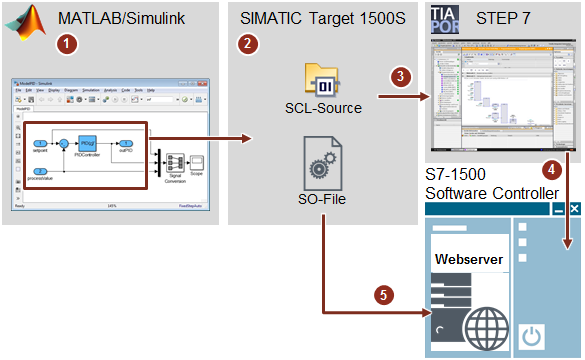
Creating the model in Simulink
Compiling the model with SIMATIC Target 1500S
Adding the SCL source in STEP 7 (TIA Portal)
Downloading the S7 program to the S7-1500 Software Controller
Loading the SO file to the web server
Advantages
Easy integration of Simulink models into the SIMATIC S7-1500 Software Controller or CPU 1518 ODK
Simulink External mode for monitoring Simulink models and changing model parameters during operation
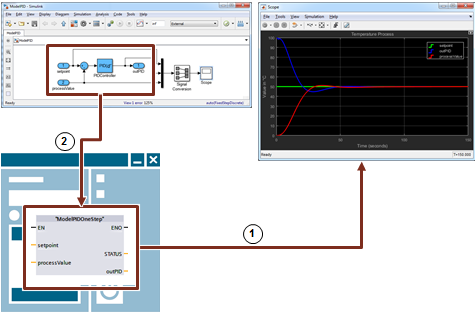
Graphical online view of the running process
Changing internal model parameters using Simulink
Manipulating internal model parameters in the user program with STEP 7
https://support.industry.siemens.com/cs/attachments/109482830/109482830_Target_1500S_DOC_V13_en.pdf
https://support.industry.siemens.com/cs/attachments/109482830/109482830_Target_1500S_CODE_V13.zip
https://anonfiles.com/1bre55bao9/109482830_Target_1500S_CODE_V13_zip
https://anonfiles.com/59r154b1o9/109482830_Target_1500S_DOC_V13_en_pdf
https://ulozto.net/tam/_oVHmzHcr7BrD
Installation requirements
STEP 7 Professional V15.1
SIMATIC S7-1500 ODK 1500S V2.0
SIMATIC Target 1500S for Simulink V1.0
MATLAB/Simulink R2016a or later |
|
| Back to top |
|
|
|
|
You cannot post new topics in this forum
You cannot reply to topics in this forum
You cannot edit your posts in this forum
You cannot delete your posts in this forum
You cannot vote in polls in this forum
|
Powered by phpBB © 2001, 2005 phpBB Group
Fa-ti si tu propriul forum GRATUIT, pe www.myforum.ro |
 FAQ
FAQ Search
 Memberlist
 Usergroups
 Register
 Profile
 Log in to check your private messages
 Log in


