| View previous topic :: View next topic |
| Author |
Message |
a_rishi
Junior 2

Joined: 29 Apr 2014
Posts: 29
|
 Posted: 15/02/2015 06:19 Post subject: Magelis HMI Posted: 15/02/2015 06:19 Post subject: Magelis HMI |
 |
|
Hi Everybody
I want to know which OS is required for Mageslis HMI and what about runtime license and development license
As far as I know, Vijeo desgner is used to build the project. Please elaborate. Also if a project is uploaded, does it also upload the runtime.
Thanks |
|
| Back to top |
|
 |
er.mehdi
Member junior

Joined: 06 Jan 2014
Posts: 63
|
| Posted: 13/04/2021 07:44 Post subject: Re: Magelis HMI |
|
|
Hi guys,
I'm looking for a software for HMI SCHNEIDER ELECTRIC MAGELIS Advanced Panel XBTGT5330. Does anybody have the software? I want to take a backup from it so is there a aparte software to do so? As far as I am concerned, software for making pages inside the HMI is Vijeo Designer but is this software can be used for making backup/restore also? |
|
| Back to top |
|
|
mahjong
Junior

Joined: 12 Nov 2017
Posts: 6
|
| Posted: 13/04/2021 09:06 Post subject: |
|
|
For XBTGT5330 you can use VJDesigner and SoMachine for connecting to controller.
backup
https://www.youtube.com/watch?v=U4Zd_MYICcs&t=205s&ab_channel=PLCSupport
How to revert the Magelis back to Initial Start Mode (Factory State)?
Product Line:
XBTG, XBTGT, XBTGK, XBTGH, HMISTO, HMISTU, HMIGTO, HMIGTU, HMIGK, iPC
For Windows 7
Look for the gray icon labeled "Runtime Installer" under:
Start->All Programs->Schneider Electric->Vijeo Designer 6.2->Tools
For Windows 10
Look for the gray icon labeled "Runtime Installer" under:
Start->Schneider Electric
Upon launching the Runtime Installer, you will see the following:
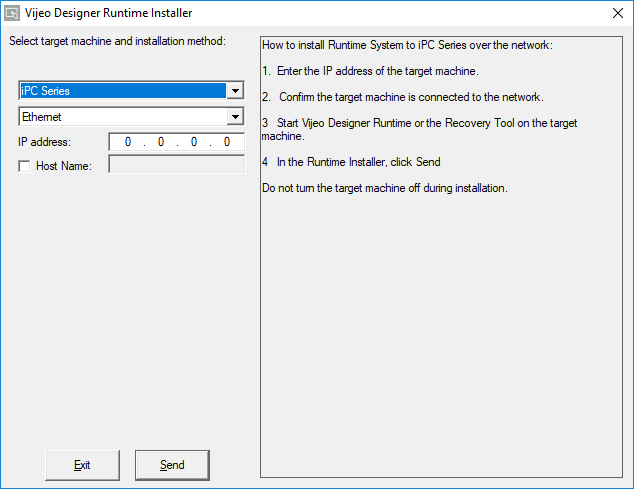
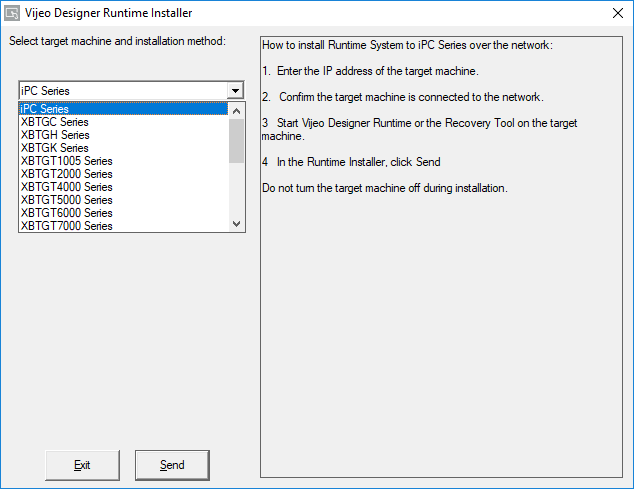
Pick the target type that matches the Magelis HMI you wish to restore back to the Initial Start Mode:
Next, pick the communication method of either Ethernet, Ehternet over NAT, or USB (requires XBTZG935 USB cable or Standard Mini-B USB to USB A cable where applicable).
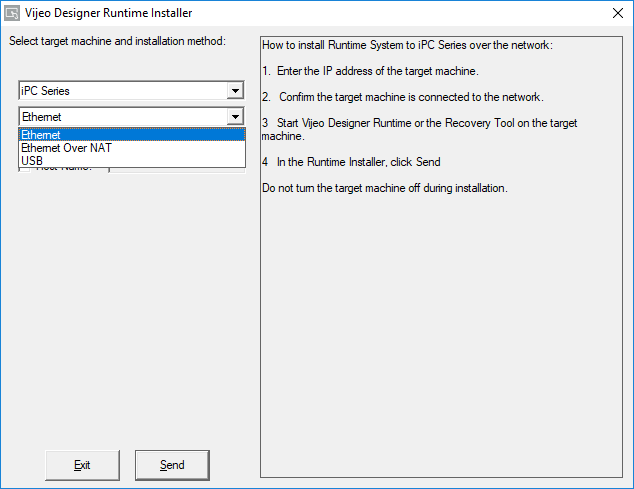
Once you have choosen Ethernet as the communication method, enter the IP address of the Magelis HMI. Once you are set, press the "Send" button to start the process.
Upon detection of your HMI, you will be prompted that an identical or existing version of Vijeo Designer Runtime already exists. Press the YES button the continue with the process.
The Magelis HMI will reboot and start the process. You will see a progress bar on the Magelis HMI (non-IPC models only).
Upon completion, you will see the white Initial Start Mode screen.
Last edited by mahjong on 13/04/2021 09:22; edited 1 time in total |
|
| Back to top |
|
|
er.mehdi
Member junior
Joined: 06 Jan 2014
Posts: 63
|
| Posted: 13/04/2021 09:18 Post subject: Re: Magelis HMI |
|
|
| mahjong wrote: | For XBTGT5330 you can use VJDesigner and SoMachine for connecting to controller.
backup
https://www.youtube.com/watch?v=U4Zd_MYICcs&t=205s&ab_channel=PLCSupport |
Thanks a million
Do you have download link for Somachine and which version should I use? |
|
| Back to top |
|
|
mahjong
Junior
Joined: 12 Nov 2017
Posts: 6
|
| Posted: 13/04/2021 09:24 Post subject: |
|
|
| You can search...so Vijeo Designer if you want to modify HMI.. |
|
| Back to top |
|
|
er.mehdi
Member junior
Joined: 06 Jan 2014
Posts: 63
|
| Posted: 13/04/2021 09:40 Post subject: |
|
|
| mahjong wrote: | | You can search...so Vijeo Designer if you want to modify HMI.. |
I just want to take a backup form Magelis HMI which it has a program inside already. I'm not familiar with Schneider's HMI unlike SIEMENS's HMI. Just could you please help me on how can I take a backup.
Regards |
|
| Back to top |
|
|
|

 FAQ
FAQ Search
 Memberlist
 Usergroups
 Register
 Profile
 Log in to check your private messages
 Log in


