| View previous topic :: View next topic |
| Author |
Message |
Fall
Junior

Joined: 01 Dec 2017
Posts: 6
|
 Posted: 18/12/2017 15:10 Post subject: M258 programming Posted: 18/12/2017 15:10 Post subject: M258 programming |
 |
|
Hi,
I have PLC TM258LD42DT4L , firmware V2.0.2.38 ; using somachine V4.1 software . Device was detected in windows using USB communication, and shown error message( firmware mismatch) while trying for further configuration. And Tried to upgrade firmware version from the computer,but it wasn't successful. There after PLC not detecting using USB cable.
Is it possible to use Somachine V4.1 to programm it?? .
Or what suitable option for it.
Thank you |
|
| Back to top |
|
 |
Fall
Junior
Joined: 01 Dec 2017
Posts: 6
|
| Posted: 18/12/2017 17:10 Post subject: Re: M258 programming |
|
|
Thank you,
Let me check , i will update |
|
| Back to top |
|
|
puyg
Junior
Joined: 18 Dec 2017
Posts: 9
|
| Posted: 18/12/2017 17:49 Post subject: |
|
|
The following part numbers are applicable for version 3.1 of SoMachine Software.
These apply to the following M258 controllers.
TM258LD42DT, TM258LF42DT, TM258LD42DT4L, TM258LF42DT4L, TM258LF42DR, TM258LF66DT4L
How to download a Somachine 3.1 program to a M258 / LMC058 PLC using an USB flash drive?
Procedure on how to download a SoMachine program to a M258 Logic Controller or LMC058 Motion Controller using an USB flash drive.
Software used: SoMachine Version 3.1.10.1
step by step procedure:
1. Insert an USB flash drive into your PC.
2. Make sure that your application is set to Start in run or you have an input configured as a Run/Stop Input. Otherwise your controller will not be in Run mode, it will be in Stop mode.
a. How to configure a Start in Run:

b. How to configure a hardwired Run/Stop Input:

3. Go to the Program tab / Project / USB Mass Storage. The USB Mass Storage... command in the Project menu allows you to save the file system image together with a file management script on a USB mass storage device.

4. Click on Macros / Download App:
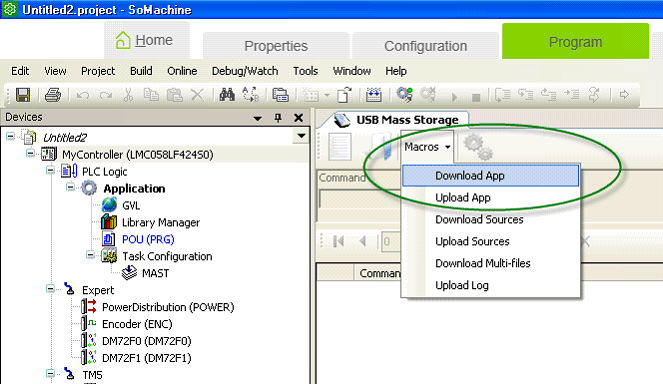
5. Click on Generate, select the USB flash drive root and then click on OK to generate the files:

6. Select Yes when the next message appears:

7. Unplug your USB flash drive from your PC and plug it into a controller that is powered up. The USB LED will blink green during transfer. At the end of the transfer the USB LED is solid green. If an error was detected the LED is solid red.
8. Cycle the power on your controller twice.
This completes the step by step procedure on how to download a program to a M258 Logic Controller or LMC058 Motion Controller using an USB flash drive. |
|
| Back to top |
|
|
Fall
Junior
Joined: 01 Dec 2017
Posts: 6
|
| Posted: 19/12/2017 09:06 Post subject: |
|
|
Hi,
thank you.
I tried to update firmware Version using USB but it wasn't successful, USB Host indicating Solid RED. I will try with this solution; I am using Somachine V4.1 can I use it as mentioned above. My current firmware version of M258 was V2.0.2.38. Can i download program created in Somachine V4.1 to M258 ( firmware version V2.0.2.38 ) using usb |
|
| Back to top |
|
|
Fall
Junior
Joined: 01 Dec 2017
Posts: 6
|
| Posted: 19/12/2017 16:03 Post subject: |
|
|
Is there any link available to download VSoMachine Version 3.1.10.1 .
Thank you |
|
| Back to top |
|
|
ortega
Junior
Joined: 17 Dec 2017
Posts: 5
|
| Posted: 19/12/2017 16:07 Post subject: |
|
|
| Fall wrote: | Is there any link available to download VSoMachine Version 3.1.10.1 .
Thank you |
I found on this page..
http://plc.myforum.ro/3-vt1016.html |
|
| Back to top |
|
|
Fall
Junior
Joined: 01 Dec 2017
Posts: 6
|
| Posted: 20/12/2017 16:58 Post subject: |
|
|
Hi,
Is existing firm ware on the controller ( M258 ) have any significance??,
Or is it possible to download a program created in Newer Version of Somachine to an older m258.?? |
|
| Back to top |
|
|
puyg
Junior
Joined: 18 Dec 2017
Posts: 9
|
| Posted: 23/12/2017 17:53 Post subject: |
|
|
Where to find SoMachine V4.1 compatible firmware version of M218, M238 PLCs
Controller Assistant do not facilitate (1) Update firmware and (2) Manage images options for M218 and / or M238 PLCs.
So , when user migrated from SoMachine V3.1 to SoMachine V4.1, compatible firmware version of SoMachine V4.1 must be loaded with controller otherwise user is not able to download / connect to controller.
So, as a 1st step it is mandatory to update the firmware version compatible with SoMachine V4.1
Firmware files for M218 and M238 PLCs are located at installation path below on your system when SoMachine V4.1 is installed
For Windows 7- 64 bit system:
C:\Program Files (x86)\Schneider Electric\SoMachine Software\V4.1\LogicBuilder\Firmware\M238 (or M218)
For Windows 7 -32 bit systems:
C:\Program Files\Schneider Electric\SoMachine Software\V4.1\LogicBuilder\Firmware\M238 (or M218) |
|
| Back to top |
|
|
jquinchoa
Junior
Joined: 09 May 2012
Posts: 4
|
| Posted: 25/06/2019 08:27 Post subject: read this |
|
|
read this compatibility document
[url=http://www.girlshare.ro/3769745195.7]migracion+documentacion.pdf[/url] |
|
| Back to top |
|
|
jquinchoa
Junior
Joined: 09 May 2012
Posts: 4
|
| Posted: 10/07/2019 22:28 Post subject: check controller status |
|
|
this is a acript I prepared to ulpoad system files and program from controller, you must do the following
1 extract SYS and USR folders on root usb stick
2 turn off the machine
3 insert usb stick on the controller
4 turn on the machine, so the usb led will be flashing (while copying files) and stops solid green (finished copy) if it become red some line of script had error (you can delete the line and try)
5 turn off the machine
6 extract usb stick
7 check folder USR/SYSLOG/ you will find firmware log and application log read out
[url=http://www.girlshare.ro/3769752545.9]PLC+PROGRAM+Uploader+001.zip[/url]
Juan Quinchoa
+584265193091 |
|
| Back to top |
|
|
A. F. El-Hamalawy
Junior
Joined: 01 Aug 2019
Posts: 1
|
| Posted: 01/08/2019 04:34 Post subject: |
|
|
Most probably, you got solid red led as you didn't compus your usb stick using FAT32
_________________
A. F. El-Hamalawy |
|
| Back to top |
|
|
|

 FAQ
FAQ Search
 Memberlist
 Usergroups
 Register
 Profile
 Log in to check your private messages
 Log in


