| View previous topic :: View next topic |
| Author |
Message |
maersk
Member 3


Joined: 17 Aug 2014
Posts: 891
|
 Posted: 04/08/2015 18:59 Post subject: Long-Term Data Archiving with WinCC Runtime PC TIA Portal Posted: 04/08/2015 18:59 Post subject: Long-Term Data Archiving with WinCC Runtime PC TIA Portal |
 |
|
Long-Term Data Archiving with WinCC Runtime PC and SIMATIC HMI Operator Panels with WinCC (TIA Portal)
https://support.industry.siemens.com/cs/document/109477071/long-term-data-archiving-with-wincc-runtime-pc-and-simatic-hmi-operator-panels-with-wincc-%28tia-portal%29
This application example introduces a method in order to avoid the usual size restrictions of data archives on SIMATIC HMI operator panels. Thus it is possible to realizate long-term archives and display them via trend views, whose size is virtually only limited by the available space on the storage medium.
In order to avoid the limitation of the maximum archive size (and therefore the recording time of the archive) the scheduler accesses a script cyclically that copies an existing data archive after the lapse of a certain time and provides it with a new name. Apart from a user-defined root, this name also includes the time of the current archive.
After that the data archive is empty and it is rewritten until a further copy process takes place after the lapse of an hour. This way, data archiving is only restricted by the free space on the storage medium and no longer by the quantity structures of the operator panels.
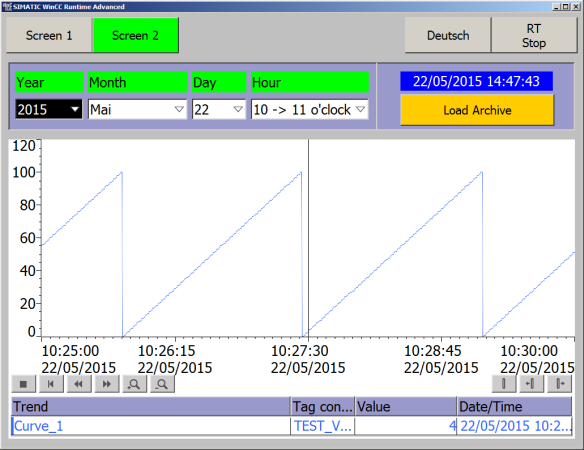
Other scripts allow it to read out certain archive section again from groups saved that way from data archives and to display them via a trend view.
In this application example WinCC (TIA Portal) projects where the full functionality has already been implemented are ready for download for WinCC Advanced RT as well as for HMI operator devices.
https://support.industry.siemens.com/cs/attachments/109477071/109477071_LongTermDataArchives_en_v10.pdf
WinCC (TIA Portal) project (V13) f. PC Runtime Advanced (826,7 KB)
https://support.industry.siemens.com/cs/attachments/109477071/109477071_LongTermDataArchives_Project_PC_Runtime.zip
Registration necessary WinCC (TIA Portal) project (V13) f. TP1200 Comfort Panel (1,0 MB)
https://support.industry.siemens.com/cs/attachments/109477071/109477071_LongTermDataArchives_Project_TP1200_Comfort.zip
Last edited by maersk on 24/04/2018 15:24; edited 1 time in total |
|
| Back to top |
|
 |
maersk
Member 3
Joined: 17 Aug 2014
Posts: 891
|
| Posted: 04/08/2015 19:03 Post subject: How do you do long-term archiving with WinCC flexible? |
|
|
How do you do long-term archiving with WinCC flexible?
https://support.industry.siemens.com/cs/document/48015332/how-do-you-do-long-term-archiving-with-wincc-flexible
The system limits for archiving tag values on operator panels and PC Runtime systems îngăduie only restricted long-term archiving.
In the case of an MP 277 Touch, the limit is 10,000 items per archive (including all the archive segments).
Furthermore, there are restrictions to the output of archived tag values by means of a trend display over a long period of time.
The period depends on the maximum number of process values that can be stored in the tag archive.
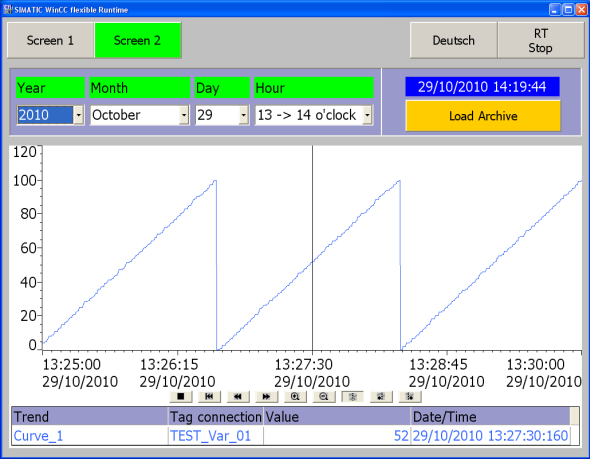
This present entry describes how you might be able to use WinCC flexible to Do long-term archiving (Fig. 1).
Realizate tag archives whose names are created first at "Runtime".
The tag archives created can then be selected via a selection field and output by means of a trend display (Fig. 2).
The figure below shows an example of how the archived entries are displayed. The names of the archives and the "folder structure" are created automatically via scripts.

Fig. 02 shows a trend display. You select the separate archives by date and time.
When the archive is downloaded, the archive contents are output in a trend display.
https://support.industry.siemens.com/cs/attachments/48015332/48015332_WinCC_flexible_Langzeitarchivierung_en.pdf
Project MP 277 Touch / PC Runtime
https://support.industry.siemens.com/cs/attachments/48015332/Project_Complete_01.zip
Last edited by maersk on 24/04/2018 15:25; edited 1 time in total |
|
| Back to top |
|
|
markyspicer
Junior

Joined: 24 Sep 2016
Posts: 5
|
| Posted: 11/06/2017 12:25 Post subject: |
|
|
Hi maersk!
I've been using this template for automatic generation of Folders and .csv archive. But my problem here is that using the Screen_2 capabilities to load an specific archive and show it in trend. I'm able to do this on a single device only but I have 17 devices need to check individually depends on the date of archive that the user select.
Maybe you have idea how to cope with it and able to retrieve data from archives to trend display.
Thanks!
marky |
|
| Back to top |
|
|
maersk
Member 3
Joined: 17 Aug 2014
Posts: 891
|
| Posted: 12/06/2017 17:30 Post subject: |
|
|
| markyspicer wrote: | Hi maersk!
I've been using this template for automatic generation of Folders and .csv archive. But my problem here is that using the Screen_2 capabilities to load an specific archive and show it in trend. I'm able to do this on a single device only but I have 17 devices need to check individually depends on the date of archive that the user select.
Maybe you have idea how to cope with it and able to retrieve data from archives to trend display.
Thanks!
marky |
Maybe you should create screens and connections for every Panels you have in Network. |
|
| Back to top |
|
|
markyspicer
Junior
Joined: 24 Sep 2016
Posts: 5
|
| Posted: 26/07/2017 09:20 Post subject: |
|
|
Hi @maersk,
I'm trying to work with the file that has been downloaded in the siemens site but having some trouble in loading the archive. Mind help me regarding the error if you have an idea. see error below. I'm working with WinCC Advanced v14 SP1.
$ 80053 - Error during read access to closed Data_Logs_Trend_View
$ 20011 - Error File not found in line 92 of called <Load_Archive> of script <Request_Load_Archive> |
|
| Back to top |
|
|
markyspicer
Junior
Joined: 24 Sep 2016
Posts: 5
|
| Posted: 26/07/2017 12:34 Post subject: |
|
|
| It's ok now. my next agenda is to have numeroase trend view archive for comparison purpose. hehe[/quote] |
|
| Back to top |
|
|
markyspicer
Junior
Joined: 24 Sep 2016
Posts: 5
|
| Posted: 27/07/2017 07:23 Post subject: |
|
|
| maersk wrote: | | markyspicer wrote: | Hi maersk!
I've been using this template for automatic generation of Folders and .csv archive. But my problem here is that using the Screen_2 capabilities to load an specific archive and show it in trend. I'm able to do this on a single device only but I have 17 devices need to check individually depends on the date of archive that the user select.
Maybe you have idea how to cope with it and able to retrieve data from archives to trend display.
Thanks!
marky |
Maybe you should făcute screens and connections for every Panels you have in Network. |
Hi Maersk,
Can I ask you something regarding the long term archive in trend?
In my case i have no problem in saving multiple devices data to archive(which also has their unique folder name). Now my problem is that when it comes to viewing the data archive in trend, i can only manipulate in a single trend view(i have done 3 copies of the original screen that will assign to devices 1, 2 , 3 respectively.) also scripts are configure as per the required tags on each devices. when doing the load archive device 1 it is successfully opening. but when I try to load archive in the devices 2 and 3. that's the error comes. Is it possible to have this numeroase trend in this sample or in wincc advanced? the main purpose is for comparison of devices readings.(almost 50+ devices to be done).
hope you may help me in order to have an idea. if you need some information please reply. Thanks! |
|
| Back to top |
|
|
valz
Member 3

Joined: 26 Jul 2015
Posts: 771
|
| Posted: 24/04/2018 15:23 Post subject: Archive tags & messages in a SQL database with WinCC TIA |
|
|
How do you archive tags and messages in an SQL database with WinCC (TIA Portal) Advanced?
https://support.industry.siemens.com/cs/document/61886098/
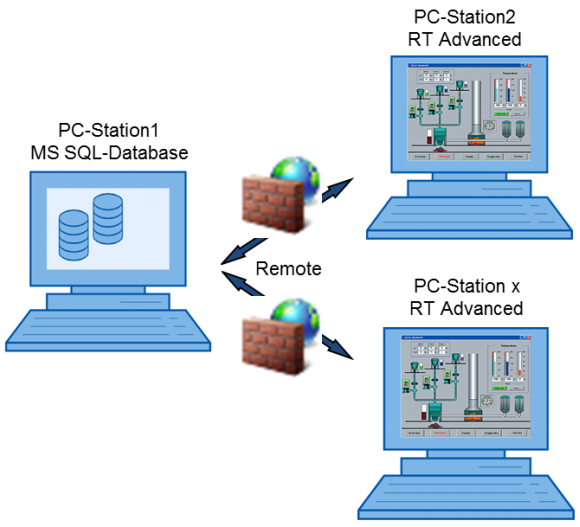
The entry describes how to archive tags and messages in a Microsoft SQL database with WinCC Runtime Advanced V15 and Microsoft SQL Server 2014.
Two configurations are described.
Configuration 1
The SQL server and the WinCC Runtime Advanced are installed together on one PC. The data is archived centrally in the SQL database created.

Configuration 2
The SQL server and the WinCC Runtime Advanced are each installed separately on a PC. The data is archived in the SQL database created on which the SQL server is running (PC Station1),
The documentation covers the following topics.
Creating a database
Local access to the SQL database
Remote access to the SQL database
Configuring the ODBC Data Source
Firewall setting
Setting in WinCC (TIA Portal)
https://support.industry.siemens.com/cs/attachments/61886098/61886098_WinCC_Adv_Archive_SQL_Database_en.pdf
https://support.industry.siemens.com/cs/attachments/61886098/61886098_WinCC_Adv_Archive_SQL_Database_CODE.zip
created with WinCC Advanced V15. |
|
| Back to top |
|
|
valz
Member 3
Joined: 26 Jul 2015
Posts: 771
|
| Posted: 10/04/2019 18:03 Post subject: Long-term data archiving with WinCC Runtime PC SIMATIC HMI |
|
|
Long-term data archiving with WinCC Runtime PC and SIMATIC HMI operating devices with WinCC (TIA Portal)
https://support.industry.siemens.com/cs/document/109477071/long-term-data-archiving-with-wincc-runtime-pc-and-simatic-hmi-operating-devices-with-wincc- (tia-portal)
Create practically any number of extensive long-term archives independent of the quantity structures of the operator interfaces and display them on PCs and HMI panels using trend views and f(x) trend views.
The storage of process tags in the form of data logs on internal drives or removable media of HMI operator interfaces allows the subsequent evaluation of the process at any time. However, there are limits to the method, since data logs can only reach a certain size depending on the type of operating device used. However, it is often desirable to record larger amounts of data over a longer period of time. The trend views/f(x) trend views should also be able to reproduce data logs whose scope is not limited by the default quantity structures.
Solution
To avoid the limitation of the maximum log size (and thus the recording time of the logs), a script is called when the data log is full. This script suspends the archive recording without data loss and copies the log into a directory for long-term storage. After that the data log is empty and can be filled again. A "library" of stored archive sections is created.
A second script is used to display the saved logs, and this script restores the long-term archived values from the "Library" and displays them in the HMI or Runtime.
The configuration can easily be adapted to different quantity structures, project requirements and existing hardware.
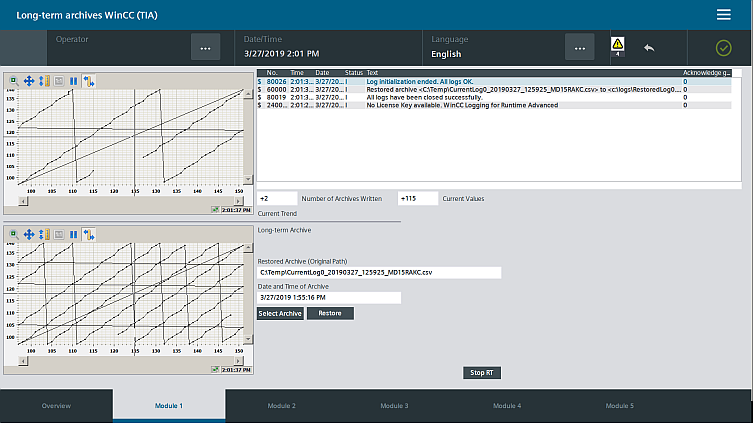
The application example provides a WinCC (TIA Portal) V15.1 project for WinCC RT Advanced as well as for HMI operator interfaces for download.
https://support.industry.siemens.com/cs/attachments/109477071/109477071_LongTermDataArchives_de_v20.pdf
https://support.industry.siemens.com/cs/attachments/109477071/109477071_Project.zip |
|
| Back to top |
|
|
valz
Member 3
Joined: 26 Jul 2015
Posts: 771
|
| Posted: 20/02/2020 20:22 Post subject: Long-term data archiving with WinCC Runtime Advanced |
|
|
Long-term data archiving with WinCC Runtime Advanced and SIMATIC HMI operating devices with WinCC (TIA Portal)
https://support.industry.siemens.com/cs/document/109477071/
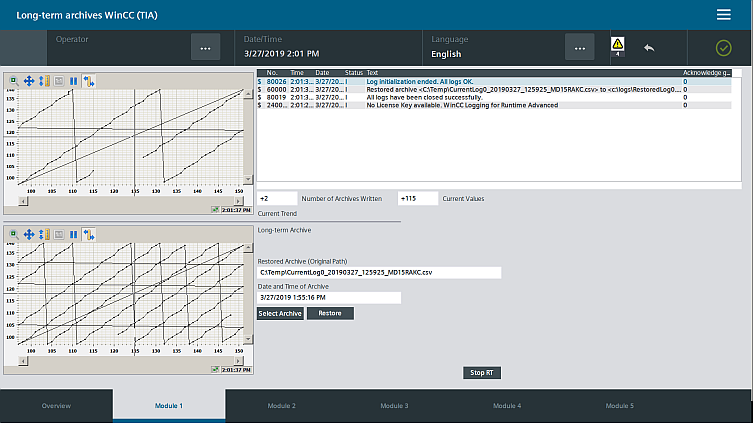
Create practically any number of extensive long-term archives independent of the quantity structures of the operator interfaces and display them on PCs and HMI panels using trend views and f(x) trend views.
The storage of process tags in the form of data logs on internal drives or removable media of HMI operator interfaces allows the subsequent evaluation of the process at any time. However, there are limits to the method, since data logs can only reach a certain size depending on the type of operating device used. However, it is often desirable to record larger amounts of data over a longer period of time. The trend views/f(x) trend views should also be able to reproduce data logs whose scope is not limited by the default quantity structures.
To avoid the limitation of the maximum log size (and thus the recording time of the logs), a script is called when the data log is full. This script suspends the archive recording without data loss and copies the log into a directory for long-term storage. After that the data log is empty and can be filled again. A "library" of stored archive sections is created.
A second script is used to display the saved logs, and this script restores the long-term archived values from the "Library" and displays them in the HMI or Runtime.
The configuration can easily be adapted to different quantity structures, project requirements and existing hardware.
https://support.industry.siemens.com/cs/attachments/109477071/109477071_LongTermDataArchives_en_v20.pdf
https://support.industry.siemens.com/cs/attachments/109477071/109477071_Project.zip
https://ulozto.net/tam/_qZSS1AIgfNQ4
https://anonfiles.com/v0d455beo8/109477071_LongTermDataArchives_en_v20_pdf
https://anonfiles.com/j6f356bao2/109477071_Project_zip |
|
| Back to top |
|
|
valz
Member 3
Joined: 26 Jul 2015
Posts: 771
|
| Posted: 20/02/2020 20:24 Post subject: How do you do long-term archiving with WinCC flexible? |
|
|
How do you do long-term archiving with WinCC flexible?
https://support.industry.siemens.com/cs/document/48015332/
The system limits for archiving tag values on operator panels and PC Runtime systems permit only restricted long-term archiving.
In the case of an MP 277 Touch, the limit is 10,000 entries per archive (including all the archive segments).
Furthermore, there are restrictions to the output of logged tag values by means of a trend view over a long period of time.
The time period depends on the maximum number of process values that can be stored in the tag log.
This present entry describes how you might be able to use WinCC flexible to
Do long-term archiving (Fig. 1).
Create tag archives whose names are created first at "Runtime".
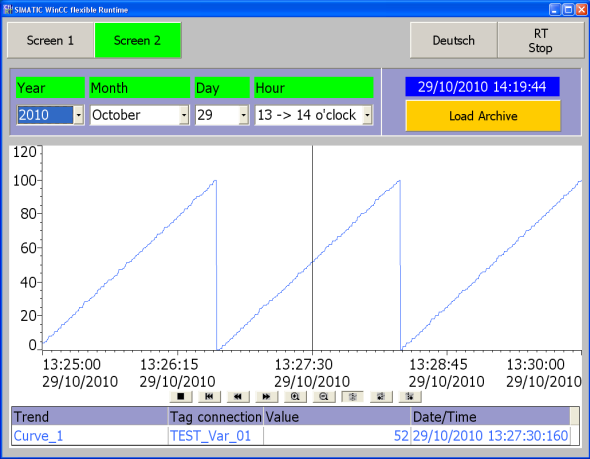
The tag archives created can then be selected via a selection field and output by means of a trend display (Fig. 2).
Fig. 1 shows an example of how the archived entries are displayed. The names of the archives and the "folder structure" are created automatically via scripts.
[img]https://i.postimg.cc/QCByZg1S/wincc-flexible-langzeitarchivierung-01-e.png
Fig. 01[/img]
Fig. 02 shows a trend display. You select the separate archives by date and time.
When the archive is downloaded, the archive contents are output in a trend display.
https://anonfiles.com/pek253b7oe/48015332_wincc_flexible_langzeitarchivierung_en_pdf
https://anonfiles.com/zckc5db0o1/project_complete_01_zip
https://ulozto.net/tam/_RWnCxIQ5Riry
Runnability and test environment:
The following table lists the components that have been used to create this entry and verify the function described.
Component Product and version designation
PC operating system Microsoft Windows XP SP3
HMI software WinCC flexible 2008 SP2 Update 3
HMI system MP277 Touch and PC Runtime |
|
| Back to top |
|
|
|

 FAQ
FAQ Search
 Memberlist
 Usergroups
 Register
 Profile
 Log in to check your private messages
 Log in


