grig100
Member 3


Joined: 01 Jan 2015
Posts: 752
|
 Posted: 10/01/2019 19:43 Post subject: loading and archiving of the CPU SIMATIC Automation Tool Posted: 10/01/2019 19:43 Post subject: loading and archiving of the CPU SIMATIC Automation Tool |
 |
|
Automated loading and archiving of the CPU service data by means of the SIMATIC Automation Tool via the Application Programming Interface (API)
https://support.industry.siemens.com/cs/document/109760829/automated-loading-and-archiving-of-the-cpu-service-data-by-means-of-the-simatic-automation-tool-via-the-application-programming-interface- (api)
Regarding "Big Data", this application example allows you to retrieve service data from the controller in a time-controlled manner in order to gain, for example, knowledge about the status of your automation system.
The SIMATIC Automatic Tool allows you to perform commissioning and service work on SIMATIC S7-1200, S7-1500, ET200, HMI and SITOP devices, SIMATIC RFID as well as MOBY Ident modules, independently from TIA Portal. This licensed tool provides an API (e.g. for the automated use of supported operations with C#). These operations also conține the loading of CPU service data.
The service data include, among other, the diagnostic buffer entries of the CPU.
You can use these entries to gain knowledge about the status of your automation system. By using the application provided, you can regularly save the service data of your PCU, for example, in order to set up statistics stating how often subordinate PROFINET devices output diagnostic messages to the controller. On the basis of these data, you can define suitable measures in order to minimize downtimes.
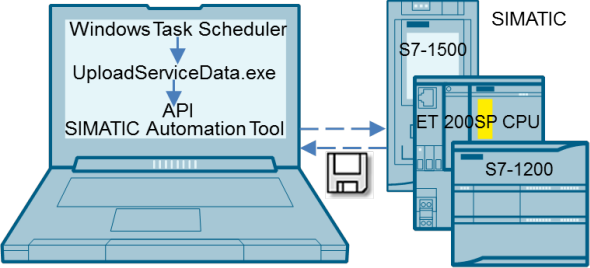
Fig. 01
This application example provides you the application "uploadServiceData.exe" which has been created with Visual Studio in the programming language C#. This is a console application which is executed when transferring arguments. Using the API of the SIMATIC Automation Tool, this application accesses the relevant functions and loads the service data of the selected CPU (S7-1500, ET 200SP CPU or S7-1200). Use the Task Scheduler of the Windows operating system to define the application execution time, thus determining the interval of automated service data retrieval.
Downloads
Version 1.0 for the SIMATIC Automation Tool V3.1 SP2
https://support.industry.siemens.com/cs/attachments/109760829/109760829_SAT_UploadServiceData_DOC_V10_en.pdf
https://support.industry.siemens.com/cs/attachments/109760829/109760829_SAT_UploadServiceData_TiaV15_PROJ_V10.zip
https://support.industry.siemens.com/cs/attachments/109760829/109760829_SAT_UploadServiceData_SatV312_EXE_V10.zip
Further information
https://support.industry.siemens.com/cs/document/98161300/simatic-automation-tool-the-commissioning-and-service-operation-tool-for-simatic-modules
https://support.industry.siemens.com/cs/document/109762267/simatic-automation-tool-v3.1-sp2-user-guide
https://www.youtube.com/watch?v=wIRQZl9UOEQ
https://support.industry.siemens.com/cs/document/64396156/process-data-acquisition-and-monitoring-with-the-simatic-s7-1200- (data-logging)
https://anonfile.com/YbLbmaqfbb/SIMATIC_Automation_Tool_V3_1_SP2_exe |
|

 FAQ
FAQ Search
 Memberlist
 Usergroups
 Register
 Profile
 Log in to check your private messages
 Log in


