 |
plc.myforum.ro
PLCs users www.plc.myforum.ro!
|
| View previous topic :: View next topic |
| Author |
Message |
valz
Member 3


Joined: 26 Jul 2015
Posts: 771
|
 Posted: 10/01/2022 15:13 Post subject: Internet access to a WinCC Unified Runtime Posted: 10/01/2022 15:13 Post subject: Internet access to a WinCC Unified Runtime |
 |
|
How do you enable access to a WinCC Unified Runtime from a separate company network or the internet?
https://support.industry.siemens.com/cs/document/109804116/
You may use a reverse proxy to access a WinCC Unified Runtime from a company network or the internet.
Notes
A prerequisite for access from a company network or the internet is a correctly set up proxy.
In network and web traffic, a proxy is a device or server that acts on behalf of other devices.
It is located between two units and performs a service. Proxies are hardware or software solutions that are located between the client and the server to manage requests and responses.
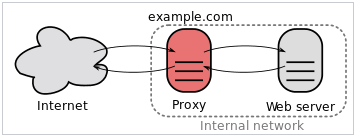
Fig. 01
In this example, the WinCC Unified Runtime is accessible under the PC name "WinCCUnified".
The proxy can be accessed under the domain "myProxy.com".
The central UMC server can be reached under the PC name "UMCServer".
When calling the WinCC Unified PC Runtime website, either a local or a central UMC server is contacted for the login process. The URL of this server is defined in the configuration of WinCC Unified. The procedure for setting the URL differs depending on the type of user management used.
Further information on how to use the registry
This entry includes information on how to edit the Windows registry. You should always make a backup copy of the Registry before editing it. More information about making a backup copy, restoring and editing the Registry is available in the Microsoft Knowledge Base in Entry ID 256986. Incorrect use of the Registry editor can cause serious problems that affect the complete system and make it necessary to reinstall the operating system. You use the Registry editor at your own risk.
Local User Management
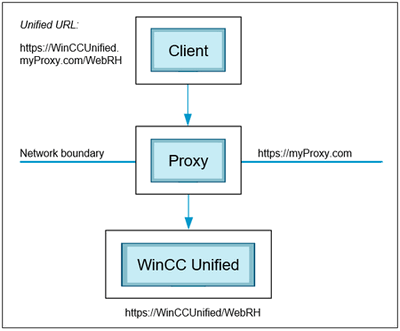
Fig. 02
To make the WinCC Unified Runtime accessible on the internet with Local User Management, some configuration files have to be changed.
Warning:
These configuration files are overwritten with the default values when the "WinCC Unified Configuration" is executed again.
1. On the Unified Runtime computer, use the editor to open the file "C:\Program Files\Automation\WinCCUnified\SimaticUA\config.json" and set the "dnsname" item to the value "WinCCUnified.myProxy.com".
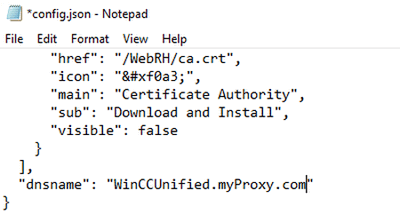
Fig. 03
2. Perform this configuration step if the Unified Runtime is installed on an Engineering Station.
For a straight Unified Runtime installation, continue with point 3.
On the Unified Runtime computer, use the editor to open the file "C:\Program Files\Siemens\Automation\UserManagement\WEB\umc-sso\config\configuration.json" and make the following changes:
Change the value of the item "reverseProxy" from "https://UMCServer" to "https://WinCCUnified.myProxy.com".
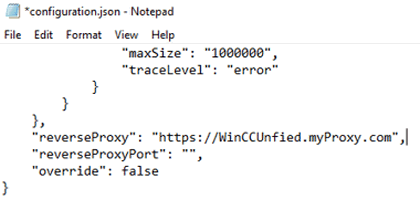
Fig. 04
3. On the Unified Runtime computer, open the file "C:\Program Files\Automation\WinCCUnified\config\config.level" and set the URL under [IdentityProvider] to the value "https://WinCCUnified.myProxy.com/umc-sso/".
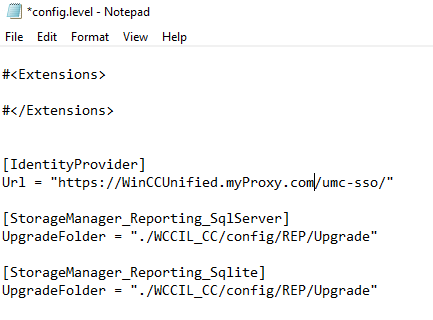
Fig. 05
4. Open the Registry editor with the command "regedit.exe" in command line and set the Registry key "HKEY_LOCAL_MACHINE\SOFTWARE\Siemens\User Management\WebUI\Settings\ipadress" to the value
"https://WinCCUnified.myProxy.com/umc-sso"
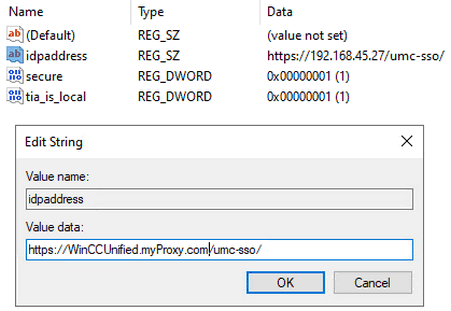
Fig. 06
5. Restart the PC.
Central User Management via UMC
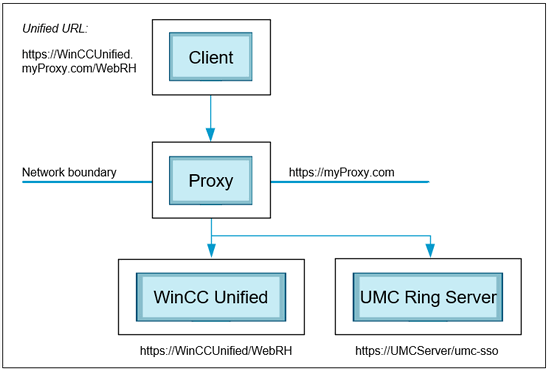
Fig. 07
For WinCC Unified to be accessible from the internet with Central User Management, the address of the UMC server including the domain of the proxy must be entered in the WinCC Unified Configuration.
In addition, you have to change a configuration file of the UMC ring server.
1. Open the Unified Configuration on the WinCC Unified Runtime computer and enter "UMCServer.myProxy.com" as UMC server address.
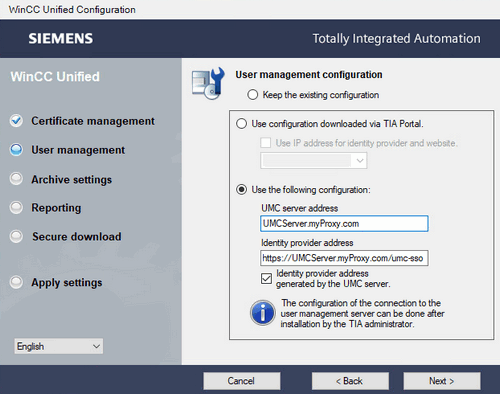
Fig. 08
2. On the server specified in the Unified Configurator, use the editor to open the file
"C:\Program Files\Siemens\UserManagement\WEB\umc-sso\config\configuration.json "and make the following changes:
Change the value of the item "reverseProxy“ from "https://UMCServer” to "https://UMCServer.myProxy.com/".
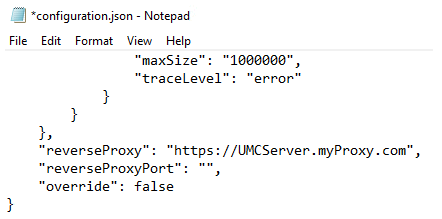
Fig. 09
3. Open the Registry editor (regedit.exe) and set the Registry key "HKEY_LOCAL_MACHINE\SOFTWARE\Siemens\User Management\WebUI\Settings\ipaddress" to the value "https://UMCServer.myProxy.com/umc-sso".
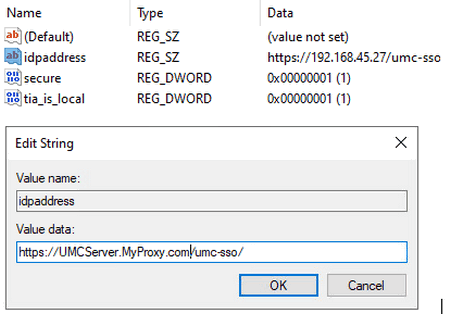
Fig. 10
4. Then restart the "UMCService" service.
Further information about configuring the UMC domain is available in the following
https://support.industry.siemens.com/cs/document/109780337/ |
|
| Back to top |
|
 |
|
|
You cannot post new topics in this forum
You cannot reply to topics in this forum
You cannot edit your posts in this forum
You cannot delete your posts in this forum
You cannot vote in polls in this forum
|
Powered by phpBB © 2001, 2005 phpBB Group
Fa-ti si tu propriul forum GRATUIT, pe www.myforum.ro |
 FAQ
FAQ Search
 Memberlist
 Usergroups
 Register
 Profile
 Log in to check your private messages
 Log in


