 |
plc.myforum.ro
PLCs users www.plc.myforum.ro!
|
| View previous topic :: View next topic |
| Author |
Message |
grig100
Member 3


Joined: 01 Jan 2015
Posts: 752
|
 Posted: 22/11/2019 16:51 Post subject: importing the Modbus block into the CFC char Posted: 22/11/2019 16:51 Post subject: importing the Modbus block into the CFC char |
 |
|
Why does an error message appear when importing the Modbus block into the CFC chart?
https://support.industry.siemens.com/cs/document/109772165/why-does-an-error-message-appear-when-importing-the-modbus-block-into-the-cfc-chart
To be able to import a function block into a CFC chart it is necessary for all the blocks called at a lower level to be in the block folder.
Otherwise the following error message is displayed:
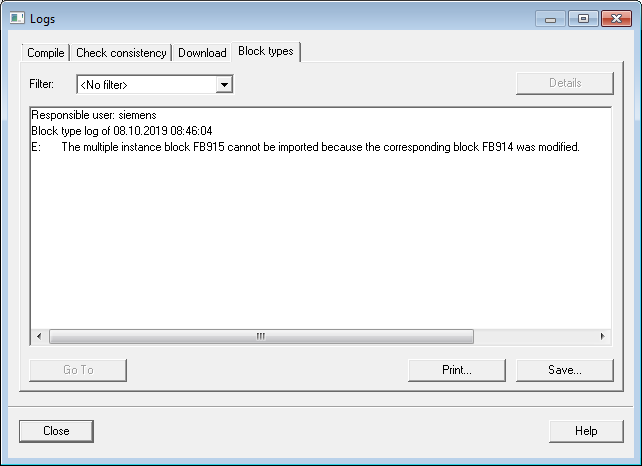
Fig. 1
The Modbus blocks are in the Modbus/TCP libraries. You import internally called communication blocks from the libraries of STEP 7:
Standard Library
SIMATIC_NET_CP
Proceed as follows for the Modbus libraries "SIMATIC Modbus/TCP PN CPU" and "SIMATIC Modbus/TCP PN Red":
Open the library entitled "Standard Library".
In the "Communication Blocks" folder you copy the function blocks FB65 "TCON", FB63 "TSEND", FB64 "TRCV" and FB66 "TDISCON".
Import the copied FBs into the Modbus library.
The Modbus block can be imported into the CFC chart from the Modbus library.
Proceed as follows for the Modbus libraries "SIMATIC Modbus/TCP CP" and "SIMATIC Modbus/TCP CP Red":
Open the library entitled "SIMATIC_NET_CP".
If you are using a SIMATIC S7-300, in the "CP 300" folder you copy the blocks FC5 "AG_SEND", FC6 "AG_RECV" and FC10 "AG_CTRL".
If you are using a SIMATIC S7-400, in the "CP 400" folder you copy the blocks FC50 "AG_LSEND", FC60 "AG_LRECV" and FC10 "AG_CTRL".
Import the copied FCs into the Modbus library.
The Modbus block can be imported into the CFC chart from the Modbus library. |
|
| Back to top |
|
 |
|
|
You cannot post new topics in this forum
You cannot reply to topics in this forum
You cannot edit your posts in this forum
You cannot delete your posts in this forum
You cannot vote in polls in this forum
|
Powered by phpBB © 2001, 2005 phpBB Group
Fa-ti si tu propriul forum GRATUIT, pe www.myforum.ro |
 FAQ
FAQ Search
 Memberlist
 Usergroups
 Register
 Profile
 Log in to check your private messages
 Log in


