 |
plc.myforum.ro
PLCs users www.plc.myforum.ro!
|
| View previous topic :: View next topic |
| Author |
Message |
messer
Senior

Joined: 08 Mar 2012
Posts: 2059
Location: Europe
|
 Posted: 25/02/2013 21:56 Post subject: ImDisk 1.6.0 - Virtual disk driver for Windows Posted: 25/02/2013 21:56 Post subject: ImDisk 1.6.0 - Virtual disk driver for Windows |
 |
|
ImDisk 1.6.0 is a virtual disk driver for Windows systems with DOS support:
ImDisk is filed under drivers and made available by Olof Lagerkvist for Windows. It was tested by Fernando Ortega
ImDisk is a virtual disk driver for Windows NT/2000/XP/2003/Vista/2008.
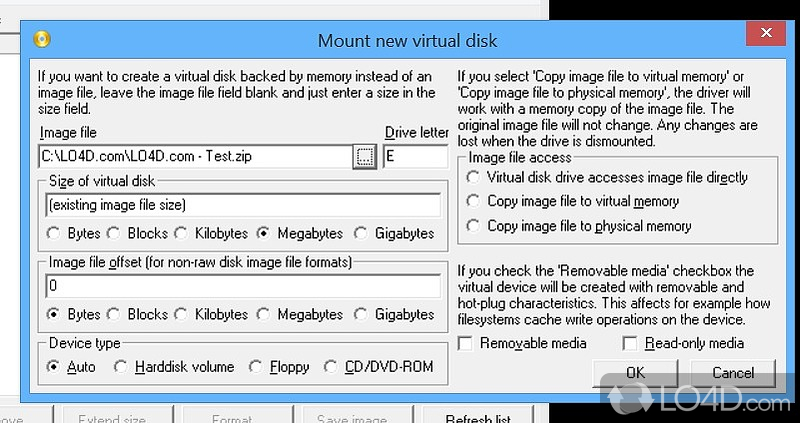
It can realizate virtual hard disk, floppy or CD/DVD drives using image files or system memory.
The install package installs a console-mode control program called imdisk.
ImDisk is licensed as Freeware for Windows (32-bit and 64-bit) operating system / platform from drivers without restrictions.
ImDisk 1.6.0 is available to all software users as a free download (Freeware).
or..
ImDisk Virtual Disk Driver Current version 1.6.0 built 02 November 2012
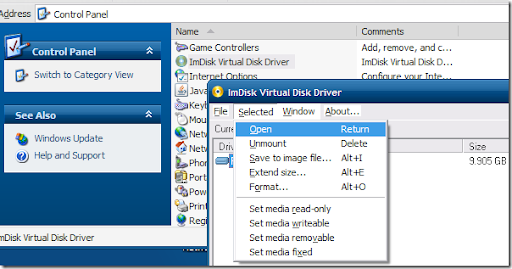
ImDisk is a virtual disk driver for Windows NT/2000/XP/Vista/7/8 or Windows Server 2003/2008/2012. It can făcute virtual hard disk, floppy or CD/DVD drives using image files or system memory. The install package installs a console-mode control program called imdisk.exe and a Control Panel applet. After install is finished, type imdisk without parameters for syntax help or dublu click the ImDisk icon in the Control Panel. It also adds a menu item in Windows Explorer so that you can right-click on a file to mount it as a virtual disk drive. Users of mdconfig in FreeBSD will probably be familiar with the command line syntax of imdisk.exe. The driver, service and control program can be uninstalled using the Add/Remove programs applet in the Control Panel. No reboot is required for installing or uninstalling.
An additional driver, awealloc, in this install package supports memory allocation beyond 4 GB limit on 32 bit Windows through address window extension, AWE.
The ImDisk driver supports forwarding I/O requests to third-party image file format handlers or to services on other computers on the network. This makes it possible to boot a machine with NTFS partitions with a Live-CD and use the included devio tool to let ImDisk on another computer running Windows on the network mount the NTFS partition on the machine with a faulty NTFS partition.
This way you can recover information and even run chkdsk on drives on machines where Windows does not boot. There are also instructions about how to use devio under Windows on Claus Valca's blog.
Page:
http://www.ltr-data.se/opencode.html/
download:
http://www.ltr-data.se/files/imdiskinst.exe
Claus Valca's blog:
http://grandstreamdreams.blogspot.ro/2009/08/devio-remote-drive-access-and.html
You can download devio.exe for Windows here:
http://www.ltr-data.se/files/devio.exe
See also questions about devio:
http://reboot.pro/index.php?showtopic=8466 |
|
| Back to top |
|
 |
|
|
You cannot post new topics in this forum
You cannot reply to topics in this forum
You cannot edit your posts in this forum
You cannot delete your posts in this forum
You cannot vote in polls in this forum
|
Powered by phpBB © 2001, 2005 phpBB Group
Fa-ti si tu propriul forum GRATUIT, pe www.myforum.ro |
 FAQ
FAQ Search
 Memberlist
 Usergroups
 Register
 Profile
 Log in to check your private messages
 Log in


