 |
plc.myforum.ro
PLCs users www.plc.myforum.ro!
|
| View previous topic :: View next topic |
| Author |
Message |
omer_1
Junior

Joined: 14 Jan 2019
Posts: 6
|
 Posted: 14/01/2019 12:01 Post subject: I/O's Read/Write from Micro850 Posted: 14/01/2019 12:01 Post subject: I/O's Read/Write from Micro850 |
 |
|
Hello,
I'm using Allen Bradley Micro850 , 2080-LC50-24QWB.
I wrote a program using Connected Component Workbench which reads certain indications and controlling contactors.
My customer would like to connect that PLC to a PC by an Ethernet cable RJ45 and read those input registers and write those output registers into his application that he had built.
He would like to know the commands in order to read or write the data and the TCP/IP data structures and frames.
i have been searching this information in the data sheets and have found none.
i hope you could help me or at least instruct me becasue that's really urgent.
thanks in advance. |
|
| Back to top |
|
 |
tanner
Member

Joined: 07 Jun 2015
Posts: 134
|
| Posted: 14/01/2019 13:27 Post subject: Micro850/820: Ethernet OPC data access using Modbus/TCP |
|
|
This is a solution from AB
Micro850/820: Ethernet OPC data access using Modbus/TCP
Question
How to setup OPC Data Access with a Micro850 controller on Ethernet using Modbus/TCP?
Environment
Connected Components Workbench Release 4
Micro850 FW 4.011 or latest
Micro 820 FW 6.001 or latest
KEPServerEnterprise 5.7
Answer
This application note details how to setup KEPServerEnterprise for OPC Data Access with a Micro850 controller (global variables only) over Modbus/TCP.
Note: it is assumed that the user is familiar with CCW programming software and KEPServerEnterprise, as many of the steps for setup are not shown.
However all important settings are mentioned, so with a minimal amount of effort, inexperienced persons should be able to get a working OPC via Modbus/TCP following the example.
1. In order to communicate with a Micro850 over Ethernet/IP it is necessary to setup the Micro850 with an IP address. In this case the Micro850 is setup to 192.168.1.1 with subnet 255.255.255.0.
2. Create some variables that we can read/write with the OPC Data Access server.
Using the KEPServerEnterprise you are limited to following data types:
| Code: | Boolean,
Char,
Byte,
Short,
Word,
Long,
Dword,
Float,
Double,
String,
BCD,
LBCD,
Date. |
Please note that these names do not correspond with the data types available in CCW software. For instance a Real in CCW software is a Float in the Kepware software. Also testing is required to make sure KEPServerEnterprise interprets the bit pattern of the data type in CCW software in the correct way in the OPC server. In this example the data source used in the Micro850 is an array of REAL's that will be made available in the OPC server.
Note: Variables/Tags that need to be accessible for the OPC have to be in Global variables.
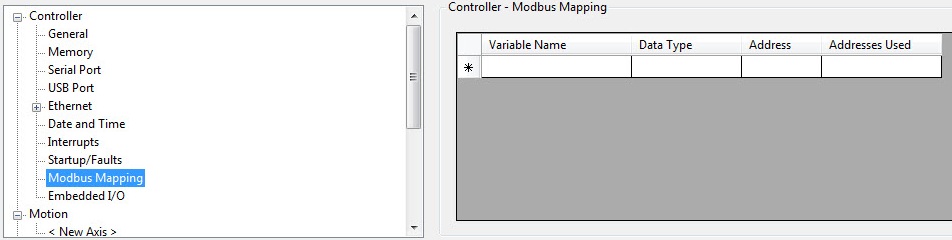
3. After creating variables (REAL array in Global Variables), the next step is to map them to the modbus registries. ;Use Modbus Mapping that can be found under the Controller configuration. See image below:
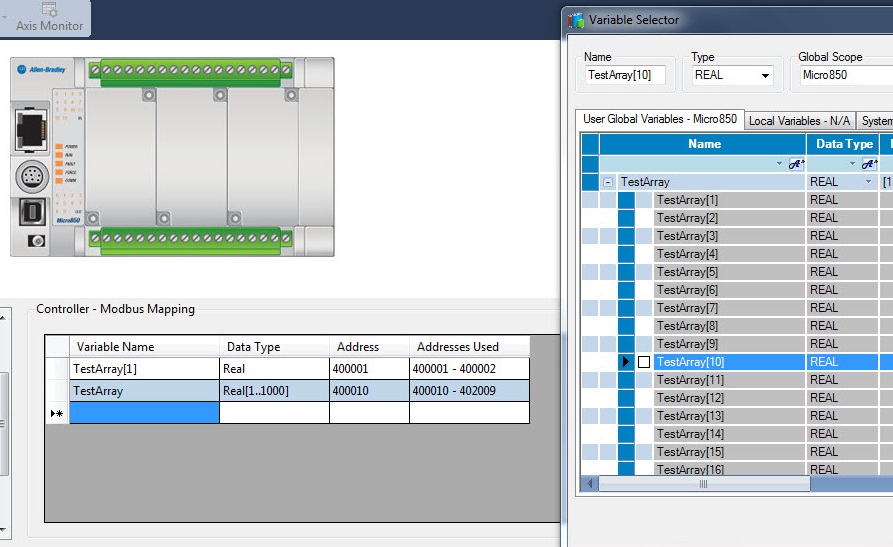
4. By double clicking the field beneath Variable Name, a pop-up window appears in which you can select the tag you would like to map to the Modbus registers. Limitations for this modbus mapping on the Micro800 series can be found in 492330 - Micro830/850: Modbus mapping limitation. After selecting the desired tag to map to the modbus registers, in the Address field you fill in the desired modbus register to map the assigned tag to. In this example, every tag was mapped to the Read/Write holding registers which has reference 4 in the modbus protocol standard. The complete array ;and the creation of another one can be seen in the following screen shot, you can see that the Addresses used column is updated automatically:
5. After building and downloading this configuration, everything is setup for OPC Data Access in the Micro850 controller via Modbus/TCP.
At this ocazie we can shift focus to configure the KEPServerEnterprise to communicate with the desired tags.
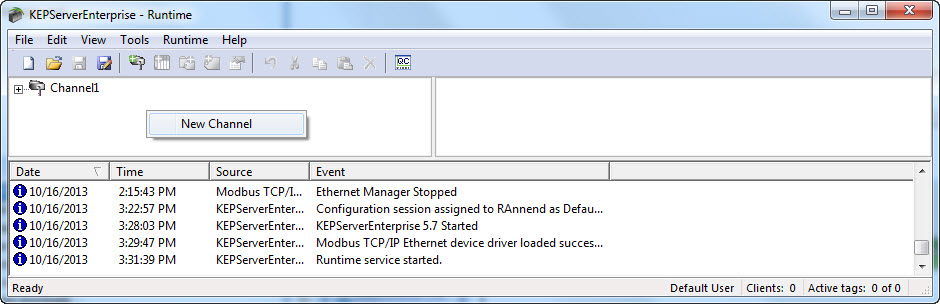
6. First thing to do after opening KEPServerEnterprise is to create the channel which we will use to atingere the Micro850 controller by using Modbus/TCP. This can be done by right-clicking the window on the left and choosing New Channel as you can see in following screen shot:
7. Clicking New Channel opens a pop-up window to name the channel and set settings. To navigate through the different settings, use the back and next buttons. Name the channel as you want, in the case of the example this was left to default (Channel 1).
8. For the Device Driver select Modbus TCP/IP Ethernet as we are going to access the tags in the Micro850 controller via the Modbus Mapping.
9. Next, select the Network Adapter with which your PC is connected with the Micro850 controller.
Note: Other settings that are shown in this pop-up by clicking next ;or previous are set to the taste of the user and in the example are left default.
10. Now that the channel has been created, a device needs to be added to this channel. This can be done ;by right-clicking the channel and ;clicking New Device.
11. Again a pop-up window to configure the settings of the device pops up. To navigate through the different settings, use the back and next buttons on the window.
The important settings here are:
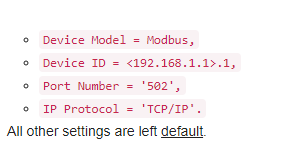
The channel on which to communicate and the device with who we want to communicate are now defined within the KEPServerEnterprise software. The next thing to configure will be the actual registers we want to read/write. Once we have the registers, we have the value of the tags.
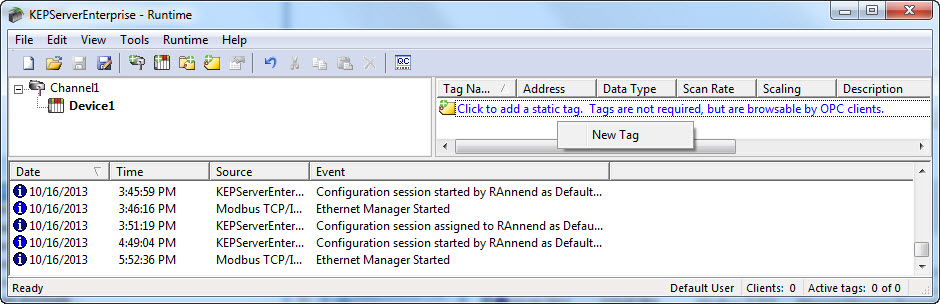
12. To do this, click on device1 in the left window, after which right-click in the right window of KEPServerEnterprise and select New Tag as shown in following screen shots:
13. This opens following pop-up window:
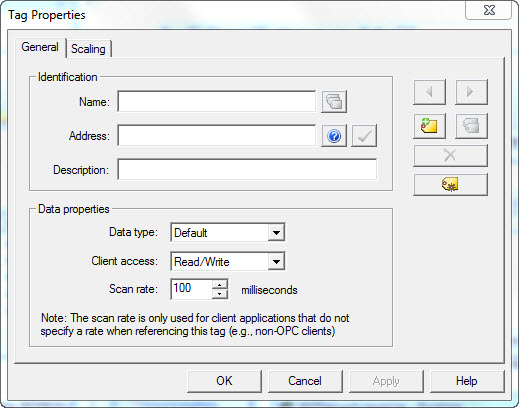
Here you can fabricate the tags in the OPC Server. In the Micro850 controller we mapped internal Micro850 tags to modbus registers. Here we will do it the other way round, thus mapping registers to named tags.
14. In the name field you put in the name you want to use within the OPC Data Access server. Address is the modbus register in which you have mapped the tag in the Micro850. If we refer back to the modbus mapping in this example if we should put 400001 in this field, we are creating an OPC tag that will have the same value as the first element of the REAL array in the Micro850.
15. Last thing that has to be setup is the Data type. In this example we are using REAL data, which means the Data type in the OPC has to be setup as Float.
This concludes a very basic setup for OPC Data Access with KEPServerEnterprise using Modbus/TCP to a Micro850.
Feel free to play around with different settings to optimize OPC and Micro850 communication.
https://www.kepware.com/getattachment/2bb313b4-34f2-419c-9e5b-a8517ce3698e/allen-bradley-micro800-ethernet-manual.pdf |
|
| Back to top |
|
|
omer_1
Junior
Joined: 14 Jan 2019
Posts: 6
|
| Posted: 14/01/2019 13:53 Post subject: I/O's Read/Write from Micro850 |
|
|
Is there any other option than using KEPSERVER?
cause that means that i have to purchase a license |
|
| Back to top |
|
|
Dulcineea
Junior
Joined: 11 Jan 2019
Posts: 3
|
| Posted: 14/01/2019 14:19 Post subject: Micro 820 slave Modbus TCP/IP |
|
|
Take a look on this ..in Spanish..
But all depends what application do you use in your PC to work as a Modbus Server.
http://www.infoplc.net/descargas/204-rockwell/automatas/micro-800/2446-micro-820-slave-modbus-tcp-ip |
|
| Back to top |
|
|
omer_1
Junior
Joined: 14 Jan 2019
Posts: 6
|
| Posted: 14/01/2019 16:03 Post subject: I/O's Read/Write from Micro850 |
|
|
Thanks,
what about the TCP/IP commands Message structure?
Like if i want to read descrete input through TCP/IP connection i have to send a command message to get the data from the PLC.
how do i do that?
thanks. |
|
| Back to top |
|
|
omer_1
Junior
Joined: 14 Jan 2019
Posts: 6
|
| Posted: 14/01/2019 17:07 Post subject: I/O's Read/Write from Micro850 |
|
|
| Does this Modbus explanation document applies to Micro850 as well? same commands ? |
|
| Back to top |
|
|
|
|
You cannot post new topics in this forum
You cannot reply to topics in this forum
You cannot edit your posts in this forum
You cannot delete your posts in this forum
You cannot vote in polls in this forum
|
Powered by phpBB © 2001, 2005 phpBB Group
Fa-ti si tu propriul forum GRATUIT, pe www.myforum.ro |
 FAQ
FAQ Search
 Memberlist
 Usergroups
 Register
 Profile
 Log in to check your private messages
 Log in


