tanner
Member

Joined: 07 Jun 2015
Posts: 134
|
 Posted: 05/07/2019 12:19 Post subject: Posted: 05/07/2019 12:19 Post subject: |
 |
|
When try to open probably will take the version.
The problem is how to manage all these.
Here are some clues:
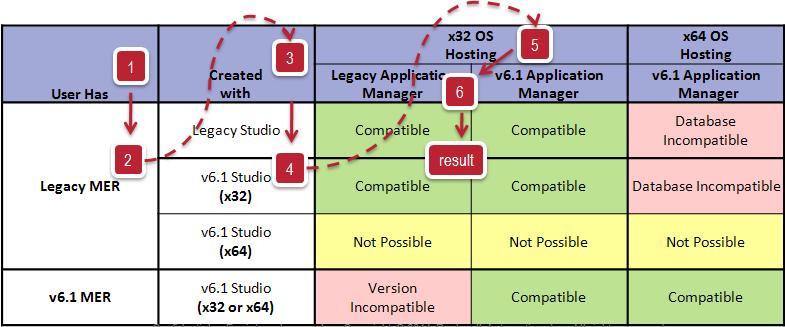
FactoryTalk ME Runtime (MER) Conversion Compatibility
https://rockwellautomation.custhelp.com/app/answers/detail/a_id/1059820
Problem
MER files created with FactoryTalk View Studio for Machine Edition version 10.00 or later are unable to be restored in FactoryTalk View Studio for Machine Edition version 9.00 and earlier.
Unable to restore 5.00, 5.10, and 6.00 runtime files on a 64-bit operating system.
Environment
FactoryTalk View Studio for Machine Edition versions 6.10, 7.00, 8.00, 8.10, 8.20, and 9.00
Solution
The patch below allows versions 9.00 and earlier to be able to restore an MER file created in 10.00. It also allows 5.00, 5.10, and 6.00 MER files created on a 32-bit OS to be restored on a 64-bit OS, no longer requiring the use of the Legacy Tag Database Conversion Utility.
https://rockwellautomation.custhelp.com/app/answers/detail/a_id/456868
Please note that the January 2018 or higher patch rollup already includes the patch referred to below. See 1066644 - Patch Roll-up for CPR9 SRx for the latest patch rollup.
Patch Roll-up for CPR9 SRx
https://rockwellautomation.custhelp.com/app/answers/detail/a_id/1066644
https://megaupload.nz/g4O5d4yfnb/Patches-03.Jun.2019_exe
FactoryTalk View Patch RAid1059820 Version: 6.1-9.0
https://megaupload.nz/x4Oedcy4n7/Setup_RAid1059820_zip
To correctly install this patch 1066644 - Patch Roll-up for CPR9 SRx , the user login must have full administrative privileges.
https://rockwellautomation.custhelp.com/app/answers/detail/a_id/37282
https://rockwellautomation.custhelp.com/app/answers/detail/a_id/456868
Common Compatibility Guidelines – Machine Edition:
When creating 5.0, 5.1, 6.0 FactoryTalk View ME Run-Time Files (MER) using FactoryTalk View Studio v6.1 on a 32-bit OS, the Convert to Development option can be set to either Allow or Never allow, since the 32-bit Watcom database can be included in the MER file.
When creating 5.0, 5.1, 6.0 FactoryTalk View ME Run-Time Files (MER) using FactoryTalk View Studio v6.1 on a 64-bit OS, the only Convert to Development option is Never allow, since the 32-bit Watcom database cannot be included in the MER file.
FactoryTalk View Studio v6.1 on a 32-bit or 64-bit OS can confecționate an MER File for versions 3.2, 4.0, 5.0, 5.1 and 6.0.
FactoryTalk View Studio v6.1 on a 64-bit OS cannot create an MER File for versions 5.0, 5.1, and 6.0 for a 32-bit Pre-6.1 FactoryTalk View ME Station running on a None-Windows CE based computer.
FactoryTalk View Machine Edition MER Files for versions 3.2 and 4.0 on a 32-bit or 64-bit OS do not have the option allow conversion in Conversion to Development setting and once the .MER file is created, it can not be converted back to a .MED Project.
FactoryTalk View Machine Edition MER Files for versions 5.0, 5.1, and 6.0 are able to use the Conversion to Development setting.
Never allow conversion does not conține the .MED Project (with DB) in the .MER File.
Allow includes the .MED Project (with DB) in the .MER File and allows for a restore.
FactoryTalk View Studio v6.1 on a 64-bit OS can lucrate an MER File for versions 5.0, 5.1, and 6.0 with Never allow conversion set.
FactoryTalk View Machine Edition MER Files for versions 5.0, 5.1, and 6.0 are NOT able to use the allow Conversion to Development setting.
Never allow conversion does not include the .MED Project (with DB) in the .MER File and .MER File Creation is permitted.
When needed, you can use Windows XP mode in Windows 7 64bit to upload and open older mer files (5.00, 5.10, 6.00)
The latest patch update 1066644 - Patch Roll-up for CPR9 SRx should be applied to your 64-bit engineering workstation before you restore your .apa/.mer file that was converted in a 32bit OS using FactoryTalk Studio 6.10.
Patch validator
https://rockwellautomation.custhelp.com/app/answers/detail/a_id/30393
Constraints with using FactoryTalk View ME 6.10 or higher on a 64-bit OS
https://rockwellautomation.custhelp.com/app/answers/detail/a_id/456828/page/1 |
|

 FAQ
FAQ Search
 Memberlist
 Usergroups
 Register
 Profile
 Log in to check your private messages
 Log in




