 |
plc.myforum.ro
PLCs users www.plc.myforum.ro!
|
| View previous topic :: View next topic |
| Author |
Message |
Linhvan64vn
Junior

Joined: 08 May 2019
Posts: 11
|
 Posted: 17/09/2020 03:56 Post subject: how to connect pc to plc omron CP1l via RS422A/485 Posted: 17/09/2020 03:56 Post subject: how to connect pc to plc omron CP1l via RS422A/485 |
 |
|
Hj Friends,
Please help me connect pc to plc omron CP1l via RS422A/485
Thank
Linh |
|
| Back to top |
|
 |
zred32
Junior
Joined: 19 Nov 2018
Posts: 3
|
| Posted: 17/09/2020 07:39 Post subject: serial communication option boards for the CP1 series PLCs |
|
|
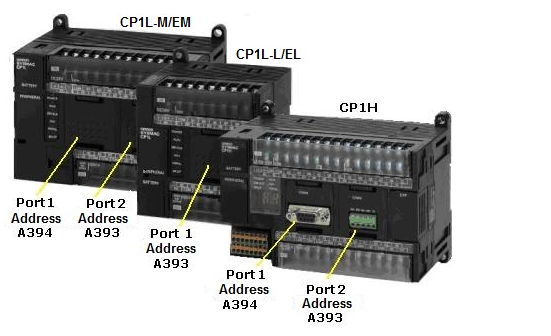
The following serial communication option boards can be used on any available option board slot for the CP1 series PLCs.
CP1W-CIF01 (RS232C)
CP1W-CIF11 (RS422A/485, 50m)
CP1W-CIF12 (RS422A/485, 500m)
Note: The single option board slot on the CP1L-L14/20 and CP1L-EL is designated as serial port 1 in CX-Programmer, but uses the flags usually allocated to port 2 of other CP1L/H types. When using ladder instructions or function blocks, specify port 2. See the CP1L CPU Unit Operation Manual (Cat. No. W462) or CP1H CPU Unit Operation Manual (Cat. No. W450) for more information.
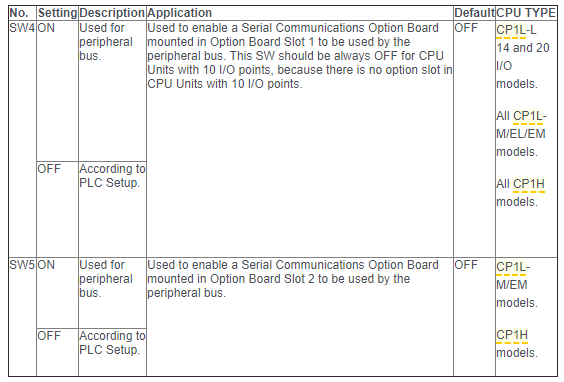
Configuration of front switches
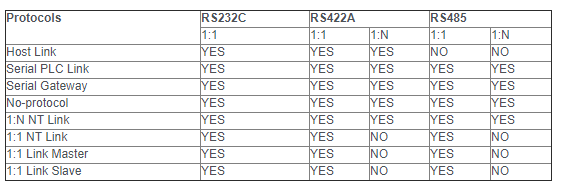
Supported protocols in user configuration
Protocol overview
Host Link: Various control commands such as reading and writing I/O memory, changing the operating mode, and force setting/resetting bits can be executed by sending C-mode host link commands or FINS commands from the host computer to the CPU Unit. It is also possible to send FINS commands from the CPU Unit to the host computer to send data or information. Use Host Link communications to monitor data, such as operating status, error information, and quality data in the PLC or send data, such as production planning information to the PLC.
Serial PLC Link: Up to ten words per Unit can be shared by up to nine CPU Units, including one Polling Unit and eight Polled Units. An RS-422A/485 Option Boards (CP1W-CIF11/CIF12) are used to communicate via RS-422A/485, or RS-232C Option Boards (CP1W-CIF01) can be used to communicate between two CPU Units via an RS-232C connection. CJ1M CPU Units can also be included in Serial PLC Links, and the Serial PLC Links can also include PTs as Polled Units via 1:N NT Links. Serial PLC Links can be created on serial port 1 or serial port 2, but not on both ports at the same time.
Serial Gateway: Converts received FINS commands into CompoWay/F or Modbus-RTU commands and transfers them on the serial communications path.
No-Protocol: Communicates with standard devices with an RS-232C or RS-422A/485 port without a command–response format. Instead the TXD(236) and RXD(235) instructions are executed from the program to transmit data from the transmission port or read data in the reception port. The frame headers and end codes can be specified.
1:N NT Link: Data can be exchanged with PTs without using a communications program in the CPU Unit. 1:N NT Links are also used for 1:1 connections.
1:1 NT Link: Enables data exchange with a PT without communications programming in the CPU Unit. (The 1:N NT Link protocol is used for communications even for 1:1 connections.)
1:1 Link Master/Slave: Enables linking data in a 64-word Link Area between two PLCs.
Configuration of communication port via STUP instruction
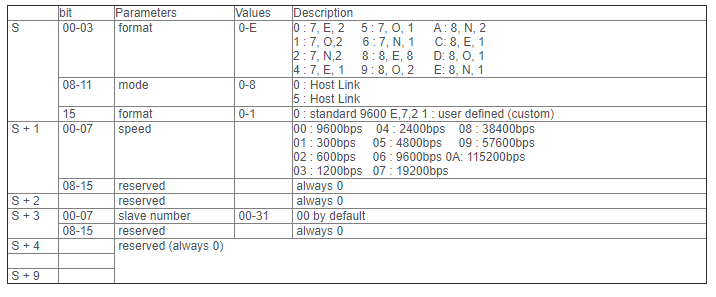
The STUP instruction changes the communications parameters of a serial port on a Serial Communications Option Board. STUP(237) thus enables the protocol mode to be changed during PLC operation. This instruction is not allowed in interrupt tasks. A CX-Programmer project file (STUP Example.cxp) is attached as an example.

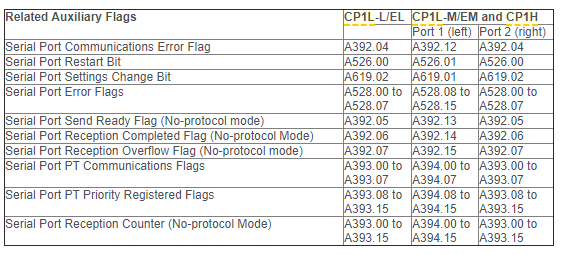
Changing the communication compus of the serial ports 1 and 2 is indicated by the system flags A619.01 and A619.02. After switching off and being switched back on, the controller incorporates the values in its communication parameters
Host Link Mode values
[url=http://www.girlshare.ro/3769966806.1]STUP_Example.cxp[/url] |
|
| Back to top |
|
|
heyfu
Junior
Joined: 28 Apr 2020
Posts: 2
|
| Posted: 17/09/2020 08:09 Post subject: Re: how to connect pc to plc omron CP1l via RS422A/485 |
|
|
| Linhvan64vn wrote: | Hj Friends,
Please help me connect pc to plc omron CP1l via RS422A/485
Thank
Linh |
[url=http://www.girlshare.ro/3769966808.3]Connecting_PLC_CG.pdf[/url]
[url=http://www.girlshare.ro/3769966809.4]w462_cp1l_cpu_unit_operation_manual_en.pdf[/url]
[url=http://www.girlshare.ro/3769966810.5]Omron+PLC+Programming+Cables+v1.4.pdf[/url]
[url=http://www.girlshare.ro/3769966811.6]W461-E1-05.pdf[/url]
https://anonfiles.com/15X6ZfV8o2/Omron_PLC_Programming_Cables_v1.4_pdf
https://anonfiles.com/58X7Z1V0o8/Connecting_PLC_CG_pdf
https://anonfiles.com/TbX5Z8Vfob/W461-E1-05_pdf
https://anonfiles.com/j2YfZ7V7o9/w462_cp1l_cpu_unit_operation_manual_en_pdf
[url=http://www.girlshare.ro/3769966812.7]PL2303_Prolific_DriverInstaller_v1_9_0.zip[/url] |
|
| Back to top |
|
|
Linhvan64vn
Junior
Joined: 08 May 2019
Posts: 11
|
| Posted: 18/09/2020 05:40 Post subject: Re: how to connect pc to plc omron CP1l via RS422A/485 |
|
|
| heyfu wrote: | | Linhvan64vn wrote: | Hj Friends,
Please help me connect pc to plc omron CP1l via RS422A/485
Thank
Linh |
[url=http://www.girlshare.ro/3769966808.3]Connecting_PLC_CG.pdf[/url]
[url=http://www.girlshare.ro/3769966809.4]w462_cp1l_cpu_unit_operation_manual_en.pdf[/url]
[url=http://www.girlshare.ro/3769966810.5]Omron+PLC+Programming+Cables+v1.4.pdf[/url]
[url=http://www.girlshare.ro/3769966811.6]W461-E1-05.pdf[/url]
https://anonfiles.com/15X6ZfV8o2/Omron_PLC_Programming_Cables_v1.4_pdf
https://anonfiles.com/58X7Z1V0o8/Connecting_PLC_CG_pdf
https://anonfiles.com/TbX5Z8Vfob/W461-E1-05_pdf
https://anonfiles.com/j2YfZ7V7o9/w462_cp1l_cpu_unit_operation_manual_en_pdf
[url=http://www.girlshare.ro/3769966812.7]PL2303_Prolific_DriverInstaller_v1_9_0.zip[/url] |
Thank you so much |
|
| Back to top |
|
|
Linhvan64vn
Junior
Joined: 08 May 2019
Posts: 11
|
| Posted: 18/09/2020 05:57 Post subject: Re: serial communication option boards for the CP1 series PL |
|
|
| zred32 wrote: | The following serial communication option boards can be used on any available option board slot for the CP1 series PLCs.
CP1W-CIF01 (RS232C)
CP1W-CIF11 (RS422A/485, 50m)
CP1W-CIF12 (RS422A/485, 500m)
Note: The single option board slot on the CP1L-L14/20 and CP1L-EL is designated as serial port 1 in CX-Programmer, but uses the flags usually allocated to port 2 of other CP1L/H types. When using ladder instructions or function blocks, specify port 2. See the CP1L CPU Unit Operation Manual (Cat. No. W462) or CP1H CPU Unit Operation Manual (Cat. No. W450) for more information.
Configuration of front switches
Supported protocols in user configuration
Protocol overview
Host Link: Various control commands such as reading and writing I/O memory, changing the operating mode, and force setting/resetting bits can be executed by sending C-mode host link commands or FINS commands from the host computer to the CPU Unit. It is also possible to send FINS commands from the CPU Unit to the host computer to send data or information. Use Host Link communications to monitor data, such as operating status, error information, and quality data in the PLC or send data, such as production planning information to the PLC.
Serial PLC Link: Up to ten words per Unit can be shared by up to nine CPU Units, including one Polling Unit and eight Polled Units. An RS-422A/485 Option Boards (CP1W-CIF11/CIF12) are used to communicate via RS-422A/485, or RS-232C Option Boards (CP1W-CIF01) can be used to communicate between two CPU Units via an RS-232C connection. CJ1M CPU Units can also be included in Serial PLC Links, and the Serial PLC Links can also include PTs as Polled Units via 1:N NT Links. Serial PLC Links can be created on serial port 1 or serial port 2, but not on both ports at the same time.
Serial Gateway: Converts received FINS commands into CompoWay/F or Modbus-RTU commands and transfers them on the serial communications path.
No-Protocol: Communicates with standard devices with an RS-232C or RS-422A/485 port without a command–response format. Instead the TXD(236) and RXD(235) instructions are executed from the program to transmit data from the transmission port or read data in the reception port. The frame headers and end codes can be specified.
1:N NT Link: Data can be exchanged with PTs without using a communications program in the CPU Unit. 1:N NT Links are also used for 1:1 connections.
1:1 NT Link: Enables data exchange with a PT without communications programming in the CPU Unit. (The 1:N NT Link protocol is used for communications even for 1:1 connections.)
1:1 Link Master/Slave: Enables linking data in a 64-word Link Area between two PLCs.
Configuration of communication port via STUP instruction
The STUP instruction changes the communications parameters of a serial port on a Serial Communications Option Board. STUP(237) thus enables the protocol mode to be changed during PLC operation. This instruction is not allowed in interrupt tasks. A CX-Programmer project file (STUP Example.cxp) is attached as an example.
Changing the communication compus of the serial ports 1 and 2 is indicated by the system flags A619.01 and A619.02. After switching off and being switched back on, the controller incorporates the values in its communication parameters
Host Link Mode values
[url=http://www.girlshare.ro/3769966806.1]STUP_Example.cxp[/url] |
Thank you so much friends. |
|
| Back to top |
|
|
|
|
You cannot post new topics in this forum
You cannot reply to topics in this forum
You cannot edit your posts in this forum
You cannot delete your posts in this forum
You cannot vote in polls in this forum
|
Powered by phpBB © 2001, 2005 phpBB Group
Fa-ti si tu propriul forum GRATUIT, pe www.myforum.ro |
 FAQ
FAQ Search
 Memberlist
 Usergroups
 Register
 Profile
 Log in to check your private messages
 Log in


