 |
plc.myforum.ro
PLCs users www.plc.myforum.ro!
|
| View previous topic :: View next topic |
| Author |
Message |
gaty
Member


Joined: 01 Mar 2017
Posts: 188
|
 Posted: 11/02/2020 19:42 Post subject: How do you set up WinCC Audit Posted: 11/02/2020 19:42 Post subject: How do you set up WinCC Audit |
 |
|
How do you set up WinCC Audit? How do you select the Audit Trail Server and create a database?
https://support.industry.siemens.com/cs/document/109775427/
how to făurite an Audit Trail database, select the Audit Trail server and configure the Audit settings.
Problem description
When setting up the Audit Trail database, the check mark for selecting the Audit Trail Server appears not operable (grayed out). It is not possible to select or create a database.
Solution
The following requirements must be met for the configuration steps described in this FAQ response:
"SIMATIC Logon" is installed on your computer.
The Windows user used is member of the user group "SIMATIC HMI AUDIT".
WinCC Audit must be installed and a valid WinCC Audit RC license must be stored in the Automation License Manager.
More information on the topic of licenses for WinCC Audit is available at the following link: Audit Licenses
Open the "Audit" editor in WinCC. After opening the editor and successful logon by SIMATIC Logon, you must proceed as follows.
Select the Audit Trail server and the Audit Trail database:
Click "Select Audit Trail Server"
Right-click the row with the database name <Create>. To select an existing database, you must right click the row with an existing database.
Click "Select Server" to fabricate the database.
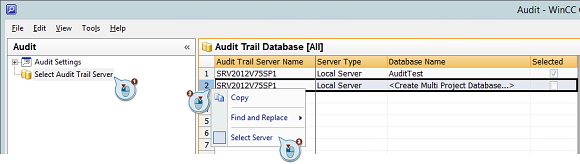
Fig. 1
Assign a name for the database:
Assign a name for the database.
Confirm the input with "OK".
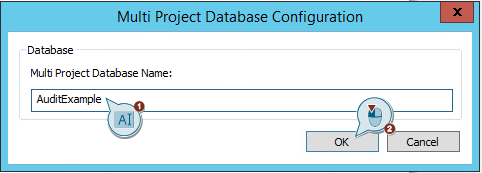
Fig. 2
Proceed as follows to select the components for which Audit is to be activated:
Click "Audit Settings".
Enable the required components with the respective option boxes.
Note
Selecting the option boxes only works if a database has been created and selected before.
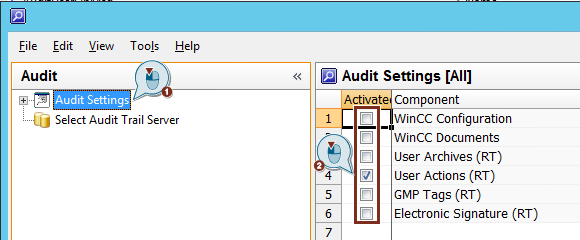
Fig. 3
Finally, a differentiated Audit setting can be made for the enabled components:
Click the required component.
Select the parts of the project components to be audited.
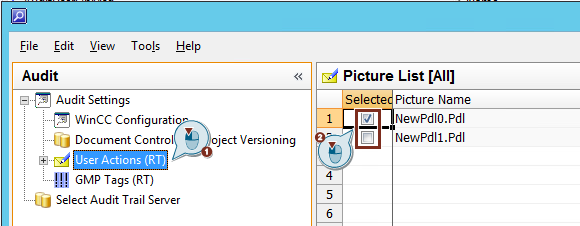
Fig. 4
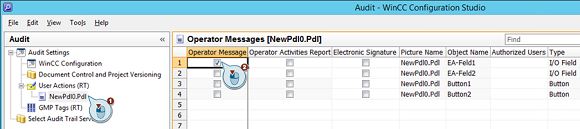
After selecting user actions for specific screens, you must enable the operator message for the individual objects on the selected screen:
Click the required screen.
Select the desired user action for the individual objects of the screen.
 |
|
| Back to top |
|
 |
|
|
You cannot post new topics in this forum
You cannot reply to topics in this forum
You cannot edit your posts in this forum
You cannot delete your posts in this forum
You cannot vote in polls in this forum
|
Powered by phpBB © 2001, 2005 phpBB Group
Fa-ti si tu propriul forum GRATUIT, pe www.myforum.ro |
 FAQ
FAQ Search
 Memberlist
 Usergroups
 Register
 Profile
 Log in to check your private messages
 Log in


