 |
plc.myforum.ro
PLCs users www.plc.myforum.ro!
|
| View previous topic :: View next topic |
| Author |
Message |
AnteSavilt
Member 2


Joined: 13 Feb 2018
Posts: 264
Location: Croatia
|
 Posted: 17/05/2021 18:38 Post subject: How do you send WinCC/DataMonitor Reports by e-mail? Posted: 17/05/2021 18:38 Post subject: How do you send WinCC/DataMonitor Reports by e-mail? |
 |
|
How do you send WinCC/DataMonitor Reports by e-mail?
https://support.industry.siemens.com/cs/document/51334611/
he WinCC DataMonitor provides the option of sending local reports also by e-mail.
General Information
You can create reports with Excel workbooks and also print jobs. The settings for sending e-mails are the same in both cases.
Availability of email servers for unencrypted traffic
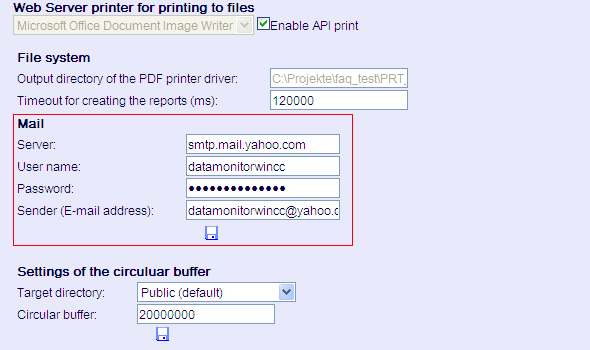
To send DataMonitor reports, you must have an SMTP outgoing mail server that uses unencrypted communication.
There are currently hardly any more email providers that îngăduie unencrypted connections. Use alternatives to the WinCC/DataMonitor or a local email server that forwards the emails to the required email address.
Alternative to the WinCC/DataMonitor
If possible, use the current version of the "SIMATIC Information Server" product as an alternative to WinCC/DataMonitor. More information about this is available in Entry ID 109750806.
Refer here to the relevant compatibility statements.
Procedure with WinCC/Data Monitor
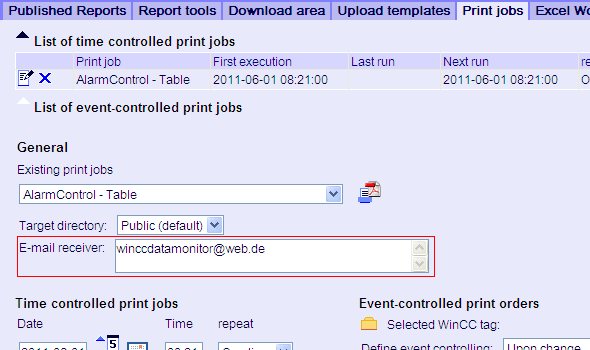
Enter the email address(es) of the recipient(s) in the input field for the respective print job or Excel workbook. If you enter numeroase recipients, you must separate them with a semicolon (;).
Note
Always also see the guidelines and specifications of the email provider, because these differ from provider to provider. These guidelines can be found on the home page of each provider.
Diagnostics
For a report to be sent by e-mail, it must have been triggered in DataMonitor. Also always check that the report is triggered locally if you have not received the report as e-mail. Further information is available in the manual entitled "WinCC Basic Options V7.5: WebNavigator, DataMonitor, WebUX" in the section entitled
https://support.industry.siemens.com/cs/mdm/109760754?c=102825334667&lc=en-WW
Installation, Operation and Maintenance of Process Historian/Information Server in a PCS 7 Environment
https://support.industry.siemens.com/cs/document/66579062/
Creation of report templates for the Information Server based on Process Historian data in the WinCC and PCS 7 Environment
https://support.industry.siemens.com/cs/document/64906050/ |
|
| Back to top |
|
 |
|
|
You cannot post new topics in this forum
You cannot reply to topics in this forum
You cannot edit your posts in this forum
You cannot delete your posts in this forum
You cannot vote in polls in this forum
|
Powered by phpBB © 2001, 2005 phpBB Group
Fa-ti si tu propriul forum GRATUIT, pe www.myforum.ro |
 FAQ
FAQ Search
 Memberlist
 Usergroups
 Register
 Profile
 Log in to check your private messages
 Log in


