 |
plc.myforum.ro
PLCs users www.plc.myforum.ro!
|
| View previous topic :: View next topic |
| Author |
Message |
grig100
Member 3


Joined: 01 Jan 2015
Posts: 752
|
 Posted: 05/07/2016 17:15 Post subject: How do you initialize structures in optimized memory areas Posted: 05/07/2016 17:15 Post subject: How do you initialize structures in optimized memory areas |
 |
|
In STEP 7 (TIA Portal), how do you initialize structures in optimized memory areas in the S7-1500?
https://support.industry.siemens.com/cs/document/78678760/in-step-7- (tia-portal)-how-do-you-initialize-structures-in-optimized-memory-areas-in-the-s7-1500
Variables in the temporary area of an optimized block are initialized with zero each time the block is called.
The following are not initialized:
Variables declared as array.
Variables declared in a non-optimized block.
In STEP 7 (TIA Portal), you can use assignments with user-defined values to initialize structures in optimized memory areas in the S7-1500.
If you want to load defined values into the separate elements of a structure, you just have to initialize the temporary structure before you assign it to the static structure. Using a FOR loop in SCL you can also initialize large fields (array of struct) during runtime with just a few code lines.
Fig. 01 shows an example for a data block structure with two DB variables. With the second DB variable the PLC data type is used as "Array [1..10] of motor data type".
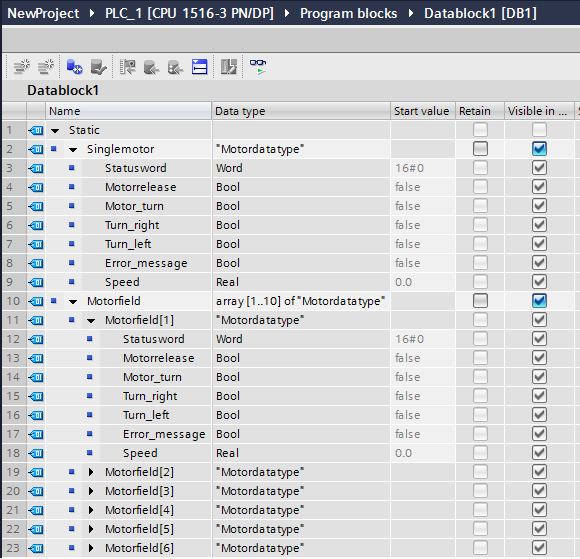
Using the "MOVE" instruction (copy value) you can completely initialize the structured InOut variable "Motor". In the example below the contents of the temporary variable "tmp_Motor" are transferred to the InOut variable "Motor". In LAD/FBD, the single bits are copied to the status word through slice access (Fig. 02).
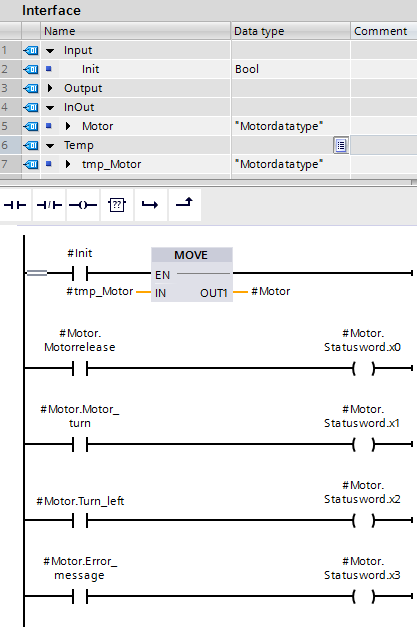
The temporary variable and the InOut variable must have the same data type or the same structured data type. Fig. 03 shows the programming of the instructions in SCL for the complete initialization of the InOut variable "Motor" and the bit-for-bit access to the single elements.

The following example shows the initialization of the DB variable "Motor field". Using the FOR instruction in SCL the program loop is processed repeatedly for as long as the run variable "tmp_Counter" is in the specified value range. Since the PLC data type is an "Array [1..10] of motor data type", the program loop must be processed 10 times ("1 TO 10 DO") to initialize all the array elements of the structured variable.

In a UDT you can define initial values already with the declaration, which then every variable based on the UDT has as start value. It is also only necessary to initialize structured variables if you want to do a programmed reset of a running machine. In the case of a STOP/RUN transition the start values are taken from the load memory anyway, which corresponds to a reset. |
|
| Back to top |
|
 |
grig100
Member 3
Joined: 01 Jan 2015
Posts: 752
|
| Posted: 02/12/2019 20:28 Post subject: How do you copy memory areas and structured data in STEP 7 ( |
|
|
How do you copy memory areas and structured data in STEP 7 (TIA Portal)?
https://support.industry.siemens.com/cs/document/42603881/how-do-you-copy-memory-areas-and-structured-data-in-step-7- (tia-portal)
With S7-1200/S7-1500, if you want to copy memory areas, in STEP 7 (TIA Portal) you use the instructions "MOVE_BLK", "MOVE", "Serialize" and "Deserialize".
The following examples show how to copy the contents of a source memory area into a target memory area. You can also copy structured data with the "MOVE" instruction. Information about this is available in Entry ID 78678760.
Example 1: Copy contents of array variables from one data block to another
If you have to copy data areas from one data block to another, you create the data blocks with variables of the "Array" data type. Using the Array variables and the "MOVE_BLK" instruction, for example, you can move parts or the complete memory area from one data block to another. With the "COUNT" parameter you define the number of the elements from which you wish to move data from the source area to the target area.
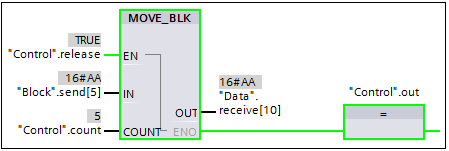
Fig. 1
Fig. 1 shows the call and parameterization of the "MOVE_BLK" instruction with two DB variables.
The formal parameter "IN" is parameterized with the array element of the DB variable "Block.send[5]".
The formal parameter "OUT" is parameterized with the array element of the DB variable "Data.receive[10]".
The actual parameter "Control.count" provides with the value "5" the number of copy repeats.
In this way the data is copied from "Block.send[5]...Block.send[9]" into the memory area "Data.receive[10]...Data.receive[14]".
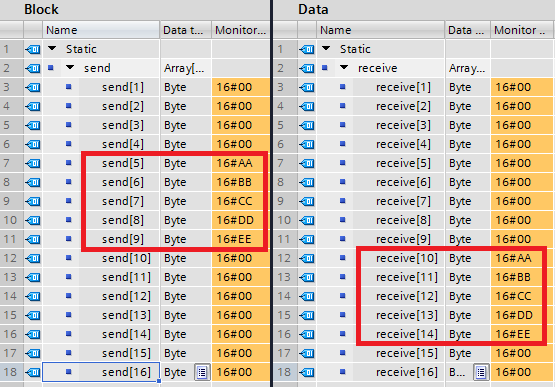
Fig. 2
Example 2: Copy structured data from one data block to another each with a different PLC data type
The "Copy" function copies from the "Source" data block the contents of the structured variable "variable" (PLC data type: "Speed") into the structured variable "value" (PLC data type: "Drive") of the "Target" data block. The two memory areas do not have the same PLC data type.
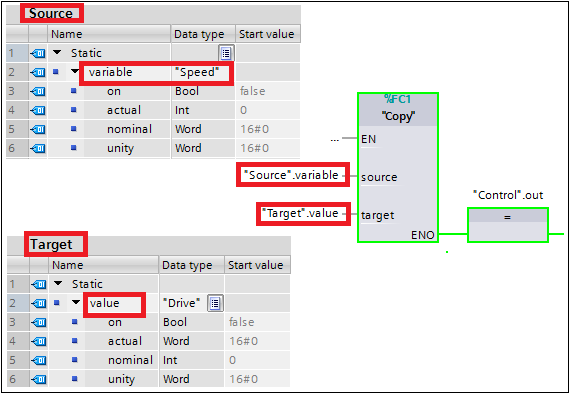
Fig. 3
Fig. 4 shows the program in the "Copy" function with the call and parameterization of the two instructions "Serialize" and "Deserialize". The "Serialize" instruction converts a PLC data type into a sequential display type and stores the structured data in the buffer memory "tempStore". In the second network the "Deserialize" instruction converts the sequential data from the buffer memory "tempStore" back into a PLC data type.
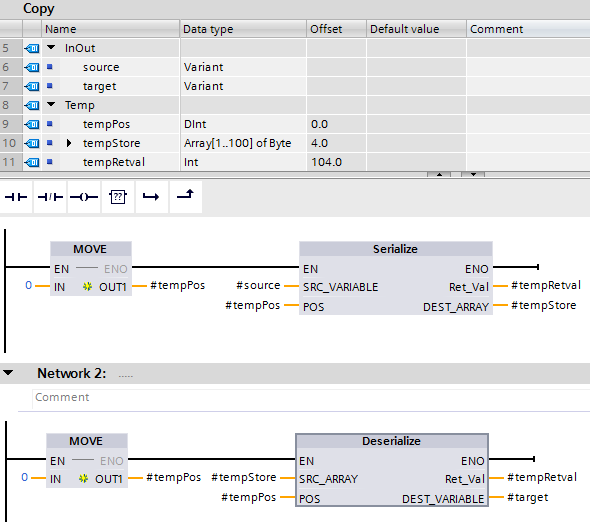
Fig. 4
Note
One of the two requirements below must be met to be able to use the "Serialize" and "Deserialize" functions.
Requirement 1: Disable the optimized block access
In the project navigation you right-click the function "Copy"
Click "Properties"
In the column on the right you select "Attributes"
Remove the check mark for "Optimized block access"
Requirement 2: In the "Retain" column you select "Set in IDB"
Choose an FB instead of an FC
Save the array ("tempStore") as a static variable
For the array ("tempStore") you select "Set in IDB" in the "Retain" column
Example 3: Copy structured data from an input module into a data block
In the example below (Fig. 5), the input areas (IB0, IB1) and output areas (data block "DBrange") are defined with the PLC data type "DataRange". This structured grouping of the input and output addresses in a higher-level PCL variable makes it easier to program your program.
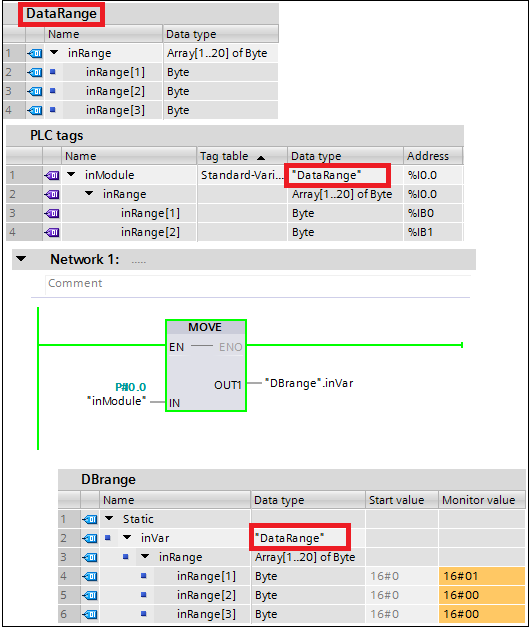
Fig. 5
Using this method, you can also copy input areas larger than 64 bytes into a data block. You need firmware V4.1 or higher for the S7-1200 CPU modules.
Notes
The above-mentioned instructions are available in the "Basic Instructions" task card:
Either in the "Move" folder or
You drag-and-drop the "Empty box" from the "General" folder into your network. Then move the cursor on the yellow triangle in the empty box until the symbol for opening the drop-down list appears. In the drop-down list you select the required command.
Applications for pointers in the comparison (S7-1200, S7-1500)
https://support.industry.siemens.com/cs/mdm/109755202?c=94603227275&lc=en-WW |
|
| Back to top |
|
|
|
|
You cannot post new topics in this forum
You cannot reply to topics in this forum
You cannot edit your posts in this forum
You cannot delete your posts in this forum
You cannot vote in polls in this forum
|
Powered by phpBB © 2001, 2005 phpBB Group
Fa-ti si tu propriul forum GRATUIT, pe www.myforum.ro |
 FAQ
FAQ Search
 Memberlist
 Usergroups
 Register
 Profile
 Log in to check your private messages
 Log in


