maersk
Member 3


Joined: 17 Aug 2014
Posts: 891
|
 Posted: 25/08/2015 21:28 Post subject: How do you export and reimport WinCC Runtime data? Posted: 25/08/2015 21:28 Post subject: How do you export and reimport WinCC Runtime data? |
 |
|
How do you export and reimport WinCC Runtime data?
https://support.industry.siemens.com/cs/document/850338/how-do-you-export-and-reimport-wincc-runtime-data
You want to export WinCC Runtime data to a "txt" or "csv" file, read the file into another system, restore the data from an earlier point in time or edit in Excel.
In WinCC V7.2 and higher you export/import the Runtime data via the Configuration Studio.
Read more on
https://support.industry.siemens.com/cs/mdm/102754925
https://support.industry.siemens.com/cs/mdm/102754925
Description
This entry shows how to proceed using C and VB scripts. In the example we only show the processing of "64-bit floating point numbers" (integer "Int" in the TIA portal). Simply change the programming for the data types, number of tags and tag names for your own project.
The following tags were configured in WinCC for the example:
TagA, TagB, TagC, TagD, TagE - floating-point number 64-bit IEEE 754 (integer "Int" in the TIA Portal)
Filename - text tag 8-bit font ("String" in the TIA Portal)
Please always assign the complete path to the WinCC tag "Filename", for example: "C:/Temp/FileA.csv"
You can download the sample scripts here to make things easier.
https://support.industry.siemens.com/cs/attachments/850338/scripte_readwritefile.zip
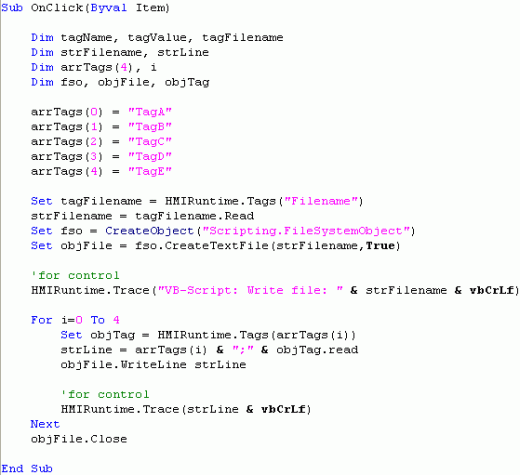
Note the following when composing the string to be written to the file:
Separate the values with a semicolon ';'.
Use the function "WriteLine" (automatically inserts the endline character).
When reading ".csv" files, "Microsoft Excel" uses the semicolon for "New Column" and endline for "New Line".
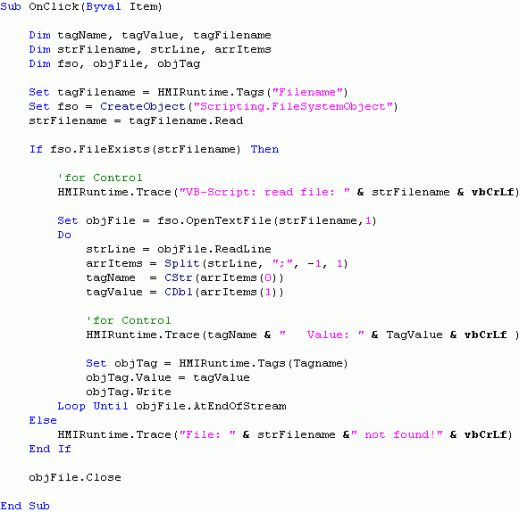
With this script you must remember to convert the character stream into the correct data compus after splitting. Here, in the example: CStr() and CDbl()
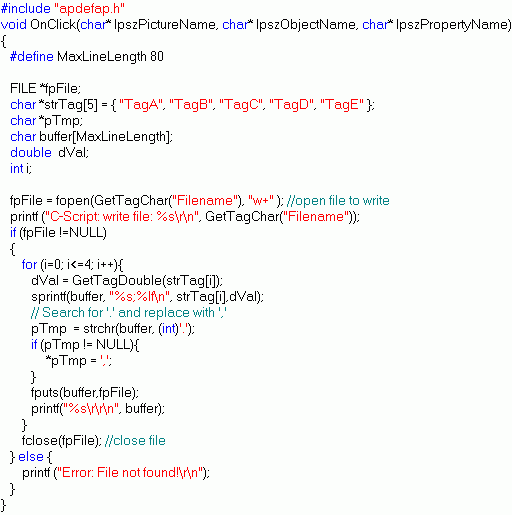
Note the following when composing the string to be written to the file:
Separate the values with a semicolon ';'.
Insert the endline character '\n'.
Change the decimal sign from point '.' to comma ',' (German standard C works with the point as decimal symbol). If you are working with the English default settings, you do not need to do this.
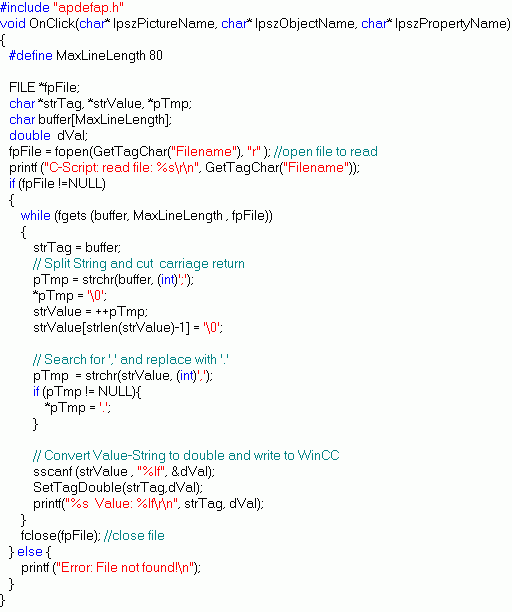
Pay attention here too to the correct type conversion. sscanf(strValue, "%lf", &dVal);

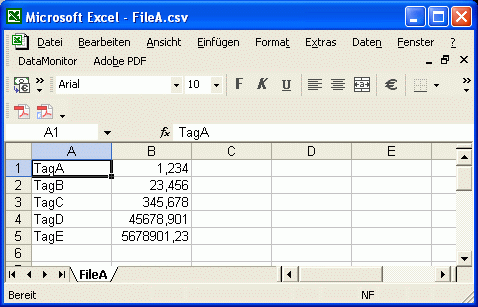
Opened with "Excel":
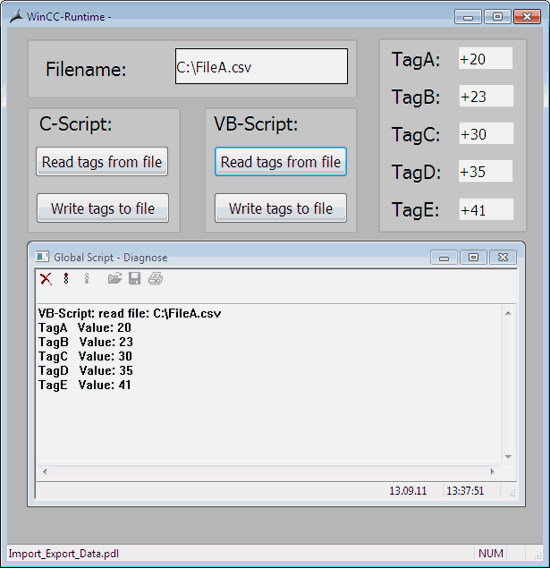
WinCC Runtime:

Download for TIA portal users (V13 SP1)
You can download a library here with a sample picture for easy testing.
https://support.industry.siemens.com/cs/attachments/850338/Import_Export_V13_SP1.zip
 |
|

 FAQ
FAQ Search
 Memberlist
 Usergroups
 Register
 Profile
 Log in to check your private messages
 Log in


