| View previous topic :: View next topic |
| Author |
Message |
fify
Junior 2

Joined: 26 Jan 2017
Posts: 26
|
 Posted: 20/06/2018 12:01 Post subject: How do you făcute dynamic text lists in WinCC (TIA Portal) Posted: 20/06/2018 12:01 Post subject: How do you făcute dynamic text lists in WinCC (TIA Portal) |
 |
|
How do you create dynamic text lists in WinCC (TIA Portal)?
https://support.industry.siemens.com/cs/document/57025748/
You can insert dynamic text lists into the following objects:
Symbolic IO field
Button
Switch
Text lists
Note
The number of entries in the text lists is predefined by the configuration of the text lists.
1) Function of dynamic text lists
The text list entries can be made dynamic by tags or other text lists.
A detailed demonstration of these two options is available in the two sample projects that you can download (see chapter 4) from this entry.

Fig. 01
2) Configuration of dynamic text lists with integrated tags
The table below explains the minimum configuration step by step.
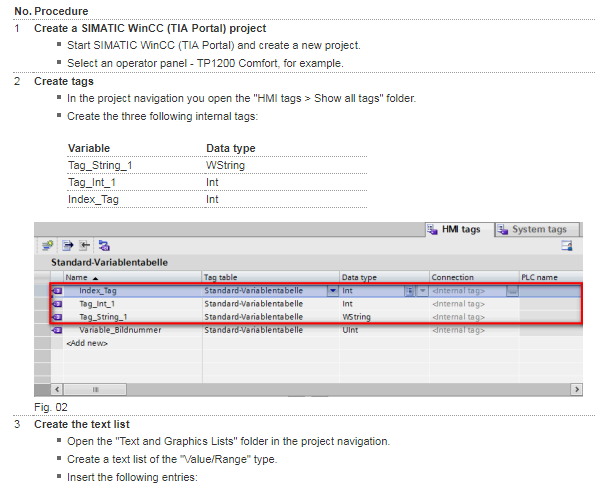


There are two projects in the attachment.
Sample project described above in extended form with the tag implemented in the text list.
Sample project described above in extended form with the text lists implemented in the text list.
https://support.industry.siemens.com/cs/attachments/57025748/57025748_wincc_tia_dynamic_textlist_CODE_V15.zip
https://support.industry.siemens.com/cs/attachments/57025748/57025748_wincc_tia_dynamic_textlist_CODE_V14_SP1.zip |
|
| Back to top |
|
 |
puno
Junior

Joined: 28 Sep 2015
Posts: 14
|
| Posted: 22/06/2018 13:03 Post subject: |
|
|
| Thank you! |
|
| Back to top |
|
|
|

 FAQ
FAQ Search
 Memberlist
 Usergroups
 Register
 Profile
 Log in to check your private messages
 Log in


