 |
plc.myforum.ro
PLCs users www.plc.myforum.ro!
|
| View previous topic :: View next topic |
| Author |
Message |
grig100
Member 3


Joined: 01 Jan 2015
Posts: 752
|
 Posted: 05/07/2016 17:12 Post subject: How do you copy memory areas and structured data in STEP 7 Posted: 05/07/2016 17:12 Post subject: How do you copy memory areas and structured data in STEP 7 |
 |
|
How do you copy memory areas and structured data in STEP 7 (TIA Portal)?
With S7-1200/S7-1500, if you want to copy memory areas, in STEP 7 (TIA Portal) you use the instructions "MOVE_BLK", "MOVE", "Serialize" and "Deserialize".
https://support.industry.siemens.com/cs/document/42603881/how-do-you-copy-memory-areas-and-structured-data-in-step-7- (tia-portal)
Example 1: Copy contents of array variables from one data block to another
If you have to copy data areas from one data block to another, you fabricate the data blocks with variables of the "Array" data type. Using the Array variables and the "MOVE_BLK" instruction, for example, you can move parts or the complete memory area from one data block to another. With the "COUNT" parameter you define the number of the elements from which you wish to move data from the source area to the target area.
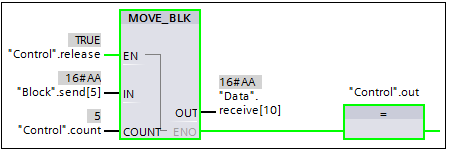
Fig. 1 shows the call and parameterization of the "MOVE_BLK" instruction with two DB variables.
The formal parameter "IN" is parameterized with the array element of the DB variable "Block.send[5]".
The formal parameter "OUT" is parameterized with the array element of the DB variable "Data.receive[10]".
The actual parameter "Control.count" provides with the value "5" the number of copy repeats.
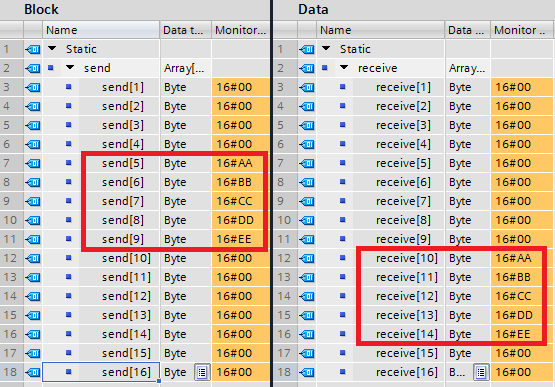
In this way the data is copied from "Block.send[5]...Block.send[9]" into the memory area "Data.receive[10]...Data.receive[14]".
Example 2: Copy structured data from one data block to another each with a different PLC data type
The "Copy" function copies from the "Source" data block the contents of the structured variable "variable" (PLC data type: "Speed") into the structured variable "value" (PLC data type: "Drive") of the "Target" data block. The two memory areas do not have the same PLC data type.
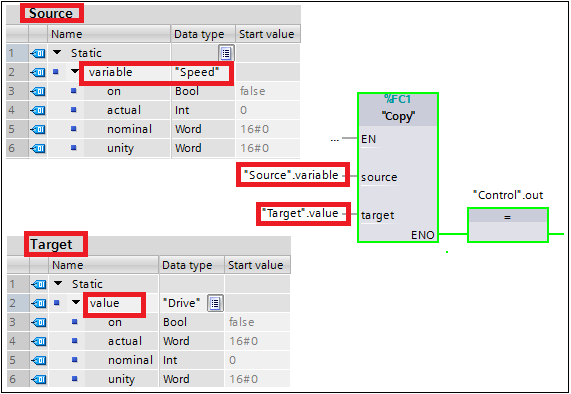
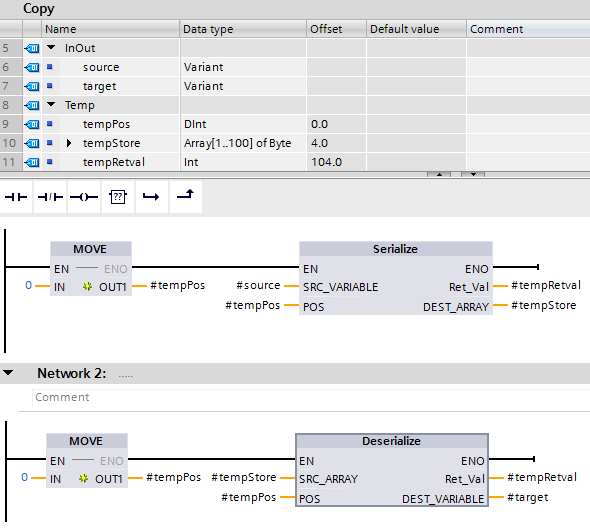
Fig. 4 shows the program in the "Copy" function with the call and parameterization of the two instructions "Serialize" and "Deserialize". The "Serialize" instruction converts a PLC data type into a sequential display type and stores the structured data in the buffer memory "tempStore". In the second network the "Deserialize" instruction converts the sequential data from the buffer memory "tempStore" back into a PLC data type.
Example 3: Copy structured data from an input module into a data block
In the example below (Fig. 5), the input areas (IB0, IB1) and output areas (data block "DBrange") are defined with the PLC data type "DataRange". This structured grouping of the input and output addresses in a higher-level PCL variable makes it easier to program your program.

Using this method you can also copy input areas larger than 64 bytes into a data block. You need firmware V4.1 or higher for the S7-1200 CPU modules. |
|
| Back to top |
|
 |
|
|
You cannot post new topics in this forum
You cannot reply to topics in this forum
You cannot edit your posts in this forum
You cannot delete your posts in this forum
You cannot vote in polls in this forum
|
Powered by phpBB © 2001, 2005 phpBB Group
Fa-ti si tu propriul forum GRATUIT, pe www.myforum.ro |
 FAQ
FAQ Search
 Memberlist
 Usergroups
 Register
 Profile
 Log in to check your private messages
 Log in


