 |
plc.myforum.ro
PLCs users www.plc.myforum.ro!
|
| View previous topic :: View next topic |
| Author |
Message |
DOD1
Junior

Joined: 14 Jan 2019
Posts: 11
|
 Posted: 22/08/2019 21:49 Post subject: How do you close a picture window in the WinCC Runtime Posted: 22/08/2019 21:49 Post subject: How do you close a picture window in the WinCC Runtime |
 |
|
How do you close a picture window in the WinCC Runtime using an additional button?
https://support.industry.siemens.com/cs/document/109769328/how-do-you-close-a-picture-window-in-the-wincc-runtime-using-an-additional-button
When using a touch screen, the default Windows button might be too small for safe operation. For this reason it is possible to incorporate an additional larger button with user-created faceplates.
When implementing this task you should first determine whether you are in the Basic Process Control (BPC) environment. When implementing in the BPC environment, please click this
https://support.industry.siemens.com/cs/document/16650946/how-do-you-close-a-faceplate-in-the-wincc-basic-process-control- (bpc)-environment-via-an-additional-larger-button
In some cases it might be necessary to close picture windows during operation using an additional button. For this reason you can close or open a screen window via the "Display" property. You can dynamize this property, for example, via a script (C, VB) or via a direct connection.
Procedure
C script
Via the “Visible” property of the picture window you can use a C script to close or open the picture window.
The following C script can be inserted as a basis in the object properties of the button under "Event > Mouse > Mouse-click":
| Code: | #include "apdefap.h"
void OnClick(char* lpszPictureName, char* lpszObjectName, char* lpszPropertyName)
{
SetPropBOOL(“PictureName”,”ItemName”,"Visible",FALSE);
} |
VB script
Via the “Visible” property of the picture window you can use a VB script to close or open the picture window.
The following VB script can be inserted as a basis in the object properties of the button under "Event > Mouse > Mouse-click":
| Code: | Sub OnClick (ByVal Item)
Dim obj
Set obj = HMIRuntime.Screens(“PictureName”).ScreenItems(“ItemName”)
obj.Visible = 0
End Sub |
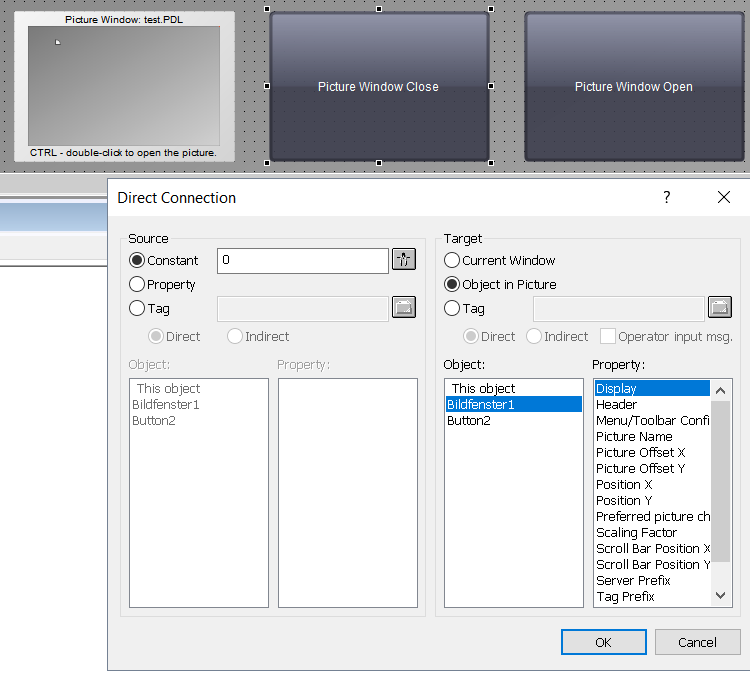
Direct connection
Via a direct connection to a property of the button you can use constants to close or open the picture window.
The figure shows how to close the picture window using the constant "0".
 |
|
| Back to top |
|
 |
|
|
You cannot post new topics in this forum
You cannot reply to topics in this forum
You cannot edit your posts in this forum
You cannot delete your posts in this forum
You cannot vote in polls in this forum
|
Powered by phpBB © 2001, 2005 phpBB Group
Fa-ti si tu propriul forum GRATUIT, pe www.myforum.ro |
 FAQ
FAQ Search
 Memberlist
 Usergroups
 Register
 Profile
 Log in to check your private messages
 Log in


