 |
plc.myforum.ro
PLCs users www.plc.myforum.ro!
|
| View previous topic :: View next topic |
| Author |
Message |
grig100
Member 3


Joined: 01 Jan 2015
Posts: 752
|
 Posted: 21/05/2019 20:01 Post subject: How do you calculate the operating time in STEP 7 TIA Portal Posted: 21/05/2019 20:01 Post subject: How do you calculate the operating time in STEP 7 TIA Portal |
 |
|
How do you calculate the operating time for a terminal device (pump, for example) in STEP 7 (TIA Portal)?
https://support.industry.siemens.com/cs/document/52258130/how-do-you-calculate-the-operating-time-for-a-terminal-device- (pump-for-example)-in-step-7-(tia-portal)
You calculate the operating time for a terminal device by reading out the current data and the current time of the CPU and calculating the difference between the two times.
Fig. 1 shows an example for calculating the operating time for a terminal device. For this, STEP 7 (TIA Portal) provides the two extended instructions "RD_SYS_T" (read time) and "T_DIFF" (time difference). The output of the calculated time is then the difference between the data read and thus the operating time for the device.
Fig. 1
The library in the entry includes the FB "Timedifferent" with an SCL program in which the "RD_SYS_T" instruction is called conditionally twice in succession.
When the input parameter "startTime" has the signal"0", the first condition is fulfilled and the first instruction "RD_SYS_T" is executed.
When the input parameter "stopTime" has the signal "0", the second condition is fulfilled and the second instruction "RD_SYS_T" is executed.
The IF instructions are followed by the call of the "T_DIFF" instruction. Fig. 2 shows an example for the call of the FB "Timedifferent" in the OB "Main"
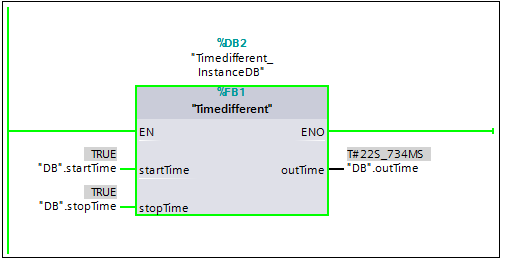
Instructions for determining the operating time for the terminal device:
| Code: | Step 1: "startTime" = "0" and "stopTime" = "0"
The two "RD_SYS_T" instructions simultaneously read out the current date and the current time of the CPU. In this way the difference between the two times calculated with the "T_DIFF" instruction is zero.
The value of the output parameter "outTime" of the "T_DIFF" instruction is reset to zero.
Step 2, start of time measurement: "startTime" = "1" and "stopTime" = "0"
The first "RD_SYS_T" instruction is not executed and thus reading of the CPU clock is interrupted. The last value read from the CPU clock is stored in a static variable.
The second "RD_SYS_T" instruction continues to be active and the current data is stored in a second static variable.
The difference between the time values of the two static variables is calculated with the "T_DIFF" instruction and stored in the output variable "outTime".
Step 3, end of time measurement: "startTime" = "1" and "stopTime" = "1"
The first "RD_SYS_T" instruction continues not to be executed. The last value read from the CPU clock remains stored in a static variable.
The second "RD_SYS_T" instruction is also no longer executed and thus, here too, reading of the CPU clock is interrupted. The last value read from the CPU clock remains stored in a static variable.
The difference between the two time values is calculated with the "T_DIFF" instruction. The result is then transferred as the operating time to the output parameter "outTime".
Note
Before a new time measurement can start you first have to reset the two parameters "startTime" and "stopTime" to zero. |
The table below shows the input and output parameters with the associated data types of the FB "Timedifferent".

https://support.industry.siemens.com/cs/mdm/109755202?c=88772662795&lc=en-WW
https://support.industry.siemens.com/cs/attachments/52258130/52258130_Timedifferent_Lib_STEP7_TIA_Portal_V13.zip
https://support.industry.siemens.com/cs/attachments/52258130/52258130_Timedifferent_Lib_STEP7_TIA_Portal_V15.1.zip |
|
| Back to top |
|
 |
|
|
You cannot post new topics in this forum
You cannot reply to topics in this forum
You cannot edit your posts in this forum
You cannot delete your posts in this forum
You cannot vote in polls in this forum
|
Powered by phpBB © 2001, 2005 phpBB Group
Fa-ti si tu propriul forum GRATUIT, pe www.myforum.ro |
 FAQ
FAQ Search
 Memberlist
 Usergroups
 Register
 Profile
 Log in to check your private messages
 Log in


