 |
plc.myforum.ro
PLCs users www.plc.myforum.ro!
|
| View previous topic :: View next topic |
| Author |
Message |
grig100
Member 3


Joined: 01 Jan 2015
Posts: 752
|
 Posted: 05/07/2016 17:19 Post subject: How do you accessbit-by-bit, byte-by-byte or word-by-word Posted: 05/07/2016 17:19 Post subject: How do you accessbit-by-bit, byte-by-byte or word-by-word |
 |
|
How in STEP 7 (TIA Portal) do you access the unstructured data types bit-by-bit, byte-by-byte or word-by-word and symbolically?
| Code: | | https://support.industry.siemens.com/cs/document/57374718/how-in-step-7-(tia-portal)-do-you-access-the-unstructured-data-types-bit-by-bit-byte-by-byte-or-word-by-word-and-symbolically |
With the S7-1200/S7-1500 you can address specific areas in declared variables and access areas of the following widths: 1 bit, 8 bits, 16 bits and 32 bits.
In order to access variables of the data type Byte, Word or DWord you need
STEP 7 (TIA Portal) V11+SP1+Upd 2 (or higher) for S7-1200 (firmware V2.0 and higher).
STEP 7 (TIA Portal) V12 (or higher) for S7-1500.
The partitioning of a memory area (Byte or Word, for example) into a smaller memory area (Bool, for example) is also called memory slicing. Fig. 01 shows the symbolic bit, byte and word access to operands.
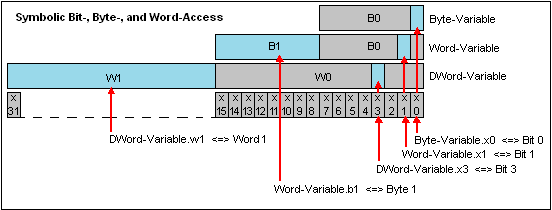
Using slice access provides you with greater programming efficiency and there is no need for additional definition in the variable declaration.
The example below shows bit-by-bit symbolic slice access. The "x" stands for bit-by-bit access in the Word or Byte concerned and the number that follows specifies the offset of the Bit concerned.
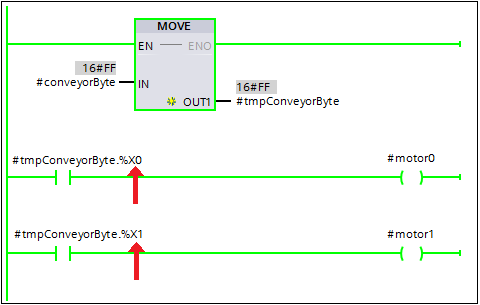
Fig. 03 shows a sample byte-by-byte slice access. Here, the "b" stands for byte-by-byte access and the number that follows specifies the offset of the byte concerned.
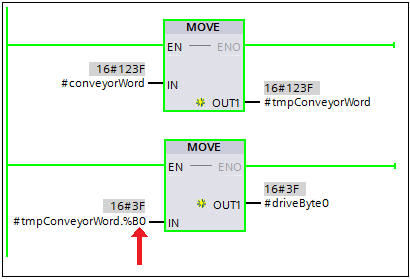
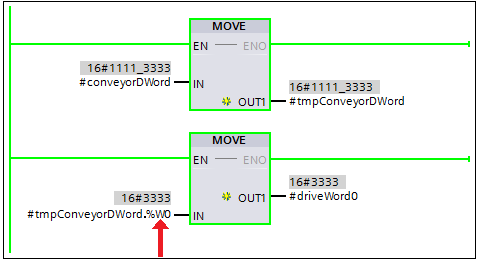
A "w" stands for word-by-word slice access and the number that follows specifies the offset of the word concerned.
In the case of some technical applications you only need the first 4 or 6 bits (Bit 0 to Bit 3 or to Bit 5 respectively) of the byte variables for converting a value of the Byte data type to a value of the Real data type. In this example a binary number (binary coded byte) is converted into a decimal number (real number). The lowest bit of the byte here has the value 2-5. This is not the places after the decimal point, but the decimal value itself that is calculated.

In the following SCL program code the first two instructions (slice accesses) set the bits not needed to the signal "False". Then, with the data type conversion, the change is made according to the value 2-5.

Notes
In STEP 7 (TIA Portal) V13 and higher, the syntax changes from "Variable.X0" to "Variable.%X0". After input as described above in the example "inByte.X0", STEP 7 (TIA Portal) V13 and higher changes the syntax automatically to "inByte.%X0".
Variables addressed by slice access in the program are not displayed with the cross references.
|
|
| Back to top |
|
 |
Yungshan
Junior

Joined: 05 Nov 2018
Posts: 2
|
| Posted: 12/05/2021 18:36 Post subject: |
|
|
 |
|
| Back to top |
|
|
|
|
You cannot post new topics in this forum
You cannot reply to topics in this forum
You cannot edit your posts in this forum
You cannot delete your posts in this forum
You cannot vote in polls in this forum
|
Powered by phpBB © 2001, 2005 phpBB Group
Fa-ti si tu propriul forum GRATUIT, pe www.myforum.ro |
 FAQ
FAQ Search
 Memberlist
 Usergroups
 Register
 Profile
 Log in to check your private messages
 Log in


