 |
plc.myforum.ro
PLCs users www.plc.myforum.ro!
|
| View previous topic :: View next topic |
| Author |
Message |
fritz
Member


Joined: 26 Dec 2015
Posts: 179
|
 Posted: 03/11/2022 15:44 Post subject: How can you back up the data of the Windows 10 event viewer? Posted: 03/11/2022 15:44 Post subject: How can you back up the data of the Windows 10 event viewer? |
 |
|
How can you back up the data of the Windows 10 event viewer?
https://support.industry.siemens.com/cs/document/15386411/
Information, warnings and errors relating to hardware or the operating system are stored in the Microsoft Windows event viewer. For diagnosing it might be necessary to make the data of the event viewer available for the Siemens Technical Support.
Instructions
To back up Event Viewer data in Windows 10, do the following:
Press the key combination "[Windows] + [X]" and select "Event Viewer" from the context menu that appears.
In the Event Viewer dialog, navigate to Windows Logs > Application".
Right click on "Application" and select "Save All Events As..." from the context menu.
Save the complete application log as *.EVTX file off.
Right click on "System" and select "Save All Events As..." from the context menu.
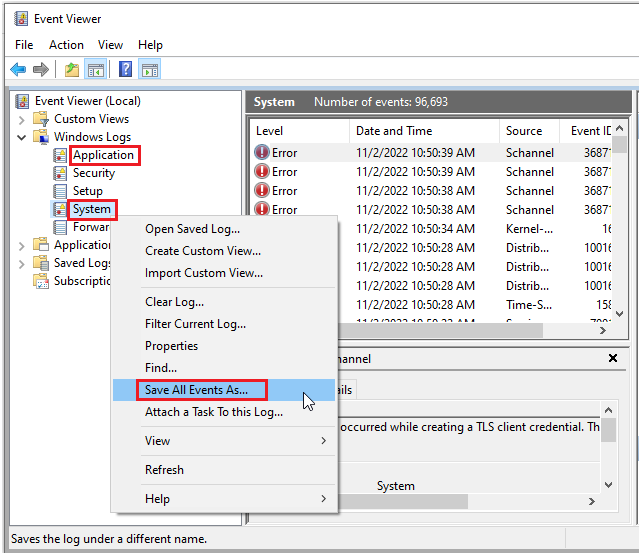
Fig. 1
Save the complete system log as an *.EVTX file away.
To reduce the amount of data to be transferred, archive the saved logs before sending them to Technical Support, e.g. as a zip file.
Send the archive file to Technical Support.
Further information
https://support.industry.siemens.com/cs/document/18194667/how-do-you-send-siemens-industry-technical-support-the-necessary-files-for-diagnosing-a-support-request- (sr)
https://support.industry.siemens.com/cs/document/65976201/how-do-you-efficiently-collect-diagnostics-and-system-information-with-the-simatic-assessment-suite-data-collector- (sas-dc) |
|
| Back to top |
|
 |
|
|
You cannot post new topics in this forum
You cannot reply to topics in this forum
You cannot edit your posts in this forum
You cannot delete your posts in this forum
You cannot vote in polls in this forum
|
Powered by phpBB © 2001, 2005 phpBB Group
Fa-ti si tu propriul forum GRATUIT, pe www.myforum.ro |
 FAQ
FAQ Search
 Memberlist
 Usergroups
 Register
 Profile
 Log in to check your private messages
 Log in


