 |
plc.myforum.ro
PLCs users www.plc.myforum.ro!
|
| View previous topic :: View next topic |
| Author |
Message |
gaborar1
Junior

Joined: 11 Aug 2020
Posts: 3
|
 Posted: 29/03/2021 10:04 Post subject: HMI MP 277 10" PDF Printing Posted: 29/03/2021 10:04 Post subject: HMI MP 277 10" PDF Printing |
 |
|
Hi everyone,
I'm new on this forum and need a little bit of help/explanation.
I have a Simatic HMI MP 277 10" Touch and I would like that all the reports from it to be printed in PDF format.
I tried the following things:
1. The HMI is connected via Ethernet cable to a server PC (with OS Windows 7).
On the server PC I have installed PDFCreator v1.6.2, this software creates a Virtual Printer, it can be shared and can be accessed by all clients.
I have tried on different client OS's (2000, XP, 7, 10, Embedded, etc.). I know that Windows CE is different but I had to give it a try...
Plus with it's Auto-Save functionality you only have to press print on the client PC and the file is printed/saved automatically with an auto-name, so you do not have to add a name and select a location... This feature is very helpful.
Unfortunately I could not access the shared Virtual Printer on the MP 277... I also installed all types of printer drivers from ProSave and tried them out, but without any luck.
2. Installation of Simatic's PDF Printer V1.5 was unsuccessful, with ProSave V16.0.0.1
In the Options Tab there are only the following options available: Printer Driver Brother PTouch... V1.4, Printer Driver PostScript V1.4, Telnet Login Disabled, ... UPS with USB support, WinAC MP V4.1.1 (TIA Portal).
I could not find the PDF Printer driver.
3*. I also made a search in the Siemens Kompatool, but here when I make the export, it shows that there is no printer compatibility, not even one printer is shown in the excel... I thought that the Siemens PDF Printer would be available to all type of HMI's, but no luck
Plus there is a printer connected to the HMI... HP LaserJet P3015, and it works fine (via Ethernet cable).
Questions regarding #1:
Am I doing something wrong?
Does this even work?
Questions regarding #2:
Do you have any older drivers available?
Or an older ProSave which has an older PDF Printer version?
Or this MP 277 is not able to print to PDF?
Thanks in advance! |
|
| Back to top |
|
 |
dttz
Junior
Joined: 13 Jan 2019
Posts: 2
|
| Posted: 29/03/2021 12:33 Post subject: Re: HMI MP 277 10" PDF Printing |
|
|
| gaborar1 wrote: | Hi everyone,
I'm new on this forum and need a little bit of help/explanation.
I have a Simatic HMI MP 277 10" Touch and I would like that all the reports from it to be printed in PDF format.
I tried the following things:
1. The HMI is connected via Ethernet cable to a server PC (with OS Windows 7).
On the server PC I have installed PDFCreator v1.6.2, this software creates a Virtual Printer, it can be shared and can be accessed by all clients.
I have tried on different client OS's (2000, XP, 7, 10, Embedded, etc.). I know that Windows CE is different but I had to give it a try...
Plus with it's Auto-Save functionality you only have to press print on the client PC and the file is printed/saved automatically with an auto-name, so you do not have to add a name and select a location... This feature is very helpful.
Unfortunately I could not access the shared Virtual Printer on the MP 277... I also installed all types of printer drivers from ProSave and tried them out, but without any luck.
2. Installation of Simatic's PDF Printer V1.5 was unsuccessful, with ProSave V16.0.0.1
In the Options Tab there are only the following options available: Printer Driver Brother PTouch... V1.4, Printer Driver PostScript V1.4, Telnet Login Disabled, ... UPS with USB support, WinAC MP V4.1.1 (TIA Portal).
I could not find the PDF Printer driver.
3*. I also made a search in the Siemens Kompatool, but here when I make the export, it shows that there is no printer compatibility, not even one printer is shown in the excel... I thought that the Siemens PDF Printer would be available to all type of HMI's, but no luck
Plus there is a printer connected to the HMI... HP LaserJet P3015, and it works fine (via Ethernet cable).
Questions regarding #1:
Am I doing something wrong?
Does this even work?
Questions regarding #2:
Do you have any older drivers available?
Or an older ProSave which has an older PDF Printer version?
Or this MP 277 is not able to print to PDF?
Thanks in advance! |
printer compatibility list
https://support.industry.siemens.com/cs/document/11376409/imprimantes-pour-les-pupitres-hmi-simatic?dti=0&lc=fr-FR
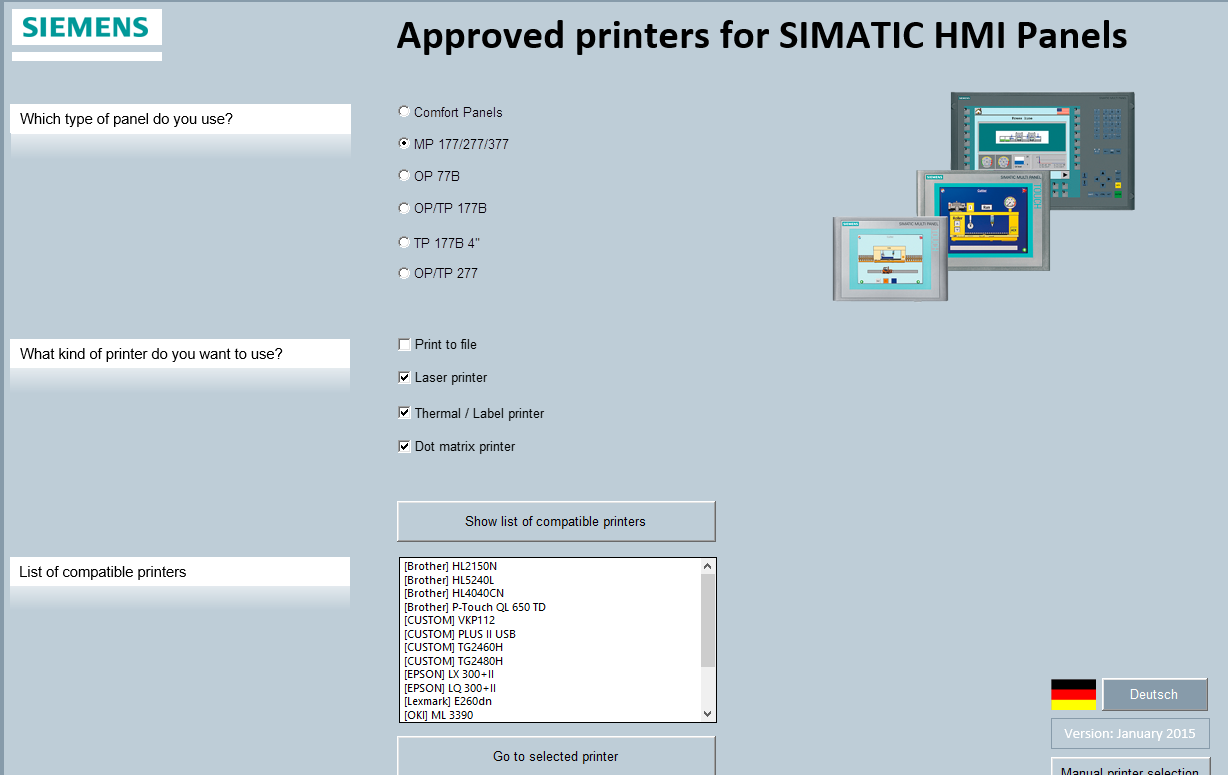
[url=http://www.girlshare.ro/3770028638.2]printers_panels_de_en.rar[/url] |
|
| Back to top |
|
|
gaborar1
Junior
Joined: 11 Aug 2020
Posts: 3
|
| Posted: 31/03/2021 12:55 Post subject: |
|
|
Thanks for the help dttz.
I downloaded and checked out everything that you sent.
But it is still not clear for me... In the excel that you sent (image) in your reply it showed that there is a possibility to print to a network printer (generic).
Unfortunately I am not able to make this work...
The HMI seems to not find the shared printer (this printer would be the Virtual Printer created with PDFCreator).
Did somebody try this out?
Printing from the HMI to a shared PDFCreator Virtual Printer?
Thanks in advance! |
|
| Back to top |
|
|
dosmaddox
Junior
Joined: 21 Oct 2018
Posts: 1
|
| Posted: 03/04/2021 15:28 Post subject: |
|
|
| you cannot use PDFCreator Virtual Printer with Siemens Panels. |
|
| Back to top |
|
|
gaborar1
Junior
Joined: 11 Aug 2020
Posts: 3
|
| Posted: 06/04/2021 07:41 Post subject: |
|
|
Hi dosmaddox,
Thanks for the clarification!
If anybody else was in my situation and found a solution, please leave a reply.
I would appreciate it.  |
|
| Back to top |
|
|
|
|
You cannot post new topics in this forum
You cannot reply to topics in this forum
You cannot edit your posts in this forum
You cannot delete your posts in this forum
You cannot vote in polls in this forum
|
Powered by phpBB © 2001, 2005 phpBB Group
Fa-ti si tu propriul forum GRATUIT, pe www.myforum.ro |
 FAQ
FAQ Search
 Memberlist
 Usergroups
 Register
 Profile
 Log in to check your private messages
 Log in


