| View previous topic :: View next topic |
| Author |
Message |
Yeo
Member

Joined: 12 Jan 2012
Posts: 223
|
 Posted: 12/10/2014 12:56 Post subject: Help: S7 Block Privacy Posted: 12/10/2014 12:56 Post subject: Help: S7 Block Privacy |
 |
|
| Anyone knows how to crack the S7 Block Privacy? |
|
| Back to top |
|
 |
scooby
Member
Joined: 25 Aug 2013
Posts: 238
Location: Dunquerque
|
| Posted: 12/10/2014 18:51 Post subject: Re: Help: S7 Block Privacy |
|
|
| Yeo wrote: | | Anyone knows how to crack the S7 Block Privacy? |
for what version? |
|
| Back to top |
|
|
Yeo
Member
Joined: 12 Jan 2012
Posts: 223
|
| Posted: 13/10/2014 01:47 Post subject: Re: Help: S7 Block Privacy |
|
|
Version 5.5, pls...
| scooby wrote: | | Yeo wrote: | | Anyone knows how to crack the S7 Block Privacy? |
for what version? |
|
|
| Back to top |
|
|
scooby
Member
Joined: 25 Aug 2013
Posts: 238
Location: Dunquerque
|
| Posted: 15/10/2014 19:37 Post subject: Re: Help: S7 Block Privacy |
|
|
| Yeo wrote: | Version 5.5, pls...
| scooby wrote: | | Yeo wrote: | | Anyone knows how to crack the S7 Block Privacy? |
for what version? |
|
S7CanOpener
http://www.datafilehost.com/d/02952723 |
|
| Back to top |
|
|
roberto_battistella
Junior 2

Joined: 31 Jul 2013
Posts: 28
|
| Posted: 19/10/2014 15:18 Post subject: |
|
|
| does not remove the protective "privacy block", only the "KNOW_HOW_PROTECT" |
|
| Back to top |
|
|
go
Member
Joined: 26 Mar 2015
Posts: 147
|
| Posted: 16/05/2015 19:02 Post subject: S7 CanOpener |
|
|
S7 CanOpener
Set and remove on the fly the KNOW_HOW_PROTECT
on S7-300/-400 blocks!
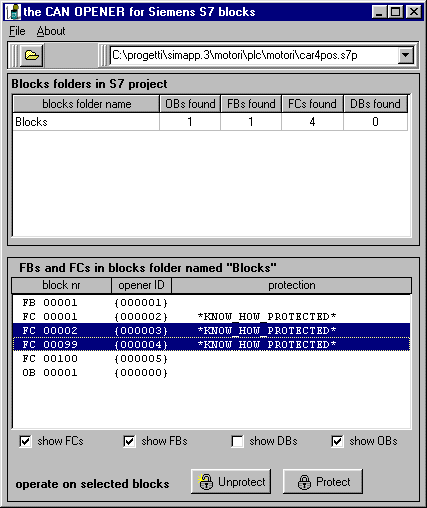
http://www.runmode.com/s7canopener.html
or
http://www.datafilehost.com/d/ac5ce39e
or
1. SHUT DOWN S7, then browse to your project file e.g. c:\my documents\some s7 project\ombstx\offline\00000001
and within this folder is a file called 'subblk.dbf'.
2.Copy this file onto root i.e c:\.
3.Then place the dbf editor on root c:\ and open a dos prompt.
4.Then type c:\dbf_edit subblk.dbf and this opens the file for editing. 5.Then using the right cursor, scroll along until you see the column 'password'.
6.Then look for instances of the number '3' and replace it using the enter key for a number '0'.
7. Press ESC to exit the program and then copy c:\subblk.dbf back to the original place you copied it from.
8. Start S7 and open the project, the KNOW_HOW is no more.
sample
http://www.datafilehost.com/d/5d17f822
or
S7 Know how manager
http://s7tools.com/s7khm.html
 |
|
| Back to top |
|
|
|

 FAQ
FAQ Search
 Memberlist
 Usergroups
 Register
 Profile
 Log in to check your private messages
 Log in


