| View previous topic :: View next topic |
| Author |
Message |
anhtoana2
Junior

Joined: 27 Jul 2015
Posts: 4
Location: fasdfas
|
 Posted: 08/07/2022 09:40 Post subject: Help me! Alarmmgr Provider '\InTouch' is disconnected Posted: 08/07/2022 09:40 Post subject: Help me! Alarmmgr Provider '\InTouch' is disconnected |
 |
|
I cannot see alarms in my Intouch application. It looks OK after restart of application, but some minutes later, the alarm provider is disconnected.
SMC logger message: "alarmmgr Provider '\InTouch' is disconnected".
I have tested the connection in Alarm DB Logger Manager and it is OK.
Any idea?
I have an Intouch application 2014R2SP1, SQL Express & OS Win7 x 32. |
|
| Back to top |
|
 |
klaid
Junior
Joined: 07 Jun 2022
Posts: 5
|
| Posted: 29/07/2022 17:33 Post subject: |
|
|
check on this
https://cdn.logic-control.com/docs/Wonderware/Tech%20Notes/Tech%20Note%20821%20-%20Troubleshoting%20WW%20Alarm%20Provider%20Query%20Issues.pdf |
|
| Back to top |
|
|
klaid
Junior
Joined: 07 Jun 2022
Posts: 5
|
| Posted: 29/07/2022 17:39 Post subject: |
|
|
Configure Wonderware InTouch to Access Database Alarms
To view and manage Geo SCADA Expert alarms from within Wonderware InTouch you need to install the Geo SCADA Expert Wonderware Alarm Provider component (see Wonderware Alarm Provider Component) and you need to enable the Wonderware Alarm Provider driver using the Server Configuration Tool.
In Wonderware InTouch, you need to enter the following Alarm Query string:
\\<Machine>:0\ClearSCADA!<Root>
where <Machine> is the machine name of your Geo SCADA Expert server.
('ClearSCADA' is used to retain backwards compatibility with earlier versions of our product.)
Example:
\\W7GBA0214L:0\ClearSCADA!World
On a multi-server system (where one or more machines act as Standby servers to provide redundancy), you specify an entry for each machine that might take over as the Main server. You have to leave a space between each entry, in the format:
\\<Machine>:0\ClearSCADA!<Root> \\<Machine>:0\ClearSCADA!<Root> \\<Machine>:0\ClearSCADA!<Root>
(for a Triple Standby system that has one Main server and two Standby servers)
Example:
\\W7GBA0214L:0\ClearSCADA!World \\W7GBA0375L:0\ClearSCADA!World \\W7GBA0865M:0\ClearSCADA!World
You do not need to include the names of any Permanent Standby servers.
For more information about entering the Alarm Query string, see the Wonderware InTouch documentation.
You also need to fabricate one or more users within Wonderware InTouch. These users will allow you to manage any alarms generated within Geo SCADA Expert. The username of such a user needs to match a Geo SCADA Expert username. Any restrictions that apply to the Wonderware InTouch user are based on the privileges of the corresponding Geo SCADA Expert user. Wonderware InTouch performs its own user validation, so user passwords can be different between Wonderware InTouch and Geo SCADA Expert.
For more information about creating users, see the Wonderware InTouch documentation. |
|
| Back to top |
|
|
klaid
Junior
Joined: 07 Jun 2022
Posts: 5
|
| Posted: 29/07/2022 17:41 Post subject: |
|
|
Install the Wonderware Alarm Provider Component
If you want to view and manage Geo SCADA Expert alarms from within Wonderware InTouch, you need to install the Geo SCADA Expert Wonderware Alarm Provider component and you need to enable the Wonderware Alarm Provider driver using the Server Configuration Tool. You can do this when you first install Geo SCADA Expert (see Installing Geo SCADA Expert) or you can modify your existing installation (see Making Changes to your Geo SCADA Expert Installation). You can find the Wonderware Alarm Provider component in the Server section of the Custom Setup page of the Geo SCADA Expert Installer Wizard.
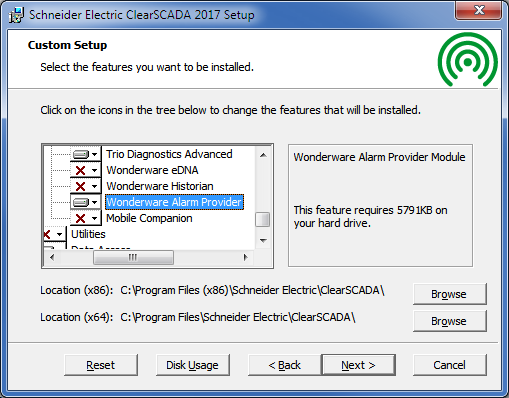
When you perform a Full or Typical Geo SCADA Expert installation, the Geo SCADA Expert installer does not automatically install the Wonderware Alarm Provider component. You need to do a Custom installation and manually select the component. |
|
| Back to top |
|
|
klaid
Junior
Joined: 07 Jun 2022
Posts: 5
|
| Posted: 29/07/2022 17:46 Post subject: |
|
|
check eventually
| Code: | | https://knowledge.insourcess.com/Visualization_and_Supervisory_Control/InTouch/Implement_and_Support/Documentation/InTouch_2014_(11.0)_Classic_Install_Guide |
|
|
| Back to top |
|
|
|

 FAQ
FAQ Search
 Memberlist
 Usergroups
 Register
 Profile
 Log in to check your private messages
 Log in


