| View previous topic :: View next topic |
| Author |
Message |
qsc6010
Junior

Joined: 03 Dec 2018
Posts: 1
Location: malang
|
 Posted: 03/12/2018 04:45 Post subject: help HMI OP7 Posted: 03/12/2018 04:45 Post subject: help HMI OP7 |
 |
|
i'm totaly newbie
but i only want to make a backup for my HMI op7
what software i should use and what cable
i just want to make backup for my HMI OP7 , so i can restore corrupted data anytime
thanks in advance
willl be better if some expert have skype or whatsapp to help me  |
|
| Back to top |
|
 |
volverine
Member junior

Joined: 23 Oct 2015
Posts: 69
Location: Michigan
|
| Posted: 03/12/2018 15:58 Post subject: |
|
|
To put OP7 in transfer mode, press ESC + Cursor Right + Cursor Down in the same time during switching on the power of the OP.
When you use the buttons ESC + Cursor UP and at the same time switch on the power, you will go to Transfer mode and the project will stay on the panel.
So you can use Prosave to back up project from ProTool or WinCC Flex 2008 SP3.
1. Cable:
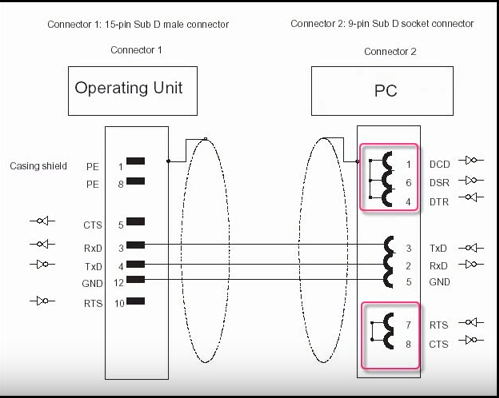
To the interface IF1 on the OP7 Panel, you can be connected via serial TTY or RS-232 interface (programing/download project to panel). If you use TTY you need a converter to serial RS-232 port.
Cable to Siemens OP7 programming interface(1F 1A) has 15pin D-sub RS232 connector
This is the Serial pin diagram
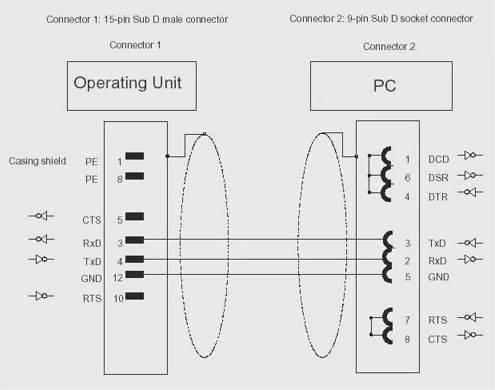
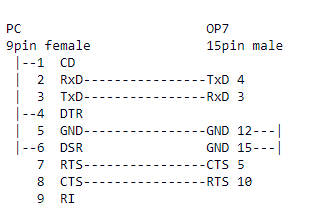
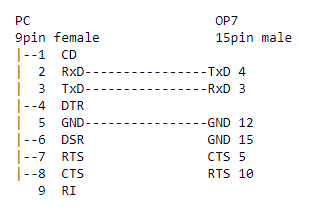
and possible communications MPI and PROFIBUS
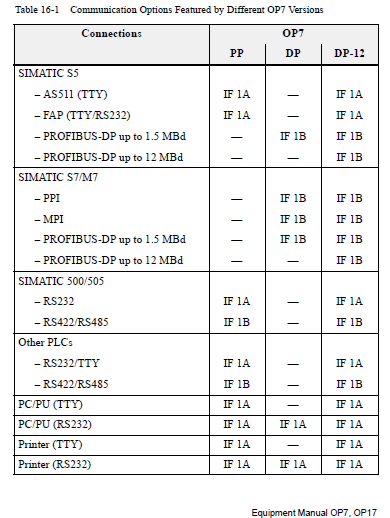
But for all the serial communication the above pinout is sufficient.
This is the Manual
https://cache.industry.siemens.com/dl/files/112/1145112/att_35842/v1/Op717_e.pdf
2. For programming and download/upload(backup) you need ProTool Pro
Check
http://plc.myforum.ro/viewtopic.php?p=37958#37958
3.Servicetool SIMATIC ProSave can be used only for upload from HMI OP7.
SIMATIC ProSave can be downloaded for free from
https://support.industry.siemens.com/cs/document/10347815/servicetool-simatic-prosave
In addition, SIMATIC ProSave can also be installed via the product DVD of ProToolPro, WinCC flexible 2008 SP3 or WinCC (TIA Portal) V14, v15 .
4.For how to Switching the Siemens OP7 and OP17 into transfer mode follow
https://www.youtube.com/watch?v=dQmHhfz89EM
Just for information but not use Formatting Simatic OP7 HMI
https://www.youtube.com/watch?v=t8GUqIcQTPk |
|
| Back to top |
|
|
Liju
Junior
Joined: 23 Mar 2019
Posts: 1
|
| Posted: 16/09/2019 03:37 Post subject: Op 7 dp to simatic pg communications |
|
|
| Simatic op7 dp to simatic pg whitch cable need |
|
| Back to top |
|
|
zoqopynx
Junior
Joined: 15 Jun 2019
Posts: 1
|
| Posted: 17/09/2019 13:42 Post subject: |
|
|
1. Windows -> Device Manager ->Ports(COM) ->Communication Port(COM1)->Port Settings->Advanced->Set the "Buffer"to a low value.
2-Transfer mode in OP7: Press and hold the keys 'ESC' and 'Cursor Up' while turning on the power supply of the panel.
Which connector cables are available for connecting to SIMATIC Panels?
https://support.industry.siemens.com/cs/document/19109408/which-connector-cables-are-available-for-connecting-to-simatic-panels
Information about specific connections and adapters
USB host-to-host cables
Information on the topic of "USB host-to-host cables" is available in
PC Adapter USB (6ES7972-0CB20-0XA0, discontinued)
The "USB PC adapter" provides an MPI/DP interface via the PC's USB interface.
Information about the USB PC adapter is available in the manual in
https://support.industry.siemens.com/cs/document/19142034/how-can-you-transfer-data-via-usb-from-a-wincc-flexible-configuration-computer-to-a-windows-based-operator-panel-and-which-usb-cables-can-be-used-for-this
USB PC adapter A2 (6GK1 571-0BA00-0AA0)
The "USB PC adapter A2" provides an MPI/DP interface via the PC's USB interface.
Information about the USB PC adapter A2 is available in the manual in
https://support.industry.siemens.com/cs/document/16983464/pc-adapter-usb
https://support.industry.siemens.com/cs/document/68849363/simatic-pg-pc-profibus-pc-adapter-usb-a2-operating-instructions
The "USB PC adapter" and "USB PC adapter A2" are released only for the devices below for project downloads and operating system updates.
OP 73
OP 77 A
TP 177 A
KTP600 Basic Color DP
KTP1000 Basic Color DP
Using USB RS232 adapters and
USB Ethernet adapters
When using the RS232/PPI Multi-Master cable, zero modem cable or Ethernet connections, you can use only "real" interfaces for project transfer.
"Real" interfaces are interfaces without prior implementation via USB. This means that you cannot use any "USB to serial" or "USB to Ethernet" adapters.
Use of external storage media
Information about the interfaces of currently available operator panels is available in
https://support.industry.siemens.com/cs/document/21847868/which-external-storage-media-can-you-use-with-the-current-simatic-panels-and-which-memory-card-interfaces-do-they-have
find here under the link of OP7 manual. .. see section 14.2.3 for dip switches. And Apendix D for interface assignment.
https://support.industry.siemens.com/cs/attachments/1145112/Op717_e.pdf |
|
| Back to top |
|
|
kribb
Junior
Joined: 09 Nov 2018
Posts: 7
|
| Posted: 20/06/2020 11:35 Post subject: |
|
|
How to backup and restore a program on a text or graphic-based panel?
https://support.industry.siemens.com/cs/document/26588748/how-to-backup-and-restore-a-program-on-a-text-or-graphic-based-panel
https://support.industry.siemens.com/cs/document/21923977/what-is-the-serial-cable-assignment-for-transferring-the-configuration-to-an-rmos-operator-panel
Siemens Simatic OP17 Backup and Restore Complete Tutorials
https://www.youtube.com/watch?v=4MXo2bRgE7M
https://support.industry.siemens.com/cs/document/15178263/why-is-the-connection-interrupted-while-transferring-a-project-with-protool-to-an-op |
|
| Back to top |
|
|
|

 FAQ
FAQ Search
 Memberlist
 Usergroups
 Register
 Profile
 Log in to check your private messages
 Log in


