 |
plc.myforum.ro
PLCs users www.plc.myforum.ro!
|
| View previous topic :: View next topic |
| Author |
Message |
cuongvcs
Member 2

Joined: 09 Dec 2011
Posts: 263
Location: DaNang, Viet Nam
|
 Posted: 09/04/2020 04:05 Post subject: GRT1-DRT DeviceNet IO connect with Rockwell PLC Posted: 09/04/2020 04:05 Post subject: GRT1-DRT DeviceNet IO connect with Rockwell PLC |
 |
|
Dear.
Can you please advise me the GRT1-DRT(Devicenet IO- Omron) can be connect to DeviceNet network of Rockwell PLC?
Many thanks. |
|
| Back to top |
|
 |
GTA887
Junior

Joined: 15 Sep 2018
Posts: 2
|
| Posted: 09/04/2020 10:46 Post subject: Quick Start Guide For Configuring DeviceNet Master |
|
|
Quick Start Guide For Configuring DeviceNet Master
Download the manuals for your PLC, DeviceNet Master and any SIO units to browse for configuration details
Plug together your PLC, Power Supply, CJ1W-DRM21 DeviceNet Master, any other SIO units and end plate
Configure the DeviceNet Master "Unit Number" e.g. to 1 (see manual W380-E1-07 CS-CJ OperManual page 53 for explanation and details), and any other SIO Unit Numbers to a unique value
Configure the DeviceNet Master 2 digit "Node Number", e.g. to 0x101 and 1x100 for node 01. This is the Master's DeviceNet Node number on this network and must be unique (see manual W380-E1-07 CS-CJ OperManual page 53 for explanation and details)
Wire up the power only and check communication to the PLC. Open the IO Table and "Create" the new IO table for the SIO units. Verify the setup by uploading the IO table and viewing
Steps to configuring your DeviceNet Master
When you're ready to configure your DeviceNet Master follow these steps:
Wire up all nodes on your DeviceNet network, following all guidelines and correctly terminating
Ensure all device Node Numbers are set correctly and power up all devices
Start CX-Integrator
If you are connecting by serial cable or USB, choose "Auto Online" from the Network menu to find and connect to your PLC
If you are connecting by Ethernet or other methods, choose "Communication Settings" from the Network menu to enter the same connection details used by CX-Programmer and then "Network->Work Online"
The "Online Information" window will now look similar to this:
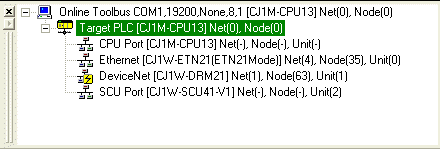
Double click the "DeviceNet [CJ1W-DRM21]" Master unit to transfer the network details. Be patient while the data is uploaded as on a larger network this can take minutes, then the Workspace and network view show the the network diagram, for example:
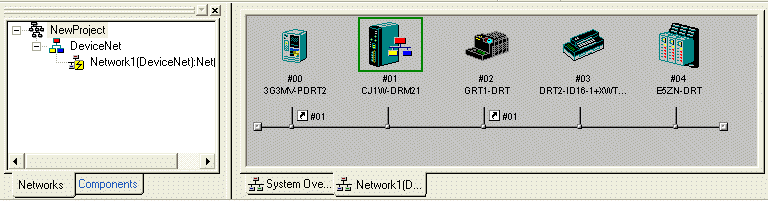
Verify the node numbers (#00, #01 etc) are as expected, and all nodes are shown
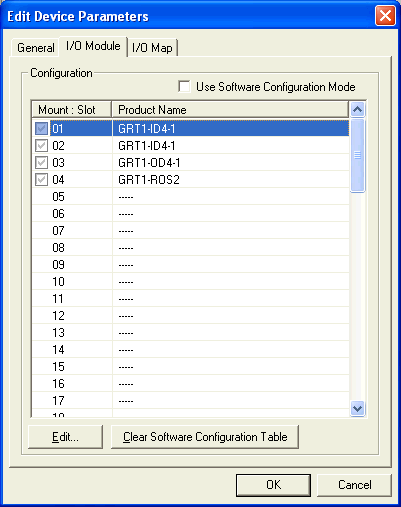
To view and configure GRT1-DRT SmartSlice settings, dublu click the icon to show the "Device Parameters" dialog. On the IO Module tab ensure the Slots match the assembled "Slices", and edit if required
Now to configure the cyclic data between the slave devices and the DeviceNet Master, double click the "CJ1W-DRM21" icon on the network view. This shows the Master's "Device Parameters" dialog
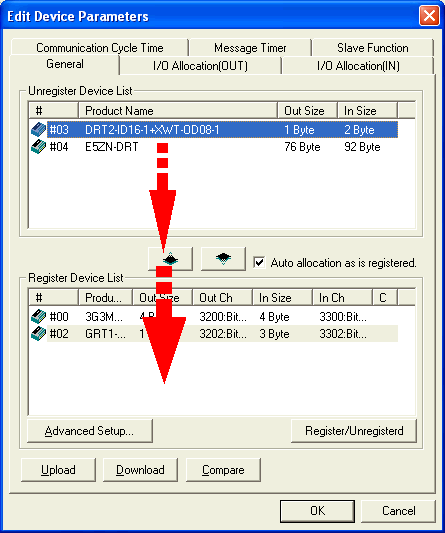
For any devices in the top "Unregistered Device List" window click the "Register" ( ) button as shown to move them to the "Registered Device List" window
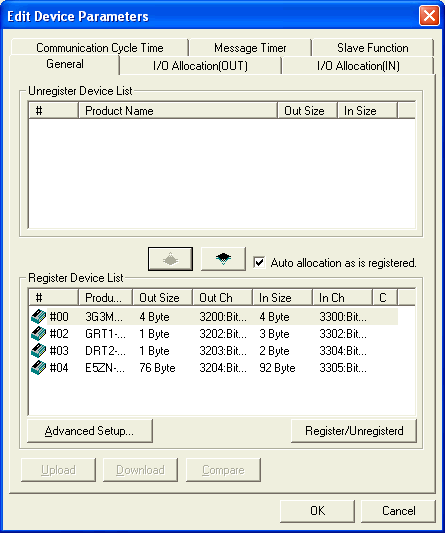
To save your changes you must download to the master unit. Right click the CJ1W-DRM21 icon and select "Parameter->Download". Note that the PLC must be in "Program" mode first.
Programming remote IO using symbols
Once the cyclic data for each slave is configured, programming using remote IO is not different to programming with natural IO. Note on the Master's dialog above the PLC addresses used for each device's inputs and outputs e.g. 3200 for 4 bytes, 3300 for 4 bytes etc. You can create Symbols for these physical addresses in CX-Programmer, to use the remote IO easily as part of your program
Using PROFINET or ProfiBus
The process for configuring PROFINET controllers or ProfiBus Masters is similar, but using CX-ConfiguratorFDT instead of CX-Integrator.
https://assets.omron.eu/downloads/manual/en/v2/w454_smartslice_-_devicenet_communications_unit_operation_manual_en.pdf |
|
| Back to top |
|
|
cuongvcs
Member 2
Joined: 09 Dec 2011
Posts: 263
Location: DaNang, Viet Nam
|
| Posted: 14/04/2020 09:01 Post subject: Re: Quick Start Guide For Configuring DeviceNet Master |
|
|
| GTA887 wrote: | Quick Start Guide For Configuring DeviceNet Master
Download the manuals for your PLC, DeviceNet Master and any SIO units to browse for configuration details
Plug together your PLC, Power Supply, CJ1W-DRM21 DeviceNet Master, any other SIO units and end plate
Configure the DeviceNet Master "Unit Number" e.g. to 1 (see manual W380-E1-07 CS-CJ OperManual page 53 for explanation and details), and any other SIO Unit Numbers to a unique value
Configure the DeviceNet Master 2 digit "Node Number", e.g. to 0x101 and 1x100 for node 01. This is the Master's DeviceNet Node number on this network and must be unique (see manual W380-E1-07 CS-CJ OperManual page 53 for explanation and details)
Wire up the power only and check communication to the PLC. Open the IO Table and "Create" the new IO table for the SIO units. Verify the setup by uploading the IO table and viewing
Steps to configuring your DeviceNet Master
When you're ready to configure your DeviceNet Master follow these steps:
Wire up all nodes on your DeviceNet network, following all guidelines and correctly terminating
Ensure all device Node Numbers are set correctly and power up all devices
Start CX-Integrator
If you are connecting by serial cable or USB, choose "Auto Online" from the Network menu to find and connect to your PLC
If you are connecting by Ethernet or other methods, choose "Communication Settings" from the Network menu to enter the same connection details used by CX-Programmer and then "Network->Work Online"
The "Online Information" window will now look similar to this:
Double click the "DeviceNet [CJ1W-DRM21]" Master unit to transfer the network details. Be patient while the data is uploaded as on a larger network this can take minutes, then the Workspace and network view show the the network diagram, for example:
Verify the node numbers (#00, #01 etc) are as expected, and all nodes are shown
To view and configure GRT1-DRT SmartSlice settings, dublu click the icon to show the "Device Parameters" dialog. On the IO Module tab ensure the Slots match the assembled "Slices", and edit if required
Now to configure the cyclic data between the slave devices and the DeviceNet Master, double click the "CJ1W-DRM21" icon on the network view. This shows the Master's "Device Parameters" dialog
For any devices in the top "Unregistered Device List" window click the "Register" ( ) button as shown to move them to the "Registered Device List" window
To save your changes you must download to the master unit. Right click the CJ1W-DRM21 icon and select "Parameter->Download". Note that the PLC must be in "Program" mode first.
Programming remote IO using symbols
Once the cyclic data for each slave is configured, programming using remote IO is not different to programming with normal IO. Note on the Master's dialog above the PLC addresses used for each device's inputs and outputs e.g. 3200 for 4 bytes, 3300 for 4 bytes etc. You can create Symbols for these physical addresses in CX-Programmer, to use the remote IO easily as part of your program
Using PROFINET or ProfiBus
The process for configuring PROFINET controllers or ProfiBus Masters is similar, but using CX-ConfiguratorFDT instead of CX-Integrator.
https://assets.omron.eu/downloads/manual/en/v2/w454_smartslice_-_devicenet_communications_unit_operation_manual_en.pdf |
Dear GTA887.
thank for your info, but I mean if we can connect together with Rockwell PLC (ex Compactlogix with DeviceNet module - 1769-SDN)? I'm not sure it can be work or not.
Thanks you. |
|
| Back to top |
|
|
djabber
Junior
Joined: 02 Oct 2018
Posts: 12
|
| Posted: 14/04/2020 09:16 Post subject: |
|
|
| https://anonfile.com/X982kap2o0/devicenet_node_commissioning_tool_rar |
|
| Back to top |
|
|
cuongvcs
Member 2
Joined: 09 Dec 2011
Posts: 263
Location: DaNang, Viet Nam
|
| Posted: 22/04/2020 06:44 Post subject: |
|
|
Dear All.
I has trial and fixed. I can connect GRT1-DRT with Compactlogix over Devicenet card.
- make new EDS file for GRT1-DRT on RSNetwork for DeviceNet
- On Master Device(1769-SDN) we select data polled and configure the data size of input and output.
- Map input/output data
- Download to 1769-SDN.
- Programming and test.
BR |
|
| Back to top |
|
|
|
|
You cannot post new topics in this forum
You cannot reply to topics in this forum
You cannot edit your posts in this forum
You cannot delete your posts in this forum
You cannot vote in polls in this forum
|
Powered by phpBB © 2001, 2005 phpBB Group
Fa-ti si tu propriul forum GRATUIT, pe www.myforum.ro |
 FAQ
FAQ Search
 Memberlist
 Usergroups
 Register
 Profile
 Log in to check your private messages
 Log in


