 |
plc.myforum.ro
PLCs users www.plc.myforum.ro!
|
| View previous topic :: View next topic |
| Author |
Message |
wbthundergod
Junior

Joined: 22 Sep 2014
Posts: 1
Location: Pilipinas
|
 Posted: 07/12/2019 08:50 Post subject: GP370-SC11-24v PLC COM. ERROR Posted: 07/12/2019 08:50 Post subject: GP370-SC11-24v PLC COM. ERROR |
 |
|
Good day to all... ^^,
I recently bought a new GP370-SC11-24v proface hmi (rev. L) to replace the old GP370-SC11-24v proface hmi (rev. D) due to later having a screen damage.
I was able to back-up screen data from the old hmi and transferred it to the new one, but after mounting the new screen it post an error saying "PLC COM. ERROR (02:07)".
Note that when i return back the old hmi, there were no errors encountered.
Please need help on this... thanks in advance.. ^^, |
|
| Back to top |
|
 |
Terranga
Junior
Joined: 19 Jun 2018
Posts: 6
Location: Senegal
|
| Posted: 07/12/2019 14:55 Post subject: |
|
|
Check
https://www.proface.com/support/index?page=content&id=FA226944&viewlocale=en_US&locale=en_US&country=PROFACE&lang=en
Communication Settings on the GP unit
How to enter the OFFLINE mode
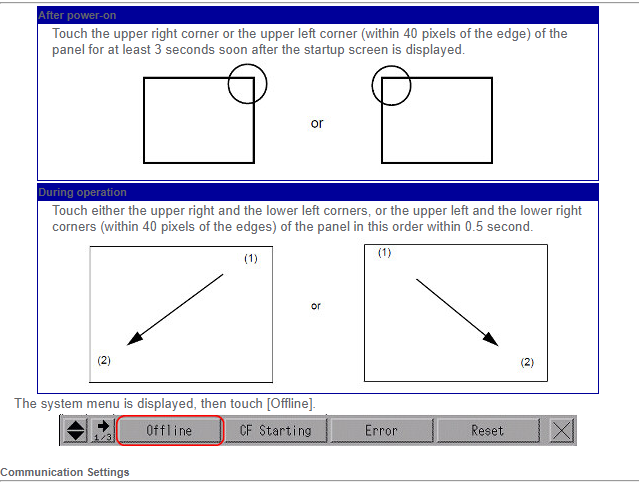
From the OFFLINE mode's [Peripheral Settings] menu, select [Device/PLC Settings]. Select the device/PLC to set up from the list, then touch [Comm.] button.
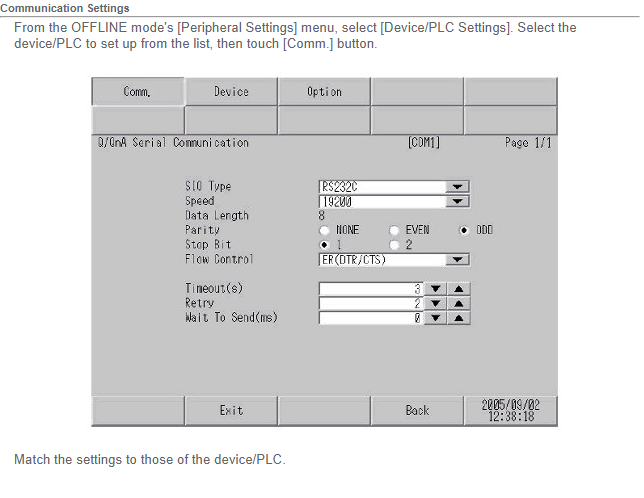
and
https://www.proface.com/support/index?page=content&id=FA226938&viewlocale=en_US&locale=en_US&country=PROFACE&lang=en
Communication Settings in GP-Pro EX
From the [System Settings] window in the Work Space, select [Device/PLC].
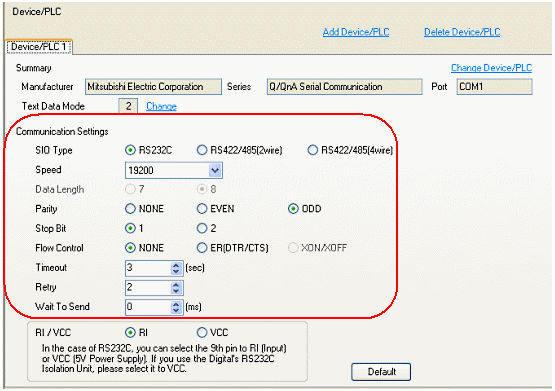
Match the settings to those of the device/PLC. |
|
| Back to top |
|
|
|
|
You cannot post new topics in this forum
You cannot reply to topics in this forum
You cannot edit your posts in this forum
You cannot delete your posts in this forum
You cannot vote in polls in this forum
|
Powered by phpBB © 2001, 2005 phpBB Group
Fa-ti si tu propriul forum GRATUIT, pe www.myforum.ro |
 FAQ
FAQ Search
 Memberlist
 Usergroups
 Register
 Profile
 Log in to check your private messages
 Log in


